


软件

产品


1.环境
Mac
安装好 git /python等
2.运行:
下载代码库:
git clone git@github.com:xubo245/AILearning.git指定模型路径,指定图片路径,注意替换成自己的。
运行代码,批量进行人脸 关键点检测 :
# coding=utf-8 import cv2import dlib def labelImage(path,out): # path = "data/face/1.jpg" print(path) img = cv2.imread(path) gray = cv2.cvtColor(img, cv2.COLOR_BGR2GRAY) # 人脸分类器 detector = dlib.get_frontal_face_detector() # 获取人脸检测器 predictor = dlib.shape_predictor("model/shape_predictor_68_face_landmarks.dat") dets = detector(gray, 1) for face in dets: print(face) shape = predictor(img, face) # 寻找人脸的68个标定点 # 遍历所有点,打印出其坐标,并圈出来 print("\n") i=1 for pt in shape.parts(): print(str(i)+"\t"+str(pt)) i=i+1 pt_pos = (pt.x, pt.y) cv2.circle(img, pt_pos, 2, (0, 0, 255), 1) cv2.imshow("image", img) cv2.imwrite( out,img) # cv2.waitKey(0) # cv2.destroyAllWindows() # path = "data/face/1.jpg"for i in range(1,9): labelImage("data/face/"+str(i)+".jpg","data/face/"+str(i)+"labeled2.jpg") print("\n")3. 运行效果:
单张人脸1:

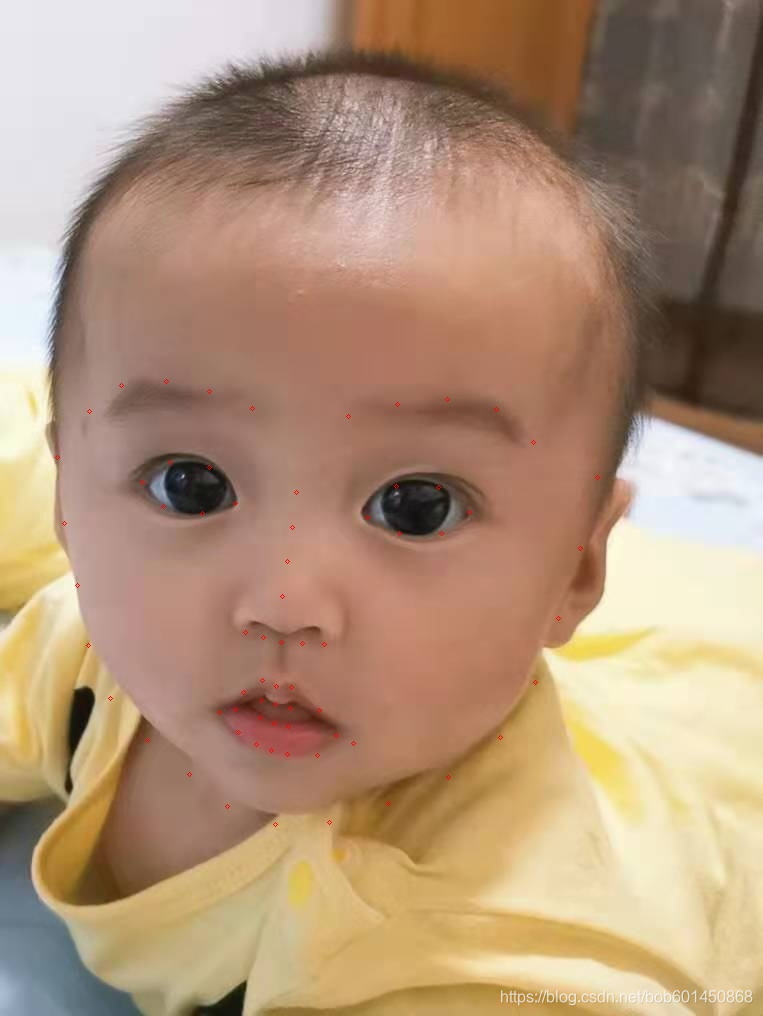
68点坐标为:
data/face/8.jpg[(48, 357) (603, 911)] 1 (57, 457)2 (64, 523)3 (77, 585)4 (88, 645)5 (110, 698)6 (147, 740)7 (189, 774)8 (227, 806)9 (275, 824)10 (329, 822)11 (388, 803)12 (448, 777)13 (500, 737)14 (535, 682)15 (558, 618)16 (580, 548)17 (597, 477)18 (89, 411)19 (121, 385)20 (166, 381)21 (209, 391)22 (252, 408)23 (348, 416)24 (397, 404)25 (447, 399)26 (496, 409)27 (533, 442)28 (296, 492)29 (292, 527)30 (287, 561)31 (282, 596)32 (245, 632)33 (263, 637)34 (281, 642)35 (302, 643)36 (324, 644)37 (142, 482)38 (170, 462)39 (209, 467)40 (235, 503)41 (202, 513)42 (163, 506)43 (367, 517)44 (396, 486)45 (438, 487)46 (469, 512)47 (441, 533)48 (399, 533)49 (219, 712)50 (243, 692)51 (262, 680)52 (276, 686)53 (291, 687)54 (319, 710)55 (353, 743)56 (317, 755)57 (287, 754)58 (271, 750)59 (256, 744)60 (238, 732)61 (235, 709)62 (261, 700)63 (275, 704)64 (290, 708)65 (336, 735)66 (288, 726)67 (274, 723)68 (260, 717)单张人脸2(68点检测):

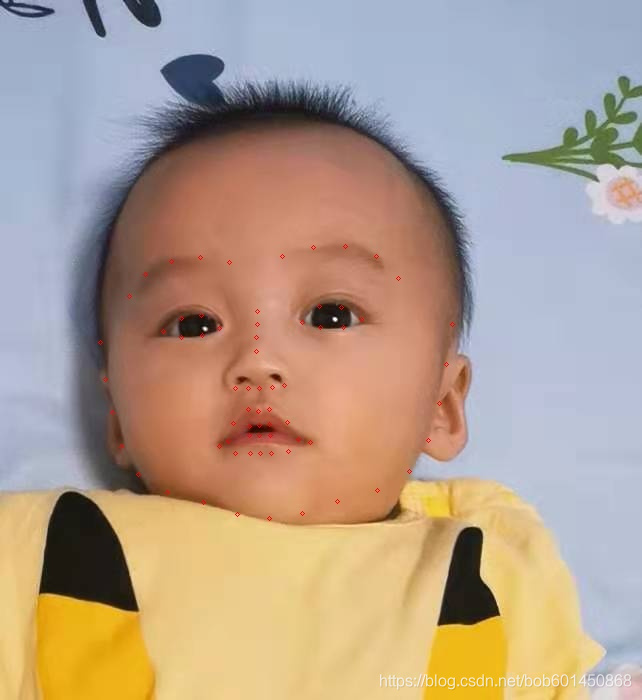
坐标为:
data/face/7.jpg[(98, 206) (419, 527)] 1 (100, 342)2 (105, 379)3 (112, 412)4 (121, 446)5 (138, 474)6 (167, 492)7 (203, 502)8 (237, 514)9 (269, 518)10 (302, 513)11 (337, 501)12 (377, 490)13 (409, 471)14 (428, 440)15 (439, 403)16 (446, 364)17 (452, 324)18 (129, 296)19 (145, 274)20 (171, 261)21 (200, 257)22 (229, 262)23 (282, 256)24 (313, 247)25 (345, 246)26 (376, 256)27 (398, 278)28 (257, 311)29 (257, 324)30 (256, 337)31 (256, 351)32 (235, 388)33 (248, 388)34 (259, 388)35 (272, 387)36 (284, 385)37 (163, 331)38 (181, 318)39 (201, 315)40 (219, 328)41 (202, 335)42 (181, 337)43 (302, 322)44 (319, 306)45 (341, 307)46 (361, 319)47 (343, 327)48 (320, 327)49 (219, 446)50 (233, 423)51 (248, 409)52 (258, 411)53 (269, 409)54 (287, 422)55 (310, 442)56 (288, 451)57 (271, 453)58 (260, 453)59 (250, 453)60 (235, 453)61 (228, 441)62 (249, 426)63 (259, 425)64 (269, 424)65 (298, 439)66 (270, 435)67 (259, 435)68 (249, 435)多张人脸3(68点检测):

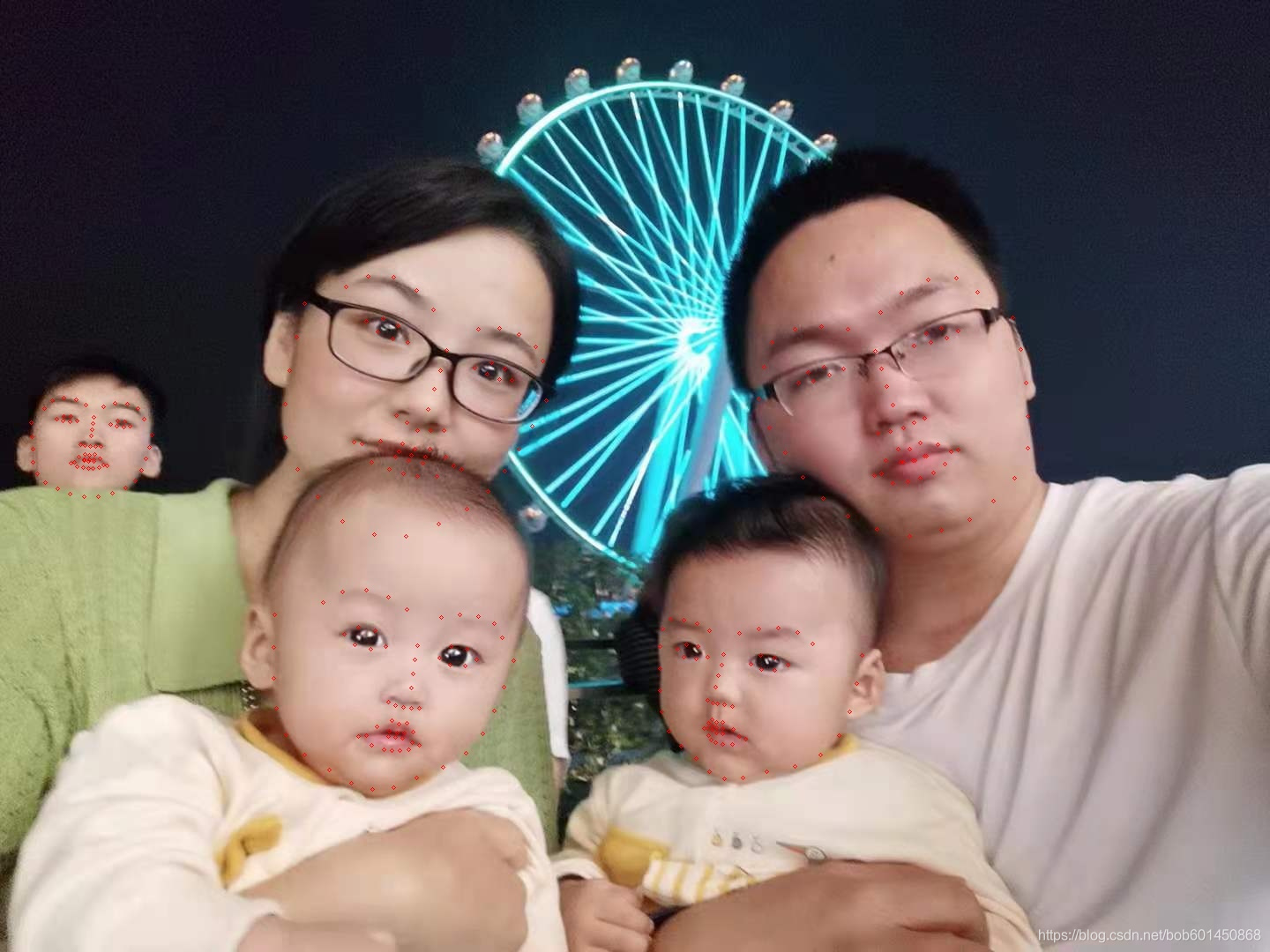
坐标为:
data/face/3.jpg[(847, 277) (1168, 598)] 1 (860, 452)2 (872, 485)3 (890, 513)4 (910, 541)5 (933, 565)6 (961, 585)7 (994, 600)8 (1031, 608)9 (1067, 601)10 (1099, 589)11 (1126, 568)12 (1150, 542)13 (1165, 508)14 (1165, 472)15 (1163, 434)16 (1157, 396)17 (1148, 360)18 (866, 416)19 (875, 388)20 (901, 373)21 (931, 370)22 (961, 373)23 (998, 354)24 (1022, 332)25 (1052, 317)26 (1084, 315)27 (1108, 331)28 (992, 398)29 (999, 418)30 (1005, 438)31 (1012, 459)32 (995, 491)33 (1009, 489)34 (1024, 485)35 (1036, 479)36 (1048, 474)37 (905, 434)38 (916, 422)39 (934, 416)40 (956, 418)41 (940, 425)42 (922, 432)43 (1036, 392)44 (1050, 378)45 (1067, 372)46 (1086, 375)47 (1073, 383)48 (1055, 388)49 (991, 539)50 (1004, 522)51 (1018, 509)52 (1031, 509)53 (1043, 502)54 (1063, 504)55 (1086, 510)56 (1071, 526)57 (1058, 536)58 (1043, 542)59 (1029, 546)60 (1012, 548)61 (999, 537)62 (1021, 524)63 (1035, 522)64 (1048, 517)65 (1078, 512)66 (1050, 517)67 (1037, 522)68 (1024, 524)[(319, 617) (587, 885)] 1 (311, 697)2 (310, 734)3 (310, 769)4 (313, 803)5 (324, 833)6 (345, 856)7 (373, 873)8 (398, 888)9 (422, 895)10 (446, 893)11 (472, 882)12 (502, 870)13 (528, 854)14 (547, 832)15 (560, 806)16 (571, 779)17 (582, 749)18 (366, 683)19 (388, 671)20 (415, 669)21 (440, 677)22 (461, 691)23 (500, 700)24 (521, 697)25 (542, 699)26 (560, 707)27 (569, 723)28 (473, 732)29 (470, 748)30 (468, 764)31 (466, 780)32 (440, 796)33 (448, 800)34 (457, 802)35 (466, 803)36 (475, 803)37 (390, 719)38 (406, 711)39 (425, 715)40 (437, 733)41 (420, 736)42 (402, 731)43 (498, 746)44 (511, 733)45 (529, 736)46 (540, 748)47 (527, 755)48 (510, 754)49 (406, 835)50 (427, 824)51 (444, 817)52 (452, 821)53 (461, 820)54 (468, 830)55 (475, 845)56 (463, 850)57 (453, 851)58 (444, 851)59 (435, 850)60 (421, 845)61 (415, 834)62 (441, 829)63 (450, 831)64 (458, 831)65 (467, 842)66 (456, 837)67 (448, 836)68 (440, 835)[(38, 440) (167, 569)] 1 (35, 479)2 (36, 495)3 (37, 509)4 (37, 524)5 (42, 537)6 (51, 547)7 (65, 554)8 (79, 560)9 (95, 563)10 (111, 563)11 (127, 559)12 (142, 553)13 (153, 545)14 (160, 533)15 (165, 520)16 (169, 507)17 (172, 493)18 (50, 463)19 (59, 454)20 (72, 451)21 (86, 453)22 (97, 459)23 (117, 461)24 (130, 457)25 (144, 458)26 (156, 463)27 (163, 475)28 (106, 473)29 (105, 480)30 (104, 487)31 (103, 494)32 (91, 504)33 (96, 505)34 (102, 506)35 (108, 506)36 (114, 506)37 (64, 475)38 (72, 472)39 (80, 472)40 (87, 477)41 (79, 478)42 (71, 477)43 (125, 481)44 (133, 477)45 (141, 478)46 (147, 483)47 (140, 484)48 (132, 483)49 (80, 525)50 (89, 518)51 (96, 515)52 (101, 516)53 (107, 515)54 (113, 520)55 (121, 528)56 (112, 530)57 (105, 531)58 (100, 531)59 (94, 530)60 (87, 529)61 (84, 524)62 (95, 521)63 (101, 521)64 (106, 521)65 (117, 527)66 (106, 523)67 (100, 523)68 (95, 522)[(712, 663) (935, 885)] 1 (748, 733)2 (748, 758)3 (748, 783)4 (750, 807)5 (758, 829)6 (772, 846)7 (789, 860)8 (804, 875)9 (821, 883)10 (842, 882)11 (869, 875)12 (901, 869)13 (930, 856)14 (951, 834)15 (963, 807)16 (971, 775)17 (977, 743)18 (751, 713)19 (760, 702)20 (775, 703)21 (790, 707)22 (804, 715)23 (838, 718)24 (860, 713)25 (882, 712)26 (904, 717)27 (921, 730)28 (820, 742)29 (818, 754)30 (814, 766)31 (811, 779)32 (802, 794)33 (808, 797)34 (813, 798)35 (821, 799)36 (830, 801)37 (768, 736)38 (778, 731)39 (791, 733)40 (802, 745)41 (789, 747)42 (775, 745)43 (851, 753)44 (862, 743)45 (878, 746)46 (893, 754)47 (878, 760)48 (863, 759)49 (798, 826)50 (803, 820)51 (807, 816)52 (812, 819)53 (819, 819)54 (831, 827)55 (845, 838)56 (830, 844)57 (819, 844)58 (811, 842)59 (806, 839)60 (803, 834)61 (802, 826)62 (807, 823)63 (812, 825)64 (819, 826)65 (838, 835)66 (819, 832)67 (812, 831)68 (807, 828)[(312, 313) (633, 634)] 1 (345, 344)2 (336, 382)3 (328, 420)4 (323, 458)5 (323, 496)6 (337, 532)7 (360, 563)8 (388, 591)9 (424, 606)10 (460, 608)11 (497, 594)12 (529, 577)13 (553, 557)14 (572, 534)15 (588, 509)16 (603, 483)17 (619, 454)18 (392, 325)19 (417, 313)20 (446, 314)21 (472, 329)22 (491, 351)23 (542, 373)24 (566, 372)25 (588, 379)26 (607, 393)27 (615, 409)28 (506, 397)29 (499, 420)30 (492, 441)31 (485, 464)32 (449, 471)33 (461, 479)34 (473, 488)35 (488, 488)36 (503, 488)37 (415, 364)38 (434, 361)39 (451, 369)40 (462, 388)41 (445, 384)42 (428, 376)43 (538, 417)44 (557, 411)45 (572, 418)46 (580, 431)47 (566, 430)48 (552, 424)49 (401, 501)50 (431, 500)51 (456, 503)52 (470, 509)53 (487, 509)54 (505, 518)55 (523, 532)56 (495, 540)57 (473, 540)58 (457, 537)59 (441, 532)60 (421, 524)61 (410, 503)62 (452, 512)63 (466, 516)64 (482, 518)65 (514, 528)66 (479, 525)67 (463, 522)68 (448, 518)4.更多模型,请下载dlib(可选)
命令:
git clone git@github.com:davisking/dlib-models.git历史:
localhost:ai xubo$ git clone git@github.com:davisking/dlib-models.gitCloning into 'dlib-models'...remote: Enumerating objects: 186, done.remote: Counting objects: 100% (32/32), done.remote: Compressing objects: 100% (31/31), done.remote: Total 186 (delta 17), reused 11 (delta 1), pack-reused 154Receiving objects: 100% (186/186), 408.51 MiB | 6.22 MiB/s, done.Resolving deltas: 100% (89/89), done.解压:
bunzip2 shape_predictor_68_face_landmarks.dat.bz2参考:
【1】模型: https://github.com/davisking/dlib-models
【2】 教程:https://www.cnblogs.com/vipstone/p/8964656.html
【3】代码库地址:https://github.com/xubo245/AILearning
【4】http://dlib.net/files/
免责声明:本文系网络转载或改编,未找到原创作者,版权归原作者所有。如涉及版权,请联系删
 技术文档
技术文档
 推荐好文
推荐好文





 155-2731-8020




