


软件

产品


随着各种美颜 相机 的出现,我们可以拍出各种胜似明星的照片,我们可以瘦脸、大眼、红唇以及增白,但这背后是如何实现的,你又了解多少呢?
AI美颜核心技术之一就是人脸关键点检测。PaddleHub已经开源了人脸关键点检测模型face_landmark_localization。人脸关键点检测是人脸识别和分析领域中的关键一步,它是诸如自动人脸识别、表情分析、三维人脸重建及三维动画等其它人脸相关问题的前提和突破口。该模型转换自 Github,支持同一张图中的多个 人脸检测 。它可以识别人脸中的68个关键点。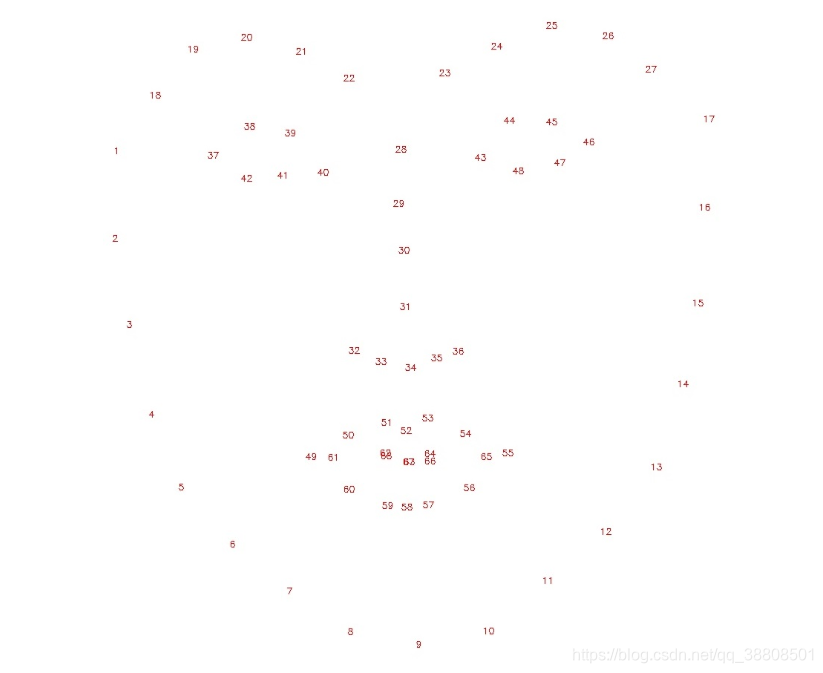
(1)线上环境:百度AI Studio提供了线上一站式开发实训平台,直接可在该平台完成。
(2)本地实现:在本 编译器 中,需要提前安装PaddleHub库,pip安装即可,最好加上国内源。
pip install paddlehub==1.6.0 -i https://pypi.tuna.tsinghua.edu.cn/simple
import cv2
import paddlehub as hub
import matplotlib.pyplot as plt
import matplotlib.image as mpimg
import numpy as np
import math

src_img = cv2.imread('./test_sample.jpg')

module = hub.Module(name="face_landmark_localization")
result = module.keypoint_detection(images=[src_img])

tmp_img = src_img.copy()
for index, point in enumerate(result[0]['data'][0]):
	# cv2.putText(img, str(index), (int(point[0]), int(point[1])), cv2.FONT_HERSHEY_COMPLEX, 3, (0,0,255), -1)
	cv2.circle(tmp_img, (int(point[0]), int(point[1])), 2, (0, 0, 255), -1)

res_img_path = 'face_landmark.jpg'
cv2.imwrite(res_img_path, tmp_img)

img = mpimg.imread(res_img_path)
# 展示预测68个关键点结果
plt.figure(figsize=(10,10))
plt.imshow(img)
plt.axis('off')
plt.show()
可得出人脸的68个关键点图: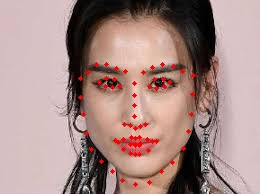
利用识别到的68个关键点完成瘦脸功能。左右脸各瘦多少,可以根据图片和自己的满意度,改变参数 face_landmark[ ]。同时利用局部平移算法局部平移算法完成瘦脸.
import numpy as np
import math
'''1、瘦脸'''
def thin_face(image, face_landmark):
    """
    实现自动人像瘦脸
    image: 人像图片
    face_landmark: 人脸关键点
    """
    end_point = face_landmark[30]

    # 瘦左脸,3号点到5号点的距离作为瘦脸距离
    dist_left = np.linalg.norm(face_landmark[3] - face_landmark[5])
    image = local_traslation_warp(image, face_landmark[3], end_point, dist_left)

    # 瘦右脸,13号点到15号点的距离作为瘦脸距离
    dist_right = np.linalg.norm(face_landmark[13] - face_landmark[15])
    image = local_traslation_warp(image, face_landmark[13], end_point, dist_right)
    return image


def local_traslation_warp(image, start_point, end_point, radius):
    """
    局部平移算法
    """
    radius_square = math.pow(radius, 2)
    image_cp = image.copy()

    dist_se = math.pow(np.linalg.norm(end_point - start_point), 2)
    height, width, channel = image.shape
    for i in range(width):
        for j in range(height):
            # 计算该点是否在形变圆的范围之内
            # 优化,第一步,直接判断是会在(start_point[0], start_point[1])的矩阵框中
            if math.fabs(i - start_point[0]) > radius and math.fabs(j - start_point[1]) > radius:
                continue

            distance = (i - start_point[0]) * (i - start_point[0]) + (j - start_point[1]) * (j - start_point[1])

            if (distance < radius_square):
                # 计算出(i,j)坐标的原坐标
                # 计算公式中右边平方号里的部分
                ratio = (radius_square - distance) / (radius_square - distance + dist_se)
                ratio = ratio * ratio

                # 映射原位置
                new_x = i - ratio * (end_point[0] - start_point[0])
                new_y = j - ratio * (end_point[1] - start_point[1])

                new_x
免责声明:本文系网络转载或改编,未找到原创作者,版权归原作者所有。如涉及版权,请联系删
 技术文档
技术文档
 推荐好文
推荐好文





 155-2731-8020




