


软件

产品


可以使用 face_landmarks 函数 ,获取人脸中特征点:
face_landmarks(face_image, face_locations=None, model="large")

#	face_image:图片对象;
#	face_locations:可选,默认为空,也可以指定要识别的人脸区域位置;
#	model:可选,不指定时的默认值为 large,另一个值为 small。large 代表识别68个特征点,
#	small 代表识别5个特征点。
例如:
face_landmarks_list = face_recognition.face_landmarks(image)
完整代码 :
# 导入face_recognition库
import face_recognition
# 读取照片
image = face_recognition.load_image_file("picture1.jpg")
# 获取中铺中人脸特征点
face_landmarks_list = face_recognition.face_landmarks(image)
运行结果:
[{'chin': [(157, 120), (162, 139), (166, 157), (172, 174), (182, 189), (198, 198), (216, 205), (235, 209), (254, 210), (271, 207), (281, 198), (288, 185), (292, 170), (295, 155), (297, 140), (297, 124), (295, 109)],
 'left_eyebrow': [(185, 89), (195, 80), (207, 75), (221, 73), (234, 77)],
 'right_eyebrow': [(256, 75), (266, 71), (276, 73), (284, 78), (289, 87)],
 'nose_bridge': [(249, 95), (251, 103), (254, 110), (256, 118)],
  'nose_tip': [(241, 137), (248, 138), (254, 138), (259, 138), (264, 137)],
  'left_eye': [(201, 104), (210, 97), (220, 96), (228, 103), (220, 105), (210, 105)],
  'right_eye': [(261, 104), (270, 98), (278, 98), (283, 105), (278, 107), (270, 106)],
  'top_lip': [(231, 167), (241, 155), (250, 150), (255, 152), (261, 152), (267, 158), (272, 169), (268, 167), (260, 160), (255, 159), (250, 159), (235, 165)],
  'bottom_lip': [(272, 169), (266, 173), (260, 174), (254, 174), (248, 173), (240, 171), (231, 167), (235, 165), (249, 164), (254, 165), (260, 166), (268, 167)]}]

Process finished with exit code 0
可以看出,返回的结果是一个一位数组,数组的元素为 JSON 格式,包含的特征区域细分为: 脸颊 chin; 左眼眉毛 left_eyebrow; 右眼眉毛 right_eyebrow; 鼻梁 nose_bridge; 鼻尖 nose_tip; 左眼 left_eye; 右眼 right_eye; 上嘴唇 top_lip; 下嘴唇 bottom_lip。
如果指定为 small 模式:
face_landmarks_list = face_recognition.face_landmarks(image, model='small')
特征点结果如下:
[{'nose_tip': [(254, 140)],
'left_eye': [(200, 104), (227, 103)],
 'right_eye': [(284, 104), (262, 103)]}]

Process finished with exit code 0
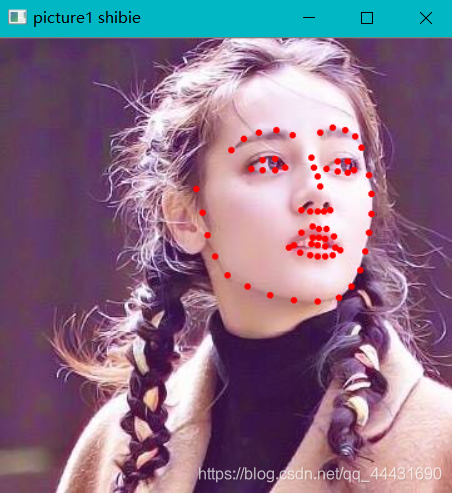
import face_recognition
import cv2

# 获取人脸特征点
image = face_recognition.load_image_file("picture1.jpg")
face_landmarks_list = face_recognition.face_landmarks(image)

# 输出人脸特征点
print(face_landmarks_list)

# 绘制人脸特征点
for face_landmarks in face_landmarks_list:
    for facial_feature in face_landmarks.keys():
        for pt_pos in face_landmarks[facial_feature]:
                cv2.circle(image, pt_pos, 1, (255, 0, 0), 2)

# 将图片转换成原来的色彩
#(因在前面的步骤中face recognition已自动将图片转化成了灰度图)
image_rgb = cv2.cvtColor(image, cv2.COLOR_BGR2RGB)
# 展示图片
cv2.imshow("picture1 shibie", image_rgb)
# 等待用户关闭界面
cv2.waitKey(0)
运行结果:
[{'chin': [(157, 120), (162, 139), (166, 157), (172, 174), (182, 189), (198, 198), (216, 205), (235, 209), (254, 210), (271, 207), (281, 198), (288, 185), (292, 170), (295, 155), (297, 140), (297, 124), (295, 109)],
 'left_eyebrow': [(185, 89), (195, 80), (207, 75), (221, 73), (234, 77)],
 'right_eyebrow': [(256, 75), (266, 71), (276, 73), (284, 78), (289, 87)],
 'nose_bridge': [(249, 95), (251, 103), (254, 110), (256, 118)],
 'nose_tip': [(241, 137), (248, 138), (254, 138), (259, 138), (264, 137)],
 'left_eye': [(201, 104), (210, 97), (220, 96), (228, 103), (220, 105), (210, 105)],
 'right_eye': [(261, 104), (270, 98), (278, 98), (283, 105), (278, 107), (270, 106)],
 'top_lip': [(231, 167), (241, 155), (250, 150), (255, 152), (261, 152), (267, 158), (272, 169), (268, 167), (260, 160), (255, 159), (250, 159), (235, 165)],
 'bottom_lip': [(272, 169), (266, 173), (260, 174), (254, 174), (248, 173), (240, 171), (231, 167), (235, 165), (249, 164), (254, 165), (260, 166), (268, 167)]}]
免责声明:本文系网络转载或改编,未找到原创作者,版权归原作者所有。如涉及版权,请联系删
 技术文档
技术文档
 推荐好文
推荐好文





 155-2731-8020




