


软件

产品


人脸3D重建
概述
为了提高不同光照和不同角度等实际工况条件下的人脸识别率,用2D人脸重建3D人脸模型,可以得到更多不同角度的人脸数据用于训练,从而提高人脸识别精度。另外用3维人脸数据来做人脸识别要比使用2D人脸图像具有更好的鲁棒性和更高的精度,特别是在人脸角度大,环境光变化,化妆、以及表情变化等复杂的情况下仍然具有较高的识别精度,因为相对于2D人脸图像数据而言,3D人脸包含了人脸的空间信息。但是高分辨率和高精度的3D人脸数据确不是那么容易得到的,特别是在各种各样的复杂或是长距离拍摄等实际工作条件下。2D人脸数据相对而言的确很容易得到,所以如何通过2D的人脸图像更好的重建出3维的人脸模型是探索人脸识别的一个重要方向。
本文中的代码可以从码云中下载:
https://gitee.com/wjiang/Face_3D_Reconstruction
人脸面部的特征点,如不同人脸的眼角和鼻尖都是通过语义的位置完成对应的,所以PCA主成分分析适合用来通过主成分来得到一个紧凑的脸型。
假设这里用下面的等式S代表3D人脸的位置 信息 向量:

其中(xi,yi,zi)是n个顶点中第i个坐标信息,一个新的3D人脸形状模型可以看做是一个平均形状模型和主成分的线性组合,这样新的形状模型可以表示为:
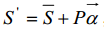
(1)
其中 表示平均形状,
 (特征向量的梯度下降)为前m个主成分特征向量组成的 矩阵 。而
 则为形状特征向量的系数。
我们可以关键点的2D位置信息与平均3D模型的对应关系来重新构建新的人脸3D模型。
在对齐的步骤,假定t个2D人脸特征点是被选择用作3D重建的。t个顶点,对应于特征点,也在面部几何结构上选择。 为面部的特征顶点在X,Y轴坐标集,因此Sf是形状向量f的一个子集,根据等式(1),一个新的面部形状S'f的这些特征顶点的X,Y坐标可以表示为:
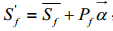
(2)
其中 和
和 分别是
分别是 和P的特征顶点的X,Y坐标。为了将脸部坐标转换到图片的坐标,令
 为转换之后的形状,所以:
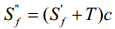
(3)
其中 是平移向量,
 是比例系数,注意因为2D面部图像和3D面部模型都是正面的,所以不需要旋转矩阵。又因为
 是正交矩阵,
 可以从等式(2)中衍生得到:

(4)
因为系数 是由部分顶点计算得到的,为了避免得到奇数值,特征向量被应用为
 的约束,所以等式(4)变为:

(5)
其中 ,
, ,
, 是常量,
是常量, 是第i个特征向量的特征值。
等式(2)和等式(3),这里有5个变量,为了计算脸部几何结构系数 ,需要进行一个迭代的过程,正如下面的概述。
第一次迭代之前,我们让 作为的初始值。
第一步,让 和
和 分别作为所有
 和
和 之间沿着X和Y轴的所有t特征点的平均距离,所以:
 ,
,
而 ,
,
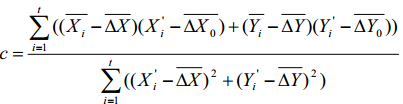
其中 和
和 分别是
分别是 和
和 上一次的迭代,在第一次迭代中,
 和
和 都设置为0,
 可以从等式(3)中计算得到。
第二步,将 赋值给
赋值给 ,面部几何结构系数
 可以由等式(5)计算得到,然后新的
 可以通过将
可以通过将 带到等式(2)得到。
几何结构系数 通常在重复步骤1和步骤2至多10次的迭代之后可以收敛。然后我们可以将
 带入等式(1)中得到整个3D的几何结构S'.
重构的脸部形状如图1(b)所示,脸部几何结构看起来很好,但是脸部特征顶点的X,Y的坐标和2D图像的特征点有些不同,原因是形状空间受限于3D人脸数据库。为了保证的特征顶点完全正确,脸部特征顶点的X,Y坐标必须强制对其到2D图片的特征点的X,Y坐标。根据特征顶点的位移,用Kriging插值法【11】来计算非特征顶点的位移。对于插值目的,径向基函数(RBF)是一个不错的选择。通过使用上面描述的方法,最终的三维脸部几何图形得到了精确的特征顶点的重构。最后的3D脸部形状如图1(c)所示。
3D Morphable Modle 即三维形变模型,是一个典型的统计三维人脸模型,通过统计分析方法明确地学习了3D人脸的先验知识。它表示三维人脸是基本三维人脸的线性组合,由主成分分析(PCA)在一组密集排列的3D人脸上得到。将三维人脸重建问题看做是模型拟合问题,模型参数(即线性组合系数和 相机 参数)进行了优化,以便产生二维投影的三维脸最好符合输入2 d图像的位置(和纹理)的一组注释面部标记(例如,眼部中心、嘴角和鼻子尖)。基于3DMM的方法通常需要在线优化,因此是计算密集型,所以实时性比较差,另外需要注意的是PCA本质上是一种低通滤波,所以这类方法在恢复人脸的细节特征方面效果仍然不理想,所以下一章节介绍基于回归框架的3D重建。
下面通过一个简单的例子介绍3DMM。
这里要介绍的是一个开源的3DMM, Surrey 3DMM Face Model,这个模型是英国Surrey大学提供的一个多分辨率的3D形变人脸模型。官方只提供了一个低分辨率的模型sfm_shape_3448.bin,因为低分辨率的形变模型对大多数应用来说更实用。 如果需要完全版本的形变模型需要申请:
http://cvssp.org/faceweb/3dmm/facemodels/register.html。
跟随形变模型一起发布的还有一个模型接口库eos,它是一个轻量级的3D形变模型拟合库,它可以进行基本的姿态和形状的拟合。
https://github.com/patrikhuber/eos
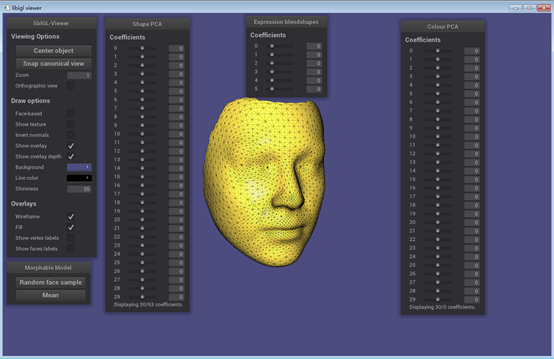
下面我们来通过下面的 viewer 程序来看下这个模型,下面的代码是用libigl配合nanogui编写(VS2015)的,这个程序分为两部分,通过#if 1来使能编译,第一个部分程序实现读一个由eos形变模型拟合库生成的网状纹理对象.obj文件。第二部分代码是一个eos的3D形变模型的viewer,通过这个viewer程序你可以通过手动的调整形状、形状的PCA系数以及表情融合变形系数,来观察3D模型的变化。
#include <igl/readOFF.h>#include <igl/readOBJ.h>#include <igl/viewer/Viewer.h>#include <nanogui/formhelper.h>#include <nanogui/screen.h>#include <iostream>#include "tutorial_shared_path.h" int main(int argc, char *argv[]){Eigen::MatrixXd V;Eigen::MatrixXi F; bool boolVariable = true;float floatVariable = 0.1f;enum Orientation { Up=0,Down,Left,Right } dir = Up; int a = 1;auto p = [&a](double x)->double { a++; return x / 2; };std::cout << p(100) << std::endl; std::cout<< "a1 = " << a << std::endl;std::cout << "a2 = " << a << std::endl; // Load a mesh in OFF format//igl::readOFF(TUTORIAL_SHARED_PATH "/bunny.off", V, F);igl::readOBJ(TUTORIAL_SHARED_PATH "/out1.obj", V, F); // Init the viewerigl::viewer::Viewer viewer;//viewer.data.clear(); // Extend viewer menuviewer.callback_init = [&](igl::viewer::Viewer& viewer){// Add new groupviewer.ngui->addGroup("New Group"); // Expose variable directly ...viewer.ngui->addVariable("float",floatVariable); // ... or using a custom callbackviewer.ngui->addVariable<bool>("bool",[&](bool val) {boolVariable = val; // set},[&]() {return boolVariable; // get}); // Expose an enumaration typeviewer.ngui->addVariable<Orientation>("Direction",dir)->setItems({"Up","Down","Left","Right"}); // Add a buttonviewer.ngui->addButton("Print Hello",[](){ std::cout << "Hello\n"; }); // Add an additional menu windowviewer.ngui->addWindow(Eigen::Vector2i(220,10),"New Window"); // Expose the same variable directly ...viewer.ngui->addVariable("float",floatVariable); // Generate menuviewer.screen->performLayout(); return false;}; // t(viewer); // Plot the mesh// viewer.data.set_normals(V);viewer.data.set_mesh(V, F);viewer.launch(); }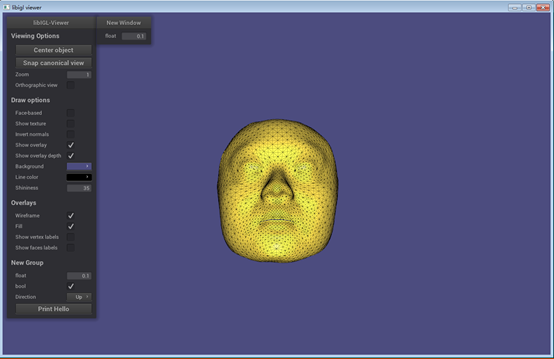
#include "eos/core/Mesh.hpp"#include "eos/morphablemodel/MorphableModel.hpp"#include "eos/morphablemodel/io/cvssp.hpp"#include "eos/morphablemodel/Blendshape.hpp" #include <igl/viewer/Viewer.h>#include "nanogui/slider.h"#include "nanogui/textbox.h"#include "nanogui/formhelper.h" #include "boost/program_options.hpp"#include "boost/filesystem.hpp" #include <iostream>#include <sstream>#include <iomanip>#include <random>//#include <algorithm>#include <map> using namespace eos;namespace po = boost::program_options;namespace fs = boost::filesystem;using std::cout;using std::endl; template <typename T>std::string to_string(const T a_value, const int n = 6){ std::ostringstream out; out << std::setprecision(n) << a_value; return out.str();} /*** Model viewer for 3D Morphable Models.** It's working well but does have a few todo's left, and the code is not very polished.** If no model and blendshapes are given via command-line, then a file-open dialog will be presented.* If the files are given on the command-line, then no dialog will be presented.*/int main(int argc, char *argv[]){ fs::path model_file, blendshapes_file; try { po::options_description desc("Allowed options"); desc.add_options() ("help,h", "display the help message") ("model,m", po::value<fs::path>(&model_file), "an eos 3D Morphable Model stored as cereal BinaryArchive (.bin)") ("blendshapes,b", po::value<fs::path>(&blendshapes_file), "an eos file with blendshapes (.bin)") ; po::variables_map vm; po::store(po::command_line_parser(argc, argv).options(desc).run(), vm); if (vm.count("help")) { cout << "Usage: eos-model-viewer [options]" << endl; cout << desc; return EXIT_SUCCESS; } po::notify(vm); } catch (const po::error& e) { cout << "Error while parsing command-line arguments: " << e.what() << endl; cout << "Use --help to display a list of options." << endl; return EXIT_FAILURE; } // Should do it from the shape instance actually - never compute the Mesh actually! auto get_V = [](const core::Mesh& mesh) { Eigen::MatrixXd V(mesh.vertices.size(), 3); for (int i = 0; i < mesh.vertices.size(); ++i) { V(i, 0) = mesh.vertices[i].x; V(i, 1) = mesh.vertices[i].y; V(i, 2) = mesh.vertices[i].z; } return V; }; auto get_F = [](const core::Mesh& mesh) { Eigen::MatrixXi F(mesh.tvi.size(), 3); for (int i = 0; i < mesh.tvi.size(); ++i) { F(i, 0) = mesh.tvi[i][0]; F(i, 1) = mesh.tvi[i][1]; F(i, 2) = mesh.tvi[i][2]; } return F; }; auto get_C = [](const core::Mesh& mesh) { Eigen::MatrixXd C(mesh.colors.size(), 3); for (int i = 0; i < mesh.colors.size(); ++i) { C(i, 0) = mesh.colors[i].r; C(i, 1) = mesh.colors[i].g; C(i, 2) = mesh.colors[i].b; } return C; }; morphablemodel::MorphableModel morphable_model; morphablemodel::Blendshapes blendshapes; // These are the coefficients of the currently active mesh instance: std::vector<float> shape_coefficients; std::vector<float> color_coefficients; std::vector<float> blendshape_coefficients; igl::viewer::Viewer viewer; std::default_random_engine rng; std::map<nanogui::Slider*, int> sliders; // If we want to set the sliders to zero separately, we need separate maps here. auto add_shape_coefficients_slider = [&sliders, &shape_coefficients, &blendshape_coefficients](igl::viewer::Viewer& viewer, const morphablemodel::MorphableModel& morphable_model, const morphablemodel::Blendshapes& blendshapes, std::vector<float>& coefficients, int coefficient_id, std::string coefficient_name) { nanogui::Widget *panel = new nanogui::Widget(viewer.ngui->window()); panel->setLayout(new nanogui::BoxLayout(nanogui::Orientation::Horizontal, nanogui::Alignment::Middle, 0, 20)); nanogui::Slider* slider = new nanogui::Slider(panel); sliders.emplace(slider, coefficient_id); slider->setFixedWidth(80); slider->setValue(0.0f); slider->setRange({ -3.5f, 3.5f }); //slider->setHighlightedRange({ -1.0f, 1.0f }); nanogui::TextBox *textBox = new nanogui::TextBox(panel); textBox->setFixedSize(Eigen::Vector2i(40, 20)); textBox->setValue("0"); textBox->setFontSize(16); textBox->setAlignment(nanogui::TextBox::Alignment::Right); slider->setCallback([slider, textBox, &morphable_model, &blendshapes, &viewer, &coefficients, &sliders, &shape_coefficients, &blendshape_coefficients](float value) { textBox->setValue(to_string(value, 2)); // while dragging the slider auto id = sliders[slider]; // Todo: if it doesn't exist, we should rather throw - this inserts a new item into the map! coefficients[id] = value; // Just update the shape (vertices): Eigen::VectorXf shape; if (blendshape_coefficients.size() > 0 && blendshapes.size() > 0) { shape = morphable_model.get_shape_model().draw_sample(shape_coefficients) + morphablemodel::to_matrix(blendshapes) * Eigen::Map<const Eigen::VectorXf>(blendshape_coefficients.data(), blendshape_coefficients.size()); } else { shape = morphable_model.get_shape_model().draw_sample(shape_coefficients); } auto num_vertices = morphable_model.get_shape_model().get_data_dimension() / 3; Eigen::Map<Eigen::MatrixXf> shape_reshaped(shape.data(), 3, num_vertices); // Take 3 at a piece, then transpose below. Works. (But is this really faster than a loop?) viewer.data.set_vertices(shape_reshaped.transpose().cast<double>()); }); return panel; }; auto add_blendshapes_coefficients_slider = [&sliders, &shape_coefficients, &blendshape_coefficients](igl::viewer::Viewer& viewer, const morphablemodel::MorphableModel& morphable_model, const morphablemodel::Blendshapes& blendshapes, std::vector<float>& coefficients, int coefficient_id, std::string coefficient_name) { nanogui::Widget *panel = new nanogui::Widget(viewer.ngui->window()); panel->setLayout(new nanogui::BoxLayout(nanogui::Orientation::Horizontal, nanogui::Alignment::Middle, 0, 20)); nanogui::Slider* slider = new nanogui::Slider(panel); sliders.emplace(slider, coefficient_id); slider->setFixedWidth(80); slider->setValue(0.0f); slider->setRange({ -0.5f, 2.0f }); //slider->setHighlightedRange({ 0.0f, 1.0f }); nanogui::TextBox *textBox = new nanogui::TextBox(panel); textBox->setFixedSize(Eigen::Vector2i(40, 20)); textBox->setValue("0"); textBox->setFontSize(16); textBox->setAlignment(nanogui::TextBox::Alignment::Right); slider->setCallback([slider, textBox, &morphable_model, &blendshapes, &viewer, &coefficients, &sliders, &shape_coefficients, &blendshape_coefficients](float value) { textBox->setValue(to_string(value, 2)); // while dragging the slider auto id = sliders[slider]; // if it doesn't exist, we should rather throw - this inserts a new item into the map! coefficients[id] = value; // Just update the shape (vertices): Eigen::VectorXf shape; if (blendshape_coefficients.size() > 0 && blendshapes.size() > 0) { shape = morphable_model.get_shape_model().draw_sample(shape_coefficients) + morphablemodel::to_matrix(blendshapes) * Eigen::Map<const Eigen::VectorXf>(blendshape_coefficients.data(), blendshape_coefficients.size()); } else { // No blendshapes - doesn't really make sense, we require loading them. But it's fine. shape = morphable_model.get_shape_model().draw_sample(shape_coefficients); } auto num_vertices = morphable_model.get_shape_model().get_data_dimension() / 3; Eigen::Map<Eigen::MatrixXf> shape_reshaped(shape.data(), 3, num_vertices); // Take 3 at a piece, then transpose below. Works. (But is this really faster than a loop?) viewer.data.set_vertices(shape_reshaped.transpose().cast<double>()); }); return panel; }; auto add_color_coefficients_slider = [&sliders, &shape_coefficients, &color_coefficients, &blendshape_coefficients](igl::viewer::Viewer& viewer, const morphablemodel::MorphableModel& morphable_model, const morphablemodel::Blendshapes& blendshapes, std::vector<float>& coefficients, int coefficient_id, std::string coefficient_name) { nanogui::Widget *panel = new nanogui::Widget(viewer.ngui->window()); panel->setLayout(new nanogui::BoxLayout(nanogui::Orientation::Horizontal, nanogui::Alignment::Middle, 0, 20)); nanogui::Slider* slider = new nanogui::Slider(panel); sliders.emplace(slider, coefficient_id); slider->setFixedWidth(80); slider->setValue(0.0f); slider->setRange({ -3.5f, 3.5f }); //slider->setHighlightedRange({ -1.0f, 1.0f }); nanogui::TextBox *textBox = new nanogui::TextBox(panel); textBox->setFixedSize(Eigen::Vector2i(40, 20)); textBox->setValue("0"); textBox->setFontSize(16); textBox->setAlignment(nanogui::TextBox::Alignment::Right); slider->setCallback([slider, textBox, &morphable_model, &blendshapes, &viewer, &coefficients, &sliders, &shape_coefficients, &color_coefficients, &blendshape_coefficients](float value) { textBox->setValue(to_string(value, 2)); // while dragging the slider auto id = sliders[slider]; // if it doesn't exist, we should rather throw - this inserts a new item into the map! coefficients[id] = value; // Set the new colour values: Eigen::VectorXf color = morphable_model.get_color_model().draw_sample(color_coefficients); auto num_vertices = morphable_model.get_color_model().get_data_dimension() / 3; Eigen::Map<Eigen::MatrixXf> color_reshaped(color.data(), 3, num_vertices); // Take 3 at a piece, then transpose below. Works. (But is this really faster than a loop?) viewer.data.set_colors(color_reshaped.transpose().cast<double>()); }); return panel; }; // Extend viewer menu viewer.callback_init = [&](igl::viewer::Viewer& viewer) { // Todo: We could do the following: If a filename is given via cmdline, then don't open the dialogue! if (model_file.empty()) model_file = nanogui::file_dialog({ { "bin", "eos Morphable Model file" },{ "scm", "scm Morphable Model file" } }, false); if (model_file.extension() == ".scm") { morphable_model = morphablemodel::load_scm_model(model_file.string()); // try? } else { morphable_model = morphablemodel::load_model(model_file.string()); // try? // morphablemodel::load_isomap(model_file.string()); // try? //load_isomap } if (blendshapes_file.empty()) blendshapes_file = nanogui::file_dialog({ { "bin", "eos blendshapes file" } }, false); blendshapes = morphablemodel::load_blendshapes(blendshapes_file.string()); // try? // Error on load failure: How to make it pop up? //auto dlg = new nanogui::MessageDialog(viewer.ngui->window(), nanogui::MessageDialog::Type::Warning, "Title", "This is a warning message"); // Initialise all coefficients (all zeros): shape_coefficients = std::vector<float>(morphable_model.get_shape_model().get_num_principal_components()); color_coefficients = std::vector<float>(morphable_model.get_color_model().get_num_principal_components()); // Todo: It can have no colour model! blendshape_coefficients = std::vector<float>(blendshapes.size()); // Todo: Should make it work without blendshapes! // Start off displaying the mean: const auto mesh = morphable_model.get_mean(); viewer.data.set_mesh(get_V(mesh), get_F(mesh)); viewer.data.set_colors(get_C(mesh)); viewer.core.align_camera_center(viewer.data.V, viewer.data.F); // General: viewer.ngui->addWindow(Eigen::Vector2i(10, 580), "Morphable Model"); // load/save model & blendshapes // save obj // Draw random sample // Load fitting result... (uesful for maybe seeing where something has gone wrong!) // see: https://github.com/wjakob/nanogui/blob/master/src/example1.cpp#L283 //viewer.ngui->addButton("Open Morphable Model", [&morphable_model]() { // std::string file = nanogui::file_dialog({ {"bin", "eos Morphable Model file"} }, false); // morphable_model = morphablemodel::load_model(file); //}); viewer.ngui->addButton("Random face sample", [&]() { const auto sample = morphable_model.draw_sample(rng, 1.0f, 1.0f); // This draws both shape and color model - we can improve the speed by not doing that. viewer.data.set_vertices(get_V(sample)); viewer.data.set_colors(get_C(sample)); // Set the coefficients and sliders to the drawn alpha value: (ok we don't have them - need to use our own random function) // Todo. }); viewer.ngui->addButton("Mean", [&]() { const auto mean = morphable_model.get_mean(); // This draws both shape and color model - we can improve the speed by not doing that. viewer.data.set_vertices(get_V(mean)); viewer.data.set_colors(get_C(mean)); // Set the coefficients and sliders to the mean: for (auto&& e : shape_coefficients) e = 0.0f; for (auto&& e : blendshape_coefficients) e = 0.0f; for (auto&& e : color_coefficients) e = 0.0f; for (auto&& s : sliders) s.first->setValue(0.0f); }); // The Shape PCA window: viewer.ngui->addWindow(Eigen::Vector2i(230, 10), "Shape PCA"); viewer.ngui->addGroup("Coefficients"); auto num_shape_coeffs_to_display = std::min(morphable_model.get_shape_model().get_num_principal_components(), 30); for (int i = 0; i < num_shape_coeffs_to_display; ++i) { viewer.ngui->addWidget(std::to_string(i), add_shape_coefficients_slider(viewer, morphable_model, blendshapes, shape_coefficients, i, std::to_string(i))); } if (num_shape_coeffs_to_display < morphable_model.get_shape_model().get_num_principal_components()) { nanogui::Label *label = new nanogui::Label(viewer.ngui->window(), "Displaying 30/" + std::to_string(morphable_model.get_shape_model().get_num_principal_components()) + " coefficients."); viewer.ngui->addWidget("", label); } // The Expression Blendshapes window: viewer.ngui->addWindow(Eigen::Vector2i(655, 10), "Expression blendshapes"); viewer.ngui->addGroup("Coefficients"); for (int i = 0; i < blendshapes.size(); ++i) { viewer.ngui->addWidget(std::to_string(i), add_blendshapes_coefficients_slider(viewer, morphable_model, blendshapes, blendshape_coefficients, i, std::to_string(i))); } // The Colour PCA window: viewer.ngui->addWindow(Eigen::Vector2i(440, 10), "Colour PCA"); viewer.ngui->addGroup("Coefficients"); auto num_color_coeffs_to_display = std::min(morphable_model.get_color_model().get_num_principal_components(), 30); for (int i = 0; i < num_shape_coeffs_to_display; ++i) { viewer.ngui->addWidget(std::to_string(i), add_color_coefficients_slider(viewer, morphable_model, blendshapes, color_coefficients, i, std::to_string(i))); } if (num_color_coeffs_to_display < morphable_model.get_shape_model().get_num_principal_components()) { nanogui::Label *label = new nanogui::Label(viewer.ngui->window(), "Displaying 30/" + std::to_string(morphable_model.get_color_model().get_num_principal_components()) + " coefficients."); viewer.ngui->addWidget("", label); } // call to generate menu viewer.screen->performLayout(); return false; }; viewer.launch(); return EXIT_SUCCESS;} 调整形状与颜色还有表情的系数可以得到不同的3D模型:
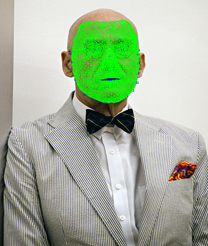
下面的应用程序演示了一种基于ibug(Intelligent Behaviour Understanding Group) LFPW图像的三维模型的相机的估计和模型的拟合。
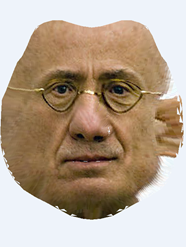
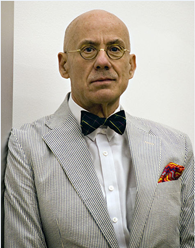
其中LFPW数据库提供了各种角度的人脸图像和它们68 landmarks标记文件.pts文件,软件实现中用LandmarkMapper转换为顶点的索引,然后估计一个正交摄像机,用相机矩阵人脸形状被拟合到lannmarks标记上。拟合得到包含拟合系数的mesh,用相机参数和mesh从图像中提取出纹理信息,最终保存这些包含纹理信息的等距映射图片,将mesh保存为纹理对象.obj文件,这个object文件包含mesh的纹理坐标信息,与obj同时保存的还有mtl文件,它是等距映射图片isomap.png的一个连接文件,它们是分开保存的。
Int main(int argc, char *argv[]){ fs::path modelfile, isomapfile, imagefile, landmarksfile, mappingsfile, outputfile; try { po::options_description desc("Allowed options"); desc.add_options() ("help,h", "display the help message") ("model,m", po::value<fs::path>(&modelfile)->required()->default_value("../share/sfm_shape_3448.bin"), "a Morphable Model stored as cereal BinaryArchive") ("image,i", po::value<fs::path>(&imagefile)->required()->default_value("data/image_0129.png"), "an input image") ("landmarks,l", po::value<fs::path>(&landmarksfile)->required()->default_value("data/image_0129.pts"), "2D landmarks for the image, in ibug .pts format") ("mapping,p", po::value<fs::path>(&mappingsfile)->required()->default_value("../share/ibug_to_sfm.txt"), "landmark identifier to model vertex number mapping") ("output,o", po::value<fs::path>(&outputfile)->required()->default_value("out"), "basename for the output rendering and obj files") ; po::variables_map vm; po::store(po::command_line_parser(argc, argv).options(desc).run(), vm); if (vm.count("help")) { cout << "Usage: fit-model-simple [options]" << endl; cout << desc; return EXIT_SUCCESS; } po::notify(vm); } catch (const po::error& e) { cout << "Error while parsing command-line arguments: " << e.what() << endl; cout << "Use --help to display a list of options." << endl; return EXIT_FAILURE; } // Load the image, landmarks, LandmarkMapper and the Morphable Model: Mat image = cv::imread(imagefile.string()); LandmarkCollection<cv::Vec2f> landmarks; try { landmarks = read_pts_landmarks(landmarksfile.string()); } catch (const std::runtime_error& e) { cout << "Error reading the landmarks: " << e.what() << endl; return EXIT_FAILURE; } morphablemodel::MorphableModel morphable_model; try { morphable_model = morphablemodel::load_model(modelfile.string()); } catch (const std::runtime_error& e) { cout << "Error loading the Morphable Model: " << e.what() << endl; return EXIT_FAILURE; } core::LandmarkMapper landmark_mapper = mappingsfile.empty() ? core::LandmarkMapper() : core::LandmarkMapper(mappingsfile); // Draw the loaded landmarks: Mat outimg = image.clone(); for (auto&& lm : landmarks) { cv::rectangle(outimg, cv::Point2f(lm.coordinates[0] - 2.0f, lm.coordinates[1] - 2.0f), cv::Point2f(lm.coordinates[0] + 2.0f, lm.coordinates[1] + 2.0f), { 255, 0, 0 }); } // These will be the final 2D and 3D points used for the fitting: vector<Vec4f> model_points; // the points in the 3D shape model vector<int> vertex_indices; // their vertex indices vector<Vec2f> image_points; // the corresponding 2D landmark points // Sub-select all the landmarks which we have a mapping for (i.e. that are defined in the 3DMM): for (int i = 0; i < landmarks.size(); ++i) { auto converted_name = landmark_mapper.convert(landmarks[i].name); if (!converted_name) { // no mapping defined for the current landmark continue; } int vertex_idx = std::stoi(converted_name.get()); auto vertex = morphable_model.get_shape_model().get_mean_at_point(vertex_idx); model_points.emplace_back(Vec4f(vertex.x(), vertex.y(), vertex.z(), 1.0f)); vertex_indices.emplace_back(vertex_idx); image_points.emplace_back(landmarks[i].coordinates); } // Estimate the camera (pose) from the 2D - 3D point correspondences fitting::ScaledOrthoProjectionParameters pose = fitting::estimate_orthographic_projection_linear(image_points, model_points, true, image.rows); fitting::RenderingParameters rendering_params(pose, image.cols, image.rows); // The 3D head pose can be recovered as follows: float yaw_angle = glm::degrees(glm::yaw(rendering_params.get_rotation())); // and similarly for pitch and roll. // Estimate the shape coefficients by fitting the shape to the landmarks: Mat affine_from_ortho = fitting::get_3x4_affine_camera_matrix(rendering_params, image.cols, image.rows); vector<float> fitted_coeffs = fitting::fit_shape_to_landmarks_linear(morphable_model, affine_from_ortho, image_points, vertex_indices); // Obtain the full mesh with the estimated coefficients: core::Mesh mesh = morphable_model.draw_sample(fitted_coeffs, vector<float>()); // Extract the texture from the image using given mesh and camera parameters: Mat isomap = render::extract_texture(mesh, affine_from_ortho, image); // Save the mesh as textured obj: outputfile += fs::path(".obj"); core::write_textured_obj(mesh, outputfile.string()); // And save the isomap: outputfile.replace_extension(".isomap.png"); cv::imwrite(outputfile.string(), isomap); cout << "Finished fitting and wrote result mesh and isomap to files with basename " << outputfile.stem().stem() << "." << endl; return EXIT_SUCCESS;}
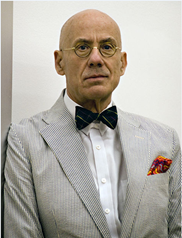
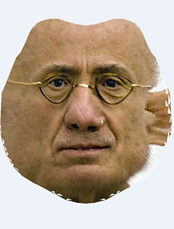
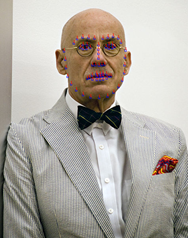
前面的例子是用LFPW数据的人脸图片和已经标记好的landmarks,当然我们还可以通过其他的一些手段获取图片的人脸,以及获得68 landmarks标记信息,例如用dlib获取人脸图片,用eos的LandmarkCollection类获取人脸的landmarks标记信息,下面就是这么一个例子:
//eos library include#include "eos/core/Landmark.hpp"#include "eos/core/LandmarkMapper.hpp"#include "eos/fitting/nonlinear_camera_estimation.hpp"#include "eos/fitting/linear_shape_fitting.hpp"#include "eos/render/utils.hpp"#include "eos/render/texture_extraction.hpp"//OpenCV include#include "opencv2/core/core.hpp"#include "opencv2/highgui/highgui.hpp" #if 0#ifdef WIN32#define BOOST_ALL_DYN_LINK // Link against the dynamic boost lib. Seems to be necessary because we use /MD, i.e. link to the dynamic CRT.#define BOOST_ALL_NO_LIB // Don't use the automatic library linking by boost with VS2010 (#pragma ...). Instead, we specify everything in cmake.#endif#endif#include "boost/program_options.hpp"#include <boost/filesystem.hpp> #include <vector>#include <iostream>#include <fstream>#include <sstream>#include <iomanip> using namespace eos;namespace po = boost::program_options;namespace fs = boost::filesystem;using eos::core::Landmark;using eos::core::LandmarkCollection;using cv::Mat;using cv::Vec2f;using cv::Vec3f;using cv::Vec4f;using std::cout;using std::endl;using std::vector;using std::string;using Eigen::Vector4f; int main(int argc, char *argv[]){ /// read eos file fs::path modelfile, isomapfile,mappingsfile, outputfilename, outputfilepath; try { po::options_description desc("Allowed options"); desc.add_options() ("help,h", "display the help message") ("model,m", po::value<fs::path>(&modelfile)->required()->default_value("../share1/sfm_shape_3448.bin"), "a Morphable Model stored as cereal BinaryArchive") ("mapping,p", po::value<fs::path>(&mappingsfile)->required()->default_value("../share1/ibug2did.txt"), "landmark identifier to model vertex number mapping") ("outputfilename,o", po::value<fs::path>(&outputfilename)->required()->default_value("out"), "basename for the output rendering and obj files") ("outputfilepath,o", po::value<fs::path>(&outputfilepath)->required()->default_value("output/"), "basename for the output rendering and obj files") ; po::variables_map vm; po::store(po::command_line_parser(argc, argv).options(desc).run(), vm); if (vm.count("help")) { cout << "Usage: webcam_face_fit_model_keegan [options]" << endl; cout << desc; return EXIT_SUCCESS; } po::notify(vm); } catch (const po::error& e) { cout << "Error while parsing command-line arguments: " << e.what() << endl; cout << "Use --help to display a list of options." << endl; return EXIT_SUCCESS; } try { cv::VideoCapture cap(0); dlib::image_window win; // Load face detection and pose estimation models. dlib::frontal_face_detector detector = dlib::get_frontal_face_detector(); dlib::shape_predictor pose_model; dlib::deserialize("../share1/shape_predictor_68_face_landmarks.dat") >> pose_model; #define TEST_FRAME cv::Mat frame_capture;#ifdef TEST_FRAME frame_capture = cv::imread("./data/image_0129.png"); cv::imshow("input", frame_capture); cv::imwrite("frame_capture.png", frame_capture); cv::waitKey(1);#endif // Grab and process frames until the main window is closed by the user. int frame_count = 0; while (!win.is_closed()) { CAPTURE_FRAME: Mat image;#ifndef TEST_FRAME cap >> frame_capture;#endif frame_capture.copyTo(image); // Turn OpenCV's Mat into something dlib can deal with. Note that this just // wraps the Mat object, it doesn't copy anything. So cimg is only valid as // long as frame_capture is valid. Also don't do anything to frame_capture that would cause it // to reallocate the memory which stores the image as that will make cimg // contain dangling pointers. This basically means you shouldn't modify frame_capture // while using cimg. dlib::cv_image<dlib::bgr_pixel> cimg(frame_capture); // Detect faces std::vector<dlib::rectangle> faces = detector(cimg); if (faces.size() == 0) goto CAPTURE_FRAME; for (size_t i = 0; i < faces.size(); ++i) { cout << faces[i] << endl; } // Find the pose of each face. std::vector<dlib::full_object_detection> shapes; for (unsigned long i = 0; i < faces.size(); ++i) shapes.push_back(pose_model(cimg, faces[i])); /// face 68 pointers for (size_t i = 0; i < shapes.size(); ++i) { morphablemodel::MorphableModel morphable_model; try { morphable_model = morphablemodel::load_model(modelfile.string()); } catch (const std::runtime_error& e) { cout << "Error loading the Morphable Model: " << e.what() << endl; return EXIT_FAILURE; } core::LandmarkMapper landmark_mapper = mappingsfile.empty() ? core::LandmarkMapper() : core::LandmarkMapper(mappingsfile); /// every face LandmarkCollection<Vec2f> landmarks; landmarks.reserve(68); cout << "point_num = " << shapes[i].num_parts() << endl; int num_face = shapes[i].num_parts(); for (size_t j = 0; j < num_face; ++j) { dlib::point pt_save = shapes[i].part(j); Landmark<Vec2f> landmark; /// input landmark.name = std::to_string(j + 1); landmark.coordinates[0] = pt_save.x(); landmark.coordinates[1] = pt_save.y(); //cout << shapes[i].part(j) << "\t"; landmark.coordinates[0] -= 1.0f; landmark.coordinates[1] -= 1.0f; landmarks.emplace_back(landmark); } // Draw the loaded landmarks: Mat outimg = image.clone(); cv::imshow("image", image); cv::waitKey(10); int face_point_i = 1; for (auto&& lm : landmarks) { cv::Point numPoint(lm.coordinates[0] - 2.0f, lm.coordinates[1] - 2.0f); cv::rectangle(outimg, cv::Point2f(lm.coordinates[0] - 2.0f, lm.coordinates[1] - 2.0f), cv::Point2f(lm.coordinates[0] + 2.0f, lm.coordinates[1] + 2.0f), { 255, 0, 0 }); char str_i[11]; sprintf(str_i, "%d", face_point_i); cv::putText(outimg, str_i, numPoint, CV_FONT_HERSHEY_COMPLEX, 0.3, cv::Scalar(0, 0, 255)); ++i; } //cout << "face_point_i = " << face_point_i << endl; cv::imshow("rect_outimg", outimg); cv::waitKey(1); // These will be the final 2D and 3D points used for the fitting: std::vector<Vec4f> model_points; // the points in the 3D shape model std::vector<int> vertex_indices; // their vertex indices std::vector<Vec2f> image_points; // the corresponding 2D landmark points // Sub-select all the landmarks which we have a mapping for (i.e. that are defined in the 3DMM): for (int i = 0; i < landmarks.size(); ++i) { auto converted_name = landmark_mapper.convert(landmarks[i].name); if (!converted_name) { // no mapping defined for the current landmark continue; } int vertex_idx = std::stoi(converted_name.get()); //Vec4f vertex = morphable_model.get_shape_model().get_mean_at_point(vertex_idx); auto vertex = morphable_model.get_shape_model().get_mean_at_point(vertex_idx); model_points.emplace_back(Vec4f(vertex.x(), vertex.y(), vertex.z(), 1.0f)); vertex_indices.emplace_back(vertex_idx); image_points.emplace_back(landmarks[i].coordinates); } // Estimate the camera (pose) from the 2D - 3D point correspondences fitting::RenderingParameters rendering_params = fitting::estimate_orthographic_camera(image_points, model_points, image.cols, image.rows); Mat affine_from_ortho = get_3x4_affine_camera_matrix(rendering_params, image.cols, image.rows); // cv::imshow("affine_from_ortho", affine_from_ortho); // cv::waitKey(); // The 3D head pose can be recovered as follows: float yaw_angle = glm::degrees(glm::yaw(rendering_params.get_rotation())); // Estimate the shape coefficients by fitting the shape to the landmarks: std::vector<float> fitted_coeffs = fitting::fit_shape_to_landmarks_linear(morphable_model, affine_from_ortho, image_points, vertex_indices);#if 0 cout << "size = " << fitted_coeffs.size() << endl; for (int i = 0; i < fitted_coeffs.size(); ++i) cout << fitted_coeffs[i] << endl;#endif // Obtain the full mesh with the estimated coefficients: core::Mesh mesh = morphable_model.draw_sample(fitted_coeffs, std::vector<float>()); // Extract the texture from the image using given mesh and camera parameters: Mat isomap = render::extract_texture(mesh, affine_from_ortho, image); ///// save obj std::stringstream strOBJ; strOBJ << std::setw(10) << std::setfill('0') << frame_count << ".obj"; // Save the mesh as textured obj: outputfilename = strOBJ.str(); std::cout << outputfilename << std::endl; auto outputfile = outputfilepath.string() + outputfilename.string(); core::write_textured_obj(mesh, outputfile); // And save the isomap: outputfilename.replace_extension(".isomap.png"); cv::imwrite(outputfilepath.string() + outputfilename.string(), isomap); cv::imshow("isomap_png", isomap); cv::waitKey(1); outputfilename.clear(); } frame_count++; // Display it all on the screen win.clear_overlay(); win.set_image(cimg); win.add_overlay(render_face_detections(shapes)); } } catch (dlib::serialization_error& e) { cout << "You need dlib's default face landmarking model file to run this example." << endl; cout << "You can get it from the following URL: " << endl; cout << " http://dlib.net/files/shape_predictor_68_face_landmarks.dat.bz2" << endl; cout << endl << e.what() << endl; } catch (std::exception& e) { cout << e.what() << endl; } return EXIT_SUCCESS;}
姿态估计和2D人脸对齐方面基于级联回归的方法现在被广泛的应用并且被认为是比较有前景的一种方法。通常一个有识别力的基于级联回归的方法在本地特征空间通过应用基于学习的方法来规避不可微的问题。这种方法允许从数据中学习到函数的梯度。
下面简单介绍级联回归的步骤,首先给定一张图片I和预先训练好的关于参数向量 的模型
的模型 ,基于回归的方法是以下面的方式迭代的更新参数
 :
:

使得后验概率 最大化。基于回归的方法通过用有监督的方法在训练集中学习得到梯度来解决这个非线性的优化问题。 也就是说目标是找到一个回归:

其中 是从输入图片中提取特征的向量,给定当前的模型参数,并且
 是预估模型参数更新,这个映射可以通过任意的回归方法从训练集中学习得到。例如线性回归,随机森林又或者是人工神经网络等等。与这些回归 算法 形成对比的是,级联回归方法产生一个由N个弱回归级联组成的强回归:

其中 是级联中的第N个弱回归,本文中用一个简单的线性回归做例子:

其中An是一个投影矩阵并且bn是第n个弱回归的偏移(bias)。
更特殊的,给定一个训练样本 ,我们首先运用岭回归算法(ridge regression algorithm) 学习第一个弱回归,最小化损失:

然后更新训练样本,例如模型阐述和相应的特诊向量,用学到的回归量给第二个弱回归的学习产生一个新的训练集。这个过程反复直到收敛或者超过预定义的回归量的最大数。
在测试阶段,这些预先训练过的弱回归量逐渐应用到输入图像中,初始模型参数估计为更新模型并输出最终拟合结果。
3D脸部几何结构重建之后,将2D图像投影正交到3D几何结构以产生纹理。可能有一些顶点没有相应的色彩信息是因为它们在人脸正面图像中被遮挡了,因此在产生的纹理映射中仍然有一些空白区域,可以用已知的颜色在空白区域进行插值。
综合不同的姿态, 光 照和表情
在自然环境中,PIE(姿态,光照和表情)在人脸识别算法中仍然是一个关键的挑战性的问题。
为了提高人脸识别的精度,在各种各样的PIE情况下捕获采样人脸图片是必要的。然而,
用任何2D-to-2D的方法在不同的PIE情况产生一个新的面部图像都是困难的。从给定的2D脸部图像重建3D人脸模型的方法可以解决这个问题。然后这个重建的3D人脸模型被旋转产生不同姿态的图片。通过应用不同的光线,不同的光照被创造出来。最后,一种基于mpe4的面部动画技术用于生成表情,这也是人脸识别的一个重要因素,但在大多数研究中都没有考虑到。
姿态的多样性是人脸识别的困难的首要根源。当在输入图像姿态有大的变化时, 人脸识别系统的性能会显著的下降,特别是当系统给的训练数据只有很少的的非正脸的图像时。改善多个视图识别的一个合理方法是用同多个视图进行训练。在被提出的工作中,通过将3D模型旋转到正确的姿态来产生任意视图非常方便的。
为了人脸识别的训练目的,在人脸图片的多视图上的特征点的位置是需要的,通常,人脸图片上的任意视角的人脸对其是十分困难的,并且目前还没有技术能以高精度的自动解决这个问题。多数多视图人脸识别方法需要手工的给这些在大量的训练集和测试采样图像上的特征点贴标签来对其它们,这种方法及不精确也非常耗时。
建议的方法是,因为多视图图像是由旋转3D模型得到,在新的人脸图像的对齐不在是一个问题。当在旋转3D模型后多个视角的人脸图像被投影, 通过3D模型上的相应特征顶点投影到2D图像可以得到脸部特征点的位置。因此多视角人脸图像的特征点位置的获取是自动和精确的。
光照是人脸识别的另一个重要的问题。同样的人脸由于光照的改变而表现不同。由光照引发的改变通常大于个体间的差异。
免责声明:本文系网络转载或改编,未找到原创作者,版权归原作者所有。如涉及版权,请联系删
 技术文档
技术文档
 推荐好文
推荐好文





 155-2731-8020




