


软件

产品


最近有需求要实现WinForm和Unity交互,也就是通信,查过几个方案有用UnityWebPlayer Control组件的(由于版本问题所以我没尝试),也有把Winform打包成dll动态链接库然后unity内引入的,还有打包Unity.exe然后Winform内嵌入的,后面两种都可以。
一.Winform打包成dll动态链接库然后unity内引入
1.总之先把界面画出来(大概有个样子)
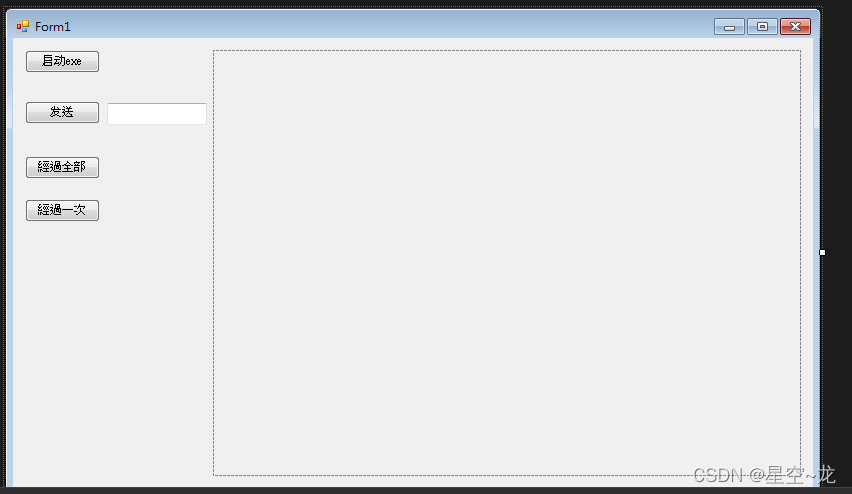
2.后台代码(我这里是winform充当服务器,unity充当客户端来连接实现socket通信)
2.1 Winform:建立SocketServer 类
- public class SocketServer
- {
- public Socket serverSocket;
- public Socket clientSocket;
-
- private string _ip = string.Empty;
- private int _port = 12345;
- /// <summary>
- /// 构造函数
- /// </summary>
- /// <param name="ip">监听的IP</param>
- /// <param name="port">监听的端口</param>
- public SocketServer(string ip, int port)
- {
- this._ip = ip;
- this._port = port;
- }
- public SocketServer(int port)
- {
- this._ip = "0.0.0.0";
- this._port = port;
- }
- static List<Socket> userOnline = new List<Socket>();
- private static readonly object textsLock;
- public Queue<string> texts = new Queue<string>();
- public void StartListen()
- {
- try
- {
- //1.0 实例化套接字(IP4寻找协议,流式协议,TCP协议)
- serverSocket = new Socket(AddressFamily.InterNetwork, SocketType.Stream, ProtocolType.Tcp);
- //2.0 创建IP对象
- IPAddress address = IPAddress.Parse(_ip);
- //3.0 创建网络端口,包括ip和端口
- IPEndPoint endPoint = new IPEndPoint(address, _port);
- //4.0 绑定套接字
- serverSocket.Bind(endPoint);
- //5.0 设置最大连接数量
- serverSocket.Listen(int.MaxValue);
- //MessageBox.Show(serverSocket.LocalEndPoint.ToString());
- //6.0 开始监听
- Thread thread = new Thread(ListenClientConnect);
- thread.IsBackground = true;
- thread.Start();
-
- }
- catch (Exception ex)
- {
-
- }
- }
- /// <summary>
- /// 监听客户端连接
- /// </summary>
- private void ListenClientConnect()
- {
- try
- {
- while (true)
- {
- //阻塞当前的线程直到某个客户端连接,连接上则返回一个新的Socket(即客户端)
- clientSocket = serverSocket.Accept();
- userOnline.Add(clientSocket);//每连接上一个客户端,就将该客户端添加至客户端列表
- Thread thread = new Thread(ReceiveMessage);//每连接上一个客户端,启动一个线程(用于接受客户端信息)
- thread.Start(clientSocket);
- }
- }
- catch (Exception)
- {
-
- }
- }
- /// <summary>
- /// 接收客户端消息
- /// </summary>
- /// <param name="socket">来自客户端的socket</param>
- private void ReceiveMessage(object socket)
- {
- Socket clientSocket = (Socket)socket;
- byte[] buffer = new byte[1024 * 1024 * 2];
- while (true)
- {
- try
- {
- //获取从客户端发来的数据
- int length = clientSocket.Receive(buffer);
- lock (textsLock)//如果textsLock没有被锁上,则可执行内部代码并主动锁上(PS:有序的执行,避免资源冲突)
- {
- texts.Enqueue(Encoding.UTF8.GetString(buffer, 0, length));//接收到消息则存入texts
- }
- //Console.WriteLine("接收客户端{0},消息{1}", clientSocket.RemoteEndPoint.ToString(), Encoding.UTF8.GetString(buffer, 0, length));
- }
- catch (Exception ex)
- {
- Console.WriteLine(ex.Message);
- clientSocket.Shutdown(SocketShutdown.Both);
- clientSocket.Close();
- break;
- }
- }
- }
- }
2.2 Winform:在Form加载时开启服务,线程监听客户端(unity)连接
p武汉格发信息技术有限公司,格发许可优化管理系统可以帮你评估贵公司软件许可的真实需求,再低成本合规性管理软件许可,帮助贵司提高软件投资回报率,为软件采购、使用提供科学决策依据。支持的软件有: CAD,CAE,PDM,PLM,Catia,Ugnx, AutoCAD, Pro/E, Solidworks 等。
 技术文档
技术文档
 推荐好文
推荐好文





 155-2731-8020


.png)



