


软件

产品


Unity_RSA_DES :Unity3d 使用 RSA 和 DES 加密网络数据包
在网络通讯中,如果数据不进行加密,那么这些数据都是透明的 。
就相当于你去寄信,但是这封信居然没有用信封装起来,这样邮局的任何一个人都可以拿过来看信的内容,毫无安全性可言。
电脑中发送出去的每个数据包,都要在交换机 路由器上通过。
如果你发送一个登陆网站的请求,而这个请求没有加密,那么在 路由器 上能明明白白的看到你的帐号密码。
最简单的测试方式:在电脑上安装 WireShark,然后让手机连上电脑发出去的 Wifi,在 WireShark 中能看到手机发送的所有数据。
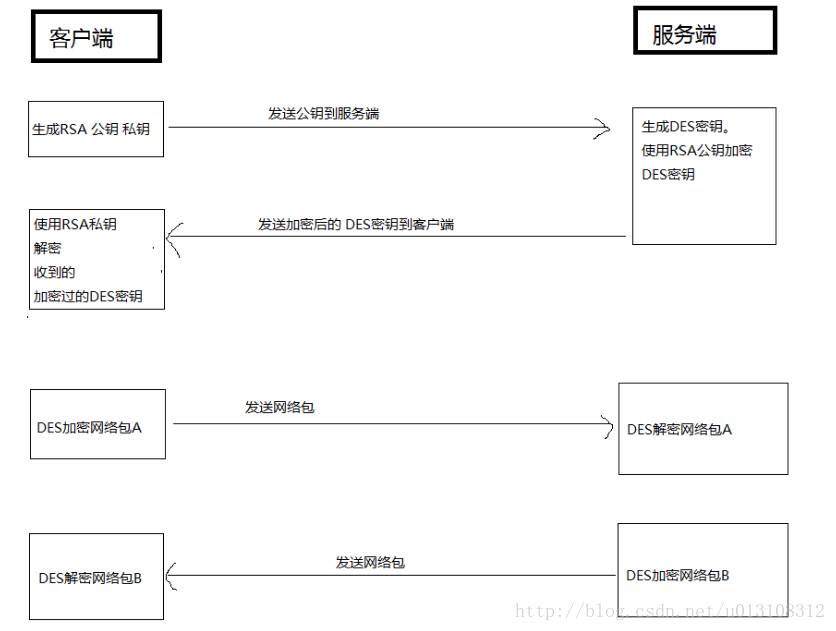
现有的加密分为 对称加密和非堆成加密。
对称加密:客户端和 服务端 使用相同的密钥,加密速度很快,比如 DES 。
非对称加密:客户端和服务端使用 不相同的密钥,加密速度非常慢。比如 RSA 。
using System.IO; using System.Security.Cryptography; public class UEncrypt { /// <summary> /// 生成RSA私钥 公钥 /// </summary> /// <param name="privateKey"></param> /// <param name="publicKey"></param> public static void RSAGenerateKey(ref string privateKey, ref string publicKey) { RSACryptoServiceProvider rsa = new RSACryptoServiceProvider(); privateKey = rsa.ToXmlString(true); publicKey = rsa.ToXmlString(false); } /// <summary> /// 用RSA公钥 加密 /// </summary> /// <param name="data"></param> /// <param name="publicKey"></param> /// <returns></returns> public static byte[] RSAEncrypt(byte[] data, string publicKey) { RSACryptoServiceProvider rsa = new RSACryptoServiceProvider(); rsa.FromXmlString(publicKey); byte[] encryptData = rsa.Encrypt(data, false); return encryptData; } /// <summary> /// 用RSA私钥 解密 /// </summary> /// <param name="data"></param> /// <param name="privateKey"></param> /// <returns></returns> public static byte[] RSADecrypt(byte[] data, string privateKey) { RSACryptoServiceProvider rsa = new RSACryptoServiceProvider(); rsa.FromXmlString(privateKey); byte[] decryptData = rsa.Decrypt(data, false); return decryptData; } /// <summary> /// DES加密 /// </summary> /// <param name="data">源数据</param> /// <param name="desrgbKey"></param> /// <param name="desrgbIV"></param> /// <returns></returns> public static byte[] DESEncrypt(byte[] data, byte[] desrgbKey, byte[] desrgbIV) { DESCryptoServiceProvider des = new DESCryptoServiceProvider(); MemoryStream ms = new MemoryStream(); CryptoStream cs = new CryptoStream(ms, des.CreateEncryptor(desrgbKey, desrgbIV), CryptoStreamMode.Write); cs.Write(data, 0, data.Length); cs.FlushFinalBlock(); return ms.ToArray(); } /// <summary> /// DES解密 /// </summary> /// <param name="data">源数据</param> /// <param name="desrgbKey"></param> /// <param name="desrgbIV"></param> /// <returns></returns> public static byte[] DESDecrypt(byte[] data, byte[] desrgbKey, byte[] desrgbIV) { DESCryptoServiceProvider des = new DESCryptoServiceProvider(); MemoryStream ms = new MemoryStream(); CryptoStream cs = new CryptoStream(ms, des.CreateDecryptor(desrgbKey, desrgbIV), CryptoStreamMode.Write); cs.Write(data, 0, data.Length); cs.FlushFinalBlock(); return ms.ToArray(); } }c#运行
using System.Text; using UnityEngine; public class Test : MonoBehaviour { public string message = "Hello World"; private string privateKey = string.Empty; private string publicKey = string.Empty; void Start() { Debug.Log("src:" + message); byte[] data = Encoding.Default.GetBytes(message); //网络数据包 //1、客户端 -- 生成RSA公钥 私钥,并把公钥发给服务器 UEncrypt.RSAGenerateKey(ref privateKey, ref publicKey); //2、服务端 -- 生成DES密钥 byte[] serverDesKey = new byte[] {1, 2, 3, 4, 8, 7, 6, 5}; //3、服务端 -- 用RSA公钥加密 DES密钥,并发给客户端 byte[] serverDesKeyEncrypt = UEncrypt.RSAEncrypt(serverDesKey, publicKey); //4、客户端 -- 用RSA私钥解密 DES密钥 byte[] clientRsaDecryptDesKey = UEncrypt.RSADecrypt(serverDesKeyEncrypt, privateKey); //5、客户端 -- 用 DES密钥加密网络包 byte[] clientDesEncryptData = UEncrypt.DESEncrypt(data, clientRsaDecryptDesKey, clientRsaDecryptDesKey); //6、服务端 -- 用 DES密钥解密网络包 byte[] serverDesDecryptData = UEncrypt.DESDecrypt(clientDesEncryptData, serverDesKey, serverDesKey); message = Encoding.Default.GetString(serverDesDecryptData); Debug.Log("des:" + message); } }c#运行
getker/Unity_RSA_DES: Unity_RSA_DES-Unity使用RSA和DES加密网络数据包 (github.com)
武汉格发信息技术有限公司,格发许可优化管理系统可以帮你评估贵公司软件许可的真实需求,再低成本合规性管理软件许可,帮助贵司提高软件投资回报率,为软件采购、使用提供科学决策依据。支持的软件有: CAD,CAE,PDM,PLM,Catia,Ugnx, AutoCAD, Pro/E, Solidworks 等。
 技术文档
技术文档
 推荐好文
推荐好文





 155-2731-8020




