


软件

产品


此文章旨在记录自己做的第一个将Unity3D嵌入到WPF的工控项目,由于实际需要,也搜寻过很多博主的文章进行学习,在进行项目开发后记录如下心得以便日后参考,亦希望大家能多多指教。
由于WPF在桌面应用程序开发且处理业务逻辑时的优点明显,但进行三维场景实时展示却捉襟见肘。相反Unity3D则具有三维场景展示与交互等优点,却在业务逻辑处理中存在一定的局限性。因此将Unity3D嵌入到WPF里并进行信息交互。
这里先放Unity的官方链接,可以参考此文档选择嵌入方式,我这边选用的是将Unity作为外部进程启动,并放到指定窗口,使用parentHWND对Unity进行初始化和呈现。https://docs.unity3d.com/Manual/UnityasaLibrary-Windows.htmlhttps://docs.unity3d.com/Manual/UnityasaLibrary-Windows.html
新建WPF项目,然后在主界面拖动Border控件到窗体中,在XAML中更改到合适的位置,以此为依托来加载Unity,然后编写MainWindow.xaml的交互逻辑。
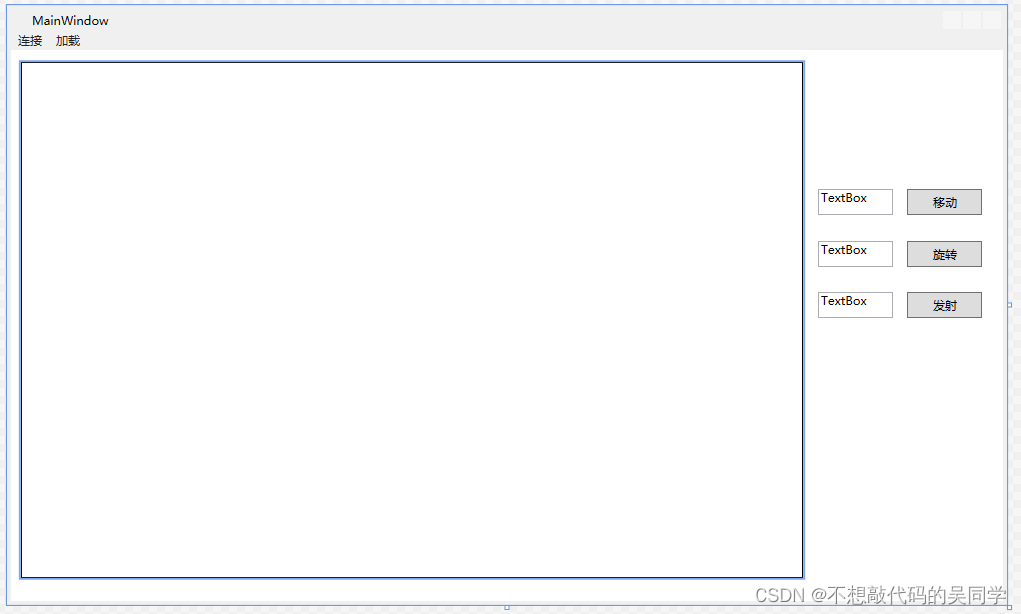
由于展示的是一个小demo,故拿物体简单的移动和旋转举例,故主要添加移动和旋转两个Button,再加两个TextBox作为输入。
<Window x:Class="示例1.MainWindow"
xmlns="http://schemas.microsoft.com/winfx/2006/xaml/presentation"
xmlns:x="http://schemas.microsoft.com/winfx/2006/xaml"
xmlns:d="http://schemas.microsoft.com/expression/blend/2008"
xmlns:mc="http://schemas.openxmlformats.org/markup-compatibility/2006"
xmlns:local="clr-namespace:示例1"
mc:Ignorable="d"
WindowStartupLocation="CenterScreen"
Title="MainWindow" Height="600" Width="1000"
Loaded="Window_Loaded"
SizeChanged="Window_SizeChanged"
Closed="Window_Closed"
Deactivated="Window_Deactivated"
Activated="Window_Activated"><Grid>
<Border x:Name="Panel1" BorderBrush="Black" BorderThickness="1" HorizontalAlignment="Left" Height="516" Margin="10,30,0,0" VerticalAlignment="Top" Width="782"/>
<Menu HorizontalAlignment="Left" Height="18
" VerticalAlignment="Top" Width="992">
<MenuItem Header="连接" Click="Connect" VerticalAlignment="Center" HorizontalAlignment="Center"/>
<MenuItem Header="加载" Name="LoadUnity3D" Click="LoadUnity_Click"/>
</Menu>
<Button Content="移动" HorizontalAlignment="Left" Margin="896,157,0,0" VerticalAlignment="Top" Width="75" Height="26" Click="Send"/>
<TextBox HorizontalAlignment="Left" Height="26" Margin="807,157,0,0" TextWrapping="Wrap" Text="TextBox" VerticalAlignment="Top" Width="75"/>
<TextBox HorizontalAlignment="Left" Height="26" Margin="807,209,0,0" TextWrapping="Wrap" Text="TextBox" VerticalAlignment="Top" Width="75"/>
<Button Content="旋转" HorizontalAlignment="Left" Margin="896,209,0,0" VerticalAlignment="Top" Width="75" Height="26"/>
<TextBox HorizontalAlignment="Left" Height="26" Margin="807,260,0,0" TextWrapping="Wrap" Text="TextBox" VerticalAlignment="Top" Width="75"/>
<Button Content="发射" HorizontalAlignment="Left" Margin="896,260,0,0" VerticalAlignment="Top" Width="75" Height="26"/></Grid>
</Window>
1.在LoadUnity()里,这里应该在该项目的bin/debug文件夹下创造一个Unity文件夹,把Unity项目导入其中。
process.StartInfo.FileName = appStartupPath + @"\Unity\example.exe";
- private void timer_Elapsed(object sender, ElapsedEventArgs e)
- {
- count += 0.05f;
- string str = string.Format("{0} , {1} ", count, -6.5f * count + 1);
- byte[] buffer = System.Text.Encoding.UTF8.GetBytes(str);
- socketCommnication.Send(buffer);
- }
这里放下demo的.cs整块代码:
- using System;
- using System.Collections.Generic;
- using System.Linq;
- using System.Text;
- using System.Threading.Tasks;
- using System.Windows;
- using System.Windows.Controls;
- using System.Windows.Data;
- using System.Windows.Documents;
- using System.Windows.Input;
- using System.Windows.Media;
- using System.Windows.Media.Imaging;
- using System.Windows.Navigation;
- using System.Windows.Shapes;
- using System.Runtime.InteropServices;
- using System.Diagnostics;
- using System.Windows.Threading;
- using System.Timers;
- using System.Net.Sockets;
- using System.Threading;
- using System.Windows.Interop;
- using System.Net;
-
- namespace 示例1
- {
- /// <summary>
- /// MainWindow.xaml 的交互逻辑
- /// </summary>
- public partial class MainWindow : Window
- {
- [DllImport("User32.dll")]
- static extern bool MoveWindow(IntPtr handle, int x, int y, int width, int height, bool redraw);
- internal delegate int WindowEnumProc(IntPtr hwnd, IntPtr lparam);
- //改变指定窗口的位置和尺寸,基于左上角(屏幕/父窗口)(指定窗口的句柄,窗口左位置,窗口顶位置,窗口新宽度,窗口新高度,指定是否重画窗口)
-
- [DllImport("user32.dll")]
- internal static extern bool EnumChildWindows(IntPtr hwnd, WindowEnumProc func, IntPtr lParam);
- //枚举一个父窗口的所有子窗口(父窗口句柄,回调函数的地址,自定义的参数)
-
- [DllImport("user32.dll")]
- static extern int SendMessage(IntPtr hWnd, int msg, IntPtr wParam, IntPtr lParam);
- //该函数将指定的消息发送到一个或多个窗口。此函数为指定的窗口调用窗口程序,直到窗口程序处理完消息再返回。(窗口句柄。窗口可以是任何类型的屏幕对象,用于区别其他消息的常量值,通常是一个与消息有关的常量值,也可能是窗口或控件的句柄,通常是一个指向内存中数据的指针)
-
- private Process process;
- private IntPtr unityHWND = IntPtr.Zero;
- private const int WM_ACTIVATE = 0x0006;
- private readonly IntPtr WA_ACTIVE = new IntPtr(1);
- private readonly IntPtr WA_INACTIVE = new IntPtr(0);
-
- private bool isU3DLoaded = false;
- private Point u3dLeftUpPos;
-
- private DispatcherTimer dispatcherTimer;
-
- System.Timers.Timer timer = new System.Timers.Timer();
- float count = 0;
- Socket socketCommnication;
- bool IsListening = true;
- Thread threadli;
-
- public MainWindow()
- {
- InitializeComponent();
- timer.Interval = 100;
- timer.Elapsed += new ElapsedEventHandler(timer_Elapsed);
- timer.AutoReset = true ;
- }
- private void timer_Elapsed(object sender, ElapsedEventArgs e)
- {
- count += 0.05f ;
- string str = string.Format("{0} , {1} ", count, -5f * count + 1);
- byte[] buffer = System.Text.Encoding.UTF8.GetBytes(str);
- socketCommnication.Send(buffer);
- }
-
- //开始监听线程
- private void Listen(object obj)
- {
- Socket socketWatch = obj as Socket;
- while (IsListening)
- {
- socketCommnication = socketWatch.Accept();
- if (socketCommnication.Connected)
- {
- System.Windows.MessageBox.Show(socketCommnication.RemoteEndPoint.ToString() + ":连接成功");
- IsListening = false;
- }
- }
- }
-
- //窗体加载事件
- private void Window_Loaded(object sender, RoutedEventArgs e)
- {
-
- }
-
- //窗体关闭事件
- private void Window_Closed(object sender, EventArgs e)
- {
- try
- {
- process.CloseMainWindow();
-
- Thread.Sleep(1000);
- while (process.HasExited == false)
- process.Kill();
-
- //Sever.QuitServer();
-
- timer.Stop();
- socketCommnication.Close();
- IsListening = false;
- threadli.Abort();
- System.Environment.Exit(0);
- }
- catch (Exception)
- {
- }
- }
-
- //窗体大小改变事件
- private void Window_SizeChanged(object sender, SizeChangedEventArgs e)
- {
- ResizeU3D();
- }
-
- //获得焦点事件,首次打开软件、由别的软件切换到当前软件
- private void Window_Deactivated(object sender, EventArgs e)
- {
- DeactivateUnityWindow();
- }
-
- //失去焦点事件
- private void Window_Activated(object sender, EventArgs e)
- {
- ActivateUnityWindow();
- }
-
- #region Unity操作
- private void LoadUnity()
- {
- try
- {
- IntPtr hwnd = ((HwndSource)PresentationSource.FromVisual(Panel1)).Handle;
- process = new Process();
-
- String appStartupPath = System.IO.Path.GetDirectoryName(Process.GetCurrentProcess().MainModule.FileName);
- process.StartInfo.FileName = appStartupPath + @"\Unity\example.exe";
- process.StartInfo.Arguments = "-parentHWND " + hwnd.ToInt32() + " " + Environment.CommandLine;
- process.StartInfo.UseShellExecute = true;
- process.StartInfo.CreateNoWindow = true;
-
- process.Start();
- process.WaitForInputIdle();
- isU3DLoaded = true;
- EnumChildWindows(hwnd, WindowEnum, IntPtr.Zero);
-
- dispatcherTimer = new DispatcherTimer();
- dispatcherTimer.Tick += new EventHandler(InitialResize);
- dispatcherTimer.Interval = new TimeSpan(0, 0, 0, 0, 200);
- dispatcherTimer.Start();
- }
- catch (Exception ex)
- {
- string error = ex.Message;
- }
- }
- private void InitialResize(object sender, EventArgs e)
- {
- ResizeU3D();
- dispatcherTimer.Stop();
- }
- private int WindowEnum(IntPtr hwnd, IntPtr lparam)
- {
- unityHWND = hwnd;
- ActivateUnityWindow();
- return 0;
- }
- private void ActivateUnityWindow()
- {
- SendMessage(unityHWND, WM_ACTIVATE, WA_ACTIVE, IntPtr.Zero);
- }
-
- private void DeactivateUnityWindow()
- {
- SendMessage(unityHWND, WM_ACTIVATE, WA_INACTIVE, IntPtr.Zero);
- }
-
- private void ResizeU3D()
- {
- if (isU3DLoaded)
- {
- Window window = Window.GetWindow(this);
- u3dLeftUpPos = Panel1.TransformToAncestor(window).Transform(new Point(0, 0));
- DPIUtils.Init(this);
- u3dLeftUpPos.X *= DPIUtils.DPIX;
- u3dLeftUpPos.Y *= DPIUtils.DPIY;
- MoveWindow(unityHWND, (int)u3dLeftUpPos.X, (int)u3dLeftUpPos.Y, (int)(Panel1.ActualWidth * DPIUtils.DPIX), (int)(Panel1.ActualHeight * DPIUtils.DPIY), true);
- ActivateUnityWindow();
- }
- }
- #endregion
-
- private void LoadUnity_Click(object sender, RoutedEventArgs e)
- {
- LoadUnity();
- }
-
- private void Connect(object sender, RoutedEventArgs e)
- {
- Socket socketWatch = new Socket(AddressFamily.InterNetwork, SocketType.Stream, ProtocolType.Tcp);
- IPAddress ip = IPAddress.Parse("127.0.0.1");
- IPEndPoint endPoint = new IPEndPoint(ip, Convert.ToInt32("9000"));
- socketWatch.Bind(endPoint);
- System.Windows.Forms.MessageBox.Show("监听成功");
- socketWatch.Listen(10);
- threadli = new Thread(new ParameterizedThreadStart(Listen));
- threadli.IsBackground = true;
- threadli.Start(socketWatch);
- }
-
- private void Send(object sender, RoutedEventArgs e)
- {
- timer.Start();
- }
- }
- #region 窗体位置坐标变换
- public class DPIUtils
- {
- private static double _dpiX = 1.0;
- private static double _dpiY = 1.0;
- public static double DPIX
- {
- get
- {
- return DPIUtils._dpiX;
- }
- }
- public static double DPIY
- {
- get
- {
- return DPIUtils._dpiY;
- }
- }
- public static void Init(System.Windows.Media.Visual visual)
- {
- Matrix transformToDevice = System.Windows.PresentationSource.FromVisual(visual).CompositionTarget.TransformToDevice;
- DPIUtils._dpiX = transformToDevice.M11;
- DPIUtils._dpiY = transformToDevice.M22;
- }
- public static Point DivideByDPI(Point p)
- {
- return new Point(p.X / DPIUtils.DPIX, p.Y / DPIUtils.DPIY);
- }
- public static Rect DivideByDPI(Rect r)
- {
- return new Rect(r.Left / DPIUtils.DPIX, r.Top / DPIUtils.DPIY, r.Width, r.Height);
- }
- }
- #endregion
- }
网上有很多资源,可以根据实际需要来选择适合的进行参考,主要有以下几点需注意。
1.开启服务端:
- public void StartServer()
- {
- IPAddress ip = IPAddress.Parse("127.0.0.1");
- serverSocket = new Socket(AddressFamily.InterNetwork, SocketType.Stream, ProtocolType.Tcp);
- serverSocket.Bind(new IPEndPoint(ip, myProt));
- serverSocket.Listen(10);
- myThread = new Thread(ListenClientConnect);
- myThread.IsBackground = true;
- myThread.Start();
- }
2.监听客户端的连接:
- private static void ListenClientConnect()
- {
- while (true)
- {
- try
- {
- clientSocket = serverSocket.Accept();
- string clientInfo = clientSocket.RemoteEndPoint.ToString();
- receiveThread = new Thread(ReceiveMessage);
- receiveThread.IsBackground = true;
- receiveThread.Start(clientSocket);
- }
- catch (Exception)
- {
-
- }
- }
- }
- private static void ReceiveMessage()
- {
- Socket myClientSocket = (Socket)clientSocket;
- while (true)
- {
- try
- {
- //通过clientSocket接收数据
- int receiveNumber = myClientSocket.Receive(result);
- }
- catch (Exception ex)
- {
- try
- {
- myClientSocket.Shutdown(SocketShutdown.Both);
- myClientSocket.Close();
- break;
- }
- catch (Exception)
- {
- }
- }
- }
- }
- internal void SendMessage(string msg)
- {
- clientSocket.Send(Encoding.ASCII.GetBytes(msg));
- }
- internal void QuitServer()
- {
- serverSocket.Close();
- clientSocket.Close();
- myThread.Abort();
- receiveThread.Abort();
- }
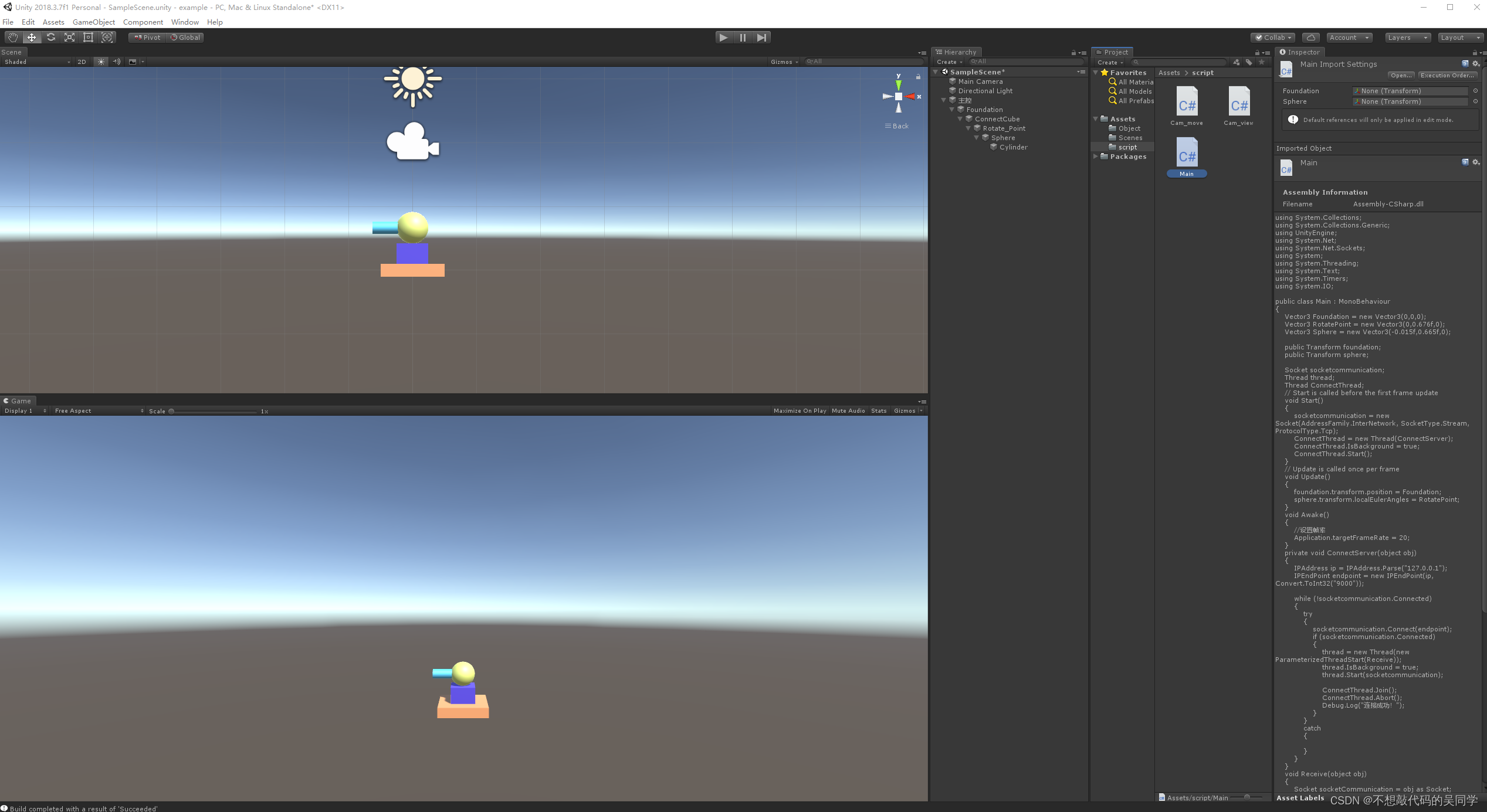
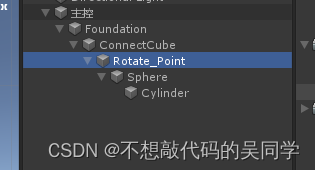
此 demo采用简单的基础三维体进行组合,形成一个小炮台,选用的是父子节点连接方式。下图中Rotate_Point是创建的一个空物体(仅一个点),目的是让炮管(青色圆柱体)绕该点进行旋转。
- using System.Collections;
- using System.Collections.Generic;
- using UnityEngine;
- using System.Net;
- using System.Net.Sockets;
- using System;
- using System.Threading;
- using System.Text;
- using System.Timers;
- using System.IO;
-
- public class Main : MonoBehaviour
- {
- Vector3 Foundation = new Vector3(0,0,0);
- Vector3 RotatePoint = new Vector3(0,0.676f,0);
- Vector3 Sphere = new Vector3(-0.015f,0.665f,0);
-
- public Transform foundation;
- public Transform sphere;
-
- Socket socketcommunication;
- Thread thread;
- Thread ConnectThread;
- void Start()
- {
- socketcommunication = new Socket(AddressFamily.InterNetwork, SocketType.Stream, ProtocolType.Tcp);
- ConnectThread = new Thread(ConnectServer);
- ConnectThread.IsBackground = true;
- ConnectThread.Start();
- }
- void Update()
- {
- foundation.transform.position = Foundation;
- sphere.transform.localEulerAngles = RotatePoint;
- }
- void Awake()
- {
- //设置帧率
- Application.targetFrameRate = 20;
- }
- private void ConnectServer(object obj)
- {
- IPAddress ip = IPAddress.Parse("127.0.0.1");
- IPEndPoint endpoint = new IPEndPoint(ip, Convert.ToInt32("9000"));
-
- while (!socketcommunication.Connected)
- {
- try
- {
- socketcommunication.Connect(endpoint);
- if (socketcommunication.Connected)
- {
- thread = new Thread(new ParameterizedThreadStart(Receive));
- thread.IsBackground = true;
- thread.Start(socketcommunication);
- ConnectThread.Join();
- ConnectThread.Abort();
- }
- }
- catch
- {
- }
- }
- }
- void Receive(object obj)
- {
- Socket socketCommunication = obj as Socket;
- byte[] buffer = new byte[1024];
- while (true)
- {
- int r = socketCommunication.Receive(buffer);
- Debug.Log(r.ToString());
- if (r == 0)
- {
- socketcommunication.Shutdown(SocketShutdown.Both);
- socketcommunication.Close();
- return;
- }
- else
- {
- string str = Encoding.UTF8.GetString(buffer, 0, r);
- String[] strs = str.Split(',');
- float a = float.Parse(strs[0]);
- float b = float.Parse(strs[1]);
- Foundation = new Vector3(-a,0,0);
- RotatePoint = new Vector3(-b, 0.676f, 0);
- }
- }
- }
- }
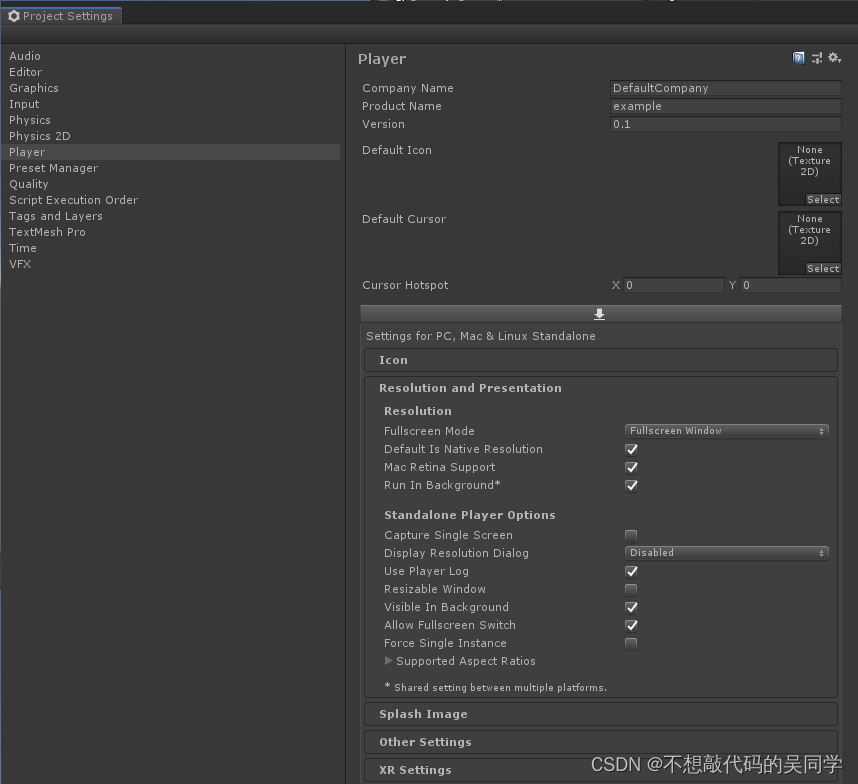
首先在Unity菜单栏 Assets 选项中选择Project Setting,将Display Resolution Dialog选项更改为Disabled,如下图所示:
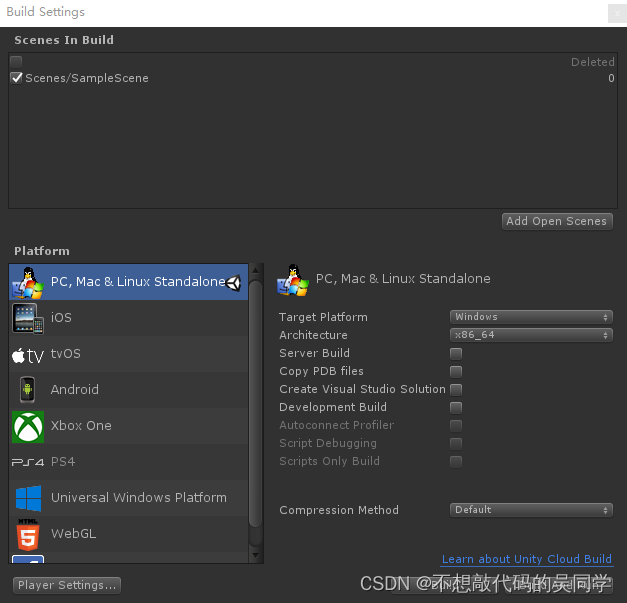
然后在菜单栏里File选择 Build Settings,如下图所示,导出到目标文件夹下即可(此处是WPF的文件夹里bin/debug/Unity,可见注意事项1)
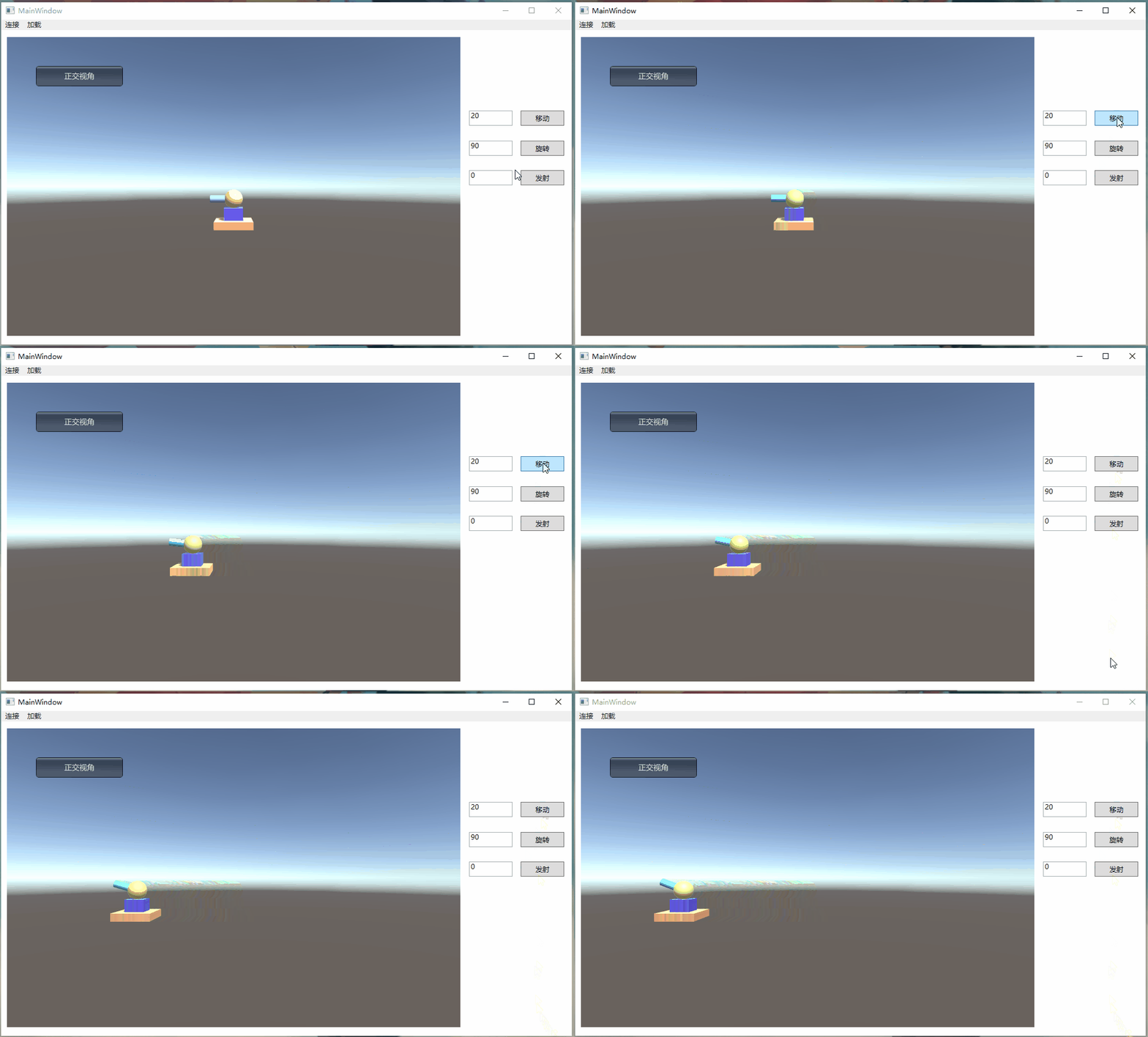
做到这一步,这个小demo就完成了,还有一些其他相关的细节及操作我会在有时间时记录下来,如物体结构较为复杂,实现多功能运动,运动指令的编码解码,鼠标控制相机视角的转换等等。当然作为新人博主,此demo也有很多可以改进的地方,希望各位不吝赐教,一起共同进步。
武汉格发信息技术有限公司,格发许可优化管理系统可以帮你评估贵公司软件许可的真实需求,再低成本合规性管理软件许可,帮助贵司提高软件投资回报率,为软件采购、使用提供科学决策依据。支持的软件有: CAD,CAE,PDM,PLM,Catia,Ugnx, AutoCAD, Pro/E, Solidworks 等。
 技术文档
技术文档
 推荐好文
推荐好文





 155-2731-8020


.png)
.png)
.png)
.png)
.png)



