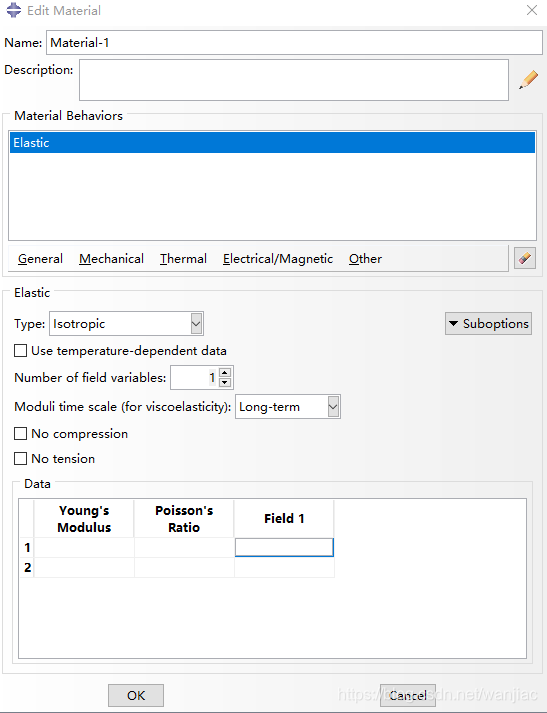
COMPRESSION FACTOR
- This parameter is meaningful only for uncoupled traction-separation elastic behavior.
- Set this parameter equal to the factor by which the elastic modulus, EnnEnn, must be scaled in compression. The use of a factor that is different from 1.0 results in different elastic moduli in tension and compression.
DEPENDENCIES
- Set this parameter equal to the number of field variable dependencies included in the definition of the moduli. If this parameter is omitted, it is assumed that the moduli are constant or depend only on temperature. See Material data definition for more information.
- This parameter is not relevant in an Abaqus/Standard analysis if spatially varying elastic moduli are defined using a distribution. See Distribution definition.
MODULI
- This parameter is applicable only when the ELASTIC option is used in conjunction with the VISCOELASTIC option.
- Set MODULI=INSTANTANEOUS to indicate that the elastic material constants define the instantaneous behavior. This parameter value is not available for frequency domain viscoelasticity in an Abaqus/Standard analysis.
- Set MODULI=LONG TERM (default) to indicate that the elastic material constants define the long-term behavior.
TYPE
- Set TYPE=ANISOTROPIC to define fully anisotropic behavior.
- Set TYPE=COUPLED TRACTION to define coupled traction behavior for cohesive elements.
- Set TYPE=ENGINEERING CONSTANTS to define orthotropic behavior by giving the “engineering constants” (the generalized Young's moduli, the Poisson's ratios, and the shear moduli in the principal directions).
- Set TYPE=ISOTROPIC (default) to define isotropic behavior.
- Set TYPE=LAMINA to define an orthotropic material in plane stress.
- Set TYPE=ORTHOTROPIC to define orthotropic behavior by giving the elastic stiffness matrix directly.
- Set TYPE=SHEAR to define the (isotropic) shear elastic modulus. This parameter setting is applicable only in conjunction with the EOS option in Abaqus/Explicit.
- Set TYPE=SHORT FIBER to define laminate material properties for each layer in each shell element. This parameter setting is applicable only when using Abaqus/Standard in conjunction with the abaqus moldflow execution procedure. Any data lines given will be ignored. Material properties will be read from the ASCII neutral file identified as jobid.shf. See Translating Moldflow data to Abaqus input files for more information.
- Set TYPE=TRACTION to define orthotropic shear behavior for warping elements or uncoupled traction behavior for cohesive elements.
- When using a distribution to define elastic moduli, the TYPE parameter must be used to indicate the level of anisotropy in the elastic behavior. The level of anisotropy must be consistent with that defined in the distribution. See Distribution definition.
PS: 材料的性质,如各向同性,各向异性等,不同的性质对应不同的data设置,具体可参考ABAQUA岩土P69和ELASTIC,关键是了解各个量的含义。
Predefined field variables
- The usage and treatment of predefined field variables is exactly analogous to that of temperature. You can prescribe the magnitude and time variation of the field at all of the nodes of the model, and Abaqus will interpolate the values to the material points.
- When prescribing field variable values, you must specify the field variable number being defined; the default is field variable number 1. Field variables must be numbered consecutively starting from one. Repeat the field variable definition to define more than one field variable.
- The field variable can be a real field (such as an electromagnetic field) generated by a previous simulation (Abaqus or another analysis code). It can also be an artificial field that you define to modify certain material properties during the course of an analysis. For example, suppose that you wish to vary Young's modulus linearly between 30 × 106 and 35 × 106 during the response. The linear elastic material definition shown in Table 1 could be used.
| Number of field variable dependencies: 1 |
| Young's modulus |
Poisson's ratio |
Value of field variable 1 |
| 30.E6 |
0.3 |
1.0 |
| 35.E6 |
0.3 |
2.0 |
- Define an initial condition to specify the initial value of field variable 1 as 1.0 for a node set. Then, define a predefined field variable in the analysis step to specify the value of field variable 1 as 2.0 for the node set. Young's modulus will vary smoothly over the course of the step as the field variable's value is ramped from 1.0 to 2.0 at all nodes in the node set.
- Field variables can also be used to vary real properties in space by making the properties depend on field variables, as above, and by assigning different field variable values to different nodes.
- Making properties depend on field variables will increase the computer time required, since Abaqus must perform the necessary table look-ups.
- In an Abaqus/Standard stress/displacement analysis the difference between a predefined field variable and its initial value (Initial conditions in Abaqus/Standard and Abaqus/Explicit) will create volumetric strains analogous to thermal strains if a field expansion coefficient (for the corresponding field variable) is given for the material (Thermal expansion).
Input File UsageUse the following option to specify a predefined field variable:FIELD, VARIABLE=nAbaqus/CAE UsagePredefined field variables are not supported in Abaqus/CAE.
Restrictions
To specify a predefined field variable in a restart analysis, the corresponding predefined field must have been specified in the original analysis as either an initial field variable value (see Defining initial values of predefined field variables) or a predefined field variable.
免责声明:本文系网络转载或改编,未找到原创作者,版权归原作者所有。如涉及版权,请联系删




 技术文档
技术文档
 推荐好文
推荐好文





 155-2731-8020




