


软件

产品


z样式如下:
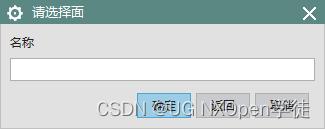
1、选择面 对话框
/// <summary> /// 选择面对话框 /// </summary> /// <param name="obj">返回被选中面</param> public void SelectFace(out NXObject obj) { UI theUI = UI.GetUI(); string message = "请选择面"; string title = "请选择面"; Selection.SelectionScope scope = Selection.SelectionScope.WorkPart; bool keepHighlighted = false; Selection.SelectionType[] typeArray = new Selection.SelectionType[1] { Selection.SelectionType.Faces }; Point3d cursor; theUI.SelectionManager.SelectObject(message, title, scope, keepHighlighted, typeArray, out obj, out cursor); } /// <summary> /// 选择面对话框 /// </summary> /// <param name="selected_face">返回被选中面</param> public void SelectFace(out Face selected_face) { try { UI theUI = UI.GetUI(); NXObject obj; string message = "请选择面"; string title = "请选择叶身底面"; Selection.SelectionScope scope = Selection.SelectionScope.WorkPart; bool keepHighlighted = false; Selection.SelectionType[] typeArray = new Selection.SelectionType[1] { Selection.SelectionType.Faces }; Point3d cursor; theUI.SelectionManager.SelectObject(message, title, scope, keepHighlighted, typeArray, out obj, out cursor); selected_face = (Face)obj; } catch { selected_face = null; } }2、选择输出的特征
/// <summary> /// 输出选择的特征 /// </summary> /// <param name="selected_feat"></param> public void SelectFeature(out Feature selected_feat) { try { UI theUI = UI.GetUI(); string message = ""; string title = ""; Selection.SelectionScope scope = Selection.SelectionScope.WorkPart; bool keepHighlighted = false; Selection.SelectionType[] typeArray = new Selection.SelectionType[1] { Selection.SelectionType.Features }; Point3d cursor; NXObject obj; theUI.SelectionManager.SelectObject(message, title, scope, keepHighlighted, typeArray, out obj, out cursor); selected_feat = (Feature)obj; } catch { selected_feat = null; } }举一反三:
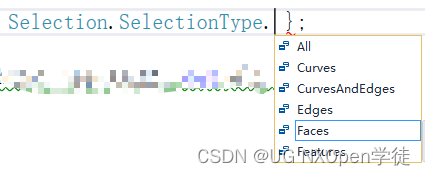
免责声明:本文系网络转载或改编,未找到原创作者,版权归原作者所有。如涉及版权,请联系删
 技术文档
技术文档
 推荐好文
推荐好文





 155-2731-8020




