


软件

产品


C:\Cadence\Cadence_SPB_16.6-2015\share\pcb\text
路径下的env文件,用记事本打开,找到
# example of a funckey to emulate Layout capability
# The "-cursor" option can be added to any Allegro command with the pick familty
# and we utilize the position under the cursor when the command is execute. So
# this example would center the display to position under the cursor when the 'c' key
# is pressed.
# funckey c "zoom center; pick -cursor"
#--------------------------------------------------------------------
# F1 is normally reserved by the system for Help so we don't use it
alias F2 zoom fit
alias F3 add connect
alias F4 show element
alias F5 redraw
alias F6 done
alias F7 next
alias F8 oops
alias F9 cancel
alias F10 grid toggle
alias F11 zoom in
alias F12 zoom out
alias SF2 property edit
alias SF3 slide
alias SF4 show measure
alias SF5 copy
alias SF6 move
alias SF7 dehilight all
alias SF8 hilight pick
alias SF9 vertex
alias SF10 save_as temp
alias SF11 zoom previous
alias SF12 zoom world
alias CF2 next
alias CF5 color192
alias CF6 layer priority
alias CSF5 status
alias ~N new
alias ~O open
alias ~S save
alias ~D delete
alias ~Z undo
funckey + subclass -+
funckey - subclass --
手动进行修改即可。
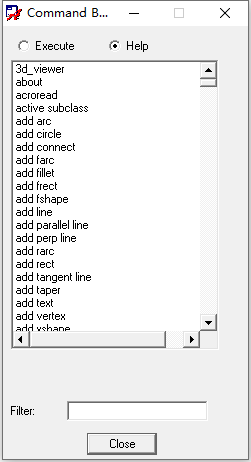
有哪些命令可用,可以在allegro软件里通过Tools -> Utilities -> Keyboards Commands查询
免责声明:本文系网络转载或改编,未找到原创作者,版权归原作者所有。如涉及版权,请联系删
 技术文档
技术文档
 推荐好文
推荐好文





 155-2731-8020




