


软件

产品


Unity3D 本地资源一般放在 Resources 目录下,但是 Resouces 文件夹的大小不能超过 2G,使用 AssetBundle 管理资源可以解决 Resources 文件夹受限问题。
本文代码资源见→基于AssetBundle实现资源热更新(更新版)。
AssetBundle 主要用于管理资源,配合 AssetDatabase 和 AssetImporter 可以实现资源重命名,配合 BuildPipeline 可以实现资源压缩,配合 WWW 或 UnityWebRequest 可以实现加载服务器资源。下面简单介绍下相关接口:
1)AssetBundle 获取资源名,加载、卸载资源
静态方法:
- // 从文件中加载AssetBundle
- public static AssetBundle LoadFromFile(string path)
- // 从二进制数组中加载AssetBundle
- public static AssetBundle LoadFromMemory(byte[] binary)
- // 从流中加载AssetBundle
- public static AssetBundle LoadFromStream(Stream stream)
- // 卸载所有AssetBundle
- public static void UnloadAllAssetBundles(bool unloadAllObjects)
- // 销毁对象
- public static void Destroy(Object obj)
实例方法:
- // 获取所有资源名
- public string[] GetAllAssetNames()
- // 判断是否包含资源
- public bool Contains(string name)
- // 加载资源
- public Object[] LoadAllAssets()
- public T[] LoadAllAssets<T>() where T : Object
- public Object[] LoadAllAssets(Type type)
- public Object LoadAsset(string name)
- public T LoadAsset<T>(string name) where T : Object
- public Object LoadAsset(string name, Type type)
- // 卸载资源, unloadAllLoadedObjects为false时不卸载已从Bundle中加载出的资源
- public void Unload(bool unloadAllLoadedObjects)
说明:入参 name 不区分大小写,建议使用小写,如果使用大写会自动转换为小写。
2)AssetBundleManifest 获取资源依赖
- // 获取所有AssetBundles
- public string[] GetAllAssetBundles()
- // 获取指定assetBundleName的直接依赖
- public string[] GetDirectDependencies(string assetBundleName)
- // 获取指定assetBundleName的所有依赖
- public string[] GetAllDependencies(string assetBundleName)
说明:入参 assetBundleName 不区分大小写,建议使用小写,如果使用大写会自动转换为小写。
3)AssetDatabase 获取所有资源名、删除资源
- // 获取所有AssetBundle资源名
- public static string[] GetAllAssetBundleNames()
- // 根据assetBundleName删除AssetBundle
- public static bool RemoveAssetBundleName(string assetBundleName, bool forceRemove)
- // 刷新Project视图目录, 相当于右键手动刷新
- public static void Refresh()
4)AssetImporter 设置资源名
- // 获取AssetImporter, 资源文件路径
- public static AssetImporter GetAtPath(string path)
- // 获取/设置资源文件名
- public string assetBundleName { get; set; }
5)BuildPipeline 压缩资源
- // 压缩所有标记为AssetBundle的资源
- public static AssetBundleManifest BuildAssetBundles(
- string outputPath, // 压缩文件输出路径
- BuildAssetBundleOptions assetBundleOptions, // 压缩算法
- BuildTarget targetPlatform // 平台
- )
- // BuildAssetBundleOptions.None: LZMA压缩算法, 压缩比大, 加载慢, 使用前需要整体解压
- // BuildAssetBundleOptions.ChunkBasedCompression: LZ4压缩算法, 压缩比中等, 加载快可以加载指定资源而不用解压全部
- // BuildAssetBundleOptions.UncompressedAssetBundle: 不压缩, 加载快
6)WWW 获取网络资源
- // 获取WWW
- public static WWW LoadFromCacheOrDownload(string url, int version)
- // 获取AssetBundle
- public AssetBundle assetBundle { get; }
说明:WWW 被 Unity3D 官方标记为过时了,建议使用 UnityWebRequest。
7)UnityWebRequest 获取网络资源
- UnityWebRequest webRequest = UnityWebRequestAssetBundle.GetAssetBundle(uri)
- yield return webRequest.SendWebRequest()
- AssetBundle assetBundle = DownloadHandlerAssetBundle.GetContent(webRequest)
Asset 资源主要有脚本、图片、网格、 模型 、预设体等,在 Assets 窗口选中资源,在 Inspector 窗口选择 AssetBundle 下拉列表,选择 New 给资源添加 AssetBundle 名,如下:
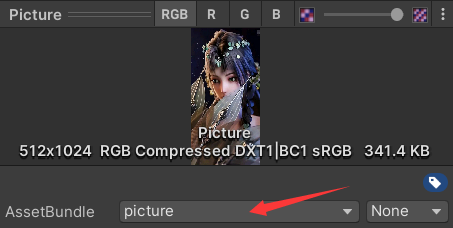
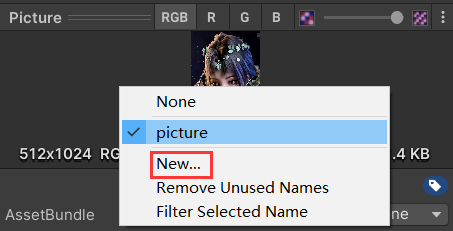
说明:AssetBundle 名不区分大小写,如果输入大写会自动转换为小写。只有添加了 AssetBundle 名的资源才能通过 BuildPipeline.BuildAssetBundles() 打包压缩。
1)创建目录及原资源
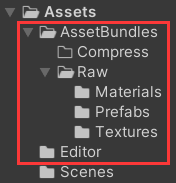
在 Assets 目录下创建 AssetBundles 目录(存放资源)和 Editor 目录(存放资源压缩脚本),在 AssetBundles 目录下创建 Compress 目录(存放压缩文件)和 Raw 目录(存放原资源文件),再在 Raw 目录下创建 Textures 目录(存放了一张图片 Picture)、Materials 目录(存放了一个材质 Material,并且依赖 Picture)、Prefabs 目录(存放了一个预设体 Quad,并且依赖 Material), 目录结构 如下:
2)自动压缩脚本
AssetCompressor.cs
- using System.IO;
- using UnityEditor;
- using UnityEngine;
-
- public class AssetCompressor : Editor {
- // G:/Unity3d/AssetBundleDemo/Assets/AssetBundles/Raw
- private static string rawPath = Application.dataPath + "/AssetBundles/Raw";
- // G:/Unity3d/AssetBundleDemo/Assets/AssetBundles/Compress
- private static string compressPath = Application.dataPath + "/AssetBundles/Compress";
-
- [MenuItem("AssetBundle/CompressAssets")]
- public static void CompressAssets() { // 打包rawPath目录的资源, 生成压缩资源到compressPath目录
- ClearAllFilesBundleName();
- SetAssetBundlesName(rawPath);
- BuildAssetBundles();
- ClearAllFilesBundleName();
- AssetDatabase.Refresh(); // 刷新Project视图目录, 相当于右键手动刷新
- }
-
- private static void BuildAssetBundles() { // 压缩资源
- BuildPipeline.BuildAssetBundles(compressPath, // 压缩包输出包路径
- BuildAssetBundleOptions.ChunkBasedCompression, // 压缩算法
- BuildTarget.StandaloneWindows64 // Windows平台
- );
- }
-
- private static void ClearAllFilesBundleName() { // 删除所有AssetBundle名
- string[] names = AssetDatabase.GetAllAssetBundleNames();
- foreach (string name in names) {
- AssetDatabase.RemoveAssetBundleName(name, true);
- }
- }
-
- private static void SetAssetBundlesName(string rootPath) { // 设置资源的Bundle名
- DirectoryInfo rootInfo = new DirectoryInfo(rootPath);
- FileSystemInfo[] fileInfos = rootInfo.GetFileSystemInfos();
- foreach (FileSystemInfo fileInfo in fileInfos) {
- if (fileInfo is DirectoryInfo) {
- SetAssetBundlesName(fileInfo.FullName); // 递归遍历子文件夹下所有文件
- } else if (!fileInfo.Name.EndsWith(".meta")) {
- SetAssetBundleName(fileInfo.FullName);
- }
- }
- }
-
- private static void SetAssetBundleName(string filePath) { // 设置资源的Bundle名
- // 导入的相对路径(G:/Unity3d/AssetBundleDemo/Assets/AssetBundles/Compress/prefabs/quad.prefab)
- string impoterPath = "Assets/" + filePath.Substring(Application.dataPath.Length + 1);
- AssetImporter assetImporter = AssetImporter.GetAtPath(impoterPath);
- if (assetImporter != null) {
- filePath = filePath.Substring(rawPath.Length + 1); // 去源文件前缀(可选, 建议使用)
- // filePath = filePath.Substring(filePath.LastIndexOf("\\") + 1); // 去所有前缀(可选, 不建议使用)
- // 去后缀(可选, 不去后缀刷新目录后会报错, 但不影响资源压缩和后续资源加载)
- filePath = filePath.Remove(filePath.LastIndexOf("."));
- assetImporter.assetBundleName = filePath;
- }
- }
- }
说明:AssetCompressor.cs 文件需要放在 Editor 目录下,编译成功后,在菜单栏可以看到 AssetBundle 菜单,如下:

点击 CompressAssets 选项,会将 Assets/AssetBundles/Raw 目录下的资源打包压缩至 Assets/AssetBundles/Compress 目录,如下:
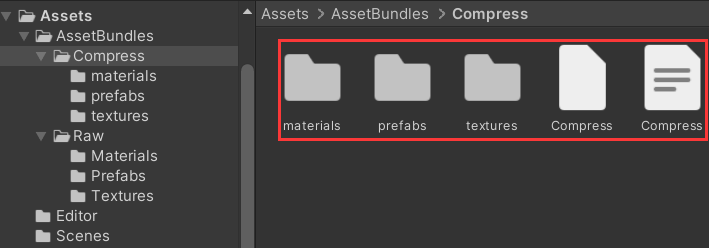
注意:如果压缩名不去后缀,会报以下错误,这是因为文件已经压缩了,但还是以 “.prefab”、“.jpg”、“.mat” 为后缀,被 Unity3D 识别为损坏文件。该错误不影响压缩文件生成,也不影响后续资源加载,可以忽略。如果不想出现以下报错,可以将去后缀的注释代码打开。

3)压缩文件
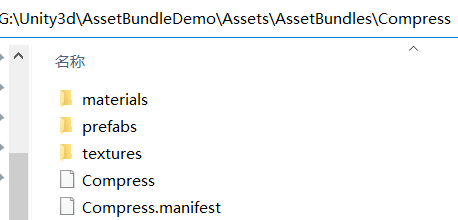
打开 Compress.manifest 文件如下:
- ManifestFileVersion: 0
- CRC: 2688481811
- AssetBundleManifest:
- AssetBundleInfos:
- Info_0:
- Name: materials/material
- Dependencies:
- Dependency_0: textures/picture
- Info_1:
- Name: prefabs/quad
- Dependencies:
- Dependency_0: materials/material
- Info_2:
- Name: textures/picture
- Dependencies: {}
说明:后续要加载资源时,如果不清楚 AssetBundle 名,可以在 Compress.manifest 文件中查看相应 Name 值。可以看到,这里的 Name 值也全都自动转换为小写了,在加载资源时,如果传入大写的也能正常获取到相应资源。
1)加载简单资源
- // targetPath="ptextures/picture"
- public static T LoadAsset<T>(string targetPath) { // 加载资源
- // G:/Unity3d/AssetBundleDemo/Assets/AssetBundles/Compress/ptextures/picture
- AssetBundle targetBundle = AssetBundle.LoadFromFile(compressPath + "/" + targetPath);
- string fileName = targetPath.Substring(targetPath.LastIndexOf("/") + 1); // picture.jpg
- object obj = targetBundle.LoadAsset(fileName);
- if (obj != null) {
- return (T) obj;
- }
- return default(T);
- }
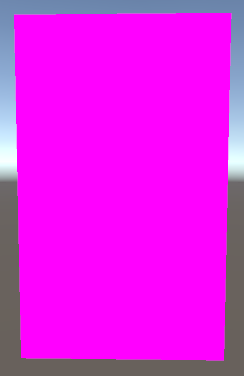
说明:如果没有依赖资源,可以使用该方法;如果有依赖资源,就会出现异常。当 targetPath = "prefabs/quad" 时,创建的 Quad 显示如下,Quad 显示品红,表示它依赖的材质和图片缺失。
2)加载有依赖的资源
LocalAssetLoader.cs
- using UnityEngine;
-
- public class LocalAssetLoader {
- // G:/Unity3d/AssetBundleDemo/Assets/AssetBundles/Compress
- private static string compressPath = Application.dataPath + "/AssetBundles/Compress"; // 压缩文件根路径
- // G:/Unity3d/AssetBundleDemo/Assets/AssetBundles/Compress/Compress
- private static string rootManifestPath = compressPath + "/Compress"; // 根manifest文件路径(Compress.manifest文件绝对路径)
-
- public static T LoadAsset<T>(string targetPath) { // 加载资源
- LoadDependencies(targetPath);
- return LoadTarget<T>(targetPath);
- }
-
- private static void LoadDependencies(string targetPath) { // 加载目标资源的依赖
- AssetBundle manifestBundle = AssetBundle.LoadFromFile(rootManifestPath);
- // 解压Manifest文件, 传入的参数不区分大小写(如果是大写, 会自动转换为小写)
- AssetBundleManifest manifest = manifestBundle.LoadAsset<AssetBundleManifest>("AssetBundleManifest");
- string[] dependencies = manifest.GetAllDependencies(targetPath); // 获取目标文件的所有依赖
- for (int i = 0; i < dependencies.Length; i++) {
- string filePath = compressPath + "/" + dependencies[i];
- AssetBundle.LoadFromFile(filePath);
- }
- }
-
- private static T LoadTarget<T>(string targetPath) { // 加载目标资源
- AssetBundle targetBundle = AssetBundle.LoadFromFile(compressPath + "/" + targetPath);
- string fileName = targetPath.Substring(targetPath.LastIndexOf("/") + 1);
- object obj = targetBundle.LoadAsset(fileName);
- if (obj != null) {
- return (T) obj;
- }
- return default(T);
- }
- }
说明:manifest.GetAllDependencies()、AssetBundle.LoadFromFile()、targetBundle.LoadAsset() 的入参不区分大小写,因此传入的 targetPath 也可以不区分大小写。
3)调用 LocalAssetLoader 加载资源
SimpleLoad.cs
- using UnityEngine;
-
- public class SimpleLoad : MonoBehaviour {
- private void Start() {
- GameObject obj = LocalAssetLoader.LoadAsset<GameObject>("prefabs/quad"); // 加载预设体
- // GameObject obj = LocalAssetLoader.LoadAsset<GameObject>("Prefabs/Quad"); // 加载预设体
- Instantiate(obj);
- }
- }
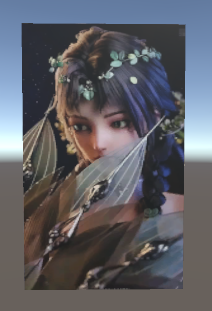
说明: 由于 LocalAssetLoader.LoadAsset 的入参不区分大小写,因此传入 "prefabs/quad" 和 "Prefabs/Quad" 都能正确加载资源。
运行效果如下:
W3AssetLoader.cs
- using System;
- using System.Collections;
- using UnityEngine;
-
- public class W3AssetLoader : MonoBehaviour {
- private string compressPath; // 压缩文件根路径
- private string rootManifestPath; // 根manifest文件路径
- private static W3AssetLoader instance; // 单例
-
- private void Awake() {
- instance = this;
- // compressPath = GetW3Path(Application.dataPath + "/AssetBundle/Compress");
- compressPath = "https://gitcode.net/m0_37602827/AssetBundleDemo/-/raw/master/Assets/AssetBundles/Compress";
- rootManifestPath = compressPath + "/Compress";
- }
-
- public static void LoadAsset<T>(string targetPath, Action<T> action) { // 加载资源
- instance.StartCoroutine(instance.LoadAssetCorutine<T>(targetPath, action));
- }
-
- private IEnumerator LoadAssetCorutine<T>(string targetPath, Action<T> action) { // 加载资源的协程
- yield return LoadDependencies(targetPath);
- yield return LoadTarget(targetPath, action);
- }
-
- private IEnumerator LoadDependencies(string targetPath) { // 加载目标资源的依赖
- WWW w3 = WWW.LoadFromCacheOrDownload(rootManifestPath, 1);
- yield return w3;
- AssetBundle assetBundle = w3.assetBundle;
- if (assetBundle != null) {
- AssetBundleManifest manifest = assetBundle.LoadAsset<AssetBundleManifest>("AssetBundleManifest");
- if (manifest != null) {
- string[] dependencies = manifest.GetAllDependencies(targetPath); // 获取目标文件的所有依赖
- for (int i = 0; i < dependencies.Length; i++) {
- string filePath = compressPath + "/" + dependencies[i];
- w3 = WWW.LoadFromCacheOrDownload(filePath, 1);
- yield return w3;
- assetBundle = w3.assetBundle;
- }
- }
- }
- }
-
- private IEnumerator LoadTarget<T>(string targetPath, Action<T> action) { // 加载目标文件
- string fullPath = compressPath + "/" + targetPath;
- WWW w3 = WWW.LoadFromCacheOrDownload(fullPath, 1);
- yield return w3;
- AssetBundle assetBundle = w3.assetBundle;
- if (assetBundle != null) {
- string fileName = targetPath.Substring(targetPath.LastIndexOf("/") + 1);
- object obj = assetBundle.LoadAsset(fileName); // 解压文件
- if (obj != null && action != null) {
- action.Invoke((T) obj);
- }
- }
- }
-
- private string GetW3Path(string path) {
- #if UNITY_EDITOR_WIN || UNITY_STANDALONE_WIN
- path = "file:///" + path;
- #elif UNITY_EDITOR_OSX || UNITY_STANDALONE_OSX
- path = "file://" + path;
- #endif
- return path;
- }
- }
SimpleLoad.cs
- using UnityEngine;
-
- public class SimpleLoad : MonoBehaviour {
-
- private void Start() {
- W3AssetLoader.LoadAsset<GameObject>("prefabs/quad.prefab", Callback);
- // W3AssetLoader.LoadAsset<GameObject>("Prefabs/Quad.prefab", Callback);
- }
-
- private void Callback(GameObject obj) {
- Instantiate(obj);
- }
- }
说明:W3AssetLoader.LoadAsset() 方法的入参不区分大小写。
WebAssetLoader.cs
- using System;
- using System.Collections;
- using UnityEngine;
- using UnityEngine.Networking;
-
- public class WebAssetLoader : MonoBehaviour {
- private string compressPath; // 压缩文件根路径
- private string rootManifestPath; // 根manifest文件路径
- private static WebAssetLoader instance; // 单例
-
- private void Awake() {
- instance = this;
- // compressPath = GetW3Path(Application.dataPath + "/AssetBundle/Compress");
- compressPath = "https://gitcode.net/m0_37602827/AssetBundleDemo/-/raw/master/Assets/AssetBundles/Compress";
- rootManifestPath = compressPath + "/Compress";
- }
-
- public static void LoadAsset<T>(string targetPath, Action<T> action) { // 加载资源
- instance.StartCoroutine(instance.LoadAssetCorutine<T>(targetPath, action));
- }
-
- private IEnumerator LoadAssetCorutine<T>(string targetPath, Action<T> action) { // 加载资源的协程
- yield return LoadDependencies(targetPath);
- yield return LoadTarget(targetPath, action);
- }
-
- private IEnumerator LoadDependencies(string targetPath) { // 加载目标资源的依赖
- UnityWebRequest webRequest = UnityWebRequestAssetBundle.GetAssetBundle(rootManifestPath);
- yield return webRequest.SendWebRequest();
- AssetBundle assetBundle = DownloadHandlerAssetBundle.GetContent(webRequest);
- if (assetBundle != null) {
- AssetBundleManifest manifest = assetBundle.LoadAsset<AssetBundleManifest>("AssetBundleManifest");
- if (manifest != null) {
- string[] dependencies = manifest.GetAllDependencies(targetPath); // 获取目标文件的所有依赖
- for (int i = 0; i < dependencies.Length; i++) {
- string filePath = compressPath + "/" + dependencies[i];
- webRequest = UnityWebRequestAssetBundle.GetAssetBundle(filePath);
- yield return webRequest.SendWebRequest();
- assetBundle = DownloadHandlerAssetBundle.GetContent(webRequest);
- }
- }
- }
- }
-
- private IEnumerator LoadTarget<T>(string targetPath, Action<T> action) { // 加载目标文件
- string fullPath = compressPath + "/" + targetPath;
- UnityWebRequest webRequest = UnityWebRequestAssetBundle.GetAssetBundle(fullPath);
- yield return webRequest.SendWebRequest();
- AssetBundle assetBundle = DownloadHandlerAssetBundle.GetContent(webRequest);
- if (assetBundle != null) {
- string fileName = targetPath.Substring(targetPath.LastIndexOf("/") + 1);
- object obj = assetBundle.LoadAsset(fileName); // 解压文件
- if (obj != null && action != null) {
- action.Invoke((T) obj);
- }
- }
- }
-
- private string GetW3Path(string path) {
- #if UNITY_EDITOR_WIN || UNITY_STANDALONE_WIN
- path = "file:///" + path; // Windows平台
- #elif UNITY_EDITOR_OSX || UNITY_STANDALONE_OSX
- path = "file://" + path; // Mac平台
- #endif
- return path;
- }
- }
SimpleLoad.cs
- using UnityEngine;
-
- public class SimpleLoad : MonoBehaviour {
-
- private void Start() {
- WebAssetLoader.LoadAsset<GameObject>("prefabs/quad", Callback);
- }
-
- private void Callback(GameObject obj) {
- Instantiate(obj);
- }
- }
说明:WebAssetLoader.LoadAsset() 的入参区分大小写。
武汉格发信息技术有限公司,格发许可优化管理系统可以帮你评估贵公司软件许可的真实需求,再低成本合规性管理软件许可,帮助贵司提高软件投资回报率,为软件采购、使用提供科学决策依据。支持的软件有: CAD,CAE,PDM,PLM,Catia,Ugnx, AutoCAD, Pro/E, Solidworks 等。
 技术文档
技术文档
 推荐好文
推荐好文





 155-2731-8020


.png)
.png)
.png)
.png)
.png)
.png)
.png)
.png)
.png)
.png)



