


软件

产品


DCS类代码位于patroni/dcs/__init__.py下,这一篇博客我们主要关注patroni组件的DCS类和如何利用ETCD DCS存储集群状态。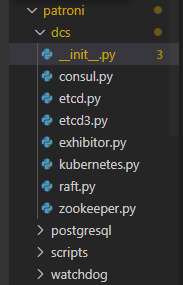
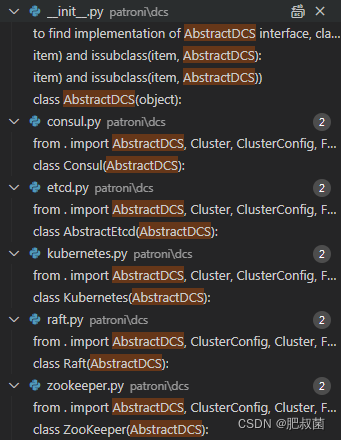
Patroni子类的构造函数调用get_dcs(self.config)函数获取dcs类,其代码如下所示。dcs_modules函数根据执行环境获取 DCS 模块的名称。 如果使用 PyInstaller 打包,则无法通过扫描源目录动态发现模块,因为 FrozenImporter 没有实现 iter_modules 方法。 但是仍然可以通过迭代toc找到所有潜在的DCS模块,其中包含所有“冻结”资源的列表。
def dcs_modules(): """Get names of DCS modules, depending on execution environment. If being packaged with PyInstaller, modules aren't discoverable dynamically by scanning source directory because `FrozenImporter` doesn't implement `iter_modules` method. But it is still possible to find all potential DCS modules by iterating through `toc`, which contains list of all "frozen" resources.""" dcs_dirname = os.path.dirname(__file__) module_prefix = __package__ + '.' if getattr(sys, 'frozen', False): toc = set() # dcs_dirname may contain a dot, which causes pkgutil.iter_importers() # to misinterpret the path as a package name. This can be avoided # altogether by not passing a path at all, because PyInstaller's # FrozenImporter is a singleton and registered as top-level finder. for importer in pkgutil.iter_importers(): if hasattr(importer, 'toc'): toc |= importer.toc return [module for module in toc if module.startswith(module_prefix) and module.count('.') == 2] else: return [module_prefix + name for _, name, is_pkg in pkgutil.iter_modules([dcs_dirname]) if not is_pkg]python运行
get_dcs函数首先遍历执行环境获取到的 DCS 模块名称,如果配置文件中指定了,则使用importlib包的import_module函数导入这些模块(可以看看importlib如果动态导入包的代码,后续利用python开发可以使用)。
def get_dcs(config): modules = dcs_modules() for module_name in modules: name = module_name.split('.')[-1] if name in config: # we will try to import only modules which have configuration section in the config file try: module = importlib.import_module(module_name) for key, item in module.__dict__.items(): # iterate through the module content # try to find implementation of AbstractDCS interface, class name must match with module_name if key.lower() == name and inspect.isclass(item) and issubclass(item, AbstractDCS): # propagate some parameters config[name].update({p: config[p] for p in ('namespace', 'name', 'scope', 'loop_wait', 'patronictl', 'ttl', 'retry_timeout') if p in config}) return item(config[name]) except ImportError: logger.debug('Failed to import %s', module_name) available_implementations = [] for module_name in modules: name = module_name.split('.')[-1] try: module = importlib.import_module(module_name) available_implementations.extend(name for key, item in module.__dict__.items() if key.lower() == name and inspect.isclass(item) and issubclass(item, AbstractDCS)) except ImportError: logger.info('Failed to import %s', module_name) raise PatroniFatalException("""Can not find suitable configuration of distributed configuration store Available implementations: """ + ', '.join(sorted(set(available_implementations))))python运行
AbstractDCS接口的定义如下@six.add_metaclass(abc.ABCMeta) class AbstractDCS(object),如下是它的构造函数和成员函数。构造函数主要是初始化一些成员变量。
def __init__(self, config): """ :param config: dict, reference to config section of selected DCS. i.e.: `zookeeper` for zookeeper, `etcd` for etcd, etc... """ self._name = config['name'] self._base_path = re.sub('/+', '/', '/'.join(['', config.get('namespace', 'service'), config['scope']])) self._set_loop_wait(config.get('loop_wait', 10)) self._ctl = bool(config.get('patronictl', False)) self._cluster = None self._cluster_valid_till = 0 self._cluster_thread_lock = Lock() self._last_lsn = '' self._last_seen = 0 self._last_status = {} self.event = Event()python运行
python多线程之事件(Event):小伙伴a,b,c围着吃火锅,当菜上齐了,请客的主人说:开吃!,于是小伙伴一起动筷子,这种场景如何实现?
事件处理的机制:全局定义了一个内置标志Flag,如果Flag值为 False,那么当程序执行 event.wait方法时就会阻塞,如果Flag值为True,那么event.wait 方法时便不再阻塞。Event其实就是一个简化版的 Condition。Event没有锁,无法使线程进入同步阻塞状态。
| 成员函数 | 类型 | 作用 |
|---|---|---|
| client_path(self, path) | ‘/’.join([self._base_path, path.lstrip(’/’)]) 拼接客户路径 | |
| initialize_path(self) | property | self.client_path(self._INITIALIZE) |
| config_path(self) | property | self.client_path(self._CONFIG) |
| members_path(self) | property | self.client_path(self._MEMBERS) |
| member_path(self) | property | self.client_path(self._MEMBERS + self._name) |
| leader_path(self) | property | self.client_path(self._LEADER) |
| failover_path(self) | property | self.client_path(self._FAILOVER) |
| history_path(self) | property | self.client_path(self._HISTORY) |
| status_path(self) | property | self.client_path(self._STATUS) |
| leader_optime_path(self) | property | self.client_path(self._LEADER_OPTIME) |
| sync_path(self) | property | self.client_path(self._SYNC) |
| set_ttl(self, ttl) | abstractmethod | 设置leader key的ttl新值 |
| ttl(self) | abstractmethod | 获取ttl新值 |
| set_retry_timeout(self, retry_timeout) | abstractmethod | 设置retry_timeout的新值 |
| _set_loop_wait(self, loop_wait) | self._loop_wait = loop_wait | |
| reload_config(self, config) | self._set_loop_wait(config[‘loop_wait’]) self.set_ttl(config[‘ttl’]) self.set_retry_timeout(config[‘retry_timeout’]) | |
| loop_wait(self) | property | return self._loop_wait |
| last_seen(self) | property | return self._last_seen |
| _load_cluster(self) | abc.abstractmethod | 在内部,此方法应构建“集群”对象,该对象表示 DCS 中集群的当前状态和拓扑。 此方法应该仅由 get_cluster 方法调用。 如果 DCS 出现通信或其他问题,请引发 ~DCSError。 如果当前节点作为主节点运行并引发异常,则实例将被降级。 |
| _bypass_caches(self) | 仅由zookeeper使用 | |
| get_cluster(self, force=False) | ||
| cluster(self) | property | |
| reset_cluster(self) | ||
| _write_leader_optime(self, last_lsn) | abc.abstractmethod | 将当前 WAL LSN 写入 DCS 中的 /optime/leader 键 参数 last_lsn:绝对 WAL LSN(以字节为单位) 成功时返回:!True。 |
| write_leader_optime(self, last_lsn) | self.write_status({self._OPTIME: last_lsn}) | |
| _write_status(self, value) | abc.abstractmethod | 将当前 WAL LSN 和永久槽的confirmed_flush_lsn 写入DCS 中的/status 键 参数值:以 JSON 形式序列化的状态 成功时返回:!True。 |
| _update_leader(self) | abc.abstractmethod | 如果领导者密钥(或会话)已成功更新,则更新领导者密钥(或会话)ttl:返回:!True。 如果不是,则必须返回 !False 并且当前实例将被降级。 您必须使用 CAS(比较和交换)操作来更新领导者密钥,例如 etcd 必须使用“prevValue”参数。 |
| write_status(self, value) | ||
| update_leader(self, last_lsn, slots=None) | 更新领导者密钥(或会话)ttl 和 optime/领导者 参数 last_lsn:绝对 WAL LSN(以字节为单位) 参数槽:带有永久槽的字典confirmed_flush_lsn 如果领导者密钥(或会话)已成功更新,则返回:!True。 如果不是,则必须返回 !False 并且当前实例将被降级 |
|
| attempt_to_acquire_leader(self, permanent=False) | abc.abstractmethod | 尝试获取领导者锁 此方法应使用 value=~self._name 创建 /leader 键 :param 永久:如果设置为 !True,领导者密钥将永不过期。 用于外部主控的 patriotictl :returns: !True 如果密钥创建成功。 必须以原子方式创建密钥。 如果密钥已经存在,则不应该 被覆盖并且必须返回 !False |
| set_failover_value(self, value, index=None) | abc.abstractmethod | 创建或更新/failover key |
| manual_failover(self, leader, candidate, scheduled_at=None, index=None) | ||
| set_config_value(self, value, index=None) | abc.abstractmethod | 创建或更新/config key |
| abc.abstractmethod | touch_member(self, data, permanent=False) | 更新 DCS 中的成员密钥。 此方法应使用名称 = ‘/members/’ + ~self._name 创建或更新密钥并且值 = 给定 DCS 中的数据。:param data:关于实例的信息(包括连接字符串) :param ttl: ttl 为成员键,可选参数。 如果是 None ~self.member_ttl will be used :param 永久:如果设置为 !True,则成员密钥永不过期。 用于外部主设备的 patriotictl。 :returns: !True 成功否则 !False |
| take_leader(self) | abc.abstractmethod | 此方法应创建值 = ~self._name 和 ttl=~self.ttl 的领导键 由于只能在初始集群引导时调用它,因此无论如何它都可以创建此密钥, 必要时覆盖密钥 |
| touch_member(self, data, permanent=False) | abc.abstractmethod | 更新 DCS 中的成员密钥。 此方法应使用名称 = ‘/members/’ + ~self._name 创建或更新密钥并且值 = 给定 DCS 中的数据。 :param data:关于实例的信息(包括连接字符串) :param ttl: ttl 为成员键,可选参数。 如果是 None ~self.member_ttl will be used :param 永久:如果设置为 !True,则成员密钥永不过期。 用于外部主设备的 patriotictl。 :returns: !True 成功否则 !False |
| initialize(self, create_new=True, sysid="") | abc.abstractmethod | 集群初始化竞赛。 :param create_new: 如果密钥应该已经存在则为 False(在我们设置 system_id 的情况下) :param sysid: PostgreSQL 集群系统标识符,如果指定,则写入 key :returns: !True 如果密钥创建成功。 这个方法应该创建原子初始化键并返回 !True 否则它应该返回 !False |
| _delete_leader(self) | abc.abstractmethod | 从 DCS 中删除领导者密钥。 如果当前实例是领导者,则此方法应删除领导者密钥 |
| delete_leader(self, last_lsn=None) | abc.abstractmethod | 更新 optime/leader 并主动从 DCS 中移除 leader key。 如果当前实例是领导者,则此方法应删除领导者密钥。 :param last_lsn: 最新的检查点位置(以字节为单位) |
| cancel_initialization(self) | abc.abstractmethod | Removes the initialize key for a cluster |
| delete_cluster(self) | abc.abstractmethod | Delete cluster from DCS |
| sync_state(leader, sync_standby) | staticmethod | return {‘leader’: leader, ‘sync_standby’: sync_standby and ‘,’.join(sorted(sync_standby)) or None} |
| write_sync_state(self, leader, sync_standby, index=None) | ||
| set_history_value(self, value) | abc.abstractmethod | |
| set_sync_state_value(self, value, index=None) | abc.abstractmethod | |
| delete_sync_state(self, index=None) | abc.abstractmethod | |
| watch(self, leader_index, timeout) | 如果当前节点是主节点,它应该只是休眠。 任何其他节点都应该在给定的超时时间内观察领导者密钥的变化 :param leader_index: 领导键的索引 :param timeout: 超时秒数 :returns: !True 如果你想重新安排下一次运行 ha 循环 |
watch函数如果当前节点是主节点,它应该只是休眠。任何其他节点都应该在给定的超时时间内观察领导者key的变化。
def watch(self, leader_index, timeout): """If the current node is a master it should just sleep. Any other node should watch for changes of leader key with a given timeout :param leader_index: index of a leader key :param timeout: timeout in seconds :returns: `!True` if you would like to reschedule the next run of ha cycle""" self.event.wait(timeout) return self.event.isSet()python运行
代表 PostgreSQL 集群的不可变对象 (namedtuple)。 由以下字段组成:
:param initialize:显示该集群是否有存储在 DC 中的初始化密钥。
:param config: 全局动态配置,引用 ClusterConfig 对象
:param leader: Leader 对象,代表集群的当前领导者
:param last_lsn: int 或 long 对象,包含最后一个已知领导者 LSN 的位置。
此值存储在 /status 键或 /optime/leader(旧版)键中
:param members:Member对象列表,包括leader在内的所有PostgreSQL集群成员
:param 故障转移:对“故障转移”对象的引用
:param sync: 引用 SyncState 对象,最后观察到的同步复制状态。
:param history: 引用 TimelineHistory 对象
:param slot:主节点上永久逻辑复制槽的状态,格式为:{“slot_name”: int}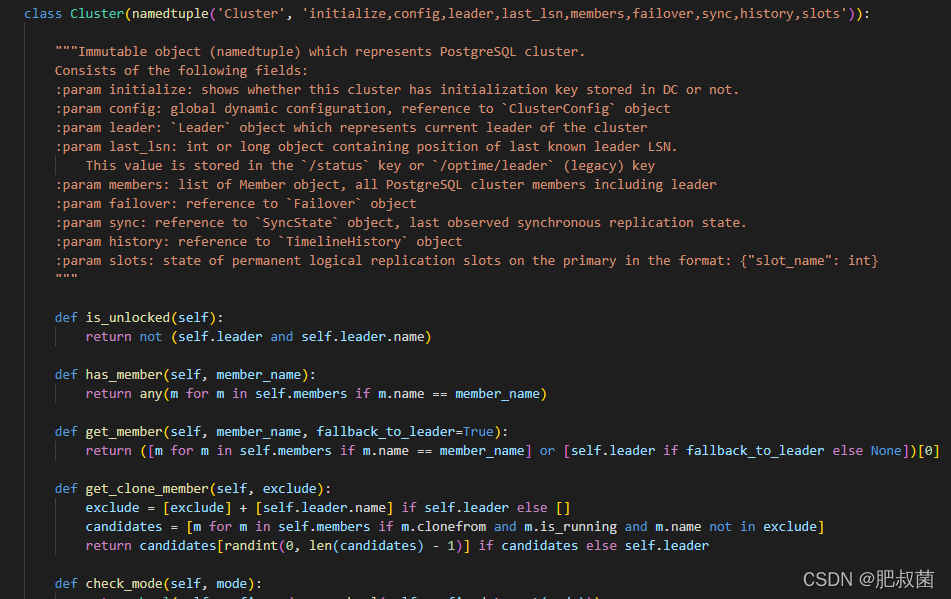
namedtuple是Python中存储数据类型,比较常见的数据类型还有有list和tuple数据类型。相比于list,tuple中的元素不可修改,在映射中可以当键使用。namedtuple类位于collections模块,有了namedtuple后通过属性访问数据能够让我们的代码更加的直观更好维护。
namedtuple能够用来创建类似于元祖的数据类型,除了能够用索引来访问数据,能够迭代,还能够方便的通过属性名来访问数据。接下来通过本文给大家分享python namedtuple()的使用,一起看看吧!
collections.namedtuple(typename, field_names, *, rename=False, defaults=None, module=None)
(1)返回一个名为typename的新元组子类
(2)新的子类用于创建类似元组的对象,这些对象具有可通过属性查找访问的字段以及可索引和可迭代的字段field_namestypename
(1)typename表示这个子类的名字,比如C++、python、Java中的类名field_names
(1)field_names是一个字符串序列,例如[‘x’,‘y’]
(2)field_names可以是单个字符串,每个字段名都用空格或逗号分隔,例如’x y’或’x,y’others
(1)其它的参数并不常用,这里不再介绍啦
from collections import namedtuple # 基本例子 Point = namedtuple('Point',['x','y']) # 类名为Point,属性有'x'和'y' p = Point(11, y=22) # 用位置或关键字参数实例化,因为'x'在'y'前,所以x=11,和函数参数赋值一样的 print(p[0]+p[1]) # 我们也可以使用下标来访问 # 33 x, y = p # 也可以像一个元组那样解析 print(x,y) # (11, 22) print(p.x+p.y) # 也可以通过属性名来访问 # 33 print(p) # 通过内置的__repr__函数,显示该对象的信息 # Point(x=11, y=22)python运行
classmethod somenamedtuple._make(iterable)
(1)从一个序列或者可迭代对象中直接对field_names中的属性直接赋值,返回一个对象
t = [11, 22] # 列表 list p = Point._make(t) # 从列表中直接赋值,返回对象 print(Point(x=11, y=22)) # Point(x=11, y=22)python运行
classmethod somenamedtuple._asdict()
(1)之前也说过了,说它是元组,感觉更像一个带名字的字典
(2)我们也可以直接使用_asdict()将它解析为一个字典dict
p = Point(x=11, y=22) # 新建一个对象 d = p._asdict() # 解析并返回一个字典对象 print(d) # {'x': 11, 'y': 22}python运行
classmethod somenamedtuple._replace(**kwargs)
(1)这是对某些属性的值,进行修改的,从replace这个单词就可以看出来
(2)注意该函数返回的是一个新的对象,而不是对原始对象进行修改
p = Point(x=11, y=22) # x=11,y=22 print(p) # Point(x=11, y=22) d = p._replace(x=33) # x=33,y=22 新的对象 print(p) # Point(x=11, y=22) print(d) # Point(x=33, y=22)python运行
classmethod somenamedtuple._fields
(1)该方法返回该对象的所有属性名,以元组的形式
(2)因为是元组,因此支持加法操作
print(p._fields) # 查看属性名 # ('x', 'y') Color = namedtuple('Color', 'red green blue') Pixel = namedtuple('Pixel', Point._fields + Color._fields) # 新建一个子类,使用多个属性名 q = Pixel(11, 22, 128, 255, 0) print(q)python运行
classmethod somenamedtuple._field_defaults
(1)该方法是python3.8新增的函数,因为我的版本是3.6,无法验证其正确性
(2)下面给出官方的示例
Account = namedtuple('Account', ['type', 'balance'], defaults=[0]) print(Account._field_defaults) #{'balance': 0} print(Account('premium')) #Account(type='premium', balance=0)python运行
(1)用来获得属性的值
print(getattr(p, 'x')) # 11python运行
字典创建namedtuple()
(1)从字典来构建namedtuple的对象
d = {'x': 11, 'y': 22} # 字典 p = Point(**d) # 双星号是重点 print(p) # Point(x=11, y=22)python运行
(1)同样可以将从csv文件或者数据库中读取的文件存储到namedtuple中
(2)这里每次存的都是一行的内容
EmployeeRecord = namedtuple('EmployeeRecord', 'name, age, title, department, paygrade') import csv for emp in map(EmployeeRecord._make, csv.reader(open("employees.csv", "r"))): # 这里每行返回一个对象 注意! print(emp.name, emp.title) import sqlite3 conn = sqlite3.connect('/companydata') # 连接数据库 cursor = conn.cursor() cursor.execute('SELECT name, age, title, department, paygrade FROM employees') for emp in map(EmployeeRecord._make, cursor.fetchall()): # 每行返回一个对象 注意! print(emp.name, emp.title)python运行
(1)接下来用deepmind的开源项目graph_nets中的一段代码来介绍
NODES = "nodes" EDGES = "edges" RECEIVERS = "receivers" SENDERS = "senders" GLOBALS = "globals" N_NODE = "n_node" N_EDGE = "n_edge" GRAPH_DATA_FIELDS = (NODES, EDGES, RECEIVERS, SENDERS, GLOBALS) GRAPH_NUMBER_FIELDS = (N_NODE, N_EDGE) class GraphsTuple( # 定义元组子类名 以及字典形式的键名(属性名) collections.namedtuple("GraphsTuple", GRAPH_DATA_FIELDS + GRAPH_NUMBER_FIELDS)): # 这个函数用来判断依赖是否满足,和我们的namedtuple关系不大 def _validate_none_fields(self): """Asserts that the set of `None` fields in the instance is valid.""" if self.n_node is None: raise ValueError("Field `n_node` cannot be None") if self.n_edge is None: raise ValueError("Field `n_edge` cannot be None") if self.receivers is None and self.senders is not None: raise ValueError( "Field `senders` must be None as field `receivers` is None") if self.senders is None and self.receivers is not None: raise ValueError( "Field `receivers` must be None as field `senders` is None") if self.receivers is None and self.edges is not None: raise ValueError( "Field `edges` must be None as field `receivers` and `senders` are " "None") # 用来初始化一些参数 不是重点 def __init__(self, *args, **kwargs): del args, kwargs # The fields of a `namedtuple` are filled in the `__new__` method. # `__init__` does not accept parameters. super(GraphsTuple, self).__init__() self._validate_none_fields() # 这就用到了_replace()函数,注意只要修改了属性值 # 那么就返回一个新的对象 def replace(self, **kwargs): output = self._replace(**kwargs) # 返回一个新的实例 output._validate_none_fields() # pylint: disable=protected-access 验证返回的新实例是否满足要求 return output # 这是为了针对tensorflow1版本的函数 # 返回一个拥有相同属性的对象,但是它的属性值是输入的大小和类型 def map(self, field_fn, fields=GRAPH_FEATURE_FIELDS): # 对每个键应用函数 """Applies `field_fn` to the fields `fields` of the instance. `field_fn` is applied exactly once per field in `fields`. The result must satisfy the `GraphsTuple` requirement w.r.t. `None` fields, i.e. the `SENDERS` cannot be `None` if the `EDGES` or `RECEIVERS` are not `None`, etc. Args: field_fn: A callable that take a single argument. fields: (iterable of `str`). An iterable of the fields to apply `field_fn` to. Returns: A copy of the instance, with the fields in `fields` replaced by the result of applying `field_fn` to them. """ return self.replace(**{k: field_fn(getattr(self, k)) for k in fields}) # getattr(self, k) 获取的是键值对中的值, k表示键python运行
AbstractEtcd类是AbstractDCS接口的实现类
武汉格发信息技术有限公司,格发许可优化管理系统可以帮你评估贵公司软件许可的真实需求,再低成本合规性管理软件许可,帮助贵司提高软件投资回报率,为软件采购、使用提供科学决策依据。支持的软件有: CAD,CAE,PDM,PLM,Catia,Ugnx, AutoCAD, Pro/E, Solidworks 等。
 技术文档
技术文档
 推荐好文
推荐好文





 155-2731-8020




