

软件

产品


代码块
JavaScript
% 初始化一个矩阵
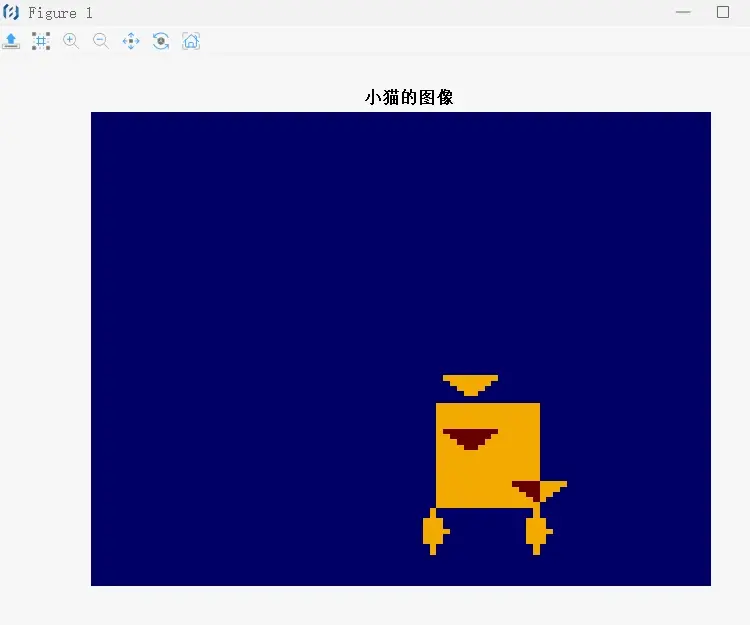
animalImage = zeros(90, 90);

% 定义小猫的轮廓
% 耳朵1
catEar1X = [50 55 60];
catEar1Y = [50 55 50];
% 耳朵2
catEar2X = [50 55 60];
catEar2Y = [60 65 60];
% 身体
catBodyX = [50 65 65 50];
catBodyY = [55 55 75 75];
% 腿1
catLeg1X = [65 67 65 63];
catLeg1Y = [75 80 85 80];
% 腿2
catLeg2X = [50 48 50 52];
catLeg2Y = [75 80 85 80];
% 尾巴
catTailX = [60 65 70];
catTailY = [70 75 70];

% 将小猫的轮廓放置在图像的左上角
animalImage = insertShape(animalImage, 'FilledPolygon', [catEar1X' catEar1Y'], 'Color', 'gray', 'Opacity', 0.5);
animalImage = insertShape(animalImage, 'FilledPolygon', [catEar2X' catEar2Y'], 'Color', 'gray', 'Opacity', 0.5);
animalImage = insertShape(animalImage, 'FilledPolygon', [catBodyX' catBodyY'], 'Color', 'gray', 'Opacity', 0.5);
animalImage = insertShape(animalImage, 'FilledPolygon', [catLeg1X' catLeg1Y'], 'Color', 'gray', 'Opacity', 0.5);
animalImage = insertShape(animalImage, 'FilledPolygon', [catLeg2X' catLeg2Y'], 'Color', 'gray', 'Opacity', 0.5);
animalImage = insertShape(animalImage, 'FilledPolygon', [catTailX' catTailY'], 'Color', 'gray', 'Opacity', 0.5);


% 使用imagesc显示整个图像
imagesc(animalImage);
axis off;
title('小猫的图像');

function img = insertShape(img, FilledPolygon_name, dogEar1, Color_name, color, Opacity_name, opacity)
    if ischar(color)
        color = 255;
    end
    img = insertFilledPolygon(img, dogEar1, color, opacity);
end


      复制成功
上面的子函数 insertShape 是为了代替 MATLAB 的 insertShape 函数, 其中用了我写的的
insertFilledPolygon函数
insertFilledPolygon.m
代码块
JavaScript
function img = insertFilledPolygon(img, vertices, color, opacity)
    % insertFilledPolygon - 在图像上插入一个填充的多边形
    %
    % 参数:
    %   img - 输入图像矩阵
    %   vertices - 多边形的顶点,格式为 [x1 y1; x2 y2; ...; xn yn]
    %   color - 多边形的颜色,格式为 [r g b] 或单个灰度值
    %   opacity - 多边形的不透明度,范围在 0 到 1 之间

    % 确保输入图像是双精度浮点型
    if ~isa(img, 'double')
        img = im2double(img);
    end

    % 创建多边形掩码
    polygonMask = poly2mask(vertices(:,1), vertices(:,2), size(img,1), size(img,2));

    % 如果颜色是3个值,则转换为灰度
    if length(color) == 3
        color = color(1);
    end

    % 调整颜色和不透明度
    color = color * opacity;

    % 应用多边形掩码和颜色
    % 如果 img 是二维的,不需要使用 repmat
    img(polygonMask) = img(polygonMask) * (1 - opacity) + color;


    % 返回修改后的图像
    img = img;
end

      复制成功
再写一个代替MATLAB的 poly2mask.m
代码块
JavaScript
function mask = poly2mask(x, y, rows, cols)
    % poly2mask - 根据多边形顶点创建二进制掩码
    %
    % 参数:
    %   x - 多边形顶点的 x 坐标数组
    %   y - 多边形顶点的 y 坐标数组
    %   rows - 输出掩码的行数
    %   cols - 输出掩码的列数
    %
    % 返回:
    %   mask - 二进制掩码矩阵

    % 初始化掩码矩阵
    mask = false(rows, cols);

    % 检查顶点数量是否足够
    if length(x) < 3 || length(y) < 3
        error('多边形至少需要3个顶点');
    end

    % 确保 x 和 y 是列向量
    if isrow(x)
        x = x(:);
    end
    if isrow(y)
        y = y(:);
    end

    % 计算多边形的边界框
    minX = min(x);
    maxX = max(x);
    minY = min(y);
    maxY = max(y);

    % 遍历掩码的每个像素
    for i = 1:rows
        for j = 1:cols
            % 检查像素是否在多边形的边界框内
            if j >= minX && j <= maxX && i >= minY && i <= maxY
                % 使用射线法检查像素是否在多边形内部
                if isInsidePolygon(j, i, x, y)
                    mask(i, j) = true;
                end
            end
        end
    end
end

function inside = isInsidePolygon(x, y, polyX, polyY)
    % isInsidePolygon - 使用射线法检查点是否在多边形内部
    %
    % 参数:
    %   x - 点的 x 坐标
    %   y - 点的 y 坐标
    %   polyX - 多边形顶点的 x 坐标数组
    %   polyY - 多边形顶点的 y 坐标数组
    %
    % 返回:
    %   inside - 点是否在多边形内部(true/false)

    inside = false;
    n = length(polyX);
    p1x = polyX(n);
    p1y = polyY(n);
    for i = 1:n
        p2x = polyX(i);
        p2y = polyY(i);
        if y > min(p1y, p2y) && y <= max(p1y, p2y) && ...
           x <= max(p1x, p2x)
            if p1y != p2y
                xinters = (y - p1y) * (p2x - p1x) / (p2y - p1y) + p1x;
            end
            if p1x == p2x || x <= xinters
                inside = ~inside;
            end
        end
        p1x = p2x;
        p1y = p2y;
    end
end

      复制成功
免责声明:本文系网络转载或改编,未找到原创作者,版权归原作者所有。如涉及版权,请联系删
 技术文档
技术文档
 推荐好文
推荐好文





 155-2731-8020