


软件

产品


您可以从文件中读取十六进制和二进制数字,并将它们作为数值变量存储在表中。readtable 函数会自动读取分别包含 0x 和 0b 前缀的十六进制和二进制数字。数值使用整数数据类型存储。您也可以使用导入选项来读取不带前缀的这些数字。
在文本编辑器中预览 hexAndBinary.txt 文件。它的一些列包含带前缀的十六进制和二进制数字,还有一列包含不带前缀的这些数字。
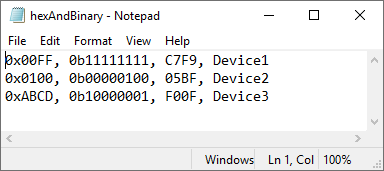
使用 readtable 读取文件。该函数检测具有 0x 和 0b 前缀的数字,并将它们作为整数存储。第三列没有前缀,因此其值被视为文本。
T = readtable('hexAndBinary.txt')
T=3×4 table
Var1 Var2 Var3 Var4
_____ ____ ________ ___________
255 255 {'C7F9'} {'Device1'}
256 4 {'05BF'} {'Device2'}
43981 129 {'F00F'} {'Device3'}
readtable 函数将数值存储在不同整数类(uint16 和 uint8)中,因为 T.Var1 的值需要 8 位以上的存储空间。
class(T.Var1)
ans =
'uint16'
class(T.Var2)
ans =
'uint8'
要指定用于存储从十六进制和二进制数字导入的数值的数据类型,请使用 'HexType' 和 'BinaryType' 名称-值对组参数。将值存储为有符号 32 位整数。
T = readtable('hexAndBinary.txt','HexType','int32','BinaryType','int32');
class(T.Var1)
ans =
'int32'
class(T.Var2)
ans =
'int32'
您可以使用导入选项来检测不带前缀的十六进制和二进制数字,并为它们指定存储。为 hexAndBinary.txt 创建一个导入选项对象。
opts = detectImportOptions('hexAndBinary.txt')
opts =
DelimitedTextImportOptions with properties:
Format Properties:
Delimiter: {','}
Whitespace: '\b\t '
LineEnding: {'\n' '\r' '\r\n'}
CommentStyle: {}
ConsecutiveDelimitersRule: 'split'
LeadingDelimitersRule: 'keep'
TrailingDelimitersRule: 'ignore'
EmptyLineRule: 'skip'
Encoding: 'UTF-8'
Replacement Properties:
MissingRule: 'fill'
ImportErrorRule: 'fill'
ExtraColumnsRule: 'addvars'
Variable Import Properties: Set types by name using setvartype
VariableNames: {'Var1', 'Var2', 'Var3' ... and 1 more}
VariableTypes: {'auto', 'auto', 'char' ... and 1 more}
SelectedVariableNames: {'Var1', 'Var2', 'Var3' ... and 1 more}
VariableOptions: Show all 4 VariableOptions
Access VariableOptions sub-properties using setvaropts/getvaropts
VariableNamingRule: 'modify'
Location Properties:
DataLines: [1 Inf]
VariableNamesLine: 0
RowNamesColumn: 0
VariableUnitsLine: 0
VariableDescriptionsLine: 0
To display a preview of the table, use preview
要指定第三列应作为十六进制值导入,即使缺少前缀也要导入,请使用 setvaropts 函数来修改表中第三个变量的变量类型。将变量类型设置为 int32。
opts = setvaropts(opts,3,'NumberSystem','hex','Type','int32')
opts =
DelimitedTextImportOptions with properties:
Format Properties:
Delimiter: {','}
Whitespace: '\b\t '
LineEnding: {'\n' '\r' '\r\n'}
CommentStyle: {}
ConsecutiveDelimitersRule: 'split'
LeadingDelimitersRule: 'keep'
TrailingDelimitersRule: 'ignore'
EmptyLineRule: 'skip'
Encoding: 'UTF-8'
Replacement Properties:
MissingRule: 'fill'
ImportErrorRule: 'fill'
ExtraColumnsRule: 'addvars'
Variable Import Properties: Set types by name using setvartype
VariableNames: {'Var1', 'Var2', 'Var3' ... and 1 more}
VariableTypes: {'auto', 'auto', 'int32' ... and 1 more}
SelectedVariableNames: {'Var1', 'Var2', 'Var3' ... and 1 more}
VariableOptions: Show all 4 VariableOptions
Access VariableOptions sub-properties using setvaropts/getvaropts
VariableNamingRule: 'modify'
Location Properties:
DataLines: [1 Inf]
VariableNamesLine: 0
RowNamesColumn: 0
VariableUnitsLine: 0
VariableDescriptionsLine: 0
To display a preview of the table, use preview
读取文件并将第三列作为数值(而不是文本)导入。
T = readtable('hexAndBinary.txt',opts)
T=3×4 table
Var1 Var2 Var3 Var4
_____ ____ _____ ___________
255 255 51193 {'Device1'}
256 4 1471 {'Device2'}
43981 129 61455 {'Device3'}
免责声明:本文系网络转载或改编,未找到原创作者,版权归原作者所有。如涉及版权,请联系删
 技术文档
技术文档
 推荐好文
推荐好文





 155-2731-8020




