


软件

产品


本例子是通过手动设置定标点对待配准图像进行移动,使其与参考图像配准!
本文是基于位移场将图像进行wrap操作,以实现最终的配准!该实现是基于WarpImageFilter 进行操作的,WarpImageFilter 在给定的位移场的作用下将已有图像进行wrap(空间扭曲)操作。位移场可以看做是一张图像,其pixel type是长度至少为N的向量型(vector type)。其中N是输入图像的维数。位移场中每个向量表示输入空间中的几何点和输出空间上点的距离。P(in)=P(out)+d。
WarpImageFilter的输出是通过逆向映射实现的,输出像素被映射到输入图像。该方案避免了创建输出图像中的任何漏洞和重叠。在映射过程中存在不能映射到输入图像的整数位置,所以需要用到插值 函数 ,用以计算在非整数位置的像素值。默认的插值方式是 LinearInterpolateImageFunction,可以通过 SetInterpolator()来进行设置。
映射到输入图像缓冲区的外部的位置,将分配一个边缘填充的值。
1、生成图像
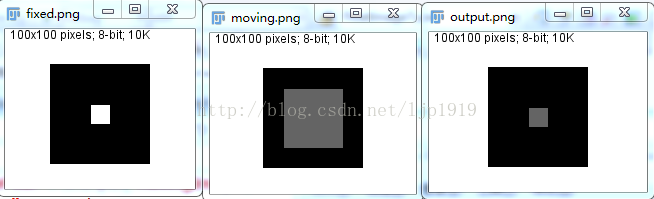
参考图为:像素尺寸100X100,在以(40,40)和(60,60)为坐标所包围的区域像素值为255,其余区域像素值为0;
待配准图为:像素尺寸100X100,在以(20,20)和(80,80)为坐标所包围的区域像素值为100,其余区域像素值为0;
在配准的过程手动设置移动场源的定标点,即为配准导航点。
2、基于两个定标集合(即所谓的导航点,也称为简单称为配准点)产生位移场(displacement field)
1)设置形变场源对象的参数时,向参考图看起,如deformationFieldSource->SetOutputSpacing( fixedImage->GetSpacing() );等
2)生成参考图和待配准图的landmarks,即两者的地标!通过InsertElement( 2, sourcePoint );对地标点进行添加!
3)将地标点与形变场源进行关联
3、建立一个WarpImageFilterType的warpImageFilter。
1)需要设置其所对应的插值器
2)根据形变场源设置warpImageFilter的SetOutputSpacing和SetOutputOrigin
3)需要将其与2中的形变场源进行关联。warpImageFilter->SetDisplacementField( deformationFieldSource->GetOutput() );
同时也需要设置其待配准图像的输入:warpImageFilter->SetInput( movingImage );
4、输出配准结果
只需要利用一个writer将warpImageFilter的结果进行输出即可!
writer->SetInput ( warpImageFilter->GetOutput() );
#include "itkImageFileReader.h"#include "itkImageFileWriter.h"#include "itkImage.h"#include "itkVector.h"#if ITK_VERSION_MAJOR < 4#include "itkDeformationFieldSource.h"#else#include "itkLandmarkDisplacementFieldSource.h"#endif #include "itkWarpImageFilter.h" const unsigned int Dimension = 2;typedef unsigned char PixelType;typedef itk::Image< PixelType, Dimension > ImageType; static void CreateFixedImage(ImageType::Pointer image);static void CreateMovingImage(ImageType::Pointer image); int main(int, char *[]){ typedef float VectorComponentType; typedef itk::Vector< VectorComponentType, Dimension > VectorType; typedef itk::Image< VectorType, Dimension > DeformationFieldType; ImageType::Pointer fixedImage = ImageType::New(); CreateFixedImage(fixedImage); ImageType::Pointer movingImage = ImageType::New(); CreateMovingImage(movingImage);//Computes a displacement field(位移场) from two sets of landmarks. #if ITK_VERSION_MAJOR < 4 typedef itk::DeformationFieldSource<DeformationFieldType> DeformationFieldSourceType;#else typedef itk::LandmarkDisplacementFieldSource<DeformationFieldType> DeformationFieldSourceType;#endif DeformationFieldSourceType::Pointer deformationFieldSource = DeformationFieldSourceType::New(); //std::cout<<fixedImage->GetSpacing(); deformationFieldSource->SetOutputSpacing( fixedImage->GetSpacing() );//以参考图作为输入 deformationFieldSource->SetOutputOrigin( fixedImage->GetOrigin() ); deformationFieldSource->SetOutputRegion( fixedImage->GetLargestPossibleRegion() ); deformationFieldSource->SetOutputDirection( fixedImage->GetDirection() ); // Create source and target landmarks. typedef DeformationFieldSourceType::LandmarkContainerPointer LandmarkContainerPointer; typedef DeformationFieldSourceType::LandmarkContainer LandmarkContainerType; typedef DeformationFieldSourceType::LandmarkPointType LandmarkPointType; LandmarkContainerType::Pointer sourceLandmarks = LandmarkContainerType::New(); LandmarkContainerType::Pointer targetLandmarks = LandmarkContainerType::New(); LandmarkPointType sourcePoint; LandmarkPointType targetPoint; //设置进行配准的起始位置 sourcePoint[0] = 40;//参考图像遍历的起始位置,坐标表示! sourcePoint[1] = 40; targetPoint[0] = 20;//待配准图像遍历的起始位置,坐标表示! targetPoint[1] = 20; sourceLandmarks->InsertElement( 0, sourcePoint ); targetLandmarks->InsertElement( 0, targetPoint ); sourcePoint[0] = 40;//设置第二个配准点 sourcePoint[1] = 60; targetPoint[0] = 20; targetPoint[1] = 80; sourceLandmarks->InsertElement( 1, sourcePoint ); targetLandmarks->InsertElement( 1, targetPoint ); sourcePoint[0] = 60;//设置第3个配准点! sourcePoint[1] = 40; targetPoint[0] = 80; targetPoint[1] = 20; sourceLandmarks->InsertElement( 2, sourcePoint ); targetLandmarks->InsertElement( 2, targetPoint ); sourcePoint[0] = 60;//设置第4个配准点 sourcePoint[1] = 60; targetPoint[0] = 80; targetPoint[1] = 80; sourceLandmarks->InsertElement( 3, sourcePoint ); targetLandmarks->InsertElement( 3, targetPoint ); //设置形变场场源!将其与配准点进行关联 deformationFieldSource->SetSourceLandmarks( sourceLandmarks.GetPointer() ); deformationFieldSource->SetTargetLandmarks( targetLandmarks.GetPointer() ); deformationFieldSource->UpdateLargestPossibleRegion(); // Write the deformation field { typedef itk::ImageFileWriter< DeformationFieldType > WriterType; WriterType::Pointer writer = WriterType::New(); writer->SetInput ( deformationFieldSource->GetOutput() ); writer->SetFileName( "deformation.mhd" ); writer->Update(); } typedef itk::WarpImageFilter< ImageType, ImageType, DeformationFieldType > WarpImageFilterType; WarpImageFilterType::Pointer warpImageFilter = WarpImageFilterType::New(); //插值器类型 typedef itk::LinearInterpolateImageFunction<ImageType, double > InterpolatorType; InterpolatorType::Pointer interpolator = InterpolatorType::New(); warpImageFilter->SetInterpolator( interpolator ); warpImageFilter->SetOutputSpacing( deformationFieldSource->GetOutput()->GetSpacing() ); warpImageFilter->SetOutputOrigin( deformationFieldSource->GetOutput()->GetOrigin() );#if ITK_VERSION_MAJOR < 4 warpImageFilter->SetDeformationField( deformationFieldSource->GetOutput() );#else warpImageFilter->SetDisplacementField( deformationFieldSource->GetOutput() );#endif warpImageFilter->SetInput( movingImage ); warpImageFilter->Update(); // Write the output typedef itk::ImageFileWriter< ImageType > WriterType; WriterType::Pointer writer = WriterType::New(); writer->SetInput ( warpImageFilter->GetOutput() ); writer->SetFileName( "output.png" ); writer->Update(); return EXIT_SUCCESS;} void CreateFixedImage(ImageType::Pointer image){ // Create a black image with a white square //参考图像为(40,40)和(60,60)之间所包围的一个矩形框,且该区域灰度值为255 ImageType::IndexType start; start.Fill(0); ImageType::SizeType size; size.Fill(100); ImageType::RegionType region; region.SetSize(size); region.SetIndex(start); image->SetRegions(region); image->Allocate(); image->FillBuffer(0); itk::ImageRegionIterator<ImageType> imageIterator(image,region); while(!imageIterator.IsAtEnd()) { if(imageIterator.GetIndex()[0] > 40 && imageIterator.GetIndex()[0] < 60 && imageIterator.GetIndex()[1] > 40 && imageIterator.GetIndex()[1] < 60) { imageIterator.Set(255); } ++imageIterator; } // Write the deformation field typedef itk::ImageFileWriter< ImageType > WriterType; WriterType::Pointer writer = WriterType::New(); writer->SetInput ( image ); writer->SetFileName( "fixed.png" ); writer->Update();} void CreateMovingImage(ImageType::Pointer image){ // Create a black image with a white square //待配准图像为(20,20)和(80,80)所围成的矩形框,且该区域灰度值为100 ImageType::IndexType start; start.Fill(0); ImageType::SizeType size; size.Fill(100); ImageType::RegionType region; region.SetSize(size); region.SetIndex(start); image->SetRegions(region); image->Allocate(); image->FillBuffer(0); itk::ImageRegionIterator<ImageType> imageIterator(image,region); while(!imageIterator.IsAtEnd()) { if(imageIterator.GetIndex()[0] > 20 && imageIterator.GetIndex()[0] < 80 && imageIterator.GetIndex()[1] > 20 && imageIterator.GetIndex()[1] < 80) { imageIterator.Set(100); } ++imageIterator; } // Write the deformation field typedef itk::ImageFileWriter< ImageType > WriterType; WriterType::Pointer writer = WriterType::New(); writer->SetInput ( image ); writer->SetFileName( "moving.png" ); writer->Update();}结果图如下所示:
免责声明:本文系网络转载或改编,未找到原创作者,版权归原作者所有。如涉及版权,请联系删
 技术文档
技术文档
 推荐好文
推荐好文





 155-2731-8020




