


软件

产品


官网文档:https://gitee.com/fluent-mybatis/fluent-mybatis/wikis/
数据库结构 表举例
-- 用户表可以添加一个点赞数字段,可选
drop table if exists social_user;
CREATE TABLE social_user (
user_id int(11) NOT NULL comment '用户id',
star_num int(11) NOT NULL default 0 COMMENT '点赞数量',
focus_num int(11) NOT NULL default 0 COMMENT '关注数量',
fan_num int(11) NOT NULL default 0 COMMENT '粉丝数量',
create_time timestamp not null default CURRENT_TIMESTAMP comment '创建时间',
update_time timestamp not null default CURRENT_TIMESTAMP comment '修改时间',
primary key(user_id)
)ENGINE=InnoDB DEFAULT CHARSET=utf8mb4 COMMENT='用户点赞表';
在pom.xml中引入相关依赖
<properties>
        <java.version>1.8</java.version>
        <fluent-mybatis.version>1.8.7</fluent-mybatis.version>
    </properties>
    <dependencies>

        <dependency>
            <groupId>org.springframework.boot</groupId>
            <artifactId>spring-boot-starter-web</artifactId>
        </dependency>

        <dependency>
            <groupId>org.springframework.boot</groupId>
            <artifactId>spring-boot-devtools</artifactId>
            <scope>runtime</scope>
            <optional>true</optional>
        </dependency>
        <dependency>
            <groupId>mysql</groupId>
            <artifactId>mysql-connector-java</artifactId>
            <scope>runtime</scope>
        </dependency>
        <dependency>
            <groupId>org.projectlombok</groupId>
            <artifactId>lombok</artifactId>
            <optional>true</optional>
        </dependency>
        <dependency>
            <groupId>org.springframework.boot</groupId>
            <artifactId>spring-boot-starter-test</artifactId>
            <scope>test</scope>
        </dependency>
        <dependency>
            <groupId>io.projectreactor</groupId>
            <artifactId>reactor-test</artifactId>
            <scope>test</scope>
        </dependency>
        <!-- 引入fluent-mybatis 运行依赖包, scope为compile -->
        <dependency>
            <groupId>com.github.atool</groupId>
            <artifactId>fluent-mybatis</artifactId>
            <version>${fluent-mybatis.version}</version>
        </dependency>
        <!-- 引入fluent-mybatis-processor, scope设置为provider 编译需要,运行时不需要 -->
        <dependency>
            <groupId>com.github.atool</groupId>
            <artifactId>fluent-mybatis-processor</artifactId>
            <scope>provided</scope>
            <version>${fluent-mybatis.version}</version>
        </dependency>
        <dependency>
            <groupId>org.mybatis.spring.boot</groupId>
            <artifactId>mybatis-spring-boot-starter</artifactId>
            <version>2.2.0</version>
        </dependency>

        <dependency>
            <groupId>org.springframework.boot</groupId>
            <artifactId>spring-boot-starter-test</artifactId>
            <version>RELEASE</version>
            <scope>compile</scope>
        </dependency>
    </dependencies>
设置代码生成文件,配置还是比较简单的
package com.zstu.social.utils;

import cn.org.atool.generator.FileGenerator;
import cn.org.atool.generator.annotation.Table;
import cn.org.atool.generator.annotation.Tables;
import org.junit.jupiter.api.Test;

public class EntityGenerator {
    // 数据源 url
    static final String url = "jdbc:mysql://localhost:3306/lamp_social?useUnicode=true&characterEncoding=utf8&serverTimezone=GMT%2B8";
    // 数据库用户名
    static final String username = "root";
    // 数据库密码
    static final String password = "root";


    @Test
    public void generate() throws Exception {
        // 引用配置类,build方法允许有多个配置类
        FileGenerator.build(Empty.class);
    }

    @Tables(
            // 设置数据库连接信息
            url = url, username = username, password = password,
            // 设置entity类生成src目录, 相对于 user.dir
            srcDir = "src/main/java",
            // 设置entity类的package值
            basePack = "com.zstu.social.entity",
            // 设置dao接口和实现的src目录, 相对于 user.dir
            daoDir = "src/main/java",
            // 设置哪些表要生成Entity文件
            // tables = {@Table(value = {"social_comment","social_user","social_user_collect_video",
            // "social_user_focus","social_user_like_video","social_video"})},
            tables = {@Table(value = {"social_user"})},
            tablePrefix = "social_",
            logicDeleted = "deleted",
            gmtCreated = "create_time",
            gmtModified = "update_time"
    )
    static class Empty { //类名随便取, 只是配置定义的一个载体
    }
}
点击运行后,此时会生成相应的entity和dao包,此时dao包可能会出现找不到 类 的错误信息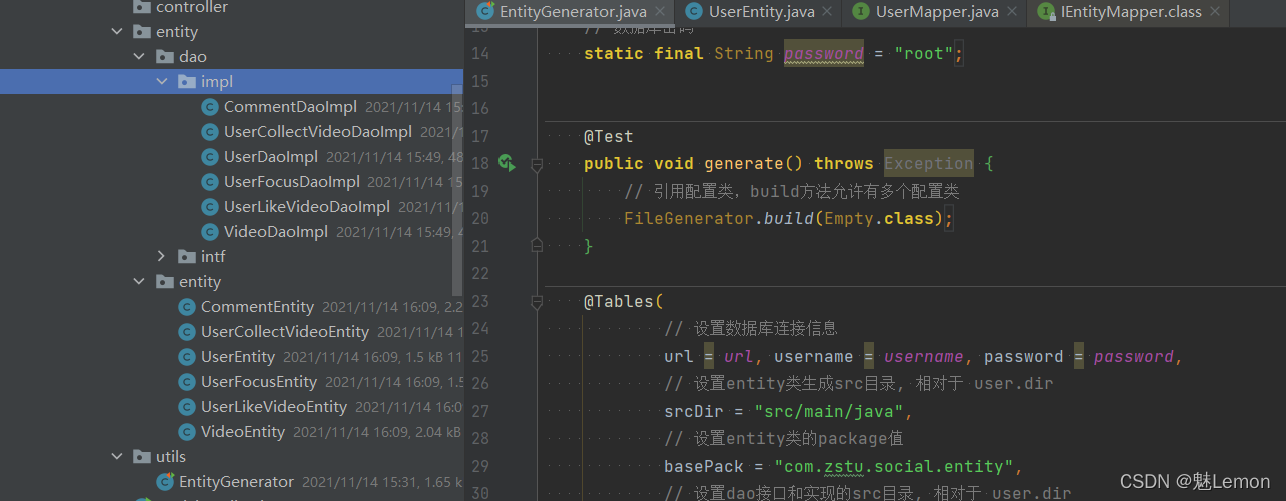
需要对项目进行编译,完成后在target目录下会自动生成相应包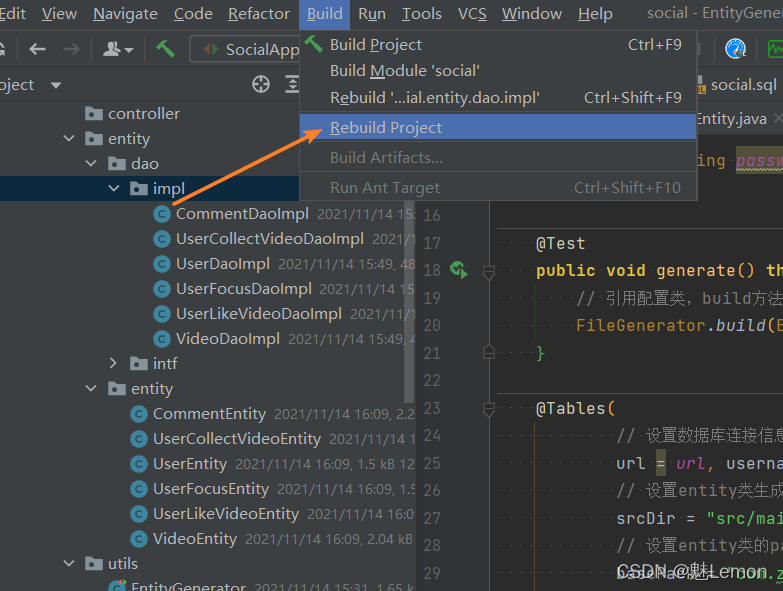
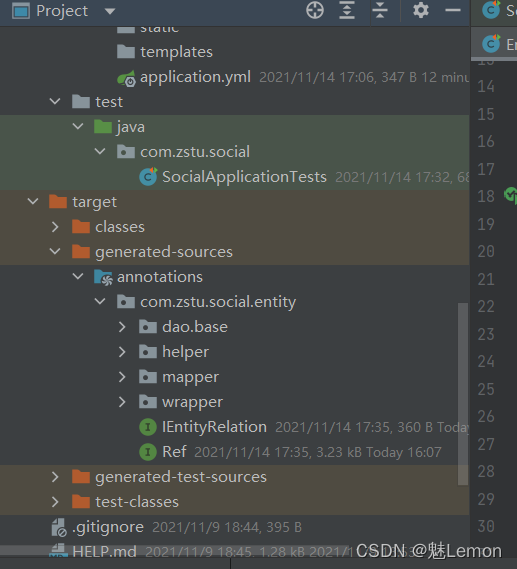
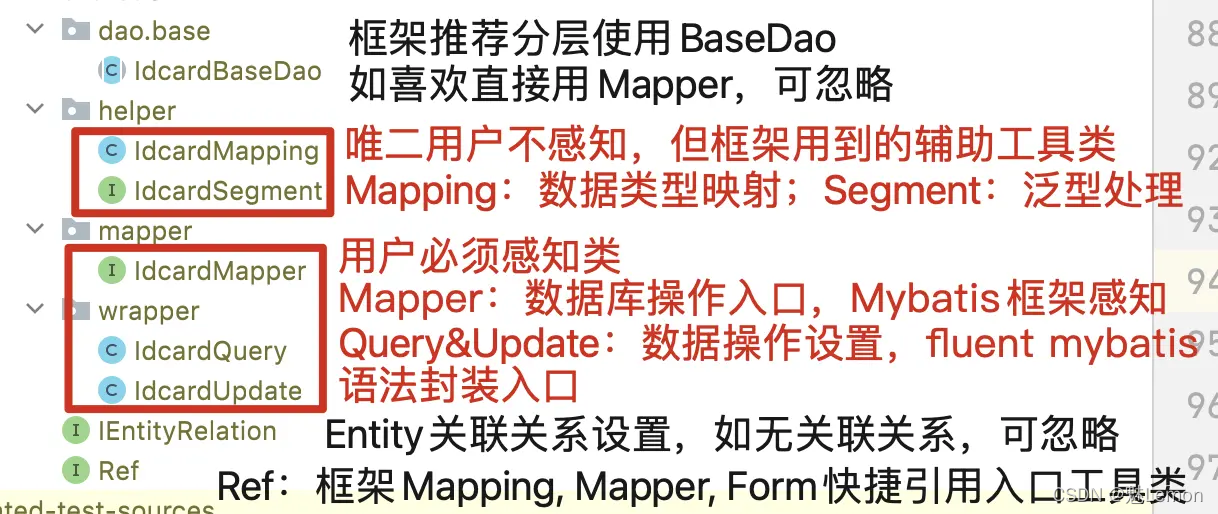
之后在application.yml配置相关数据
spring:
  # 应用名称
  application:
    name: social
  datasource:
    driver-class-name: com.mysql.cj.jdbc.Driver
    username: root
    password: root
    url: jdbc:mysql://localhost:3306/lamp_social?useSSL=false&allowPublicKeyRetrieval=true&useUnicode=true&characterEncoding=utf-8&serverTimezone=GMT%2B8&rewriteBatchedStatements=true
😄较为关键一点,需要设置数据源。我之前忘记配置就出错了,这里先配置默认数据源
package com.zstu.social.config;

import cn.org.atool.fluent.mybatis.spring.MapperFactory;
import org.springframework.context.annotation.Bean;
import org.springframework.context.annotation.Configuration;

@Configuration
public class ApplicationConfig {

    //  @Bean("dataSource")
    //  public DruidDataSource newDataSource() {
    //    return DataSourceCreator.create("datasource");
    //  }
    //
    //  @Bean
    //  public SqlSessionFactoryBean sqlSessionFactoryBean() throws Exception {
    //    SqlSessionFactoryBean bean = new SqlSessionFactoryBean();
    //    bean.setDataSource(newDataSource());
    //    ResourcePatternResolver resolver = new PathMatchingResourcePatternResolver();
    //    // 以下部分根据自己的实际情况配置
    //    // 如果有mybatis原生文件, 请在这里加载
    //    bean.setMapperLocations(resolver.getResources("classpath*:mapper/*.xml"));
    //    /* bean.setMapperLocations(
    //    /*      new ClassPathResource("mapper/xml1.xml"),
    //    /*      new ClassPathResource("mapper/xml2.xml")
    //    /* );
    //    */
    //    org.apache.ibatis.session.Configuration configuration =
    //        new org.apache.ibatis.session.Configuration();
    //    configuration.setLazyLoadingEnabled(true);
    //    configuration.setMapUnderscoreToCamelCase(true);
    //    bean.setConfiguration(configuration);
    //    return bean;
    //  }

    // 定义fluent mybatis的MapperFactory
    @Bean
    public MapperFactory mapperFactory() {
        return new MapperFactory();
    }
}
最后在主函数上添加@MapperScan注解
@SpringBootApplication
@MapperScan({"com.zstu.social.entity.mapper"})
public class SocialApplication {

    public static void main(String[] args) {
        SpringApplication.run(SocialApplication.class, args);
    }
}
测试代码,成功
package com.zstu.social;

import com.zstu.social.entity.entity.UserEntity;
import com.zstu.social.entity.mapper.UserMapper;
import org.junit.jupiter.api.Test;
import org.springframework.beans.factory.annotation.Autowired;
import org.springframework.boot.test.context.SpringBootTest;

@SpringBootTest
class SocialApplicationTests {

    @Autowired
    UserMapper userMapper;

    @Test
    void contextLoads() {
    }

    @Test
    public void testInsert() {
        UserEntity userEntity = new UserEntity()
                .setUserId(1)
                .setFanNum(2)
                .setFocusNum(3)
                .setStarNum(4);
        userMapper.insertWithPk(userEntity);
    }
}
1、出现以下错误,需要引入mybatis的maven依赖
Invalid default: public abstract java.lang.Class org.mybatis.spring.annotation.MapperScan.factoryBean()
<dependency>
    <groupId>org.mybatis.spring.boot</groupId>
    <artifactId>mybatis-spring-boot-starter</artifactId>
    <version>2.2.0</version>
</dependency>
2、出现以下错误,代表没配置好数据源
Error invoking SqlProvider method 'public static java.lang.String cn.org.atool.fluent.mybatis.base.provider.SqlProvider.insertWithPk(java.util.Map,org.apache.ibatis.builder.annotation.ProviderContext)' with specify parameter 'class org.apache.ibatis.binding.MapperMethod$ParamMap'.  Cause: cn.org.atool.fluent.mybatis.exception.FluentMybatisException: Please add MapperFactory to spring container management:


免责声明:本文系网络转载或改编,未找到原创作者,版权归原作者所有。如涉及版权,请联系删
 技术文档
技术文档
 推荐好文
推荐好文





 155-2731-8020




