


软件

产品


Unity是一款强大的跨平台游戏开发引擎,由Unity Technologies开发和维护。它提供了一个综合的开发环境,可以用于创建2D和3D游戏,以及其他交互式内容,如虚拟现实和增强现实应用程序。大学时期的室友Unity玩得很好,开发出了很多有趣的高质量游戏。这里,本人第一次使用Unity,来实现手部的3D检测追踪。
代码:
- import cv2
- from cvzone.HandTrackingModule import HandDetector
- import socket
-
- width, height = 1280, 720
- cap = cv2.VideoCapture(0)
- cap.set(3, width)
- cap.set(4, height)
-
- # Hand Detector
- detector = HandDetector(maxHands=1, detectionCon=0.8)
- # communication
- sock = socket.socket(socket.AF_INET, socket.SOCK_DGRAM)
- serverAddressPort = ("127.0.0.1", 5052)
-
- while True:
- success, img = cap.read()
- # hands
- hands, img = detector.findHands(img)
- data = []
-
- # Landmark values -(x,y,z)*21
- if hands:
- # get the first hand detected
- hand = hands[0]
- # get the landmark list
- lmlist = hand['lmList']
- # print(lmlist)
- for lm in lmlist:
- data.extend([lm[0], height - lm[1], lm[2]])
- print(data)
- sock.sendto(str.encode(str(data)), serverAddressPort)
-
- img = cv2.resize(img, (0, 0), None, 0.5, 0.5)
- cv2.imshow("Image", img)
- cv2.waitKey(1)
效果:
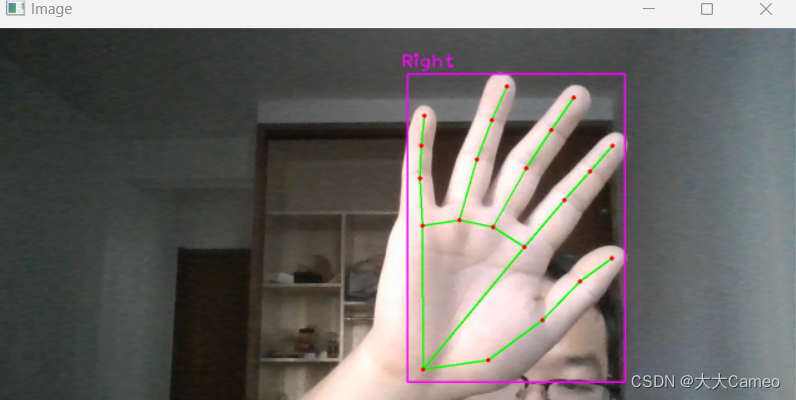
2.Unity搭建
(1)根据手部的21个特征点搭建模型
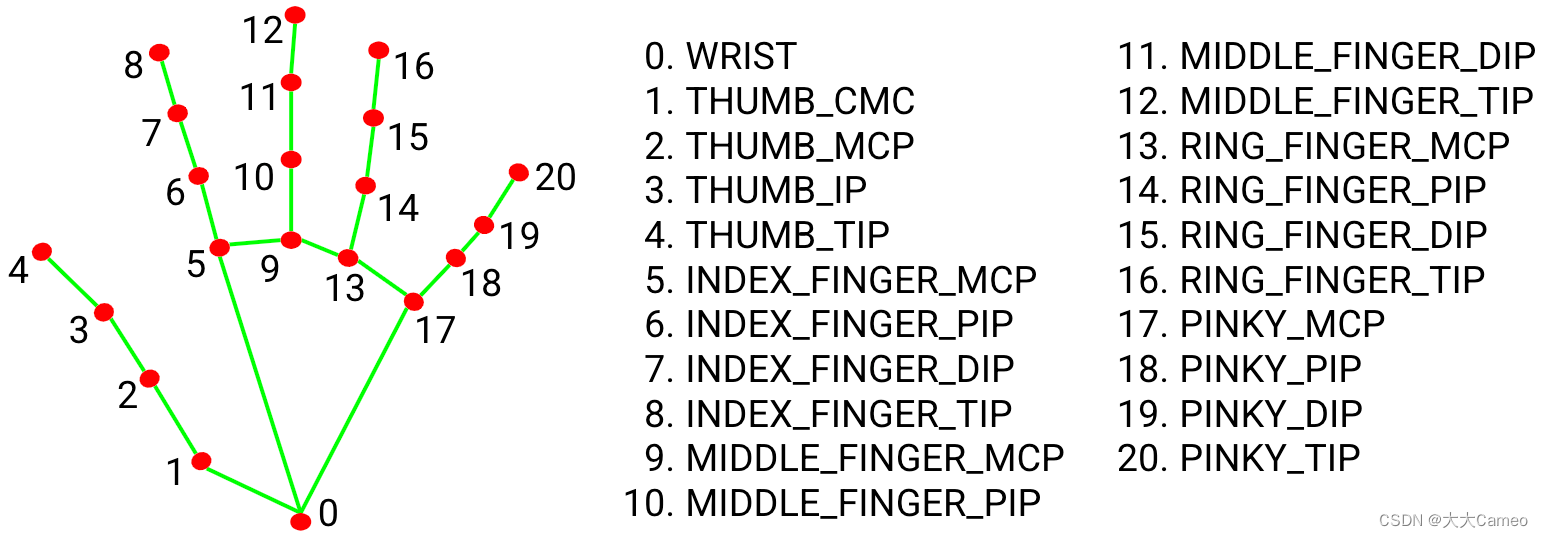
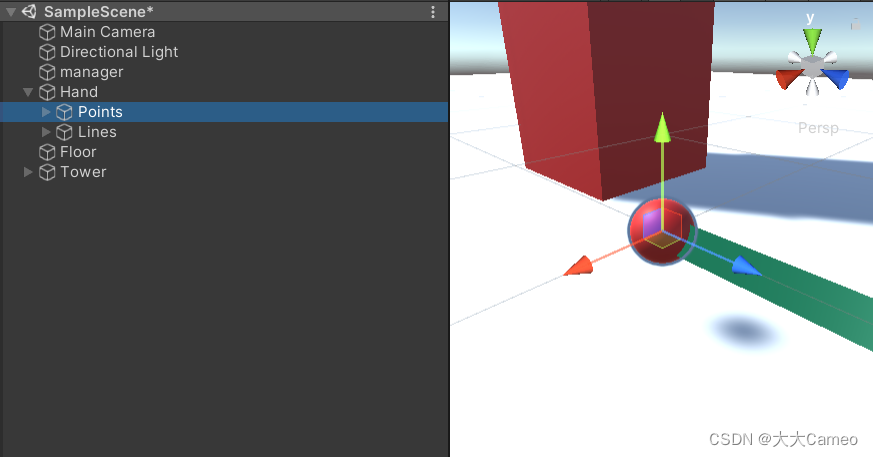
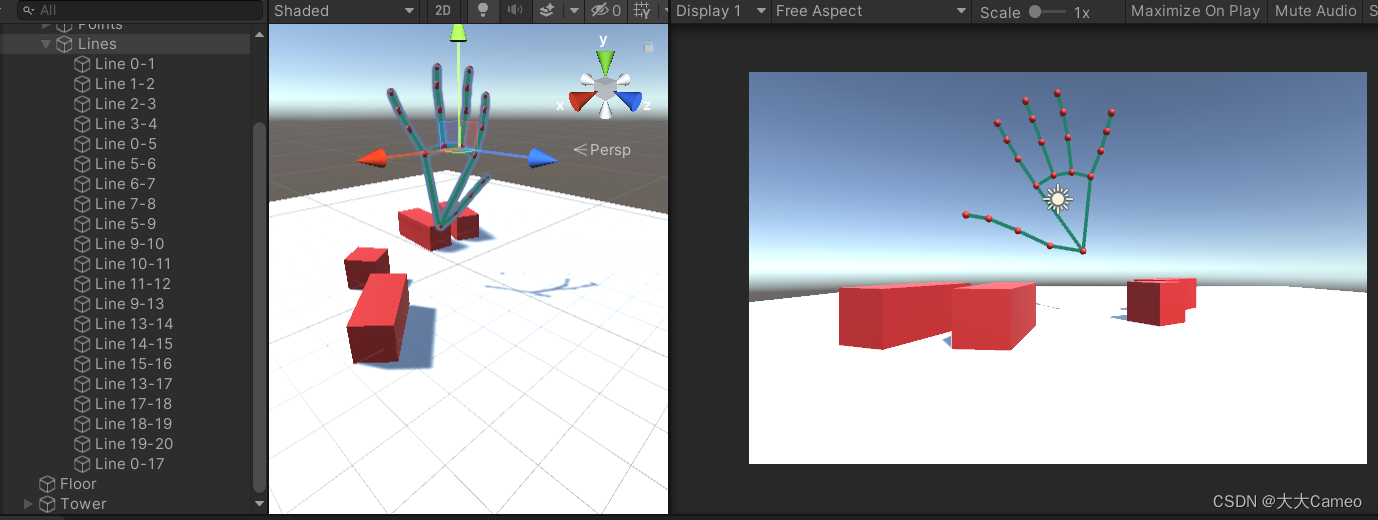
通过21个点和21条线,构造手部模型,过程较复杂
如下:
(2)Unity代码
在模型构建中,使用到了UDPReceive.cs、HandTracking.cs和LineCode.cs三段代码,分别用于实现信息传输、手部数据追踪和点线相连。
1.UDPReceive.cs
- using UnityEngine;
- using System;
- using System.Text;
- using System.Net;
- using System.Net.Sockets;
- using System.Threading;
-
- public class UDPReceive : MonoBehaviour
- {
- Thread receiveThread;
- UdpClient client;
- public int port = 5052;
- public bool startRecieving = true;
- public bool printToConsole = false;
- public string data;
-
- public void Start()
- {
-
- receiveThread = new Thread(
- new ThreadStart(ReceiveData));
- receiveThread.IsBackground = true;
- receiveThread.Start();
- }
-
- // receive thread
- private void ReceiveData()
- {
-
- client = new UdpClient(port);
- while (startRecieving)
- {
- try
- {
- IPEndPoint anyIP = new IPEndPoint(IPAddress.Any, 0);
- byte[] dataByte = client.Receive(ref anyIP);
- data = Encoding.UTF8.GetString(dataByte);
-
- if (printToConsole) { print(data); }
- }
- catch (Exception err)
- {
- print(err.ToString());
- }
- }
- }
-
- }
2.HandTracking.cs
- using System.Collections;
- using System.Collections.Generic;
- using UnityEngine;
-
- public class HandTracking : MonoBehaviour
- {
- // Start is called before the first frame update
- public UDPReceive udpReceive;
- public GameObject[] handPoints;
- void Start()
- {
-
- }
-
- // Update is called once per frame
- void Update()
- {
- string data = udpReceive.data;
-
- data = data.Remove(0, 1);
- data = data.Remove(data.Length-1, 1);
- print(data);
- string[] points = data.Split(',');
- print(points[0]);
-
- //0 1*3 2*3
- //x1,y1,z1,x2,y2,z2,x3,y3,z3
-
- for ( int i = 0; i<21; i++)
- {
-
- float x = 7-float.Parse(points[i * 3])/100;
- float y = float.Parse(points[i * 3 + 1]) / 100;
- float z = float.Parse(points[i * 3 + 2]) / 100;
-
- handPoints[i].transform.localPosition = new Vector3(x, y, z);
-
- }
-
- }
- }
3.LineCode.cs
- using System.Collections;
- using System.Collections.Generic;
- using UnityEngine;
-
- public class LineCode : MonoBehaviour
- {
-
- LineRenderer lineRenderer;
-
- public Transform origin;
- public Transform destination;
-
- // Start is called before the first frame update
- void Start()
- {
- lineRenderer = GetComponent<LineRenderer>();
- lineRenderer.startWidth = 0.1f;
- lineRenderer.endWidth = 0.1f;
- }
-
- // Update is called once per frame
- void Update()
- {
- lineRenderer.SetPosition(0, origin.position);
- lineRenderer.SetPosition(1, destination.position);
- }
- }
(3)3D 手部追踪效果
还行
第一次使用Unity,不熟悉模型的构建,花费了很多时间,但最终实现了效果,还是很开心的。Unity在游戏开发和交互式领域上有着广泛的应用前景,值得我们学习和探索。
武汉格发信息技术有限公司,格发许可优化管理系统可以帮你评估贵公司软件许可的真实需求,再低成本合规性管理软件许可,帮助贵司提高软件投资回报率,为软件采购、使用提供科学决策依据。支持的软件有: CAD,CAE,PDM,PLM,Catia,Ugnx, AutoCAD, Pro/E, Solidworks 等。
 技术文档
技术文档
 推荐好文
推荐好文





 155-2731-8020




