


软件

产品


前面已经说了,WPF项目中引入3DTools dll之后,在xaml中加入它的命名空间,
xmlns:tools="clr-namespace:_3DTools;assembly=3DTools"
把<Viewport3D>标签包含在<tools:TrackballDecorator>标签之中,就可以用鼠标控制 <Viewport3D> 中的3d模型;
看一下单独用3DTools dll能否加载3d模型;没有资料;
用ILSpy看一下;
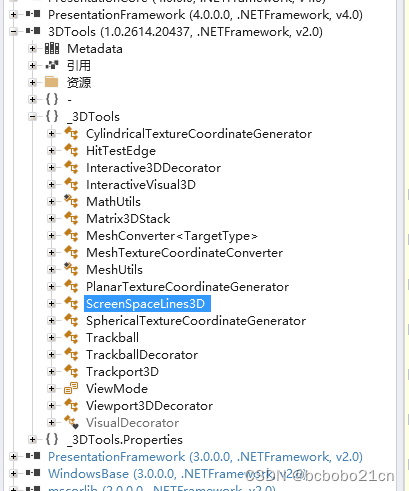
直接从3DTools包含的 类 ,类名看,有数学工具类,可能提供一些矩阵运算;有前面的TrackballDecorator类;还有碰撞检测类,hit;看不出是否有加载3d模型的类;有时间再看;
之前做过一些wpf 简单3D物体,都是直接写在xaml代码里;
下面从cs代码里做一下简单3D物体;
在xaml中给3d根节点加上名称属性,这样可以在cs代码中引用此节点;
<Viewport3D Name="v3">......</Viewport3D>
xaml代码如下;
- <Window x:Class="mytest1.MainWindow"
- xmlns="http://schemas.microsoft.com/winfx/2006/xaml/presentation"
- xmlns:x="http://schemas.microsoft.com/winfx/2006/xaml"
- xmlns:tools="clr-namespace:_3DTools;assembly=3DTools"
- Title="MainWindow" Height="350" Width="525">
- <Grid Width="300" Height="200" ShowGridLines="True">
- <tools:TrackballDecorator>
- <Viewport3D Name="v3">
-
- </Viewport3D>
- </tools:TrackballDecorator>
- </Grid>
- </Window>
cs代码如下;
- using System;
- using System.Collections.Generic;
- using System.Linq;
- using System.Text;
- using System.Threading.Tasks;
- using System.Windows;
- using System.Windows.Controls;
- using System.Windows.Data;
- using System.Windows.Documents;
- using System.Windows.Input;
- using System.Windows.Media;
- using System.Windows.Media.Imaging;
- using System.Windows.Navigation;
- using System.Windows.Shapes;
- using System.Windows.Media.Media3D;
-
- namespace mytest1
- {
- /// <summary>
- /// MainWindow.xaml 的交互逻辑
- /// </summary>
- public partial class MainWindow : Window
- {
- public MainWindow()
- {
- InitializeComponent();
-
- // 创建一个3D正方体
- MeshGeometry3D mesh = new MeshGeometry3D();
- mesh.Positions = new Point3DCollection()
- {
- new Point3D(-1, 1, 1),
- new Point3D(1, 1, 1),
- new Point3D(-1, -1, 1),
- new Point3D(1, -1, 1),
- new Point3D(-1, 1, -1),
- new Point3D(1, 1, -1),
- new Point3D(-1, -1, -1),
- new Point3D(1, -1, -1),
- };
- mesh.TriangleIndices = new Int32Collection()
- {
- 0, 1, 2,
- 1, 3, 2,
- 1, 5, 3,
- 5, 7, 3,
- 5, 4, 7,
- 4, 6, 7,
- 4, 0, 6,
- 0, 2, 6,
- 2, 3, 6,
- 3, 7, 6,
- 4, 5, 0,
- 5, 1, 0,
- };
-
- // 创建一个材质
- DiffuseMaterial material = new DiffuseMaterial(new SolidColorBrush(Colors.Blue));
-
- // 创建一个模型
- GeometryModel3D model = new GeometryModel3D(mesh, material);
-
- // 创建一个模型组
- Model3DGroup group = new Model3DGroup();
- group.Children.Add(model);
-
- // 将模型组添加到Viewport3D中
- v3.Children.Add(new ModelVisual3D() { Content = group });
-
- PerspectiveCamera camera = new PerspectiveCamera();
- camera.Position = new Point3D(0, 0, 5);
- camera.LookDirection = new Vector3D(0, 0, -1);
- camera.FieldOfView = 60;
- v3.Camera = camera;
- }
- }
- }
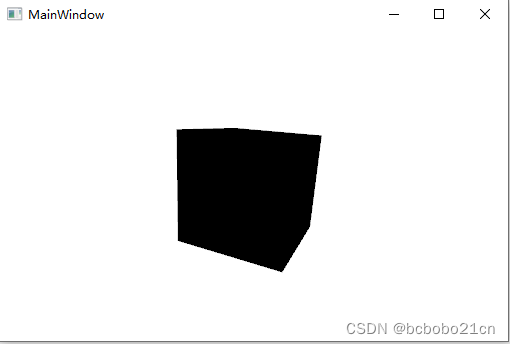
从cs代码中创建一个立方体模型;摄像机也在cs代码中创建;然后加入名为"v3"的节点;
运行如下;

顺带看一下ILSpy的许可证,它是MIT许可;
MIT许可证 (The MIT License)是许多软件授权条款中,被广泛使用的其中一种;与其他常见的软件授权条款(如GPL、LGPL、BSD)相比,MIT是相对宽松的软件授权条款;
MIT内容与三条款BSD许可证(3-clause BSD license)内容颇为近似,但是赋予软件被授权人更大的权利与更少的限制;
武汉格发信息技术有限公司,格发许可优化管理系统可以帮你评估贵公司软件许可的真实需求,再低成本合规性管理软件许可,帮助贵司提高软件投资回报率,为软件采购、使用提供科学决策依据。支持的软件有: CAD,CAE,PDM,PLM,Catia,Ugnx, AutoCAD, Pro/E, Solidworks 等。
 技术文档
技术文档
 推荐好文
推荐好文





 155-2731-8020


.png)
.png)



