


软件

产品


通过,您能创建有着强大互动功能的XAML基础应用程序,这些应用程序专注于当代客户的需求和构建未来新一代支持触摸的解决方案。
本教程将指导您完成根据基础数据源自动创建3D系列所需的步骤。
应该执行以下步骤,本文我们将为大家介绍3个步骤及最后结果,更多完整内容欢迎持续关注!
Step 3. 自定义图表外观
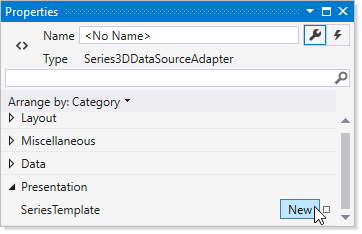
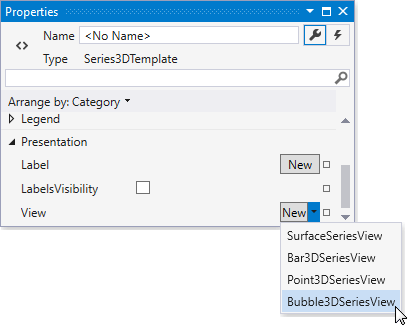
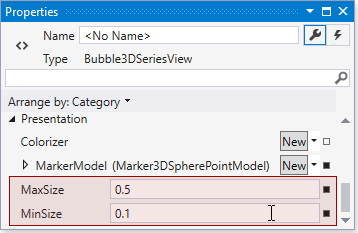
在此步骤中,您将学习如何配置外观图设置,为此请按照以下步骤操作。

结果
完成上述所有步骤后,您的代码将显示如下。
IriesViewModel.cs
using System;
using System.Collections.ObjectModel;
using System.Windows;
using System.Windows.Resources;
using System.Xml.Linq;

namespace Chart3D_Lesson3 {
public class IrisesViewModel {
public ObservableCollection<IrisData> Irises { get; set; }
public IrisesViewModel() {
this.Irises = DataLoader.GetIrises("/Data/IrisDataSet.xml");
}
}
static class DataLoader {
public static ObservableCollection<IrisData> GetIrises(string filepath) {
ObservableCollection<IrisData> irisDataSet = new ObservableCollection<IrisData>();
Uri uri = new Uri(filepath, UriKind.RelativeOrAbsolute);
StreamResourceInfo info = Application.GetResourceStream(uri);
XDocument document = XDocument.Load(info.Stream);
if (document == null) return irisDataSet;
foreach (XElement element in document.Element("IrisDataSet").Elements("IrisData")) {
double sepalLength = Convert.ToDouble(element.Element("SepalLength").Value);
double sepalWidth = Convert.ToDouble(element.Element("SepalWidth").Value);
double petalLength = Convert.ToDouble(element.Element("PetalLength").Value);
double petalWidth = Convert.ToDouble(element.Element("PetalWidth").Value);
string species = element.Element("Species").Value.ToString();
irisDataSet.Add(new IrisData(species, sepalWidth, sepalLength, petalWidth, petalLength));
}
return irisDataSet;
}
}
}
Iris.cs
namespace Chart3D_Lesson3 {
public class IrisData {
public string Species { get; private set; }
public double SepalWidth { get; private set; }
public double SepalLength { get; private set; }
public double PetalWidth { get; private set; }
public double PetalLength { get; private set; }
public IrisData(
string species,
double sepalWidth,
double sepalLength,
double petalWidth,
double petalLength
) {
Species = species;
SepalWidth = sepalWidth;
SepalLength = sepalLength;
PetalWidth = petalWidth;
PetalLength = petalLength;
}
}
}
IrisesViewModel.vb
Imports System
Imports System.Collections.ObjectModel
Imports System.Windows
Imports System.Windows.Resources
Imports System.Xml.Linq

Namespace Chart3D_Lesson3
Public Class IrisesViewModel
Public Property Irises() As ObservableCollection(Of IrisData)
Public Sub New()
Me.Irises = DataLoader.GetIrises("/Data/IrisDataSet.xml")
End Sub
End Class
Friend NotInheritable Class DataLoader

Private Sub New()
End Sub

Public Shared Function GetIrises(ByVal filepath As String) As ObservableCollection(Of IrisData)
Dim irisDataSet As New ObservableCollection(Of IrisData)()
Dim uri As New Uri(filepath, UriKind.RelativeOrAbsolute)
Dim info As StreamResourceInfo = Application.GetResourceStream(uri)
Dim document As XDocument = XDocument.Load(info.Stream)
If document Is Nothing Then
Return irisDataSet
End If
For Each element As XElement In document.Element("IrisDataSet").Elements("IrisData")
Dim sepalLength As Double = Convert.ToDouble(element.Element("SepalLength").Value)
Dim sepalWidth As Double = Convert.ToDouble(element.Element("SepalWidth").Value)
Dim petalLength As Double = Convert.ToDouble(element.Element("PetalLength").Value)
Dim petalWidth As Double = Convert.ToDouble(element.Element("PetalWidth").Value)
Dim species As String = element.Element("Species").Value.ToString()
irisDataSet.Add(New IrisData(species, sepalWidth, sepalLength, petalWidth, petalLength))
Next element
Return irisDataSet
End Function
End Class
End Namespace
Iris.vb
Namespace Chart3D_Lesson3
Public Class IrisData
Private privateSpecies As String
Public Property Species() As String
Get
Return privateSpecies
End Get
Private Set(ByVal value As String)
privateSpecies = value
End Set
End Property
Private privateSepalWidth As Double
Public Property SepalWidth() As Double
Get
Return privateSepalWidth
End Get
Private Set(ByVal value As Double)
privateSepalWidth = value
End Set
End Property
Private privateSepalLength As Double
Public Property SepalLength() As Double
Get
Return privateSepalLength
End Get
Private Set(ByVal value As Double)
privateSepalLength = value
End Set
End Property
Private privatePetalWidth As Double
Public Property PetalWidth() As Double
Get
Return privatePetalWidth
End Get
Private Set(ByVal value As Double)
privatePetalWidth = value
End Set
End Property
Private privatePetalLength As Double
Public Property PetalLength() As Double
Get
Return privatePetalLength
End Get
Private Set(ByVal value As Double)
privatePetalLength = value
End Set
End Property
Public Sub New(ByVal species As String, ByVal sepalWidth As Double, ByVal sepalLength As Double, ByVal petalWidth As Double, ByVal petalLength As Double)
Me.Species = species
Me.SepalWidth = sepalWidth
Me.SepalLength = sepalLength
Me.PetalWidth = petalWidth
Me.PetalLength = petalLength
End Sub
End Class
End Namespace
MainWindow.xaml
<Window
xmlns="http://schemas.microsoft.com/winfx/2006/xaml/presentation"
xmlns:x="http://schemas.microsoft.com/winfx/2006/xaml"
xmlns:d="http://schemas.microsoft.com/expression/blend/2008"
xmlns:mc="http://schemas.openxmlformats.org/markup-compatibility/2006"
xmlns:local="clr-namespace:Chart3D_Lesson3"
xmlns:dxc="http://schemas.devexpress.com/winfx/2008/xaml/charts"
x:Class="Chart3D_Lesson3.MainWindow"
mc:Ignorable="d"
Title="MainWindow" Height="350" Width="525">
<Window.DataContext>
<local:IrisesViewModel/>
</Window.DataContext>
<Grid>
<dxc:Chart3DControl>
<dxc:Chart3DControl.Legends>
<dxc:Legend BorderBrush="Transparent" Background="Transparent"/>
</dxc:Chart3DControl.Legends>
<dxc:Series3DDataSourceAdapter DataSource="{Binding Irises}"
XArgumentDataMember="SepalLength"
YArgumentDataMember="PetalLength"
ValueDataMember="SepalWidth"
SeriesDataMember="Species"
dxc:Bubble3DSeriesView.WeightDataMember="PetalWidth" >
<dxc:Series3DDataSourceAdapter.SeriesTemplate>
<dxc:Series3DTemplate>
<dxc:Series3DTemplate.View>
<dxc:Bubble3DSeriesView MaxSize="0.5"
MinSize="0.1">
<dxc:Bubble3DSeriesView.MarkerModel>
<dxc:Marker3DSpherePointModel/>
</dxc:Bubble3DSeriesView.MarkerModel>
</dxc:Bubble3DSeriesView>
</dxc:Series3DTemplate.View>
</dxc:Series3DTemplate>
</dxc:Series3DDataSourceAdapter.SeriesTemplate>
</dxc:Series3DDataSourceAdapter>
</dxc:Chart3DControl>
</Grid>
</Window>
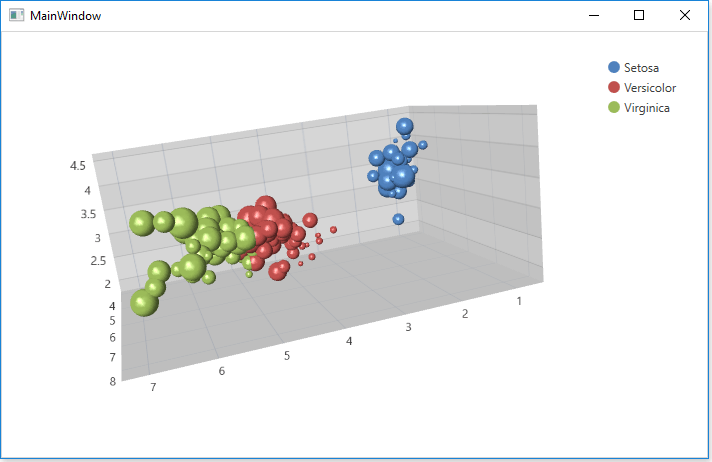
运行项目以查看结果,下图显示了应用程序运行时的结果图表。
DevExpress技术交流群2:775869749 欢迎一起进群讨论
 QQ群名片
QQ群名片
.png)
武汉格发信息技术有限公司,格发许可优化管理系统可以帮你评估贵公司软件许可的真实需求,再低成本合规性管理软件许可,帮助贵司提高软件投资回报率,为软件采购、使用提供科学决策依据。支持的软件有: CAD,CAE,PDM,PLM,Catia,Ugnx, AutoCAD, Pro/E, Solidworks 等。
 技术文档
技术文档
 推荐好文
推荐好文





 155-2731-8020




