


软件

产品


地图编辑这一部分还是挺复杂的,先看一下整个编辑过程的流程图(图1),再继续介绍每一步的细节 信息 和代码。
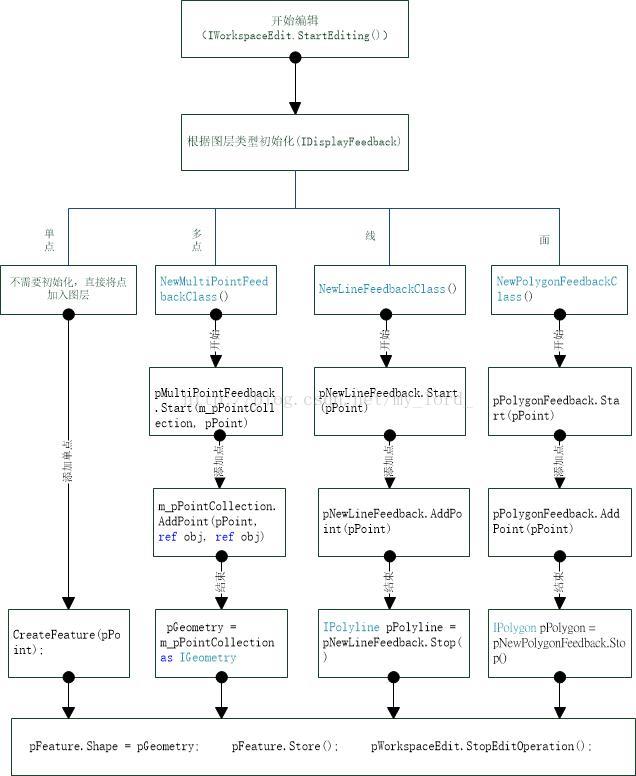
图1 流程图
具体步骤如下:
一、新建一个编辑工具栏
工具栏的 样式 如下,包括一下几个内容:编辑、选择、取消、重复、节点、移动、目标图层(Combox列表)、属性、保存、退出。各个控件的功能介绍如下:
编辑:该按钮是开始编辑按钮。
选择:单击该按钮可以选择地图上一定区域内的要素。
取消:取消本次编辑。
重复:回复上次编辑。
节点:对要素的节点信息进行编辑。
移动:移动选择的要素。
目标图层:显示当前地图中包含的矢量图层名。
属性:显示选择要素的属性信息。
保存:保存当前编辑内容。
退出:退出本次编辑。
在对地图编辑之前需要将当前MapControl中包含的地图传入该 类 中。因此需要在类的Load函数中获取需要编辑的地图。

二、地图编辑
不同的图层所具有的要素类型也不相同,整体可分为:单点、多点、线、面。在单击编辑时,打开编辑空间的开始编辑。
//开始编辑 public void StartEditing() { try { if (InEdit() == -1) return; if (!(m_pCurrentLayer is ESRI.ArcGIS.Carto.IGeoFeatureLayer)) return; ESRI.ArcGIS.Carto.IFeatureLayer pFeatureLayer = this.m_pCurrentLayer as ESRI.ArcGIS.Carto.IFeatureLayer; ESRI.ArcGIS.Geodatabase.IDataset pDataset = pFeatureLayer.FeatureClass as ESRI.ArcGIS.Geodatabase.IDataset; ESRI.ArcGIS.Geodatabase.IWorkspaceEdit pWorkspaceEdit = pDataset.Workspace as ESRI.ArcGIS.Geodatabase.IWorkspaceEdit; if (!pWorkspaceEdit.IsBeingEdited()) { pWorkspaceEdit.StartEditing(true); pWorkspaceEdit.EnableUndoRedo(); } } catch (Exception ex) { MessageBox.Show(ex.Message); } }以上包含了三步:
1.得到矢量图层中的要素类(FeatureClass);
2.将要素类转化为数据集(IDataset);
3.把要素集的工作空间转化为编辑工作空间,开始编辑(StartEditing(true))。其中true表示是否启用UndoRedo,真表示启用。下面就接着:EnableUndoRedo();
由于编辑时需要选择图层,就以目前图层中选择的图层作为当前编辑图层。然后根据图层的要素类型进行编辑:
//编辑 public void NewFeatureMouseDown(int x, int y) { ESRI.ArcGIS.Display.INewLineFeedback pNewLineFeedback; ESRI.ArcGIS.Display.INewMultiPointFeedback pMultiPointFeedback; ESRI.ArcGIS.Display.INewPolygonFeedback pPolygonFeedback; try { if (this.InEdit() == -1) return; ESRI.ArcGIS.Carto.IFeatureLayer pFeatureLayer = m_pCurrentLayer as ESRI.ArcGIS.Carto.IFeatureLayer; ESRI.ArcGIS.Carto.IActiveView pActiveView = m_pMap as ESRI.ArcGIS.Carto.IActiveView; ESRI.ArcGIS.Geometry.IPoint pPoint = pActiveView.ScreenDisplay.DisplayTransformation.ToMapPoint(x, y); if (!m_bInUse) { this.m_pMap.ClearSelection(); switch (pFeatureLayer.FeatureClass.ShapeType) { case (ESRI.ArcGIS.Geometry.esriGeometryType.esriGeometryPoint): CreateFeature(pPoint); break; case (ESRI.ArcGIS.Geometry.esriGeometryType.esriGeometryMultipoint): m_bInUse = true; this.m_pFeedback = new ESRI.ArcGIS.Display.NewMultiPointFeedbackClass(); pMultiPointFeedback = m_pFeedback as ESRI.ArcGIS.Display.INewMultiPointFeedback; m_pPointCollection = new ESRI.ArcGIS.Geometry.Multipoint(); pMultiPointFeedback.Start(m_pPointCollection, pPoint); break; case (ESRI.ArcGIS.Geometry.esriGeometryType.esriGeometryPolyline): m_bInUse = true; this.m_pFeedback = new ESRI.ArcGIS.Display.NewLineFeedbackClass(); pNewLineFeedback = m_pFeedback as ESRI.ArcGIS.Display.INewLineFeedback; pNewLineFeedback.Start(pPoint); break; case (ESRI.ArcGIS.Geometry.esriGeometryType.esriGeometryPolygon): m_bInUse = true; this.m_pFeedback = new ESRI.ArcGIS.Display.NewPolygonFeedbackClass(); pPolygonFeedback = m_pFeedback as ESRI.ArcGIS.Display.INewPolygonFeedback; pPolygonFeedback.Start(pPoint); break; } if (m_pFeedback != null) m_pFeedback.Display = pActiveView.ScreenDisplay; } else { if (this.m_pFeedback is ESRI.ArcGIS.Display.INewMultiPointFeedback) { object obj = System.Reflection.Missing.Value; m_pPointCollection.AddPoint(pPoint, ref obj, ref obj); } else if (this.m_pFeedback is ESRI.ArcGIS.Display.INewLineFeedback) { pNewLineFeedback = this.m_pFeedback as ESRI.ArcGIS.Display.INewLineFeedback; pNewLineFeedback.AddPoint(pPoint); } else if (this.m_pFeedback is ESRI.ArcGIS.Display.INewPolygonFeedback) { pPolygonFeedback = this.m_pFeedback as ESRI.ArcGIS.Display.INewPolygonFeedback; pPolygonFeedback.AddPoint(pPoint); } } } catch (Exception ex) { MessageBox.Show(ex.Message); } }结束编辑:
public void NewFeatureEnd() { ESRI.ArcGIS.Geometry.IGeometry pGeometry = null; ESRI.ArcGIS.Geometry.IPointCollection pPointCol = null; try { if (this.m_pFeedback is ESRI.ArcGIS.Display.INewMultiPointFeedback) { ESRI.ArcGIS.Display.INewMultiPointFeedback pNewMultiPointFeedback = m_pFeedback as ESRI.ArcGIS.Display.INewMultiPointFeedback; pNewMultiPointFeedback.Stop(); //返回值为Void pGeometry = this.m_pPointCollection as ESRI.ArcGIS.Geometry.IGeometry; } else if (this.m_pFeedback is ESRI.ArcGIS.Display.INewLineFeedback) { ESRI.ArcGIS.Display.INewLineFeedback pNewLineFeedback = this.m_pFeedback as ESRI.ArcGIS.Display.INewLineFeedback; ESRI.ArcGIS.Geometry.IPolyline pPolyline = pNewLineFeedback.Stop(); pPointCol = pPolyline as ESRI.ArcGIS.Geometry.IPointCollection; if (pPointCol.PointCount < 2) { MessageBox.Show("至少输入两个节点"); return; } else pGeometry = pPointCol as ESRI.ArcGIS.Geometry.IGeometry; } else if (this.m_pFeedback is ESRI.ArcGIS.Display.INewPolygonFeedback) { ESRI.ArcGIS.Display.INewPolygonFeedback pNewPolygonFeedback = this.m_pFeedback as ESRI.ArcGIS.Display.INewPolygonFeedback; ESRI.ArcGIS.Geometry.IPolygon pPolygon = pNewPolygonFeedback.Stop(); pPointCol = pPolygon as ESRI.ArcGIS.Geometry.IPointCollection; if (pPointCol.PointCount < 3) { MessageBox.Show("至少输入三个节点"); return; } else pGeometry = pPointCol as ESRI.ArcGIS.Geometry.IGeometry; } CreateFeature(pGeometry); m_pFeedback = null; m_bInUse = false; } catch (Exception ex) { MessageBox.Show(ex.Message); } }
结束编辑中的CreatFeature()函数:
public void CreateFeature(ESRI.ArcGIS.Geometry.IGeometry pGeometry) { try { if (pGeometry == null) return; if (this.m_pCurrentLayer == null) return; ESRI.ArcGIS.Geodatabase.IWorkspaceEdit pWorkspaceEdit = GetWorkspaceEdit(); ESRI.ArcGIS.Carto.IFeatureLayer pFeatureLayer = this.m_pCurrentLayer as ESRI.ArcGIS.Carto.IFeatureLayer; ESRI.ArcGIS.Geodatabase.IFeatureClass pFeatureClass = pFeatureLayer.FeatureClass; pWorkspaceEdit.StartEditOperation(); ESRI.ArcGIS.Geodatabase.IFeature pFeature = pFeatureClass.CreateFeature(); pFeature.Shape = pGeometry; pFeature.Store(); pWorkspaceEdit.StopEditOperation(); this.m_pMap.SelectFeature(this.m_pCurrentLayer, pFeature); ESRI.ArcGIS.Carto.IActiveView pActiveView = this.m_pMap as ESRI.ArcGIS.Carto.IActiveView; pActiveView.Refresh(); } catch (Exception ex) { MessageBox.Show(ex.Message); } }
整个大体的框架就是这样,其中含包含的具体细节信息我会在下一节中在做详细的介绍。
--------------------------------------------------------------------------------------end----------------------------------------------------------------------------------
免责声明:本文系网络转载或改编,未找到原创作者,版权归原作者所有。如涉及版权,请联系删
 技术文档
技术文档
 热门文章
热门文章





 155-2731-8020




