软件

产品


想要把unity做好的场景资源一键迁移到UE去做效果,重新放虚幻摆场景感觉浪费时间,一些比较普通的材质球再重新做一遍也觉得麻烦,不如写个工具一键导入。思路是把unity场景所有的资源和引用存成json,再在虚幻中读json重新生成这个资源并附上该有的材质就好了。思路有了,开整!
unity版本:2022.3.34
UE版本:5.4.4 需要下载插件Va rest
unity侧比较简单,一个脚本存场景信息就好。
代码块
using UnityEngine;
using UnityEditor;
using UnityEngine.SceneManagement;
using System.Collections.Generic;
using System.IO;

public class ExportSceneToUnreal_KeepSchema
{
    [MenuItem("Tools/Export Scene To Unreal")]
    static void Export()
    {
        var scene = SceneManager.GetActiveScene();
        if (!scene.isLoaded)
        {
            Debug.LogError("No active scene.");
            return;
        }

        List<ObjectInfo> results = new();

        foreach (var root in scene.GetRootGameObjects())
        {
            foreach (var r in root.GetComponentsInChildren<Renderer>(true))
            {
                if (!TryGetMeshAssetInfo(r, out string fbxPath, out string fbxBase, out string meshName))
                    continue;

                ObjectInfo info = new ObjectInfo();

                info.fbxPath = fbxPath.Replace("\\", "/").Replace("Assets/", "");
                info.ueMesh = BuildUEMeshName(fbxBase, meshName);

                var t = r.transform;
                info.pos = new float[] { t.position.x, t.position.y, t.position.z };
                info.rot = new float[] { t.eulerAngles.x, t.eulerAngles.y, t.eulerAngles.z };
                info.scale = new float[] { t.lossyScale.x, t.lossyScale.y, t.lossyScale.z };

                info.textures = CollectAllTextureProperties(r.sharedMaterials);

                results.Add(info);
            }
        }

        Wrapper wrapper = new Wrapper { objects = results };
        string json = JsonUtility.ToJson(wrapper, true);

        string outPath = EditorUtility.SaveFilePanel(
            "Export Scene JSON",
            Application.dataPath,
            scene.name + "_unreal.json",
            "json"
        );

        if (!string.IsNullOrEmpty(outPath))
        {
            File.WriteAllText(outPath, json);
            Debug.Log("导出完成: " + outPath);
        }
    }

    // ================= mesh =================
    static bool TryGetMeshAssetInfo(Renderer r, out string fbxPath, out string fbxBase, out string meshName)
    {
        fbxPath = null;
        fbxBase = null;
        meshName = null;

        Mesh mesh = null;

        if (r is MeshRenderer)
        {
            var mf = r.GetComponent<MeshFilter>();
            if (mf && mf.sharedMesh) mesh = mf.sharedMesh;
        }
        else if (r is SkinnedMeshRenderer smr)
        {
            if (smr.sharedMesh) mesh = smr.sharedMesh;
        }

        if (!mesh) return false;

        meshName = mesh.name;

        fbxPath = AssetDatabase.GetAssetPath(mesh);
        if (string.IsNullOrEmpty(fbxPath)) return false;

        fbxBase = Path.GetFileNameWithoutExtension(fbxPath);

        return true;
    }


    static string BuildUEMeshName(string fbxBase, string meshName)
    {
        return $"{fbxBase}_{meshName}";
    }

    // ================= textures =================
    // 扫描材质中所有 Texture 参数

    static TextureBlock CollectAllTextureProperties(Material[] mats)
    {
        TextureBlock block = new TextureBlock();

        foreach (var mat in mats)
        {
            if (!mat) continue;

            var shader = mat.shader;
            int count = ShaderUtil.GetPropertyCount(shader);

            for (int i = 0; i < count; i++)
            {
                if (ShaderUtil.GetPropertyType(shader, i) != ShaderUtil.ShaderPropertyType.TexEnv)
                    continue;

                string prop = ShaderUtil.GetPropertyName(shader, i);
                var tex = mat.GetTexture(prop);
                if (tex == null) continue;

                string path = AssetDatabase.GetAssetPath(tex);
                if (string.IsNullOrEmpty(path)) continue;

                block.items.Add(new TextureKV
                {
                    key = prop,
                    value = path.Replace("\\", "/").Replace("Assets/", "")
                });
            }
        }

        return block;
    }

    // ================= 数据结构 =================

    [System.Serializable]
    class Wrapper
    {
        public List<ObjectInfo> objects;
    }

    [System.Serializable]
    class ObjectInfo
    {
        public string fbxPath;
        public string ueMesh;
        public float[] pos;
        public float[] rot;
        public float[] scale;
        public TextureBlock textures;
    }

    [System.Serializable]
    class TextureBlock
    {
        public List<TextureKV> items = new();
    }

    [System.Serializable]
    class TextureKV
    {
        public string key;
        public string value;
    }
}
这里要注意几点,虚幻引擎中的资源名没有.fbx,并且我的fbx中的mesh可能不止一个,导入进去会变为展开的名字,比如我的fbx叫A.fbx,里面的mesh名一个叫A01一个叫A02,那么我BuildUEMeshName生成的名字会叫A_A01和A_A02,这样比较符合虚幻命名规则。
使用之后会生成一个格式如下的json文件就是成功啦。
代码块
{
    "objects": [
        {
            "fbxPath": "XXX/fbx/A.fbx",
            "ueMesh": "A_A01",
            "pos": [
                -10.131000518798829,
                0.026399999856948854,
                -3.6366002559661867
            ],
            "rot": [
                0.0,
                270.0,
                0.0
            ],
            "scale": [
                0.8700120449066162,
                0.8700120449066162,
                0.8700120449066162
            ],
            "textures": {
                "items": [
                    {
                        "key": "_BaseMap",
                        "value": "XXX/Texture/A_01_D.tga"
                    },
                    {
                        "key": "_NormalMap",
                        "value": "XXX/Texture/A_01_N.tga"
                    },
                    {
                        "key": "_MetallicGlossMap",
                        "value": "XXX/Texture/A_01_M.tga"
                    }
                ]
            }
        }
    }
}
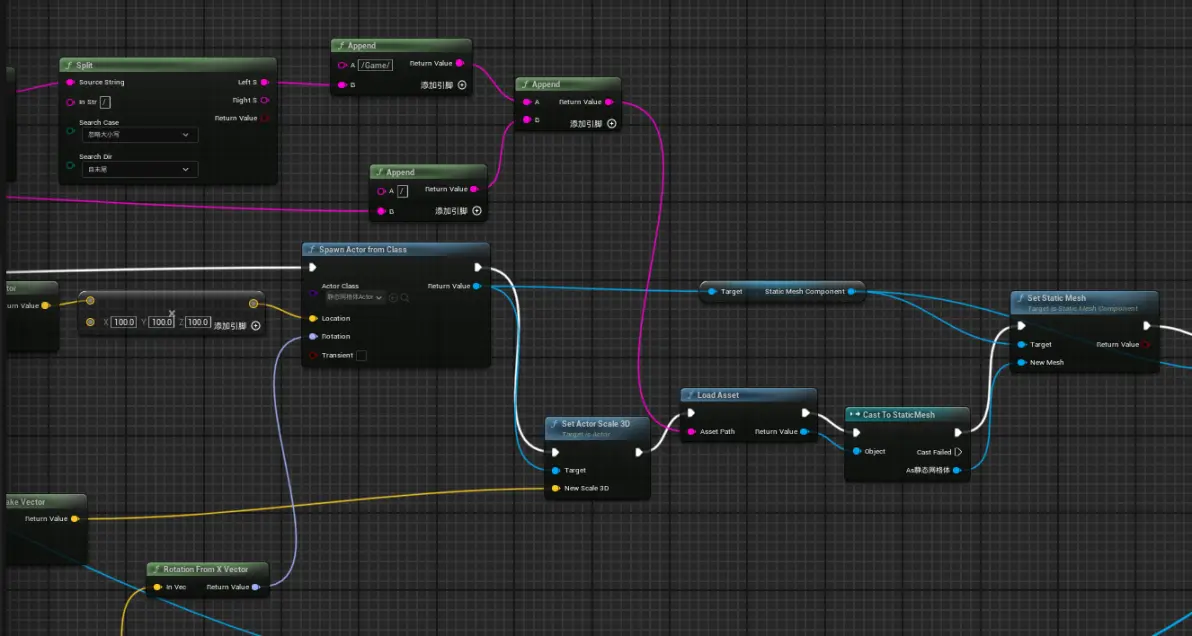
根据unity的路径需要存放对应的资源,比如unity是Assets/XXX/fbx/A.fbx,那么在虚幻中也需要新建Content/XXX/fbx/A这么一个资源,这个操作是准确无误找到我们资源并重建的基础。
然后就可以快乐地构建蓝图啦!
做了一个编辑器控件,放了一个button和一个文本,文本用来填我们unity输出的json路径,button用来执行操作,以下都写在这个button的点击事件上了。
首先是简单的获取json内容,虚幻我了解的不深,好像没有什么好的直接读json的方式,就使用了varest这个插件。读我们json的object中的内容(也就是全部,其实可以分开或者再添加什么内容都可以)。
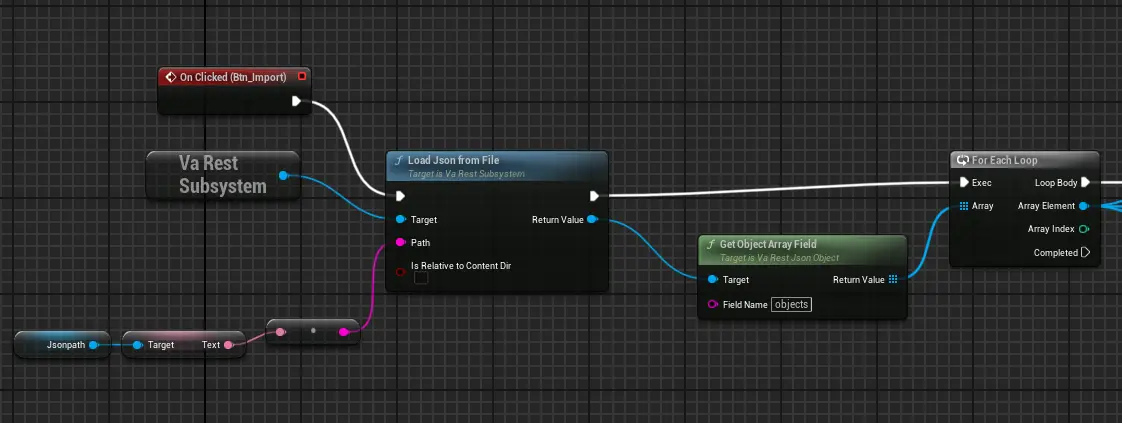
先取出我们的路径变为虚幻引擎中的路径

然后是我们的位置缩放旋转
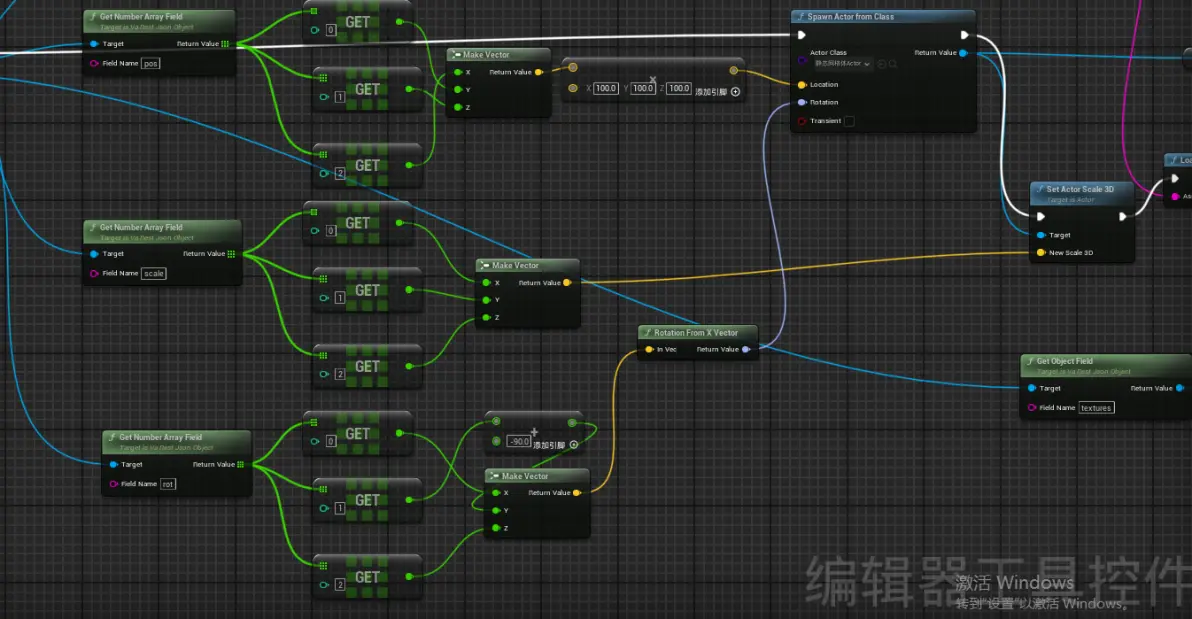
有了这些就足够我们还原出unity场景中每个gameobject的排布了。
接下来是给材质,和拿前面的一样的步骤去拿贴图信息,提前预设好一个父材质球,贴图命名和unity中设置的能对应即可。
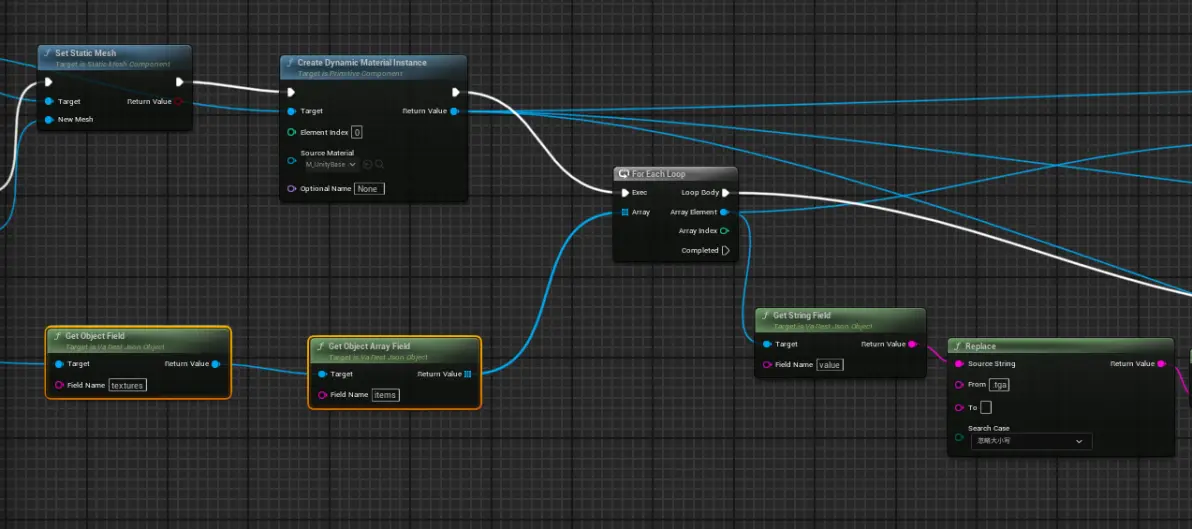
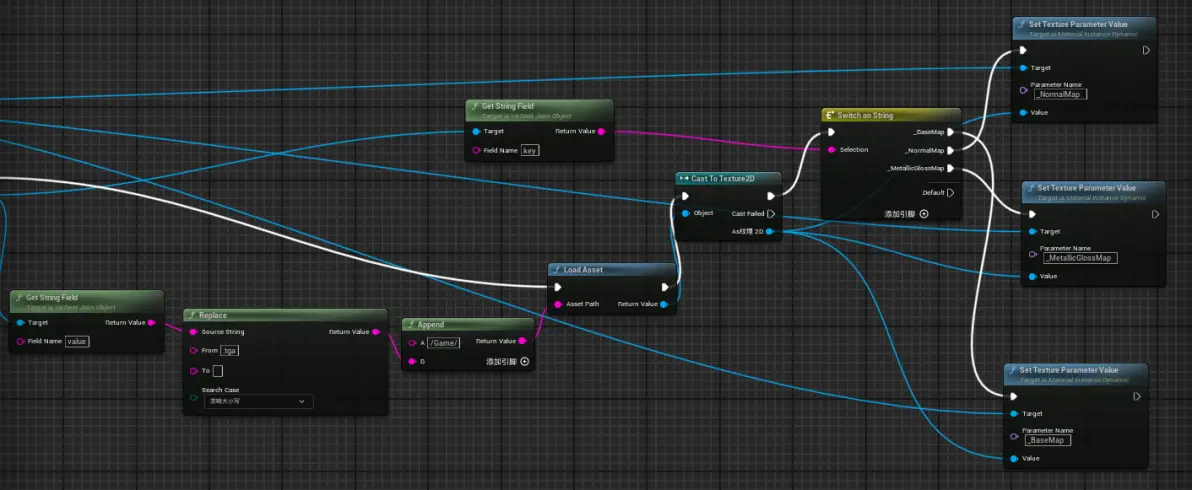
我比较懒,只做了base,normal和粗糙度金属度的贴图。注意:虚幻的法线y通道与unity中的相反,在父材质球中设置好即可。
免责声明:本文系网络转载或改编,未找到原创作者,版权归原作者所有。如涉及版权,请联系删
 技术文档
 推荐好文



 155-2731-8020