


软件

产品


硬件: Nvidia Orin NX 16GB
软件:Jetson Linux R35.3.1
GPU 的压力测试主要使用工具:
https://github.com/anseeto/jetson-gpu-burn
CPU的压力测试主要使用工具 stress
注意安装 jetson-gpu-burn需要在 /etc/apt/sources.list 添加如下源:
root@w:~# cat /etc/apt/sources.list.d/nvidia-l4t-apt-source.list # SPDX-FileCopyrightText: Copyright (c) 2019-2021 NVIDIA CORPORATION & AFFILIATES. All rights reserved.# SPDX-License-Identifier: LicenseRef-NvidiaProprietary## NVIDIA CORPORATION, its affiliates and licensors retain all intellectual# property and proprietary rights in and to this material, related# documentation and any modifications thereto. Any use, reproduction,# disclosure or distribution of this material and related documentation# without an express license agreement from NVIDIA CORPORATION or# its affiliates is strictly prohibited. deb https://repo.download.nvidia.com/jetson/common r35.3 maindeb https://repo.download.nvidia.com/jetson/t234 r35.3 main简单点操作:
cat /etc/apt/sources.list.d/nvidia-l4t-apt-source.list >> /etc/apt/sources.list然后执行如下安装命令进行安装
sudo apt-get updatesudo apt-get install cuda-toolkit-11-4sudo apt-get install stresssudo apt-get -y install pipsudo apt-get -y install python-pipsudo -H pip install -U jetson-stats在设备上 下载 jetson-gpu-burn 源码进行编译
git clone https://github.com/anseeto/jetson-gpu-burn.git cd jetson-gpu-burn make 编译成功会生成一个 gpu_burn 的二进制可执行程序,执行该程序即可跑满gpu.
跑满CPU:8个核
root@w:~# stress -c 8 &[1] 3302root@w:~# stress: info: [3302] dispatching hogs: 8 cpu, 0 io, 0 vm, 0 hdd跑满GPU:
root@w:~/jetson-gpu-burn# ./gpu_burn 1000Run length not specified in the command line. Burning for 10 secs执行jtop命令观察
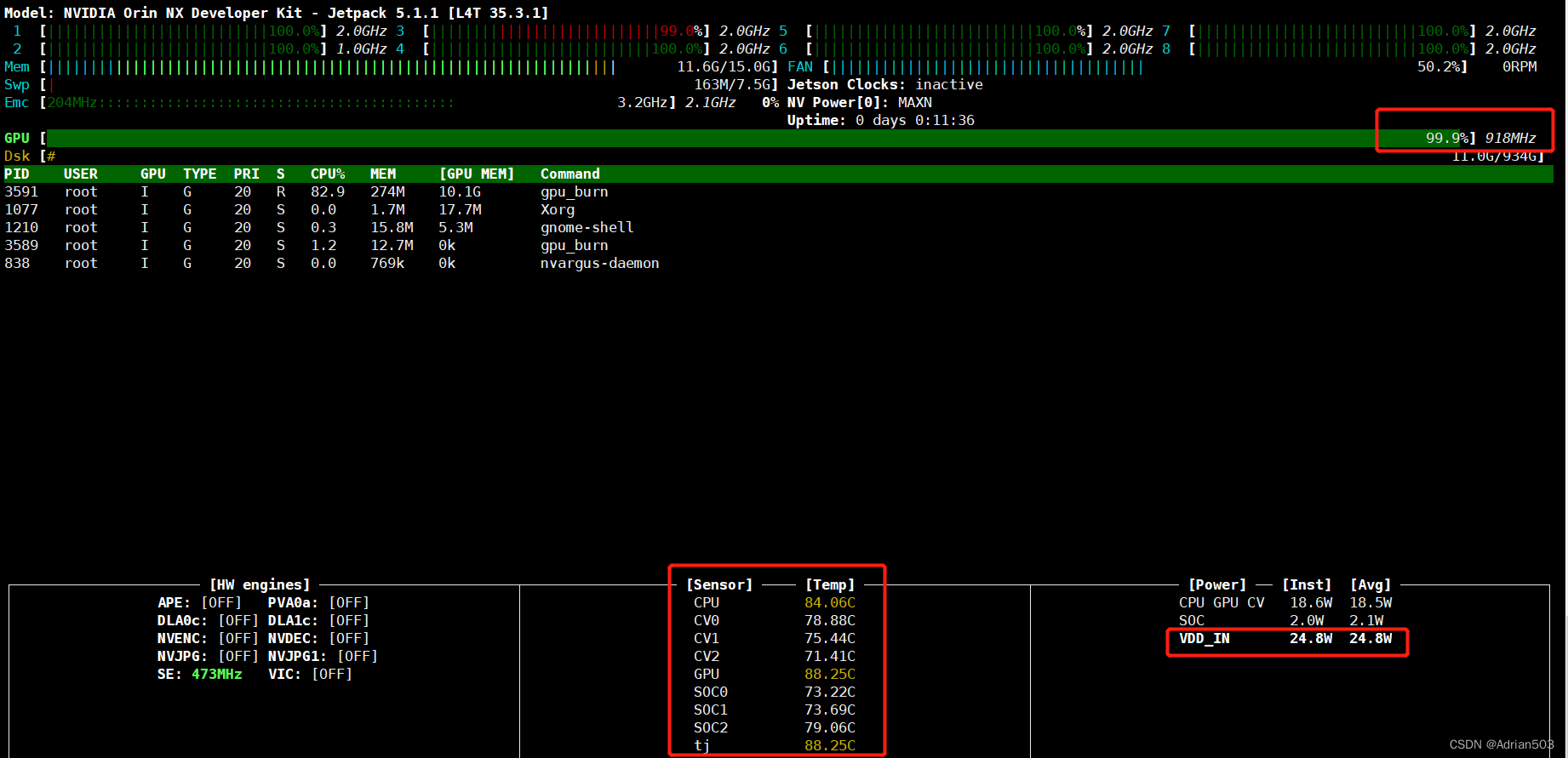
可以看到我们设备的电源模式是最大功率MAXN的模式,GPU 918MHz和CPU 2.0GHz 8个核都已经全负荷工作,此时实时的功率24.8W左右,CPU和GPU的温度可以实时看到。
如果设备的散热性能不好的话,CPU和GPU的温度会很高,可能会影响性能表现,比如GPU和CPU会在高温时出现降频。
下面是Orin Nx模块的最大性能和工作温度范围:
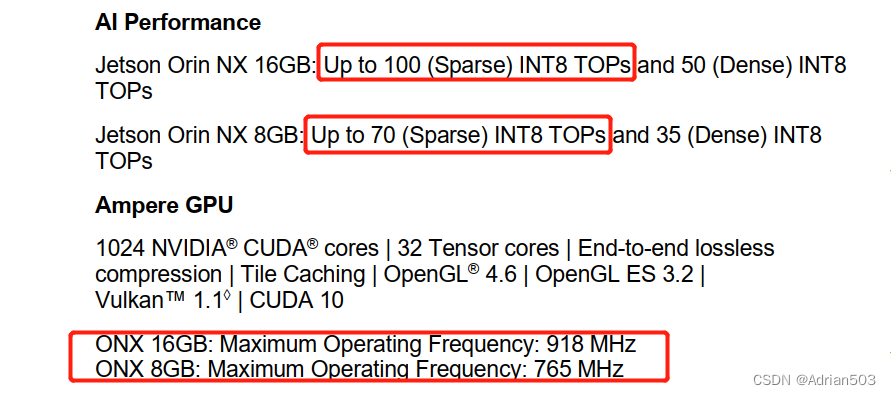
 如果要Orin Nx达到最大性能,设备的散热问题做好设计是不可忽略的。
root@w:~# jtop Traceback (most recent call last): File "/usr/local/bin/jtop", line 8, in <module> sys.exit(main()) File "/usr/local/lib/python3.8/dist-packages/jtop/__main__.py", line 159, in main curses.wrapper(JTOPGUI, jetson, pages, init_page=args.page, File "/usr/lib/python3.8/curses/__init__.py", line 105, in wrapper return func(stdscr, *args, **kwds) File "/usr/local/lib/python3.8/dist-packages/jtop/gui/jtopgui.py", line 79, in __init__ NColors(color_filter) File "/usr/local/lib/python3.8/dist-packages/jtop/gui/lib/colors.py", line 43, in __init__ curses.init_pair(NColors.RED, curses.COLOR_RED if not color_filter else curses.COLOR_BLUE, curses.COLOR_BLACK)_curses.error: init_pair() returned ERR解决办法:
export TERM='xterm-256color'
root@w:~# jtop The jtop.service is not active. Please run:sudo systemctl restart jtop.service解决方法:
systemctl restart jtop.service
免责声明:本文系网络转载或改编,未找到原创作者,版权归原作者所有。如涉及版权,请联系删
 技术文档
技术文档
 推荐好文
推荐好文





 155-2731-8020




