


软件

产品


import networkx as nximport matplotlib.pyplot as pltG = nx.Graph()#创建空图G.add_node(5)#添加一个节点G.add_nodes_from([6,7])#添加一个节点列表#从任何一个可以迭代的节点容器里添加G = nx.Graph()H = nx.path_graph(20)#H 是一个有5个节点的链状图,就是首尾相连的图G.add_nodes_from(H)nx.draw(G)plt.show() 
h = nx .path_graph(10)
g.add_nodes_from( h) #添加一个能够迭代的 集合 (例如:list, set, graph, file等等),这样g中包含了h中的元素
#从set集合里添加G =nx.Graph()t = set("Hello")#set不可以重复G.add_nodes_from(t)# 添加一个能够迭代的集合(例如:list, set, graph, file等等),这样g中包含了h中的元素nx.draw(G)plt.show() 
#做删除操作#1节点的删除G.remove_node(1)G.remove_nodes_from([5,6])#可以通过一个一个添加或者是元组,列表G = nx.Graph()G.add_edge(1,2)G.add_edges_from([(1,3),(3,4)])H=nx.path_graph(6)G.add_edges_from(H.edges())nx.draw(G)plt.show()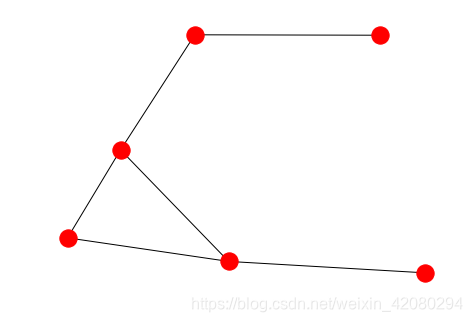
G = nx.Graph()G.add_nodes_from([1,2,3,4])G.add_edges_from(([(1,2),(1,3),(5,6),('a','b'),(11,22),(33,44),(55,66)]))nx.draw(G)plt.show()print('节点个数是:',G.number_of_nodes())print("*"*30)print('边的个数是:',G.number_of_edges())print("*"*30)print("节点分别是:",G.nodes())print('*'*30)print('边有那些:',G.edges())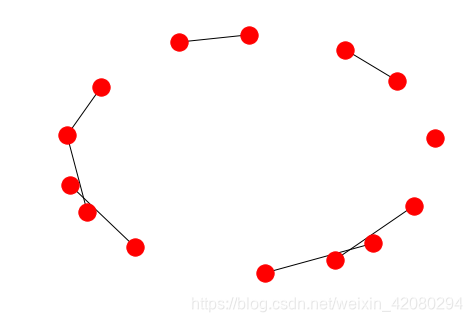
节点个数是: 14******************************边的个数是: 7******************************节点分别是: [1, 2, 3, 4, 5, 6, 'a', 'b', 11, 22, 33, 44, 55, 66]******************************边有那些: [(1, 2), (1, 3), (5, 6), ('a', 'b'), (11, 22), (33, 44), (55, 66)]#每个图、节点和边都可以在相关的属性字典中保存键/值属性对(键必须是可哈希的)。
#默认情况下,它们是空的,但是可以使用add_edge、
#add_node或分别对名为graph、node和edge的属性字典进行直接操作来添加或更改它们
G = nx.Graph(day='friday')G.graph{'day': 'friday'}
******************************
[(1, {}), (2, {}), (3, {}), (4, {}), (0, {}), (5, {})]
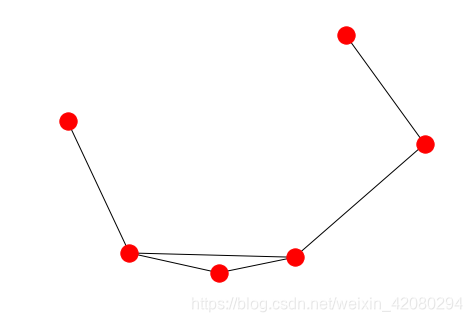
#加权图G = nx.Graph()G.add_node(0)G.add_node(1,weight = 2)G.add_node(2,weight = 4)#dict(G.nodes(data='weight', default=1))dict(G.nodes(data='weight'))#以字典返回 {0: {}, 1: {'weight': 2}, 2: {'weight': 4}}
#查看节点属性list(G.nodes(data=True))[(1, {'time': '5pm', 'rome': 110}), (3, {'time': '2pm'}), (2, {}), (4, {}), (5, {})]
#查看边属性list(G.edges(data=True))[(1, 2, {'weight': 4.7, 'color': 'blue'}),
(3, 4, {'color': 'red'}),
(3, 2, {'weight': 8}),
(4, 5, {'color': 'red'})]
# 计算 节点长度
len(G)
G = nx.path_graph(4)G.has_edge(0,1)#判断边是否有True
G.get_edge_data('a','b',default = 0)# edge not in graph return 00
#遍历边的情况G = nx.Graph()G.add_edge('a','b',weight=7)G['a']#求有节点a 的边{'b': {'weight': 7}}
G =nx.Graph()G.add_edge('a','b',weight = 2)G.add_edge('b','c',weight = 4) print(G.size())print(G.size(weight='weight'))2
6.0
有G.copy和G.deepcopy问题
#Graph.copy 浅拷贝G = nx.path_graph(5)H = G.copy()print(H.edges())#H = G.copy(as_view = False)print(H.edges())H = nx.Graph(G)H = G.__class__(G)print(H.edges())#将无向图复制为有向图G = nx.Graph()G.add_edge(0, 1)H = G.to_directed()print(list(H.edges()))print(list(G.nodes()))[(0, 1), (1, 0)]
[0, 1]
#有向图的复制情况G = nx.DiGraph()G.add_edge(0, 1)H = G.to_directed()list(H.edges())[(0, 1)]
G = nx.path_graph(4)H = G.subgraph([0, 1, 2])list(H.edges())[(0, 1), (1, 2)]
#图形G = nx.cubical_graph()plt.subplot(122)nx.drawnx.draw(G,pos = nx.circular_layout(G),nodecolor = 'r',edge_color = 'b')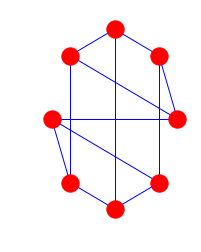
DiGraph类针对有向edge提供了另外的方法,例如:out_edges(), in_degree(),predecessors(),successors()等。为了是算法能够正常运行,有向版本的neighbors()和degree()对于seccessor()方法是相同的。in_degree()和out_degree()都是独自的。
G = nx.DiGraph()G.add_weighted_edges_from([(1,2,0.5),(2,3,1.5)])print(G.out_degree(2,weight="weight"))#出度print(G.degree(2,weight='weight'))#print(G.seccessors(1))print(G.neighbors(1))1.5
2.0
[2]
注:一些算法只对有向grapsh起作用,其他算法没有明确定义。同时使用有向graph和无向graph是非常危险的事情。如果想将有向graph 转换 为无向graph可以使用
Graph.to_undirected()#orh = nx.Graph(G)NetworkX提供了类来实现一对node之间存在多个edge的实现类:MultiGraph和MultiDiGraph,他们都允许使用的edge数据添加多个的edge。对于某些应这个特性非常有用,但是很多算法在这种graph中并没有明确定义。
MG = nx.MultiGraph()MG.add_weighted_edges_from([(1,2,0.5),(2,3,2.0),(2,4,3.3)])#直接添加节点和权重print(MG.degree(weight='weight')){1: 0.5, 2: 5.8, 3: 2.0, 4: 3.3}
最短路径长度#a-b最短的路径
GG=nx.Graph()for n,nbrs in MG.adjacency_iter(): for nbr,edict in nbrs.items(): minvalue=min([d['weight'] for d in edict.values()]) GG.add_edge(n,nbr, weight = minvalue)print(nx.shortest_path(GG,1,3))[1, 2, 3]
免责声明:本文系网络转载或改编,未找到原创作者,版权归原作者所有。如涉及版权,请联系删
 技术文档
技术文档
 推荐好文
推荐好文





 155-2731-8020




