


软件

产品


安装完Matlab R2016a一个多月了,一直用得好好的。昨天用着用着突然崩溃了。关闭重启都无效。打开MATLAB没有问题,但是打开simulink后就蹦出错误:
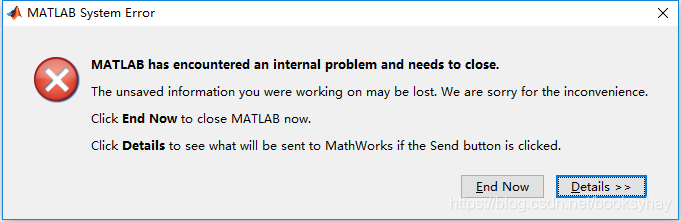
crash dump崩溃日志:
------------------------------------------------------------------------ Assertion detected at Wed Jan 30 08:21:16 2019------------------------------------------------------------------------ Configuration: Crash Decoding : Disabled Crash Mode : continue (default) Current Graphics Driver: Unknown software Default Encoding : GBK Graphics card 1 : Advanced Micro Devices, Inc. ( 0x1002 ) Radeon (TM) R5 M430 Version 21.19.128.4 Graphics card 2 : Intel Corporation ( 0x8086 ) Intel(R) HD Graphics 620 Version 24.20.100.6286 Host Name : xxxx Java Crash Report : C:\Users\xxxx\AppData\Local\Temp\hs_error_pid1192.log MATLAB Architecture : win64 MATLAB Root : D:\Program Files\MATLAB\R2016a MATLAB Version : 9.0.0.341360 (R2016a) OpenGL : software Operating System : Microsoft Windows 10 专业版 Processor ID : x86 Family 6 Model 142 Stepping 9, GenuineIntel Virtual Machine : Java 1.7.0_60-b19 with Oracle Corporation Java HotSpot(TM) 64-Bit Server VM mixed mode Window System : Version 10.0 (Build 16299) Fault Count: 1 Assertion in void __cdecl `anonymous-namespace'::mwJavaAbort(void) at b:\matlab\src\jmi\jmi\javainit.cpp line 1389:Fatal Java Exception. See Java Crash Report for details. Register State (captured): RAX = 0000000012d8d001 RBX = 0000000000000000 RCX = 0000000170022010 RDX = 0000000000000000 RSP = 0000000170021b80 RBP = 00000000275fd8a0 RSI = 0000000170022650 RDI = 0000000012d7cfb8 R8 = 0000000000000000 R9 = 00007ffb0afc0000 R10 = 0000000012d7d008 R11 = 0000000012d7d008 R12 = 00000000275fd8a0 R13 = 0000000043dc0000 R14 = 0000000012d8d088 R15 = 0000000012d8d008 RIP = 0000000012bb961a EFL = 00000202 CS = 0033 FS = 0053 GS = 002b Stack Trace (captured):[ 0] 0x0000000012bb961a https://www.gofarlic.com\Program Files\MATLAB\R2016a\bin\win64\libmwfl.dll+00103962[ 1] 0x0000000012bb5b58 https://www.gofarlic.com\Program Files\MATLAB\R2016a\bin\win64\libmwfl.dll+00088920[ 2] 0x0000000012bb54a7 https://www.gofarlic.com\Program Files\MATLAB\R2016a\bin\win64\libmwfl.dll+00087207[ 3] 0x0000000012bb9068 https://www.gofarlic.com\Program Files\MATLAB\R2016a\bin\win64\libmwfl.dll+00102504[ 4] 0x000000002759ffc7 https://www.gofarlic.com\Program Files\MATLAB\R2016a\bin\win64\jmi.dll+00589767[ 5] 0x0000000069857b6d https://www.gofarlic.com\Program Files\MATLAB\R2016a\sys\java\jre\win64\jre\bin\server\jvm.dll+02390893[ 6] 0x0000000069840ad8 https://www.gofarlic.com\Program Files\MATLAB\R2016a\sys\java\jre\win64\jre\bin\server\jvm.dll+02296536[ 7] 0x00000000698588e6 https://www.gofarlic.com\Program Files\MATLAB\R2016a\sys\java\jre\win64\jre\bin\server\jvm.dll+02394342[ 8] 0x000000006985c2d8 https://www.gofarlic.com\Program Files\MATLAB\R2016a\sys\java\jre\win64\jre\bin\server\jvm.dll+02409176[ 9] 0x00000000698f3a48 https://www.gofarlic.com\Program Files\MATLAB\R2016a\sys\java\jre\win64\jre\bin\server\jvm.dll+03029576[ 10] 0x00007ffb1ab74ecd C:\WINDOWS\SYSTEM32\ntdll.dll+00675533[ 11] 0x00007ffb1aaf6058 C:\WINDOWS\SYSTEM32\ntdll.dll+00155736[ 12] 0x00007ffb1ab73dfe C:\WINDOWS\SYSTEM32\ntdll.dll+00671230[ 13] 0x00000000a79806be C:\WINDOWS\System32\DriverStore\FileRepository\c0308878.inf_amd64_79c2f81f9ef16d16\atio6axx.dll+16254654[ 14] 0x00000000a7980686 C:\WINDOWS\System32\DriverStore\FileRepository\c0308878.inf_amd64_79c2f81f9ef16d16\atio6axx.dll+16254598[ 15] 0x00000000a6c7ec7d C:\WINDOWS\System32\DriverStore\FileRepository\c0308878.inf_amd64_79c2f81f9ef16d16\atio6axx.dll+02616445[ 16] 0x00000000a77ec3b1 C:\WINDOWS\System32\DriverStore\FileRepository\c0308878.inf_amd64_79c2f81f9ef16d16\atio6axx.dll+14599089[ 17] 0x00000000a77ec588 C:\WINDOWS\System32\DriverStore\FileRepository\c0308878.inf_amd64_79c2f81f9ef16d16\atio6axx.dll+14599560[ 18] 0x00000000a77ebfa8 C:\WINDOWS\System32\DriverStore\FileRepository\c0308878.inf_amd64_79c2f81f9ef16d16\atio6axx.dll+14598056[ 19] 0x00000000a6b5193b C:\WINDOWS\System32\DriverStore\FileRepository\c0308878.inf_amd64_79c2f81f9ef16d16\atio6axx.dll+01382715[ 20] 0x00000000a6b50c67 C:\WINDOWS\System32\DriverStore\FileRepository\c0308878.inf_amd64_79c2f81f9ef16d16\atio6axx.dll+01379431[ 21] 0x00007ffb0a7c6dcc C:\WINDOWS\SYSTEM32\OPENGL32.dll+00159180[ 22] 0x00007ffb0a7c716b C:\WINDOWS\SYSTEM32\OPENGL32.dll+00160107[ 23] 0x00007ffb0a7da659 C:\WINDOWS\SYSTEM32\OPENGL32.dll+00239193[ 24] 0x00007ffb170734ac C:\WINDOWS\System32\gdi32full.dll+00537772[ 25] 0x0000000043dd3150 <unknown-module>+00000000[ 26] 0x00000007e4604318 <unknown-module>+00000000[ 27] 0x000000017002f170 <unknown-module>+00000000[ 28] 0x00000007e4601378 <unknown-module>+00000000[ 29] 0x0000000043dc6274 <unknown-module>+00000000 If this problem is reproducible, please submit a Service Request via: http://www.mathworks.com/support/contact_us/ A technical support engineer might contact you with further information. Thank you for your help.打开java crash report,内容为:
------------------------------------------------------------------------ Assertion detected at Wed Jan 30 08:21:16 2019------------------------------------------------------------------------ Configuration: Crash Decoding : Disabled Crash Mode : continue (default) Current Graphics Driver: Unknown software Default Encoding : GBK Graphics card 1 : Advanced Micro Devices, Inc. ( 0x1002 ) Radeon (TM) R5 M430 Version 21.19.128.4 Graphics card 2 : Intel Corporation ( 0x8086 ) Intel(R) HD Graphics 620 Version 24.20.100.6286 Host Name : xxxx Java Crash Report : C:\Users\xxxx\AppData\Local\Temp\hs_error_pid1192.log MATLAB Architecture : win64 MATLAB Root : D:\Program Files\MATLAB\R2016a MATLAB Version : 9.0.0.341360 (R2016a) OpenGL : software Operating System : Microsoft Windows 10 专业版 Processor ID : x86 Family 6 Model 142 Stepping 9, GenuineIntel Virtual Machine : Java 1.7.0_60-b19 with Oracle Corporation Java HotSpot(TM) 64-Bit Server VM mixed mode Window System : Version 10.0 (Build 16299) Fault Count: 1 Assertion in void __cdecl `anonymous-namespace'::mwJavaAbort(void) at b:\matlab\src\jmi\jmi\javainit.cpp line 1389:Fatal Java Exception. See Java Crash Report for details. Register State (captured): RAX = 0000000012d8d001 RBX = 0000000000000000 RCX = 0000000170022010 RDX = 0000000000000000 RSP = 0000000170021b80 RBP = 00000000275fd8a0 RSI = 0000000170022650 RDI = 0000000012d7cfb8 R8 = 0000000000000000 R9 = 00007ffb0afc0000 R10 = 0000000012d7d008 R11 = 0000000012d7d008 R12 = 00000000275fd8a0 R13 = 0000000043dc0000 R14 = 0000000012d8d088 R15 = 0000000012d8d008 RIP = 0000000012bb961a EFL = 00000202 CS = 0033 FS = 0053 GS = 002b Stack Trace (captured):[ 0] 0x0000000012bb961a https://www.gofarlic.com\Program Files\MATLAB\R2016a\bin\win64\libmwfl.dll+00103962[ 1] 0x0000000012bb5b58 https://www.gofarlic.com\Program Files\MATLAB\R2016a\bin\win64\libmwfl.dll+00088920[ 2] 0x0000000012bb54a7 https://www.gofarlic.com\Program Files\MATLAB\R2016a\bin\win64\libmwfl.dll+00087207[ 3] 0x0000000012bb9068 https://www.gofarlic.com\Program Files\MATLAB\R2016a\bin\win64\libmwfl.dll+00102504[ 4] 0x000000002759ffc7 https://www.gofarlic.com\Program Files\MATLAB\R2016a\bin\win64\jmi.dll+00589767[ 5] 0x0000000069857b6d https://www.gofarlic.com\Program Files\MATLAB\R2016a\sys\java\jre\win64\jre\bin\server\jvm.dll+02390893[ 6] 0x0000000069840ad8 https://www.gofarlic.com\Program Files\MATLAB\R2016a\sys\java\jre\win64\jre\bin\server\jvm.dll+02296536[ 7] 0x00000000698588e6 https://www.gofarlic.com\Program Files\MATLAB\R2016a\sys\java\jre\win64\jre\bin\server\jvm.dll+02394342[ 8] 0x000000006985c2d8 https://www.gofarlic.com\Program Files\MATLAB\R2016a\sys\java\jre\win64\jre\bin\server\jvm.dll+02409176[ 9] 0x00000000698f3a48 https://www.gofarlic.com\Program Files\MATLAB\R2016a\sys\java\jre\win64\jre\bin\server\jvm.dll+03029576[ 10] 0x00007ffb1ab74ecd C:\WINDOWS\SYSTEM32\ntdll.dll+00675533[ 11] 0x00007ffb1aaf6058 C:\WINDOWS\SYSTEM32\ntdll.dll+00155736[ 12] 0x00007ffb1ab73dfe C:\WINDOWS\SYSTEM32\ntdll.dll+00671230[ 13] 0x00000000a79806be C:\WINDOWS\System32\DriverStore\FileRepository\c0308878.inf_amd64_79c2f81f9ef16d16\atio6axx.dll+16254654[ 14] 0x00000000a7980686 C:\WINDOWS\System32\DriverStore\FileRepository\c0308878.inf_amd64_79c2f81f9ef16d16\atio6axx.dll+16254598[ 15] 0x00000000a6c7ec7d C:\WINDOWS\System32\DriverStore\FileRepository\c0308878.inf_amd64_79c2f81f9ef16d16\atio6axx.dll+02616445[ 16] 0x00000000a77ec3b1 C:\WINDOWS\System32\DriverStore\FileRepository\c0308878.inf_amd64_79c2f81f9ef16d16\atio6axx.dll+14599089[ 17] 0x00000000a77ec588 C:\WINDOWS\System32\DriverStore\FileRepository\c0308878.inf_amd64_79c2f81f9ef16d16\atio6axx.dll+14599560[ 18] 0x00000000a77ebfa8 C:\WINDOWS\System32\DriverStore\FileRepository\c0308878.inf_amd64_79c2f81f9ef16d16\atio6axx.dll+14598056[ 19] 0x00000000a6b5193b C:\WINDOWS\System32\DriverStore\FileRepository\c0308878.inf_amd64_79c2f81f9ef16d16\atio6axx.dll+01382715[ 20] 0x00000000a6b50c67 C:\WINDOWS\System32\DriverStore\FileRepository\c0308878.inf_amd64_79c2f81f9ef16d16\atio6axx.dll+01379431[ 21] 0x00007ffb0a7c6dcc C:\WINDOWS\SYSTEM32\OPENGL32.dll+00159180[ 22] 0x00007ffb0a7c716b C:\WINDOWS\SYSTEM32\OPENGL32.dll+00160107[ 23] 0x00007ffb0a7da659 C:\WINDOWS\SYSTEM32\OPENGL32.dll+00239193[ 24] 0x00007ffb170734ac C:\WINDOWS\System32\gdi32full.dll+00537772[ 25] 0x0000000043dd3150 <unknown-module>+00000000[ 26] 0x00000007e4604318 <unknown-module>+00000000[ 27] 0x000000017002f170 <unknown-module>+00000000[ 28] 0x00000007e4601378 <unknown-module>+00000000[ 29] 0x0000000043dc6274 <unknown-module>+00000000 If this problem is reproducible, please submit a Service Request via: http://www.mathworks.com/support/contact_us/ A technical support engineer might contact you with further information. Thank you for your help.
上网查了一下,有各种说法。最有用的几条是:
https://ww2.mathworks.cn/matlabcentral/answers/258814-matlab-2015a-crashes-while-installing-b-r-automation-studio-simulink
https://ww2.mathworks.cn/support/bugreports/1112746
查看了一下本机的显卡,确实有一个是 AMD 的。
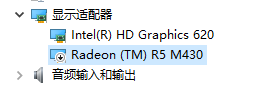
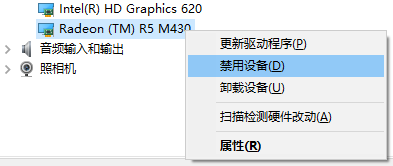
把它禁用之后,再试一下,果然好了。
免责声明:本文系网络转载或改编,未找到原创作者,版权归原作者所有。如涉及版权,请联系删
 技术文档
技术文档
 推荐好文
推荐好文





 155-2731-8020




