


软件

产品


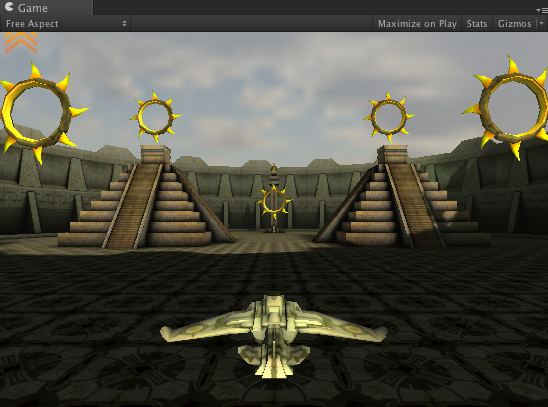
导出Unity场景的所有游戏对象信息,一种是XML一种是JSON。本篇文章我们把游戏场景中游戏对象的、旋转、缩放、平移与Prefab的名称导出在XML与JSON中。然后解析刚刚导出的XML或JSON通过脚本把导出的游戏场景还原。在Unity官网上下载随便下载一个demo Project,如下图所示这是我刚刚在官网上下载的一个范例程序。
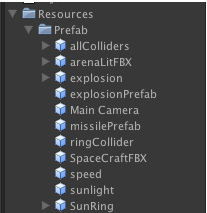
接着将层次视图中的所有游戏对象都封装成Prefab保存在资源路径中,这里注意一下如果你的Prefab绑定的脚本中有public Object 的话 ,需要在代码中改一下。。用 Find() FindTag()这类方法在脚本中Awake()方法中来拿,不然Prefab动态加载的时候无法赋值的,如下图所示,我把封装的Prefab对象都放在了Resources/Prefab文件夹下。
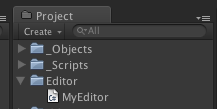
OK,现在我们就需要编写我们的导出工具、在Project视图中创建Editor文件夹,接着创建脚本MyEditor 。如下图所示。
因为编辑的游戏场景数量比较多,导出的时候我们需要遍历所有的游戏场景,一个一个的读取场景信息。然后取得游戏场景中所有游戏对象的Prefab的 名称 旋转 缩放 平移。有关XML的使用请大家看我的上一篇文章: Unity3D 使用 C#合成解析XML与JSON 代码中我只注释重点的部分,嘿嘿。
MyEditor.cs
- using UnityEngine;
- using System.Collections;
- using UnityEditor;
- using System.Collections.Generic;
- using System.Xml;
- using System.IO;
- using System.Text;
- using LitJson;
- public class MyEditor : Editor
- {
- //将所有游戏场景导出为XML格式
- [MenuItem ("GameObject/ExportXML")]
- static void ExportXML ()
- {
- string filepath = Application.dataPath + @"/StreamingAssets/my.xml";
- if(!File.Exists (filepath))
- {
- File.Delete(filepath);
- }
- XmlDocument xmlDoc = new XmlDocument();
- XmlElement root = xmlDoc.CreateElement("gameObjects");
- //遍历所有的游戏场景
- foreach (UnityEditor.EditorBuildSettingsScene S in UnityEditor.EditorBuildSettings.scenes)
- {
- //当关卡启用
- if (S.enabled)
- {
- //得到关卡的名称
- string name = S.path;
- //打开这个关卡
- EditorApplication.OpenScene(name);
- XmlElement scenes = xmlDoc.CreateElement("scenes");
- scenes.SetAttribute("name",name);
- foreach (GameObject obj in Object.FindObjectsOfType(typeof(GameObject)))
- {
- if (obj.transform.parent == null)
- {
- XmlElement gameObject = xmlDoc.CreateElement("gameObjects");
- gameObject.SetAttribute("name",obj.name);
-
- gameObject.SetAttribute("asset",obj.name + ".prefab");
- XmlElement transform = xmlDoc.CreateElement("transform");
- XmlElement position = xmlDoc.CreateElement("position");
- XmlElement position_x = xmlDoc.CreateElement("x");
- position_x.InnerText = obj.transform.position.x+"";
- XmlElement position_y = xmlDoc.CreateElement("y");
- position_y.InnerText = obj.transform.position.y+"";
- XmlElement position_z = xmlDoc.CreateElement("z");
- position_z.InnerText = obj.transform.position.z+"";
- position.AppendChild(position_x);
- position.AppendChild(position_y);
- position.AppendChild(position_z);
-
- XmlElement rotation = xmlDoc.CreateElement("rotation");
- XmlElement rotation_x = xmlDoc.CreateElement("x");
- rotation_x.InnerText = obj.transform.rotation.eulerAngles.x+"";
- XmlElement rotation_y = xmlDoc.CreateElement("y");
- rotation_y.InnerText = obj.transform.rotation.eulerAngles.y+"";
- XmlElement rotation_z = xmlDoc.CreateElement("z");
- rotation_z.InnerText = obj.transform.rotation.eulerAngles.z+"";
- rotation.AppendChild(rotation_x);
- rotation.AppendChild(rotation_y);
- rotation.AppendChild(rotation_z);
-
- XmlElement scale = xmlDoc.CreateElement("scale");
- XmlElement scale_x = xmlDoc.CreateElement("x");
- scale_x.InnerText = obj.transform.localScale.x+"";
- XmlElement scale_y = xmlDoc.CreateElement("y");
- scale_y.InnerText = obj.transform.localScale.y+"";
- XmlElement scale_z = xmlDoc.CreateElement("z");
- scale_z.InnerText = obj.transform.localScale.z+"";
-
- scale.AppendChild(scale_x);
- scale.AppendChild(scale_y);
- scale.AppendChild(scale_z);
-
- transform.AppendChild(position);
- transform.AppendChild(rotation);
- transform.AppendChild(scale);
-
- gameObject.AppendChild(transform);
- scenes.AppendChild(gameObject);
- root.AppendChild(scenes);
- xmlDoc.AppendChild(root);
- xmlDoc.Save(filepath);
-
- }
- }
- }
- }
- //刷新Project视图, 不然需要手动刷新哦
- AssetDatabase.Refresh();
- }
-
- //将所有游戏场景导出为JSON格式
- [MenuItem ("GameObject/ExportJSON")]
- static void ExportJSON ()
- {
- string filepath = Application.dataPath + @"/StreamingAssets/json.txt";
- FileInfo t = new FileInfo(filepath);
- if(!File.Exists (filepath))
- {
- File.Delete(filepath);
- }
- StreamWriter sw = t.CreateText();
-
- StringBuilder sb = new StringBuilder ();
- JsonWriter writer = new JsonWriter (sb);
- writer.WriteObjectStart ();
- writer.WritePropertyName ("GameObjects");
- writer.WriteArrayStart ();
-
- foreach (UnityEditor.EditorBuildSettingsScene S in UnityEditor.EditorBuildSettings.scenes)
- {
- if (S.enabled)
- {
- string name = S.path;
- EditorApplication.OpenScene(name);
- writer.WriteObjectStart();
- writer.WritePropertyName("scenes");
- writer.WriteArrayStart ();
- writer.WriteObjectStart();
- writer.WritePropertyName("name");
- writer.Write(name);
- writer.WritePropertyName("gameObject");
- writer.WriteArrayStart ();
-
- foreach (GameObject obj in Object.FindObjectsOfType(typeof(GameObject)))
- {
- if (obj.transform.parent == null)
- {
- writer.WriteObjectStart();
- writer.WritePropertyName("name");
- writer.Write(obj.name);
-
- writer.WritePropertyName("position");
- writer.WriteArrayStart ();
- writer.WriteObjectStart();
- writer.WritePropertyName("x");
- writer.Write(obj.transform.position.x.ToString("F5"));
- writer.WritePropertyName("y");
- writer.Write(obj.transform.position.y.ToString("F5"));
- writer.WritePropertyName("z");
- writer.Write(obj.transform.position.z.ToString("F5"));
- writer.WriteObjectEnd();
- writer.WriteArrayEnd();
-
- writer.WritePropertyName("rotation");
- writer.WriteArrayStart ();
- writer.WriteObjectStart();
- writer.WritePropertyName("x");
- writer.Write(obj.transform.rotation.eulerAngles.x.ToString("F5"));
- writer.WritePropertyName("y");
- writer.Write(obj.transform.rotation.eulerAngles.y.ToString("F5"));
- writer.WritePropertyName("z");
- writer.Write(obj.transform.rotation.eulerAngles.z.ToString("F5"));
- writer.WriteObjectEnd();
- writer.WriteArrayEnd();
-
- writer.WritePropertyName("scale");
- writer.WriteArrayStart ();
- writer.WriteObjectStart();
- writer.WritePropertyName("x");
- writer.Write(obj.transform.localScale.x.ToString("F5"));
- writer.WritePropertyName("y");
- writer.Write(obj.transform.localScale.y.ToString("F5"));
- writer.WritePropertyName("z");
- writer.Write(obj.transform.localScale.z.ToString("F5"));
- writer.WriteObjectEnd();
- writer.WriteArrayEnd();
-
- writer.WriteObjectEnd();
- }
- }
-
- writer.WriteArrayEnd();
- writer.WriteObjectEnd();
- writer.WriteArrayEnd();
- writer.WriteObjectEnd();
- }
- }
- writer.WriteArrayEnd();
- writer.WriteObjectEnd ();
-
- sw.WriteLine(sb.ToString());
- sw.Close();
- sw.Dispose();
- AssetDatabase.Refresh();
- }
- }
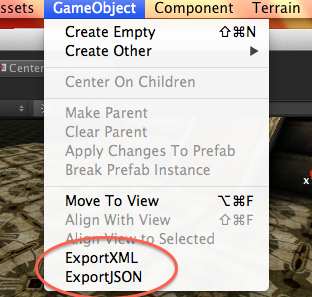
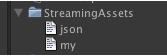
如下图所示,场景导出完毕后,会将xml 与Json 文件保存在StreamingAssets路径下,放在这里的原因是方便移动平台移植,因为它们属于二进制文件,移动平台在读取二进制文件的路径是不一样的。一定要放在这里喔。
接着,我继续创建两个游戏场景,一个用来解析XML的场景,一个用来解析JSON的场景。
XML场景中,创建一个空的游戏对象,把XML.cs挂上去。
- using UnityEngine;
- using System.Collections;
- using System.Xml;
- using System.IO;
- public class XML : MonoBehaviour {
-
- // Use this for initialization
- void Start ()
- {
-
- //电脑和iphong上的路径是不一样的,这里用标签判断一下。
- #if UNITY_EDITOR
- string filepath = Application.dataPath +"/StreamingAssets"+"/my.xml";
- #elif UNITY_IPHONE
- string filepath = Application.dataPath +"/Raw"+"/my.xml";
- #endif
- //如果文件存在话开始解析。
- if(File.Exists (filepath))
- {
- XmlDocument xmlDoc = new XmlDocument();
- xmlDoc.Load(filepath);
- XmlNodeList nodeList=xmlDoc.SelectSingleNode("gameObjects").ChildNodes;
- foreach(XmlElement scene in nodeList)
- {
- //因为我的XML是把所有游戏对象全部导出, 所以这里判断一下只解析需要的场景中的游戏对象
- //JSON和它的原理类似
- if(!scene.GetAttribute("name").Equals("Assets/StarTrooper.unity"))
- {
- continue;
- }
-
- foreach(XmlElement gameObjects in scene.ChildNodes)
- {
-
- string asset = "Prefab/" + gameObjects.GetAttribute("name");
- Vector3 pos = Vector3.zero;
- Vector3 rot = Vector3.zero;
- Vector3 sca = Vector3.zero;
- foreach(XmlElement transform in gameObjects.ChildNodes)
- {
- foreach(XmlElement prs in transform.ChildNodes)
- {
- if(prs.Name == "position")
- {
- foreach(XmlElement position in prs.ChildNodes)
- {
- switch(position.Name)
- {
- case "x":
- pos.x = float.Parse(position.InnerText);
- break;
- case "y":
- pos.y = float.Parse(position.InnerText);
- break;
- case "z":
- pos.z = float.Parse(position.InnerText);
- break;
- }
- }
- }else if(prs.Name == "rotation")
- {
- foreach(XmlElement rotation in prs.ChildNodes)
- {
- switch(rotation.Name)
- {
- case "x":
- rot.x = float.Parse(rotation.InnerText);
- break;
- case "y":
- rot.y = float.Parse(rotation.InnerText);
- break;
- case "z":
- rot.z = float.Parse(rotation.InnerText);
- break;
- }
- }
- }else if(prs.Name == "scale")
- {
- foreach(XmlElement scale in prs.ChildNodes)
- {
- switch(scale.Name)
- {
- case "x":
- sca.x = float.Parse(scale.InnerText);
- break;
- case "y":
- sca.y = float.Parse(scale.InnerText);
- break;
- case "z":
- sca.z = float.Parse(scale.InnerText);
- break;
- }
- }
- }
- }
-
- //拿到 旋转 缩放 平移 以后克隆新游戏对象
- GameObject ob = (GameObject)Instantiate(Resources.Load(asset),pos,Quaternion.Euler(rot));
- ob.transform.localScale = sca;
-
- }
- }
- }
- }
- }
-
- // Update is called once per frame
- void Update ()
- {
-
- }
-
- void OnGUI()
- {
- if(GUI.Button(new Rect(0,0,200,200),"XML WORLD"))
- {
- Application.LoadLevel("JSONScene");
- }
-
- }
-
- }
- using UnityEngine;
- using System.Collections;
- using System.IO;
- using LitJson;
-
- public class JSON : MonoBehaviour {
-
- // Use this for initialization
- void Start ()
- {
- #if UNITY_EDITOR
- string filepath = Application.dataPath +"/StreamingAssets"+"/json.txt";
- #elif UNITY_IPHONE
- string filepath = Application.dataPath +"/Raw"+"/json.txt";
- #endif
-
- StreamReader sr = File.OpenText(filepath);
- string strLine = sr.ReadToEnd();
- JsonData jd = JsonMapper.ToObject(strLine);
- JsonData gameObjectArray = jd["GameObjects"];
- int i,j,k;
- for (i = 0; i < gameObjectArray.Count; i++)
- {
- JsonData senseArray = gameObjectArray[i]["scenes"];
- for (j = 0; j < senseArray.Count; j++)
- {
- string sceneName = (string)senseArray[j]["name"];
- if(!sceneName.Equals("Assets/StarTrooper.unity"))
- {
- continue;
- }
- JsonData gameObjects = senseArray[j]["gameObject"];
-
- for (k = 0; k < gameObjects.Count; k++)
- {
- string objectName = (string)gameObjects[k]["name"];
- string asset = "Prefab/" + objectName;
- Vector3 pos = Vector3.zero;
- Vector3 rot = Vector3.zero;
- Vector3 sca = Vector3.zero;
-
- JsonData position = gameObjects[k]["position"];
- JsonData rotation = gameObjects[k]["rotation"];
- JsonData scale = gameObjects[k]["scale"];
-
- pos.x = float.Parse((string)position[0]["x"]);
- pos.y = float.Parse((string)position[0]["y"]);
- pos.z = float.Parse((string)position[0]["z"]);
-
- rot.x = float.Parse((string)rotation[0]["x"]);
- rot.y = float.Parse((string)rotation[0]["y"]);
- rot.z = float.Parse((string)rotation[0]["z"]);
-
- sca.x = float.Parse((string)scale[0]["x"]);
- sca.y = float.Parse((string)scale[0]["y"]);
- sca.z = float.Parse((string)scale[0]["z"]);
-
- GameObject ob = (GameObject)Instantiate(Resources.Load(asset),pos,Quaternion.Euler(rot));
- ob.transform.localScale = sca;
-
- }
-
- }
- }
-
- }
-
- // Update is called once per frame
- void Update () {
-
- }
-
- void OnGUI()
- {
- if(GUI.Button(new Rect(0,0,200,200),"JSON WORLD"))
- {
- Application.LoadLevel("XMLScene");
- }
-
- }
-
- }
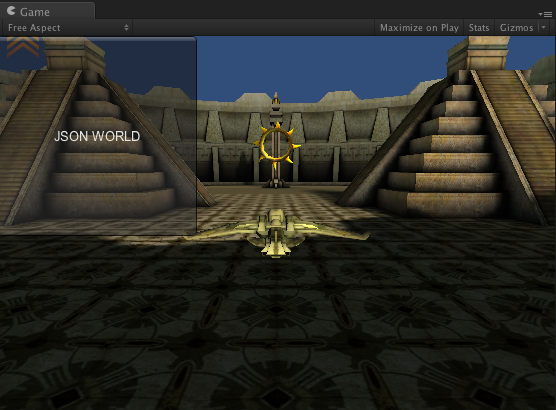
本例的下载地址:http://download.csdn.net/detail/e295166319/9664828
最近在做客户端与服务器的交互,使用JSON 和XML会感觉数据量太大,影响效率。最后使用二进制的方式来完成。如下图所示,使用二进制可以把空间节省到803K ,是不是很不错呢? 下面我们开始学习如何制作吧。

导出场景时增加导出二进制文件选项,代码如下。
- [MenuItem ("GameObject/BINARY")]
- static void XMLJSONTOBinary ()
- {
- string filepath = Application.dataPath + @"/StreamingAssets/binary.txt";
- if(File.Exists (filepath))
- {
- File.Delete(filepath);
- }
- FileStream fs = new FileStream(filepath, FileMode.Create);
- BinaryWriter bw = new BinaryWriter(fs);
- foreach (UnityEditor.EditorBuildSettingsScene S in UnityEditor.EditorBuildSettings.scenes)
- {
- if (S.enabled)
- {
- string name = S.path;
- EditorApplication.OpenScene(name);
-
- foreach (GameObject obj in Object.FindObjectsOfType(typeof(GameObject)))
- {
- if (obj.transform.parent == null)
- {
- //注解 直接写入字符串
- bw.Write(name);
- bw.Write(obj.name);
-
- short posx = (short)(obj.transform.position.x * 100);
- bw.Write(posx);
- bw.Write((short)(obj.transform.position.y * 100.0f));
- bw.Write((short)(obj.transform.position.z * 100.0f));
- bw.Write((short)(obj.transform.rotation.eulerAngles.x * 100.0f));
- bw.Write((short)(obj.transform.rotation.eulerAngles.y * 100.0f));
- bw.Write((short)(obj.transform.rotation.eulerAngles.z * 100.0f));
- bw.Write((short)(obj.transform.localScale.x * 100.0f));
- bw.Write((short)(obj.transform.localScale.y * 100.0f));
- bw.Write((short)(obj.transform.localScale.z * 100.0f));
-
- }
- }
-
- }
- }
-
- bw.Flush();
- bw.Close();
- fs.Close();
- }
注解
在写入二进制数据时用到的核心类就是BinaryWriter ,Binary是二进制的意思 ,可见操作二进制写入就用BinaryWriter了。 常用的数据类型会分配固定的字节数量,假设BinaryWriter 写入一个short 那么就占2字节,写一个 int 就占4字节,如果是数组的话需要数组类型字节长度在乘以数组长度。
然后在说说string,字符串它并不是标准的数据类型,它是一个对象 object 那么它的字节长度就是可变的。开始我也在string 上纠结了一小会儿。还有BinaryWriter 在写入string 的时候会现将字符串的长度以byte的形式储存,然后在储存字符串的字节长度。那么在解析字符串的时候需要先解析字符串长度,然后在根据长度取得后面对应长度的字节数组,再把这个字节数组转换成string就行啦。还有,上面我用的是short x 100 其实上为了节省长度, 因为short是2字节,float是4字节。我在解析的时候用short 在除以100 就可以 换算成float拉。
然后我们在看看解析的代码,写入的时候我们用的是BinaryWriter 那么读取的时候应该是 BinaryReader。
Binary.cs
- using UnityEngine;
- using System.Collections;
- using System.IO;
- using System.Text;
- using System;
- public class Binary : MonoBehaviour
- {
-
- void Start ()
- {
- string filepath = Application.dataPath + @"/StreamingAssets/binary.txt";
-
- if(File.Exists (filepath))
- {
- FileStream fs = new FileStream (filepath,FileMode.Open);
- BinaryReader br = new BinaryReader(fs);
-
- int index = 0;
- //将二进制字节流全部读取在这个byte数组当中
- //ReadBytes传递的参数是一个长度,也就是流的长度
- byte[] tempall = br.ReadBytes((int)fs.Length);
-
- //开始解析这个字节数组
- while(true)
- {
- //当超过流长度,跳出循环
- if(index >= tempall.Length)
- {
- break;
- }
-
- //得到第一个byte 也就是得到字符串的长度
- int scenelength = tempall[index];
- byte []sceneName = new byte [scenelength];
- index += 1;
- //根据长度拷贝出对应长度的字节数组
- System.Array.Copy(tempall,index,sceneName,0,sceneName.Length);
- //然后把字节数组对应转换成字符串
- string sname = System.Text.Encoding.Default.GetString(sceneName);
-
- //这里和上面原理一样就不赘述
- int objectLength = tempall[index + sceneName.Length];
- byte []objectName = new byte [objectLength];
-
- index += sceneName.Length + 1;
- System.Array.Copy(tempall,index,objectName,0,objectName.Length);
- string oname = System.Text.Encoding.Default.GetString(objectName);
-
- //下面就是拿short 每一个short的长度是2字节。
-
- index += objectName.Length;
- byte[] posx = new byte[2];
- System.Array.Copy(tempall,index,posx,0,posx.Length);
- //取得对应的数值 然后 除以100 就是float拉。
- float x = System.BitConverter.ToInt16(posx,0) /100.0f;
-
- //下面都差不多
- index += posx.Length;
- byte[] posy = new byte[2];
- System.Array.Copy(tempall,index,posy,0,posy.Length);
- float y = System.BitConverter.ToInt16(posy,0) /100.0f;
-
- index += posy.Length;
- byte[] posz = new byte[2];
- System.Array.Copy(tempall,index,posz,0,posz.Length);
- float z = System.BitConverter.ToInt16(posz,0) /100.0f;
-
- index += posz.Length;
- byte[] rotx = new byte[2];
- System.Array.Copy(tempall,index,rotx,0,rotx.Length);
- float rx = System.BitConverter.ToInt16(rotx,0) /100.0f;
-
- index += rotx.Length;
- byte[] roty = new byte[2];
- System.Array.Copy(tempall,index,roty,0,roty.Length);
- float ry = System.BitConverter.ToInt16(roty,0) /100.0f;
-
- index += roty.Length;
- byte[] rotz = new byte[2];
- System.Array.Copy(tempall,index,rotz,0,rotz.Length);
- float rz = System.BitConverter.ToInt16(rotz,0) /100.0f;
-
- index += rotz.Length;
- byte[] scax = new byte[2];
- System.Array.Copy(tempall,index,scax,0,scax.Length);
- float sx = System.BitConverter.ToInt16(scax,0) /100.0f;
-
- index += scax.Length;
- byte[] scay = new byte[2];
- System.Array.Copy(tempall,index,scay,0,scay.Length);
- float sy = System.BitConverter.ToInt16(scay,0) /100.0f;
-
- index += scay.Length;
- byte[] scaz = new byte[2];
- System.Array.Copy(tempall,index,scaz,0,scaz.Length);
- float sz = System.BitConverter.ToInt16(scaz,0) /100.0f;
-
- index+=scaz.Length;
-
- if(sname.Equals("Assets/StarTrooper.unity"))
- {
- //最后在这里把场景生成出来
- string asset = "Prefab/" + oname;
- Vector3 pos = new Vector3 (x,y,z);
- Vector3 rot = new Vector3(rx,ry,rz);
- Vector3 sca = new Vector3(sx,sy,sz);
- GameObject ob = (GameObject)Instantiate(Resources.Load(asset),pos,Quaternion.Euler(rot));
- ob.transform.localScale = sca;
- }
-
- }
- }
- }
-
- // Update is called once per frame
- void Update ()
- {
-
- }
- }
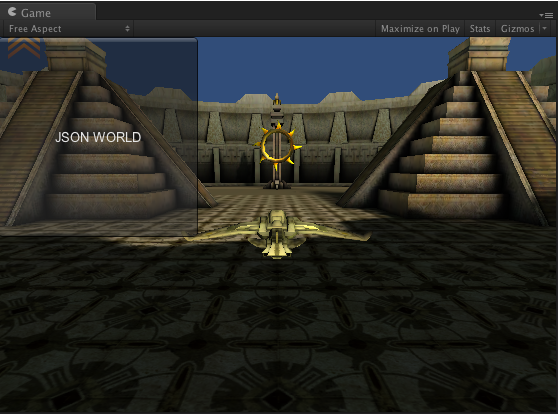
最后把代码放出来,晚安 Good Ngith 哇咔咔。
下载地址 :http://vdisk.weibo.com/s/la_QE
留言中刚好有人讨论到这块。另外还有一种方式也可以实现动态增加建立场景,使用.unity 来实现场景的加载,我觉得这种方式可能会更好一些。我在网上已经发现有人写了,那就转载过来吧。
原文地址:http://blog.csdn.net/cony100/article/details/8842919
在Unity3d中,场景(scene)多半通过在build settings中点击add current或者把场景拖进面板实现,假如不这么做,你的场景便不会被加载,哪怕你制定了绝对路径。
就是说,一个游戏里要加载多少场景多半都是固定的。
这样的方法会有很多不便,不容易动态加载场景。所以我们今天要说的,是一种动态加载场景的方法。
首先,你需要一个编辑器文件,放在editor文件夹下。注意,这个文件不可以继承自monobehaviour
- public class BuildSceneEditor{
- [@MenuItem("build/BuildWebplayerStreamed")]
- static void Build(){
- string[] levels = new string[]{"Assets/Level1.unity","Assets/Level2.unity"};
- BuildPipeline.BuildStreamedSceneAssetBundle(levels,"streamed.unity3d",BuildTarget.WebPlayer);
- }
- }
- WWW download = WWW.LoadFromCacheOrDownload("http://xxx/streamed.unity3d",0);
- yield return download;
- Application.LoadLevel("Level1");
大家注意到了吗。下载好以后就可以直接loadlevel了,不需要手动进行add current的操作了。
这里还有一篇圣典翻译的文章 http://game.ceeger.com/Script/BuildPipeline/BuildPipeline.BuildStreamedSceneAssetBundle.html
最后我在补充一下使用.unity3d确实方便很多,因为它不仅会把场景打包进去,并且还会把场景中对应的资源文件打包进去。举个例子,你将美工做好的模型文件放在Project视图中,然后在将模型放在Hierarchy视图中的 100,100,100坐标点中,最后把该场景打包成.unity3d文件。此时你在新建一个工程只需下载刚刚打包的场景文件,他会自动把模型放在 100,100,100坐标点中。
这说明场景文件,包含了该场景中所用到的所有模型,并且还包含了模型资源与Hierarchy视图的关系。它会带来一个弊端,比如你有N个场景,每个场景中都有相同的模型文件,这样每个场景都需要重复下载这些相同的模型文件,所以我觉得最好还是使用assetbundle来对同类的资源文件进行分包处理。
武汉格发信息技术有限公司,格发许可优化管理系统可以帮你评估贵公司软件许可的真实需求,再低成本合规性管理软件许可,帮助贵司提高软件投资回报率,为软件采购、使用提供科学决策依据。支持的软件有: CAD,CAE,PDM,PLM,Catia,Ugnx, AutoCAD, Pro/E, Solidworks 等。
 技术文档
技术文档
 推荐好文
推荐好文





 155-2731-8020


.png)
.png)
.png)
.png)
.png)



