


软件

产品


在看博客之前,首先重点说明,本博客中使用的软件版本:
ArcGIS Server10.2ArcGIS Object10.2 如果你的版本是10.0,本博客中的代码肯定不可以用(10.0版本到10.1版本是一个大的提升)
如果你的版本是10.1,本博客中的代码需要稍微修改(10.1版本到10.2版本会有小部分的修改)
在本篇博客中主要以几何网络分析为例,介绍一下如果使用SOE来扩展我们的WebGIS应用。想要使用SOE扩展我们的WebGIS应用,需要对ArcGIS Object有一定的掌握。
ArcGIS Object中进行几何网络分析。在SOE扩展几何网络之前,先回顾一下如何使用ArcGIS Object来进行几何网络分析。
MapControl中绘制四类点(点标记listJunctionFlags,线标记listEdgeFlags,点障碍listJunctionBarrier,线障碍listEdgeBarrier)。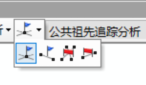
IPointToEID接口,将我们的点转换成网络中的节点(其实就是寻找网络中满足容差最近的节点),转换成功之后的数组为:junctionFlags,edgeFlags,junctionBarrier,edgeBarrierFindCommonAncestors),分析之后得到结果,得到的结果是网络中的节点id(有节点id,也有线id)id获得相应的Feature,然后就可以在地图中显示。SOE扩展几何网络分析难点在上面我们用文字简单的介绍了一下如何使用ArcGIS Object去分析几何网络,如果你熟悉AO,那么上面的过程你应该非常熟悉了。接下来我们就说一下在SOE中扩展WebGIS会遇到哪一些难点。
json数组),前台传来的是一个json数据,我们需要将json数组转换成List<IPoint>,然后通过IPointToEID,去查找网络中与改点最近的节点(在一定容差内)IMap,ILayer对象,但是呢?IPointToEID这个接口需要传入IMap对象,所以IPointToEID这个接口在ArcGIS Server10.1之后不能使用了(SOE开发中不能用,AO中是可以使用的),但是这个接口的功能是我们必须要用到的,所以这个功能需要我们自己写代码实现。json字符串,然后传给前台。在前面我们说了,自己扩展几何网络分析会遇到哪一些困难,接下来,我们就扩展一个几何网络服务,然后解决掉上述遇到的问题。
IMapServer3 mapServer = this.serverObjectHelper.ServerObject as IMapServer3;
IMapServerDataAccess dataAccess = (IMapServerDataAccess)mapServer;
IFeatureClass featureclass = (IFeatureClass)dataAccess.GetDataSource(mapServer.DefaultMapName, 0);
IFeatureDataset ds = featureclass.FeatureDataset;
INetworkCollection2 networkCollection2 = ds as INetworkCollection2;
//获得所需要的几何网络
IGeometricNetwork geometricNetwork = networkCollection2.get_GeometricNetwork(0);
//定义一个点标记数据
object[] listJunctionFlags;
//读取前台传来的数据(json数组)
operationInput.TryGetArray("listJunctionFlags", out listJunctionFlags);
//我们要将json数据转换成List<IPoint>对象
List<IPoint> junctionFlags = new List<IPoint>();
foreach (JsonObject jo in listJunctionFlags.Cast<JsonObject>().ToArray())
{
                IPoint location = Conversion.ToGeometry(jo, esriGeometryType.esriGeometryPoint) as IPoint;
                junctionFlags.Add(location);
}
IPointToEID所具备的功能
/*
searchTolerance:搜索容差
point:搜索的点,也就是上面我们转换得到的 List<IPoint> junctionFlags
elementType:搜索的类型,(搜索节点,还是搜索线)
geometricNetwork:搜索哪一个网络?
EID:搜索得到的节点id
geometry:搜索得到的几何形状
*/
public void GetEIDFromPoint(double searchTolerance, IPoint point, esriElementType elementType, IGeometricNetwork geometricNetwork, out int EID, out IGeometry geometry)
        {
            EID = -1;
            geometry = null;
            IEnumFeatureClass enumFeatureClassSimple = null;
            IEnumFeatureClass enumFeatureClassComlex = null;
            if (elementType == esriElementType.esriETEdge)
            {
                enumFeatureClassSimple = geometricNetwork.get_ClassesByType(esriFeatureType.esriFTSimpleEdge);
                enumFeatureClassComlex = geometricNetwork.get_ClassesByType(esriFeatureType.esriFTComplexEdge);
            }
            else if (elementType == esriElementType.esriETJunction)
            {
                enumFeatureClassSimple = geometricNetwork.get_ClassesByType(esriFeatureType.esriFTSimpleJunction);
                enumFeatureClassComlex = geometricNetwork.get_ClassesByType(esriFeatureType.esriFTComplexJunction);
            }
            double distance = double.PositiveInfinity;
            int featureClassID = -1;
            FindNearestDistance(enumFeatureClassSimple, point, searchTolerance, ref distance, ref featureClassID, ref geometry);
            FindNearestDistance(enumFeatureClassComlex, point, searchTolerance, ref distance, ref featureClassID, ref geometry);
            if (featureClassID == -1)
            {
                EID = -1;
                return;
            }
            IProximityOperator proximityPoint = geometry as IProximityOperator;
            IPoint p = proximityPoint.ReturnNearestPoint(point, esriSegmentExtension.esriNoExtension);
            if (elementType == esriElementType.esriETEdge)
            {
                EID = geometricNetwork.get_EdgeElement(p);
                return;
            }
            else if (elementType == esriElementType.esriETJunction)
            {
                EID = geometricNetwork.get_JunctionElement(p);
                return;
            }
id int eid;
IGeometry geo;
//points 是我们在4.2中转换得到的List<IPoint>对象
for (int i = 0; i < points.Count; i++)
{
GetEIDFromPoint(tol, points[i], esriElementType.esriETJunction, this.geometricNetwork, out eid, out geo);
if (geo != null)
{
INetElements netElements = geometricNetwork.Network as INetElements;
int userClassID = 0;
int userID = 0;
int userSubID = 0;
netElements.QueryIDs(eid, esriElementType.esriETJunction, out userClassID, out userID, out userSubID);
INetFlag junctionFlag = new JunctionFlagClass() as INetFlag;
junctionFlag.UserClassID = userClassID;
junctionFlag.UserID = userID;
//jFlags类型为List<IJunctionFlag>,是我们分析真正用到的节点id
jFlags.Add(junctionFlag as IJunctionFlag);
}
//几何网络分析的具体接口
traceFlowSolverGEN = new TraceFlowSolverClass();
netSolver = traceFlowSolverGEN as INetSolver;
//设置几何网络
netSolver.SourceNetwork = geometricNetwork.Network;
//设置几何网络的点标记
IJunctionFlag[] arrayJunctionFlag = new IJunctionFlag[jFlags.Count];
for (int i = 0; i < listJunctionFlags.Count; i++)
     arrayJunctionFlag[i] = listJunctionFlags[i];
traceFlowSolverGEN.PutJunctionOrigins(ref arrayJunctionFlag);
//同理设置线标记,点障碍,和线障碍
//进行几何网络分析(以公共祖先为例)
//junctionEIDs是分析结果的 节点id
//edgeEIDs是分析结果的 线id
traceFlowSolverGEN.FindCommonAncestors(esriFlowElements.esriFEJunctionsAndEdges,
                        out junctionEIDs, out edgeEIDs);
INetElements netElements = geometricNetwork.Network as INetElements;
int userClassID = -1;
int userID = -1;
int userSubID = -1;
int eid = -1;
IFeature feature;
IFeatureClass featureClass = null;
objectJson = new JsonObject();
//没有查找到线
if (edgeEIDs.Count == 0)
{
        objectJson.AddArray("edges", (new List<JsonObject>()).ToArray());
}
else
{
		//如果有查询到线,将线的geometry和属性封装成json对象
        JsonObject[] featureSet = new JsonObject[edgeEIDs.Count];
        for (int i = 0; i < edgeEIDs.Count; i++)
        {
               eid = edgeEIDs.Next();
               netElements.QueryIDs(eid, esriElementType.esriETEdge, out userClassID, out userID, out userSubID);
               featureClass = GetFeatureClassByUserID(userClassID);
               if (featureClass != null)
               {
                      feature = featureClass.GetFeature(userID);
                      featureSet[i] = new JsonObject();
                      featureSet[i].AddJsonObject("geometry", Conversion.ToJsonObject(feature.Shape));
                      JsonObject[] arr = new JsonObject[feature.Fields.FieldCount];
                      for (int j = 0; j < feature.Fields.FieldCount; j++)
                      {
                             IField field=feature.Fields.Field[j];
				             arr[j] = new JsonObject();
			                 arr[j].AddObject(field.AliasName, feature.get_Value(j));
					  }
                                featureSet[i].AddArray("attr",arr);
}
//没有查找到点
if (junctionEIDs.Count == 0)
{
objectJson.AddArray(“junctions”, (new List<JsonObject>()).ToArray());
}
else
{
//如果有 查询 到点,将点的geometry和属性封装成json对象
JsonObject[] featureSet = new JsonObject[junctionEIDs.Count];
for (int i = 0; i < junctionEIDs.Count; i++)
{
eid = junctionEIDs.Next();
netElements.QueryIDs(eid, esriElementType.esriETJunction, out userClassID, out userID, out userSubID);
featureClass = GetFeatureClassByUserID(userClassID);
if (featureClass != null)
{
feature = featureClass.GetFeature(userID);
featureSet[i] = new JsonObject();
featureSet[i].AddJsonObject(“geometry”, Conversion.ToJsonObject(feature.Shape));
JsonObject[] arr = new JsonObject[feature.Fields.FieldCount];
for (int j = 0; j < feature.Fields.FieldCount; j++)
{
IField field = feature.Fields.Field[j];
arr[j] = new JsonObject();
arr[j].AddObject(field.AliasName, feature.get_Value(j));
}
featureSet[i].AddArray(“attr”, arr);
       }
   }
   objectJson.AddArray("junctions", featureSet);
}
//GetFeatureClassByUserID方法
private IFeatureClass GetFeatureClassByUserID(int userClassID)
{
IMapServer3 serverObject = this.serverObjectHelper.ServerObject as IMapServer3;
IMapLayerInfos mapLayerInfos = serverObject.GetServerInfo(serverObject.DefaultMapName).MapLayerInfos;
 for (int i = 0; i < mapLayerInfos.Count; i++)
 {
      IMapLayerInfo mapLayerInfo = mapLayerInfos.get_Element(i);
      if (mapLayerInfo.IsFeatureLayer)
      {
          IFeatureClass featureClass = this.GetFeatureClass(mapLayerInfo.ID);
          if (featureClass.FeatureClassID == userClassID)
              return featureClass;
      }
 }
 return null;
}
return Encoding.UTF8.GetBytes(objectJson.ToJson());
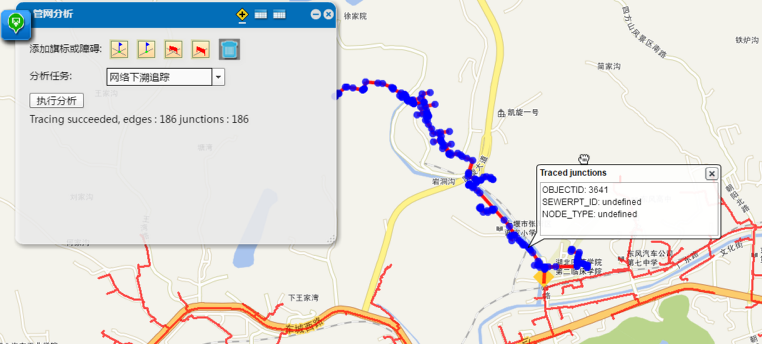
GitHub的数据及代码下载链接(如果从GitHub下载代码,麻烦给小Demo一个Star,您的支持是我最大的动力)
免责声明:本文系网络转载或改编,未找到原创作者,版权归原作者所有。如涉及版权,请联系删 技术文档
技术文档
 推荐好文
推荐好文





 155-2731-8020




