软件

产品


最近完成了MC框架完全解耦(可作为一个dll,植入任何Unity游戏)。框架仅依赖Unity,魔改自老外写的Uniblocks。做了不少优化,原本60s才能刷2000W单元,现在只需2s(内存从无到有,Unity创建2千GameObject空间团块的速度,配置是9年前旗舰笔记本i7 7700K/1070)。虽还没做多线程,但速度已然不错,可以放出来了。看看有多少感兴趣的小伙伴,一起来完善它。
框架由代码目录+寥寥3~4张Png图片组成,支持增加更多材质捆绑更多贴图集,即便是同一个空间团块,都能给每一个单元的瓦片选择不同材质纹理(由框架重新提交三角形数组时进行区分)。
代码篇幅大,可自行查阅项目(Github):网页链接
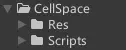
框架目录名CellSpace
Res素材目录预制文件可删了,只用到里面几张图片(如下)↓
代码块
/// <summary>
/// 获取CellChunk预制体.此预制体包含CellChunk相关组件,用于处理团块空间网格数据.作为模板使用,后续会创建多份实例复制体.
/// </summary>
public static GameObject CellChunk
{
    get
    {
        string name = "CellChunk";
        if (!runtimePrefab.ContainsKey(name))
        {
            GameObject tempGameObject = new GameObject(name);
            tempGameObject.SetActive(false);
            tempGameObject.transform.parent = group.transform;
            tempGameObject.transform.localScale = CellSpace.CPEngine.scale;
            tempGameObject.AddComponent<MeshFilter>();
            tempGameObject.AddComponent<MeshRenderer>();
            if (string.IsNullOrEmpty(externalTexturePath))
            {
                //Unity编辑器模式下的路径
                externalTexturePath = Application.dataPath + @"/CellSpace/Res/Textures";
            }
            tempGameObject.GetComponent<MeshRenderer>().materials = new Material[4]
            {

                //材质和主纹理集可以大量添加,也能随便分割,但框架预制地块限制最终可用的uv数量为65536个(代表65536种地块),超过后无效.
                //CPMat挂载在CellChunk和CellChunkAdditionalMesh的MeshRenderer组件上,这里是第1~4个材质,分别有不同主纹理图.框架所用到的所有地块uv都是从主纹理图上划取.
                CPMat("CPMat", externalTexturePath+@"/CPTextureSheet.png"), //第1个材质
                CPMat("CPMat1", externalTexturePath+@"/CPTextureSheet1.png"), //第2个材质
                CPMat("CPMat2", externalTexturePath+@"/CPTextureSheet2.png"), //第3个材质
                CPMat("CPMat3", externalTexturePath+@"/CPTextureSheet3.png")  //第4个材质
            };
            tempGameObject.AddComponent<MeshCollider>();
            tempGameObject.AddComponent<CellChunk>();
            tempGameObject.GetComponent<CellChunk>().meshContainer = CellChunkAdditionalMesh;
            tempGameObject.GetComponent<CellChunk>().chunkCollider = CellChunkTriggerCollider;
            tempGameObject.AddComponent<CellChunkMeshCreator>();
            tempGameObject.GetComponent<CellChunkMeshCreator>().Cube = GetCubeMesh();
            tempGameObject.AddComponent<CellChunkDataFiles>();
            tempGameObject.AddComponent<CPCustomTerrainGenerator>();
            runtimePrefab.Add(name, tempGameObject);
            awakeEnable[name] = true;
            Debug.Log($"预制体已创建: {name}");
        }
        return runtimePrefab.Get(name) as GameObject;
    }
}

      复制成功
CellSpace框架用到一个我自己的纯C#方法库↓存储些常用通用函式
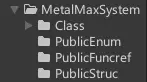
框架可能用到的方法库
我们先从搞定预制体开始,因要全解耦做成dll,就必须零场景。这些原本在编辑器场景中的对象,统统要纯代码“组装”。所以,整个框架用到的预制体,都转为如下代码↓
代码块
PlainText
using MetalMaxSystem.Unity; //用到RuntimePrefab
using System.Collections.Generic;
using System.IO;
using UnityEngine;
namespace CellSpace
{
/// <summary>
/// CellSpace预制体类.但这些预制体源头都是代码组装起来的.
/// </summary>
public class CellSpacePrefab : MonoBehaviour
{
//预制体保存方法只能在编辑器模式下调用,ScriptableObject不必保存成硬盘文件,直接内存环境使用.
/// <summary>
/// 预制体字典.
/// 当RuntimePrefab.Add(string key, Object obj,bool clone = false)中的clone参数为true时,资源为副本存储,
/// 当clone参数为false时,直接存储对象,摧毁原对象会影响该字典内容,场景切换时未被DontDestroyOnLoad保护的实例会被Unity自动销毁,请做好保护.
/// </summary>
public static RuntimePrefab runtimePrefab = UKit.runtimePrefab;
/// <summary>
/// 用来阻止挂组件时自动Awake一次.而Start、Update那些就不用阻止了,因为runtimePrefab不在场景,即便预制体上组件Enable也不起作用.
/// </summary>
public static Dictionary<string, bool> awakeEnable = new Dictionary<string, bool>();
/// <summary>
/// 预制体实例化后的父级GameObject.
/// </summary>
public static GameObject group;
/// <summary>
/// 预制体初始化是否完成.
/// </summary>
public static bool initialized;
/// <summary>
/// [外部]纹理路径.默认留空并使用路径:Application.dataPath + @"/CellSpace/Res/Textures".其他路径示范:
/// externalTexturePath = System.IO.Path.GetDirectoryName(Application.dataPath) + "/BepInEx/plugins/MCFramework/Res/Textures";
/// </summary>
public static string externalTexturePath;
/// <summary>
/// 预制体初始化方法.在使用CellSpacePrefab前必须调用此方法来确保预制体已被创建.
/// </summary>
public static void Init()
{
if (initialized) return;
group = GameObject.Find("CellSpacePrefabs") ?? new GameObject("CellSpacePrefabs"); //创建存放CellSpace预制体实例的父级容器
DontDestroyOnLoad(group);
runtimePrefab.hideFlags = HideFlags.DontUnloadUnusedAsset; //资源持久化标记
var temp = CPEngine; //顺带初始化其他预制体
initialized = true;
}
/// <summary>
/// 获取CPEngine预制体.作为单例直接使用.
/// 如不存在,会创建名为"CPEngine"的游戏物体并添加CPEngine、CellChunkManager、CPConnectionInitializer组件.
/// 首次创建的预制体不激活.
/// </summary>
public static GameObject CPEngine
{
get
{
string name = "CPEngine";
if (!runtimePrefab.ContainsKey(name))
{
//GameObject若用C#声明并添加组件,则默认在Managed内存场景中创建实例而非Native内存,此时MonoBehaviour组件会被Unity自动调用Awake、Start等完整生命周期方法.
GameObject tempGameObject = new GameObject(name);
tempGameObject.SetActive(false); //阻止后续添加组件时执行Awake以外的方法
tempGameObject.transform.parent = group.transform; //作为group的子物体"存放"
tempGameObject.AddComponent<CPConnectionInitializer>(); //添加网络连接初始化组件,注意会运行Awake方法,可设计awakeEnable[name]字段来阻断(余同)
CPConnectionInitializer.NetworkPrefab = CPNetwork; //设置网络预制体
CellSpace.CPEngine.chunkManagerInstance = tempGameObject.AddComponent<CellChunkManager>(); //添加团块空间管理组件
CellChunkManager.ChunkPrefab = CellChunk; //设置团块空间预制体
tempGameObject.AddComponent<CPEngine>(); //添加引擎核心组件
runtimePrefab.Add(name, tempGameObject); //存入预制体字典
awakeEnable[name] = true; //允许Awake运行
Debug.Log($"预制体已创建: {name}");
}
return runtimePrefab.Get(name) as GameObject;
}
}
/// <summary>
/// 获取CPNetwork预制体.此预制体包含Client和Server组件,用于网络通信.作为单例直接使用.
/// </summary>
public static GameObject CPNetwork
{
get
{
string name = "CPNetwork";
if (!runtimePrefab.ContainsKey(name))
{
GameObject tempGameObject = new GameObject(name);
tempGameObject.SetActive(false);
tempGameObject.transform.parent = group.transform;
tempGameObject.AddComponent<Client>();
tempGameObject.AddComponent<Server>();
runtimePrefab.Add(name, tempGameObject);
awakeEnable[name] = true;
Debug.Log($"预制体已创建: {name}");
}
return runtimePrefab.Get(name) as GameObject;
}
}
/// <summary>
/// 获取CellChunk预制体.此预制体包含CellChunk相关组件,用于处理团块空间网格数据.作为模板使用,后续会创建多份实例复制体.
/// </summary>
public static GameObject CellChunk
{
get
{
string name = "CellChunk";
if (!runtimePrefab.ContainsKey(name))
{
GameObject tempGameObject = new GameObject(name);
tempGameObject.SetActive(false);
tempGameObject.transform.parent = group.transform;
tempGameObject.transform.localScale = CellSpace.CPEngine.scale;
tempGameObject.AddComponent<MeshFilter>();
tempGameObject.AddComponent<MeshRenderer>();
if (string.IsNullOrEmpty(externalTexturePath))
{
//Unity编辑器模式下的路径
externalTexturePath = Application.dataPath + @"/CellSpace/Res/Textures";
}
tempGameObject.GetComponent<MeshRenderer>().materials = new Material[4]
{
//材质和主纹理集可以大量添加,也能随便分割,但框架预制地块限制最终可用的uv数量为65536个(代表65536种地块),超过后无效.
//CPMat挂载在CellChunk和CellChunkAdditionalMesh的MeshRenderer组件上,这里是第1~4个材质,分别有不同主纹理图.框架所用到的所有地块uv都是从主纹理图上划取.
CPMat("CPMat", externalTexturePath+@"/CPTextureSheet.png"), //第1个材质
CPMat("CPMat1", externalTexturePath+@"/CPTextureSheet1.png"), //第2个材质
CPMat("CPMat2", externalTexturePath+@"/CPTextureSheet2.png"), //第3个材质
CPMat("CPMat3", externalTexturePath+@"/CPTextureSheet3.png") //第4个材质
};
tempGameObject.AddComponent<MeshCollider>();
tempGameObject.AddComponent<CellChunk>();
tempGameObject.GetComponent<CellChunk>().meshContainer = CellChunkAdditionalMesh;
tempGameObject.GetComponent<CellChunk>().chunkCollider = CellChunkTriggerCollider;
tempGameObject.AddComponent<CellChunkMeshCreator>();
tempGameObject.GetComponent<CellChunkMeshCreator>().Cube = GetCubeMesh();
tempGameObject.AddComponent<CellChunkDataFiles>();
tempGameObject.AddComponent<CPCustomTerrainGenerator>();
runtimePrefab.Add(name, tempGameObject);
awakeEnable[name] = true;
Debug.Log($"预制体已创建: {name}");
}
return runtimePrefab.Get(name) as GameObject;
}
}
/// <summary>
/// 获取CellChunk预制体.此预制体包含CellChunk相关组件,用于处理团块空间网格数据.作为模板使用,后续会创建多份实例复制体.
/// </summary>
public static GameObject CellChunkAdditionalMesh
{
get
{
string name = "CellChunkAdditionalMesh";
if (!runtimePrefab.ContainsKey(name))
{
GameObject tempGameObject = new GameObject(name);
tempGameObject.SetActive(false);
tempGameObject.transform.parent = group.transform;
tempGameObject.AddComponent<MeshFilter>();
tempGameObject.AddComponent<MeshRenderer>();
if (string.IsNullOrEmpty(externalTexturePath))
{
//Unity编辑器模式下的路径或本地测试路径
externalTexturePath = Application.dataPath + @"/CellSpace/Res/Textures";
}
tempGameObject.GetComponent<MeshRenderer>().materials = new Material[4]
{
CPMat("CPMat", externalTexturePath+@"/CPTextureSheet.png"), //第1个材质
CPMat("CPMat1", externalTexturePath+@"/CPTextureSheet1.png"), //第2个材质
CPMat("CPMat2", externalTexturePath+@"/CPTextureSheet2.png"), //第3个材质
CPMat("CPMat3", externalTexturePath+@"/CPTextureSheet3.png") //第4个材质
};
tempGameObject.AddComponent<MeshCollider>();
tempGameObject.AddComponent<CellChunkExtension>();
runtimePrefab.Add(name, tempGameObject);
awakeEnable[name] = true;
Debug.Log($"预制体已创建: {name}");
}
return runtimePrefab.Get(name) as GameObject;
}
}
/// <summary>
/// 获取CellChunk预制体.此预制体包含CellChunk相关组件,用于处理团块空间网格数据.作为模板使用,后续会创建多份实例复制体.
/// </summary>
public static GameObject CellChunkTriggerCollider
{
get
{
string name = "CellChunkTriggerCollider";
if (!runtimePrefab.ContainsKey(name))
{
GameObject tempGameObject = new GameObject(name);
tempGameObject.SetActive(false);
tempGameObject.transform.parent = group.transform;
tempGameObject.AddComponent<MeshCollider>();
tempGameObject.AddComponent<CellChunkExtension>();
runtimePrefab.Add(name, tempGameObject);
awakeEnable[name] = true;
Debug.Log($"预制体已创建: {name}");
}
return runtimePrefab.Get(name) as GameObject;
}
}
/// <summary>
/// 返回材质名为materialName的预制体.此预制体包含路径texturePath的主纹理图,采用名为"Standard"的Shader.
/// </summary>
/// <param name="materialName">材质名</param>
/// <param name="texturePath">纹理图片地址</param>
/// <returns></returns>
public static Material CPMat(string materialName, string texturePath)
{
return CPMat(materialName, texturePath, "Standard");
}
/// <summary>
/// 返回材质名为materialName的预制体.此预制体包含路径texturePath的主纹理图,采用名为shaderName的Shader.
/// </summary>
/// <param name="materialName">材质名</param>
/// <param name="texturePath">纹理图片地址</param>
/// <param name="shaderName">Shader名</param>
/// <returns></returns>
public static Material CPMat(string materialName, string texturePath, string shaderName)
{
Material cachedMaterial;
Shader shader = Shader.Find(shaderName);
if (!runtimePrefab.ContainsKey(materialName))
{
// 创建新材质并配置基础属性
if (shader == null)
{
Debug.LogError(shaderName + "未包含在构建中!");
}
else
{
cachedMaterial = new Material(shader)
{
name = materialName,
mainTexture = LoadImageAndConvertToTexture2D(texturePath)
};
runtimePrefab.Add(materialName, cachedMaterial);
Debug.Log($"材质已创建: {materialName}");
}
}
return runtimePrefab.Get(materialName) as Material;
}
/// <summary>
/// 读取图片并转Texture2D,仅支持png和jpg
/// </summary>
/// <param name="filePath">完整的图片文件路径</param>
/// <returns></returns>
public static Texture2D LoadImageAndConvertToTexture2D(string filePath)
{
if (!File.Exists(filePath))
{
Debug.LogWarning(filePath);
return null;
}
byte[] fileData = File.ReadAllBytes(filePath); //打包后的程序中运行,路径不对的话会卡在这里
Texture2D texture = new Texture2D(2, 2); //随便定义初始尺寸但不可为null
bool success = texture.LoadImage(fileData); //加载图片Unity会自动调整尺寸
if (success)
{
//图片加载成功
Debug.Log("Image loaded successfully with width: " + texture.width + " and height: " + texture.height);
}
else
{
//图片加载失败,可能需要检查字节数组是否有效或图片格式是否支持
Debug.LogError("Failed to load image.");
}
return texture;
}
/// <summary>
/// 获取Cube网格(优先查找内置资源,不存在则动态生成)
/// </summary>
public static Mesh GetCubeMesh()
{
// 尝试获取内置Cube资源
Mesh builtinMesh = Resources.GetBuiltinResource<Mesh>("Cube.fbx");
if (builtinMesh != null)
{
return builtinMesh;
}
// 动态生成Cube网格
Mesh dynamicMesh = new Mesh();
dynamicMesh.name = "DynamicCube";
// 定义8个顶点(中心点(0,0,0),边长1)
Vector3[] vertices = {
// 前面
new Vector3(-0.5f, -0.5f, -0.5f), // 0 左下
new Vector3( 0.5f, -0.5f, -0.5f), // 1 右下
new Vector3( 0.5f, 0.5f, -0.5f), // 2 右上
new Vector3(-0.5f, 0.5f, -0.5f), // 3 左上
// 后面
new Vector3(-0.5f, -0.5f, 0.5f), // 4
new Vector3( 0.5f, -0.5f, 0.5f), // 5
new Vector3( 0.5f, 0.5f, 0.5f), // 6
new Vector3(-0.5f, 0.5f, 0.5f) // 7
};
// 定义12个三角形(6个面×2个三角)
int[] triangles = {
// 前面
0, 2, 1, 0, 3, 2,
// 后面
5, 6, 4, 4, 6, 7,
// 左面
4, 7, 0, 0, 7, 3,
// 右面
1, 2, 5, 5, 2, 6,
// 上面
3, 6, 2, 3, 7, 6,
// 下面
0, 1, 4, 4, 1, 5
};
// 几何数据
dynamicMesh.vertices = vertices;
dynamicMesh.triangles = triangles;
// 根据三角形顺序自动生成法线,而非自己定义每个面的朝向.三角形按序顺时针形成的面的法线朝向用户屏幕,为正方向)
dynamicMesh.RecalculateNormals();
// 重新计算网格包围盒(完全包含网格所有顶点的最小长方体,Unity用它进行视锥体裁剪、碰撞检测等操作,在改变顶点数组后调用此方法能刷新渲染或使物理系统正常工作)
dynamicMesh.RecalculateBounds();
return dynamicMesh;
}
/// <summary>
/// 获取支持uv的球体网格(优先查找内置资源,不存在则动态生成).
/// </summary>
/// <param name="radius">半径</param>
/// <param name="segments">分段数,越多越像球</param>
/// <param name="torf">为true时查找内置资源来生成球体(注意内置资源不支持后面2个参数且大小固定)</param>
/// <returns></returns>
public static Mesh GetSphereMeshWithUV(bool torf = false, float radius = 1.0f, int segments = 32)
{
if (torf)
{
Mesh builtinMesh = Resources.GetBuiltinResource<Mesh>("Sphere.fbx");
if (builtinMesh != null)
{
return builtinMesh;
}
}
// 动态创建球体网格
Mesh dynamicMesh = new Mesh();
dynamicMesh.name = $"DynamicSphere_{radius}";
// 生成顶点数据
List<Vector3> vertices = new List<Vector3>();
List<Vector2> uvs = new List<Vector2>();
List<int> triangles = new List<int>();
float pi = Mathf.PI;
float deltaPhi = pi / segments;
float deltaTheta = 2f * pi / segments;
// 生成顶点和UV坐标
for (int i = 0; i <= segments; i++)
{
float phi = i * deltaPhi;
float sinPhi = Mathf.Sin(phi);
float cosPhi = Mathf.Cos(phi);
for (int j = 0; j <= segments; j++)
{
float theta = j * deltaTheta;
float sinTheta = Mathf.Sin(theta);
float cosTheta = Mathf.Cos(theta);
// 球面坐标转笛卡尔坐标
Vector3 vertex = new Vector3(
radius * sinPhi * cosTheta,
radius * cosPhi,
radius * sinPhi * sinTheta
);
vertices.Add(vertex);
// 等距柱状投影UV映射
uvs.Add(new Vector2(
theta / (2f * pi) + 0.5f, // 经度(0-1)
1 - phi / pi // 纬度(0-1)
));
}
}
// 生成三角面
for (int i = 0; i < segments; i++)
{
for (int j = 0; j < segments; j++)
{
int v1 = i * (segments + 1) + j;
int v2 = v1 + segments + 1;
int v3 = v1 + 1;
int v4 = v2 + 1;
// 添加两个三角形组成四边形
triangles.Add(v1);
triangles.Add(v2);
triangles.Add(v3);
triangles.Add(v3);
triangles.Add(v2);
triangles.Add(v4);
}
}
// 应用网格数据
dynamicMesh.vertices = vertices.ToArray();
dynamicMesh.uv = uvs.ToArray();
dynamicMesh.triangles = triangles.ToArray();
dynamicMesh.RecalculateNormals();
dynamicMesh.RecalculateBounds();
return dynamicMesh;
}
/// <summary>
/// 获取纯色球体.
/// </summary>
/// <param name="radius">半径</param>
/// <param name="segments">分段数,越多越像球</param>
/// <returns></returns>
public static Mesh GetSphereMesh(float radius = 1.0f, int segments = 32)
{
// 动态生成球体网格
Mesh dynamicMesh = new Mesh();
dynamicMesh.name = $"DynamicSphere_{radius}";
// 定义球体顶点(极角/方位角分段)
List<Vector3> vertices = new List<Vector3>();
List<int> triangles = new List<int>();
float pi = Mathf.PI;
float deltaPhi = pi / segments;
float deltaTheta = 2f * pi / segments;
for (int i = 0; i <= segments; i++)
{
float phi = i * deltaPhi;
float sinPhi = Mathf.Sin(phi);
float cosPhi = Mathf.Cos(phi);
for (int j = 0; j <= segments; j++)
{
float theta = j * deltaTheta;
float sinTheta = Mathf.Sin(theta);
float cosTheta = Mathf.Cos(theta);
// 球面坐标转笛卡尔坐标
Vector3 vertex = new Vector3(
radius * sinPhi * cosTheta,
radius * cosPhi,
radius * sinPhi * sinTheta
);
vertices.Add(vertex);
}
}
// 生成三角面(四边形剖分)
for (int i = 0; i < segments; i++)
{
for (int j = 0; j < segments; j++)
{
int v1 = i * (segments + 1) + j;
int v2 = v1 + segments + 1;
int v3 = v1 + 1;
int v4 = v2 + 1;
// 添加两个三角形组成四边形
triangles.Add(v1);
triangles.Add(v2);
triangles.Add(v3);
triangles.Add(v3);
triangles.Add(v2);
triangles.Add(v4);
}
}
// 应用几何数据
dynamicMesh.vertices = vertices.ToArray();
dynamicMesh.triangles = triangles.ToArray();
dynamicMesh.RecalculateNormals();
dynamicMesh.RecalculateBounds();
return dynamicMesh;
}
/// <summary>
/// 创建指定缩放因子的球体网格,若内置资源不存在则使用GetSphereMeshWithUV默认参数方法生成.
/// </summary>
/// <param name="scaleFactor"></param>
/// <returns></returns>
public static Mesh GetScaledSphereMeshWithUV(float scaleFactor = 1f)
{
Mesh builtinMesh = Resources.GetBuiltinResource<Mesh>("Sphere.fbx");
if (builtinMesh == null)
{
builtinMesh = GetSphereMeshWithUV();
}
//创建缩放后的网格副本
Mesh scaledMesh = Object.Instantiate(builtinMesh);
Vector3[] vertices = builtinMesh.vertices;
// 应用缩放
for (int i = 0; i < vertices.Length; i++)
{
vertices[i] *= scaleFactor;
}
scaledMesh.vertices = vertices;
scaledMesh.RecalculateBounds();
scaledMesh.RecalculateNormals();
return scaledMesh;
}
}
}
复制成功
如此,包括后面UI、太阳(光照)、相机镜头,全部模块化。首次调用时,它们应自己检查完整性创建并返回。
代码块
//#define UNITY_STANDALONE //BepInEx制作UnityMOD时可手动启用
#if UNITY_EDITOR || UNITY_STANDALONE
using System.Collections.Generic;
using UnityEngine;
namespace MetalMaxSystem.Unity
{
/// <summary>
/// 运行时预制体.
/// 用于存储配置、共享数据或资源引用,是纯粹的数据容器(模拟加载AB包资源后的状态).
/// 示范用法RuntimePrefab runtimePrefab = ScriptableObject.CreateInstance<RuntimePrefab>();
/// 当RuntimePrefab.Add(string key, Object obj,bool clone = false)中的clone参数为true时,资源为副本存储,
/// 当clone参数为false时,直接存储对象,摧毁原对象会影响该字典内容,场景切换时未被DontDestroyOnLoad保护的实例会被Unity自动销毁,请做好保护.
/// </summary>
public class RuntimePrefab : ScriptableObject
{
[SerializeReference] List<string> _keys = new List<string>();
[SerializeReference] List<Object> _values = new List<Object>();
public List<string> Keys => _keys;
public List<Object> Values => _values;
/// <summary>
/// 添加资源到RuntimePrefab.
/// </summary>
/// <param name="key"></param>
/// <param name="obj"></param>
/// <param name="clone">是否克隆,默认false,资源直接存储,反之以副本存储</param>
public void Add(string key, Object obj,bool clone = false)
{
_keys.Add(key);
if (!clone)
_values.Add(obj);
else
_values.Add(Object.Instantiate(obj, null));
}
public Object Get(string key)
{
int index = _keys.IndexOf(key);
return index >= 0 ? _values[index] : null;
}
/// <summary>
/// 通过List.Contains检查key存在性
/// </summary>
/// <param name="key"></param>
/// <returns></returns>
public bool ContainsKey(string key)
{
return _keys.Contains(key);
}
}
}
#endif
复制成功
上面这个RuntimePrefab.cs本想模仿从AB包读取对象后的预制体在内存的状态,但失败了,现就当纯粹数据容器用,那时候还没做数据表...懒得删改了。还莫名其妙用在很多地方,那就用吧。
AB包(未用到)、SO文件(未用到)、主相机、太阳预制件等↓
代码块
C#
自动换行
//#define UNITY_STANDALONE //BepInEx制作UnityMOD时可手动启用
#if UNITY_EDITOR || UNITY_STANDALONE
using System;
using System.Collections;
using System.Collections.Generic;
using System.IO;
using System.Linq;
using UnityEngine;
namespace MetalMaxSystem.Unity
{
/// <summary>
/// Unity通用方法类.
/// </summary>
public class UKit : MonoBehaviour
{
private static AssetBundle _specialAssetBundle;
/// <summary>
/// [外部]材质、Shader、贴图等资源,做成AssetBundle包.
/// 编辑器环境放Assets/AssetBundle/SpecialAssets.ab,或打包后运行时环境从应用名_Data目录/AssetBundle/SpecialAssets.ab获取
/// </summary>
public static AssetBundle SpecialAssetBundle
{
get
{
if (_specialAssetBundle == null)
{
_specialAssetBundle = AssetBundle.LoadFromMemory(File.ReadAllBytes(Application.dataPath + "/AssetBundle/SpecialAssets.ab"));
}
return _specialAssetBundle;
}
}
private static SpecialAssets _specialAssetData;
/// <summary>
/// [编辑器环境][内部]材质、Shader、贴图等资源做成ScriptableObject文件,编辑器环境放Resources/ScriptableObject/SpecialAssets.asset,打包时自动关联所有文件,使用时智能管理.
/// Resources只需放这么一个SO文件,其余素材放别目录,用到时拖给SO即可(SO也可拖给SO),避免不一定用到的素材全放Resources致冗余,也方便素材管理.
/// </summary>
public static SpecialAssets SpecialAssetData
{
get
{
if (_specialAssetData == null)
{
//编辑器的Resources目录下只需放1个ScriptableObject/SpecialAssets.asset
_specialAssetData = Resources.Load<SpecialAssets>("ScriptableObject/SpecialAssets");
if (_specialAssetData == null)
{
//若没有放,则用AssetBundleLoader同步加载指定地址名称的AB包内的SpecialAssets.asset
_specialAssetData = AssetBundleLoader.LoadFromMemory<SpecialAssets>(Application.dataPath + "/AssetBundle/SpecialAssets.ab", "SpecialAssets", out _specialAssetBundle);
}
}
return _specialAssetData;
}
}
private static Shader _shader;
/// <summary>
/// [内部]Shader,在SpecialAssets.asset中配置.
/// 默认使用"Custom/ReciprocalColorFixed"的Shader,利用顶点颜色倒数的特性,实现纯黑→纯白的瞬间切换,但无法做渐变过渡,也不能自定义闪烁色,更适合只需要硬闪全白、追求极致轻量的受击反馈场景.
/// 如果该文件不存在,则换成精灵默认Shader = Shader.Find("Sprites/Default").
/// </summary>
public static Shader Shader
{
get
{
if (_shader == null)
{
//"Custom/ReciprocalColorFixed"利用顶点颜色倒数的特性,实现纯黑→纯白的瞬间切换,但无法做渐变过渡,也不能自定义闪烁色,更适合只需要硬闪全白、追求极致轻量的受击反馈场景
_shader = UKit.SpecialAssetData.shaders[0];
if (_shader == null)
{
//如果该文件不存在,则换成普通精灵默认Shader
_shader = Shader.Find("Sprites/Default");
}
}
return _shader;
}
}
private static Material _material;
/// <summary>
/// [内部]材质,用UKit.Shader进行创建.
/// UKit.Shader默认用"Custom/ReciprocalColorFixed",利用顶点颜色倒数的特性,实现纯黑→纯白的瞬间切换,但无法做渐变过渡,也不能自定义闪烁色,更适合只需要硬闪全白、追求极致轻量的受击反馈场景.
/// 如果该文件不存在,则换成精灵默认Shader = Shader.Find("Sprites/Default").
/// 最后通过new Material(UKit.Shader)方式新建材质,Unity会自动将材质默认名设为Shader名称.
/// </summary>
public static Material Material
{
get
{
if (_material == null)
{
_material = new Material(UKit.Shader);
_material.enableInstancing = true; //开启GPU实例化(需要Shader支持),支持合批渲染,提高性能
//Debug.Log("开启了GPU实例化!");
}
return _material;
}
}
private static string _externalPath;
/// <summary>
/// [外部]资源目录.默认留空并使用路径:Application.dataPath + @"/Res".其他路径示范:
/// ExternalPath = System.IO.Path.GetDirectoryName(Application.dataPath) + "/BepInEx/plugins/MCFramework/Res";
/// 打包后需要手动转移素材至Application.dataPath目录(一般为:程序名_Data),在该目录下创建Res文件夹放置外部资源.
/// </summary>
public static string ExternalPath
{
get
{
if (string.IsNullOrEmpty(_externalPath))
{
_externalPath = Application.dataPath + @"/Res";
}
return _externalPath;
}
set
{
_externalPath = value;
}
}
/// <summary>
/// 预制体字典.
/// 当RuntimePrefab.Add(string key, Object obj,bool clone = false)中的clone参数为true时,资源为副本存储,
/// 当clone参数为false时,直接存储对象,摧毁原对象会影响该字典内容,场景切换时未被DontDestroyOnLoad保护的实例会被Unity自动销毁,请做好保护.
/// </summary>
public static RuntimePrefab runtimePrefab = ScriptableObject.CreateInstance<RuntimePrefab>();
/// <summary>
/// 查找父物体下的子物体,包括隐藏的子物体,返回第一个匹配的GameObject实例,未找到返回null.
/// </summary>
/// <param name="parent"></param>
/// <param name="childName"></param>
/// <returns></returns>
public static GameObject FindGameObject(GameObject parent, string childName)
{
//获取所有Transform组件实例(包括隐藏的)
Transform[] allChildren = parent.transform.GetComponentsInChildren<Transform>(true);
foreach (Transform child in allChildren)
{
//Debug.Log($"Checking child: {child.gameObject.name}");
if (child.gameObject.name == childName)
{
return child.gameObject;
}
}
return null;
}
/// <summary>
/// 检测游戏物体是否包含Transform组件外的组件,有则返回true.
/// </summary>
/// <param name="obj"></param>
/// <returns>当发现任何非Transform组件时返回true,否则全部遍历结束返回false</returns>
public static bool HasEssentialComponents(GameObject obj)
{
return obj.GetComponents<Component>().Where(c => c != null).Any(c => !(c is Transform));
}
/// <summary>
/// 检测游戏物体是否含指定名称外的组件,有则返回true.
/// </summary>
/// <param name="obj"></param>
/// <param name="excludeTypeNames">任意组件类型名称字符串</param>
/// <returns></returns>
public static bool HasComponentsExcluding(GameObject obj, string[] excludeComponentNames)
{
return obj.GetComponents<Component>()
.Where(c => c != null)
.Any(c => !excludeComponentNames.Contains(c.GetType().Name)
&& !excludeComponentNames.Contains(c.GetType().FullName));
}
/// <summary>
/// 加载外部图片(PNG或JPG)并按指定网格行列数分割为精灵数组.
/// </summary>
/// <param name="path"></param>
/// <param name="gridX"></param>
/// <param name="gridY"></param>
/// <param name="isTopLeftOrigin"></param>
/// <param name="pixelsPerUnit"></param>
/// <returns></returns>
/// <exception cref="FileNotFoundException"></exception>
public static Sprite[] SplitImageToSprites(string path, int gridX, int gridY, bool isTopLeftOrigin = false, float pixelsPerUnit = 100f)
{
if (!File.Exists(path)) throw new FileNotFoundException(path);
byte[] bytes = File.ReadAllBytes(path);
Texture2D sourceTexture = new Texture2D(2, 2);
sourceTexture.LoadImage(bytes);
sourceTexture.filterMode = FilterMode.Bilinear;
int cellWidth = sourceTexture.width / gridX;
int cellHeight = sourceTexture.height / gridY;
List<Sprite> sprites = new List<Sprite>();
for (int y = 0; y < gridY; y++)
{
int currentY = isTopLeftOrigin ?
(gridY - 1 - y) : y;
for (int x = 0; x < gridX; x++)
{
Rect rect = new Rect(
x * cellWidth,
currentY * cellHeight,
cellWidth,
cellHeight
);
Sprite sprite = Sprite.Create(
sourceTexture,
rect,
new Vector2(0.5f, 0.5f),
pixelsPerUnit
);
sprite.name = $"slice_{x}_{y}";
sprites.Add(sprite);
}
}
return sprites.ToArray();
}
/// <summary>
/// 读取图片并转Texture2D,仅支持png和jpg
/// </summary>
/// <param name="filePath">完整的图片文件路径</param>
/// <returns></returns>
public static Texture2D LoadImageAndConvertToTexture2D(string filePath)
{
if (!File.Exists(filePath))
{
Debug.LogWarning(filePath);
return null;
}
byte[] fileData = File.ReadAllBytes(filePath); //打包后的程序中运行,路径不对的话会卡在这里
Texture2D texture = new Texture2D(2, 2); //随便定义初始尺寸但不可为null
bool success = texture.LoadImage(fileData); //加载图片Unity会自动调整尺寸
if (success)
{
//图片加载成功
Debug.Log("Image loaded successfully with width: " + texture.width + " and height: " + texture.height);
}
else
{
//图片加载失败,可能需要检查字节数组是否有效或图片格式是否支持
Debug.LogError("Failed to load image.");
}
return texture;
}
/// <summary>
/// 返回材质名为materialName的预制体.此预制体包含路径texturePath的主纹理图,采用名为"Standard"的Shader.
/// </summary>
/// <param name="materialName">材质名</param>
/// <param name="texturePath">纹理图片地址</param>
/// <returns></returns>
public static Material CPMat(string materialName, string texturePath)
{
return CPMat(materialName, texturePath, "Standard");
}
/// <summary>
/// 返回材质名为materialName的预制体.此预制体包含路径texturePath的主纹理图,采用名为shaderName的Shader.
/// </summary>
/// <param name="materialName">材质名</param>
/// <param name="texturePath">纹理图片地址</param>
/// <param name="shaderName">Shader名</param>
/// <returns></returns>
public static Material CPMat(string materialName, string texturePath, string shaderName)
{
Material cachedMaterial;
Shader shader = Shader.Find(shaderName);
if (!runtimePrefab.ContainsKey(materialName))
{
// 创建新材质并配置基础属性
if (shader == null)
{
Debug.LogError(shaderName + "未包含在构建中!");
}
else
{
cachedMaterial = new Material(shader)
{
name = materialName,
mainTexture = LoadImageAndConvertToTexture2D(texturePath)
};
runtimePrefab.Add(materialName, cachedMaterial);
Debug.Log($"材质已创建: {materialName}");
}
}
return runtimePrefab.Get(materialName) as Material;
}
/// <summary>
/// 获取或创建预制体通用方法.
/// </summary>
/// <param name="name">预制体名称</param>
/// <param name="onCreate">对象不存在时,创建后的配置回调(仅在新创建时调用)</param>
/// <returns>预制体GameObject</returns>
public static GameObject GetOrCreatePrefab(string name, System.Action<GameObject> onCreate = null)
{
if (runtimePrefab.ContainsKey(name)) return runtimePrefab.Get(name) as GameObject;
GameObject go = GameObject.Find(name);
if (go == null)
{
go = new GameObject(name);
onCreate?.Invoke(go);
}
runtimePrefab.Add(name, go);
return go;
}
/// <summary>
/// 获取Sun预制体.作为单例直接使用.
/// 如不存在,会创建名为"Sun"的游戏物体并添加Light组件.
/// 首次创建的预制体不激活.
/// </summary>
public static GameObject Sun
{
get
{
return GetOrCreatePrefab("Sun", go =>
{
// 太阳位置在场景上方(Y=50),朝向地面倾斜照射
go.transform.SetPositionAndRotation(new Vector3(0f, 50f, 0f), Quaternion.Euler(60f, 28.5f, 90f));
Light light = go.AddComponent<Light>();
light.type = LightType.Directional; // 平行光(模拟太阳光)
light.intensity = 1.0f; // 光源强度(1.0为满强度)
light.range = 100f; // 光源范围(平行光此参数实际不影响光照)
light.color = Color.white; // 白色光源
// light.shadowStrength = 0.5f; // 阴影强度(0-1),当前关闭阴影
// light.shadowBias = 0.001f; // 阴影偏移,防止阴影贴图瑕疵
// light.shadowNormalBias = 0.001f; // 阴影法线偏移
light.cullingMask = ~0; // 照亮所有层(~0即-1,二进制取反)
go.SetActive(true); // 光源需要立即激活才能照亮场景
Debug.Log($"预制体已创建: Sun");
});
}
}
/// <summary>
/// 获取MainCamera预制体.作为单例直接使用.
/// 如不存在,会创建名为"MainCamera"的游戏物体并添加Camera组件.
/// </summary>
public static GameObject MainCamera
{
get
{
return GetOrCreatePrefab("MainCamera", go =>
{
// 主摄像机位置在正后方(Z=-20)
go.transform.SetPositionAndRotation(new Vector3(0f, 0f, -20f), Quaternion.identity);
Camera camera = go.AddComponent<Camera>();
#if UNITY_EDITOR
camera.tag = "MainCamera"; // 设置标签以便Camera.main能识别(需编辑器环境提前创建全部标签种类)
#endif
camera.clearFlags = CameraClearFlags.SolidColor; // 纯色背景,确保光源生效
camera.backgroundColor = new Color(0.2f, 0.4f, 0.6f, 1f); // 蓝色背景(天空色)
// cullingMask使用位运算指定渲染层:(1 << 层序号) 表示包含该层
// Default(0) | TransparentFX(1) | IgnoreRaycast(2) | Water(4) | UI(5)
camera.cullingMask = (1 << 0) | (1 << 1) | (1 << 2) | (1 << 4) | (1 << 5);
camera.depth = 0f; // 相机渲染顺序,数值越大越后渲染(-1为小地图相机)
camera.nearClipPlane = 0.3f; // 近裁剪面
camera.farClipPlane = 1000f; // 远裁剪面
camera.allowMSAA = true; // 开启多重采样抗锯齿
go.SetActive(true); // 主摄像机需要立即激活
});
}
}
/// <summary>
/// 获取PlanetCamera预制体.作为单例直接使用.
/// 如不存在,会创建名为"PlanetCamera"的游戏物体并添加Camera组件.
/// </summary>
public static GameObject PlanetCamera
{
get
{
return GetOrCreatePrefab("PlanetCamera", go =>
{
// 主摄像机位置在正后方(Z=-20)
go.transform.SetPositionAndRotation(new Vector3(0f, 0f, -20f), Quaternion.identity);
Camera camera = go.AddComponent<Camera>();
#if UNITY_EDITOR
//camera.tag = "PlanetCamera"; // 设置标签以便能识别(需编辑器环境提前创建全部标签种类)
#endif
camera.clearFlags = CameraClearFlags.SolidColor; // 纯色背景,确保光源生效
camera.backgroundColor = new Color(0.1f, 0.1f, 0.1f); // 蓝色背景(天空色)
camera.orthographic = false;
camera.fieldOfView = 60f;
// cullingMask使用位运算指定渲染层:(1 << 层序号) 表示包含该层
// Default(0) | TransparentFX(1) | IgnoreRaycast(2) | Water(4) | UI(5)
//camera.cullingMask = (1 << 0) | (1 << 1) | (1 << 2) | (1 << 4) | (1 << 5);
camera.cullingMask = ~0; // 渲染所有层
camera.depth = -1f; // 相机渲染顺序,数值越大越后渲染
camera.nearClipPlane = 0.3f; // 近裁剪面
camera.farClipPlane = 1000f; // 远裁剪面
camera.allowMSAA = true; // 开启多重采样抗锯齿
go.SetActive(true); // 主摄像机需要立即激活
});
}
}
}
}
#endif
复制成功
存放UGUI模板、方法、用到的字体↓
代码块
PlainText
//#define UNITY_STANDALONE //BepInEx制作UnityMOD时可手动启用
#if UNITY_EDITOR || UNITY_STANDALONE
using System;
using TMPro;
using UnityEngine;
using UnityEngine.EventSystems;
using UnityEngine.UI;
namespace MetalMaxSystem.Unity
{
/// <summary>
/// 用于快速创建/获取的常用UGUI对象.
/// </summary>
public class UGUITemplate : MonoBehaviour
{
//内置字体(编辑器环境放在Resources目录)
private static TMP_FontAsset _fontFZYaSong;
/// <summary>
/// 方正雅宋中文字体.请将对应的字体文件放在Resources/Fonts目录下,并命名为"FZ_YaSong SDF"以供加载.
/// </summary>
public static TMP_FontAsset FontFZYaSong
{
set
{
_fontFZYaSong = value;
}
get
{
if (_fontFZYaSong == null)
{
_fontFZYaSong = Resources.Load<TMP_FontAsset>("Fonts/FZ_YaSong SDF");
if (_fontFZYaSong == null) _fontFZYaSong = TMP_Settings.defaultFontAsset;
if (_fontFZYaSong == null)
{
Debug.LogWarning("未能找到FZ_YaSong SDF字体及内置默认字体");
}
}
return _fontFZYaSong;
}
}
private static TMP_FontAsset _fontMetalMax;
/// <summary>
/// MetalMax中文字体.请将对应的字体文件放在Resources/Fonts目录下,并命名为"MM_VonwaonBitmap SDF"以供加载.
/// </summary>
public static TMP_FontAsset FontMetalMax
{
set
{
_fontMetalMax = value;
}
get
{
if (_fontMetalMax == null)
{
_fontMetalMax = Resources.Load<TMP_FontAsset>("Fonts/MM_VonwaonBitmap SDF");
if (_fontMetalMax == null) _fontMetalMax = TMP_Settings.defaultFontAsset;
if (_fontMetalMax == null)
{
Debug.LogWarning("未能找到MM_VonwaonBitmap SDF字体");
}
}
return _fontMetalMax;
}
}
private static TMP_FontAsset _defaultFont;
public static TMP_FontAsset DefaultFont
{
set
{
_defaultFont = value;
if (_defaultFont == null) _defaultFont = FontFZYaSong;
}
get
{
if (_defaultFont == null)
{
_defaultFont = FontFZYaSong;
}
return _defaultFont;
}
}
private static string _gameUIName;
public static string GameUIName
{
get { if (string.IsNullOrEmpty(_gameUIName)) return "GameUI"; return _gameUIName; }
set { if (!string.IsNullOrEmpty(value)) _gameUIName = value; }
}
private static string _eventSystemName;
public static string EventSystemName
{
get { if (string.IsNullOrEmpty(_eventSystemName)) return "EventSystem"; return _eventSystemName; }
set { if (!string.IsNullOrEmpty(value)) _eventSystemName = value; }
}
/// <summary>
/// 输入模式检测结果的枚举
/// </summary>
public enum InputSupportType
{
None, // 都不支持(极罕见)
Legacy_Standalone, // 仅支持旧版 (StandaloneInputModule)
New_InputSystemUI, // 仅支持新版 (InputSystemUIInputModule)
Both // 两者类都存在(通常对应 Project Settings 中的 "Both" 模式)
}
/// <summary>
/// 检查当前环境中可用的InputModule类型.
/// 编辑器打包UnityEngine.InputModule.dll(新版)、UnityEngine.InputLegacyModule.dll(旧版)或两者都存在时,返回对应的枚举值.
/// </summary>
public static InputSupportType CheckAvailableInputModule()
{
bool hasLegacy = false;
bool hasNew = false;
// 1. 检查旧版模块 (通常位于 UnityEngine.UI 程序集)
// StandaloneInputModule 是 UGUI 核心部分,大多数 Unity 版本都包含
Type legacyType = Type.GetType("UnityEngine.EventSystems.StandaloneInputModule, UnityEngine.UI");
if (legacyType != null)
{
hasLegacy = true;
}
// 2. 检查新版模块 (位于 Unity.InputSystem 程序集)
// 如果游戏没装 Input System Package,这个类型会是 null
Type newType = Type.GetType("UnityEngine.InputSystem.UI.InputSystemUIInputModule, Unity.InputSystem");
if (newType != null)
{
hasNew = true;
}
if (hasLegacy && hasNew) return InputSupportType.Both;
if (hasLegacy) return InputSupportType.Legacy_Standalone;
if (hasNew) return InputSupportType.New_InputSystemUI;
return InputSupportType.None;
}
/// <summary>
/// 内部辅助:根据反射检测结果添加模块.
/// </summary>
/// <param name="go"></param>
/// <param name="inputSupportType">Input模块类型,默认自动检测并优先添加旧版模块,因为不需要额外配置 Actions Asset,兼容性最稳.可选指定类型</param>
public static void AddCompatibleModule(GameObject go, InputSupportType? inputSupportType = null)
{
InputSupportType support;
if (inputSupportType == null)
{
support = CheckAvailableInputModule();
}
else
{
support = inputSupportType.Value;
}
switch (support)
{
case InputSupportType.New_InputSystemUI:
// 注意:新版模块若无 Actions Asset 绑定,可能无法响应点击
// 但在没有引用的情况下,这是唯一能添加的途径
Type newType = Type.GetType("UnityEngine.InputSystem.UI.InputSystemUIInputModule, Unity.InputSystem");
if (newType != null) go.AddComponent(newType);
break;
case InputSupportType.Legacy_Standalone:
case InputSupportType.Both:
// 优先使用旧版,因为不需要额外配置 Actions Asset,兼容性最稳
Type legacyType = Type.GetType("UnityEngine.EventSystems.StandaloneInputModule, UnityEngine.UI");
if (legacyType != null) go.AddComponent(legacyType);
break;
case InputSupportType.None:
Debug.LogWarning("未拥有任何InputModule类型,UI将无法交互!");
break;
}
}
/// <summary>
/// 文本自适应模式
/// </summary>
public enum AutoSizeMode
{
None, // 不自动调整,使用 RectTransform 当前设置的尺寸或锚点拉伸
WidthOnly, // 宽度固定(由maxWidth决定或当前宽),高度自适应内容
HeightOnly, // 高度固定(由maxHeight决定或当前高),宽度自适应内容
Both // 宽高均自适应内容 (忽略 maxWidth/maxHeight 限制,除非设为0)
}
/// <summary>
/// 应用自适应尺寸逻辑
/// </summary>
private static void ApplyAutoSize(TextMeshProUGUI tmpText, RectTransform rectTransform, AutoSizeMode mode, float maxWidth, float maxHeight)
{
if (mode == AutoSizeMode.None)
return;
// 如果锚点是拉伸状态(Min != Max),通常意味着我们希望它跟随父物体缩放,
// 此时手动设置 sizeDelta 可能会与锚点冲突.
// 这里我们假设:如果开启了 AutoSize,我们倾向于使用精确的 sizeDelta,
// 或者将锚点重置为中心点/左上角以便 sizeDelta 生效.
// 为了简化,如果检测到锚点拉伸,我们暂时不强制覆盖 sizeDelta,除非模式是 Both 且用户明确想要包裹内容.
// 获取首选尺寸
// GetPreferredValues(string text, float width, float height)
// width: 如果 > 0,表示在此宽度内换行;如果 <= 0,表示不限制宽度(单行)
// height: 通常传 0,让高度无限延伸以容纳所有行
float calcWidth = (mode == AutoSizeMode.WidthOnly || mode == AutoSizeMode.Both) ? maxWidth : 0f;
// 注意:如果 maxWidth <= 0 且模式需要宽度限制,TMP 将不会换行,可能导致文本溢出
Vector2 preferredSize = tmpText.GetPreferredValues(tmpText.text, calcWidth, 0f);
// 根据模式应用尺寸
switch (mode)
{
case AutoSizeMode.WidthOnly:
// 宽度保持当前 RectTransform 的宽度(或 maxWidth),高度自适应
// 如果 maxWidth > 0,则使用 maxWidth,否则使用当前 rect 的宽度
float finalWidth = maxWidth > 0 ? maxWidth : rectTransform.rect.width;
rectTransform.sizeDelta = new Vector2(finalWidth, preferredSize.y);
break;
case AutoSizeMode.HeightOnly:
// 宽度自适应,高度保持当前或 maxHeight
float finalHeight = maxHeight > 0 ? maxHeight : rectTransform.rect.height;
rectTransform.sizeDelta = new Vector2(preferredSize.x, finalHeight);
break;
case AutoSizeMode.Both:
// 宽高完全自适应
// 如果 maxWidth > 0,preferredSize.x 不会超过 maxWidth(因为上面传参限制了换行)
rectTransform.sizeDelta = new Vector2(preferredSize.x, preferredSize.y);
// 可选:如果希望锚点也配合自适应,可以将锚点重置为 Center 或 TopLeft
// 这里保持用户传入的锚点不变,但 sizeDelta 会生效
break;
}
}
/// <summary>
/// 获取或创建EventSystem用于处理UI交互事件.
/// </summary>
/// <param name="inputSupportType">Input模块类型,默认自动检测并优先添加旧版模块,因为不需要额外配置 Actions Asset,兼容性最稳.可选指定类型</param>
/// <returns></returns>
public static GameObject GetEventSystem(InputSupportType? inputSupportType = null)
{
if (UKit.runtimePrefab.ContainsKey(EventSystemName)) return UKit.runtimePrefab.Get(EventSystemName) as GameObject;
//若预制体字典中不存在,则尝试在场景中查找已有的EventSystem
EventSystem existing = GameObject.FindObjectOfType<EventSystem>();
if (existing != null)
{
//检查模块完整性(新版必须注册InputActions按键预设文件到InputSystemUIInputModule组件的ActionsAsset属性字段,完成初始化才能获取到)
if (existing.currentInputModule == null)
{
Debug.Log($"当前输入模块: 未检测到!将使用默认的InputActions");
}
else
{
//安全获取当前激活的输入模块
BaseInputModule module = existing.currentInputModule;
if (module != null)
{
Debug.Log($"当前输入模块: {module.GetType().Name}");
}
}
//将已有对象记录到runtimePrefab字典中
UKit.runtimePrefab.Add(EventSystemName, existing.gameObject);
return existing.gameObject;
}
//如果场景中没有EventSystem就全新创建,并手动添加EventSystem组件和InputModule组件
return UKit.GetOrCreatePrefab(EventSystemName, go =>
{
//添加EventSystem组件
go.AddComponent<EventSystem>();
//添加InputModule组件(处理鼠标/键盘输入)
AddCompatibleModule(go, inputSupportType);
GameObject.DontDestroyOnLoad(go);
Debug.Log($"预制体已创建: " + EventSystemName);
});
}
/// <summary>
/// 对话框_游戏UI界面(最上层UI)
/// </summary>
public static GameObject Dialog_GameUI
{
get
{
return UKit.GetOrCreatePrefab(GameUIName, go =>
{
Canvas canvas_GameUI = go.GetComponent<Canvas>();
if (canvas_GameUI == null)
{
//画布
canvas_GameUI = go.AddComponent<Canvas>();
canvas_GameUI.renderMode = RenderMode.ScreenSpaceOverlay; //设置为屏幕空间覆盖模式,该模式下UI会覆盖在所有游戏对象之上
canvas_GameUI.sortingOrder = 9999; //确保UI在最上层显示
//画布缩放器
CanvasScaler scaler = go.AddComponent<CanvasScaler>();
scaler.uiScaleMode = CanvasScaler.ScaleMode.ScaleWithScreenSize; //根据屏幕分辨率缩放UI
scaler.referenceResolution = new Vector2(1920, 1080); //参考分辨率进行缩放,这里设置为1920x1080适配大部分屏幕,缩放时保持宽高比,比如在1920x1080的屏幕上显示正常,在1280x720的屏幕上会缩小但保持比例
go.AddComponent<GraphicRaycaster>();
//背景区域面板
RectTransform bgRect = go.GetComponent<RectTransform>(); //加Canvas组件时Unity会自动添加RectTransform组件
//设置背景区域面板覆盖整个画布
bgRect.anchorMin = Vector2.zero;
bgRect.anchorMax = Vector2.one;
bgRect.offsetMin = Vector2.zero;
bgRect.offsetMax = Vector2.zero;
//背景图
Image bgImage = go.AddComponent<Image>();
bgImage.color = new Color(0.05f, 0.05f, 0.08f, 1f); //深空黑色背景
}
GameObject.DontDestroyOnLoad(go);
Debug.Log($"预制体已创建: {GameUIName}");
});
}
}
private static Canvas _control_GameUICanvas;
/// <summary>
/// 控件_游戏UI画布(Canvas组件)
/// </summary>
public static Canvas Control_GameUICanvas
{
get
{
if (_control_GameUICanvas == null)
{
_control_GameUICanvas = Dialog_GameUI.GetComponent<Canvas>();
}
return _control_GameUICanvas;
}
}
private static Image _control_GameUIBackground;
/// <summary>
/// 控件_游戏UI背景图(Image组件)
/// </summary>
public static Image Control_GameUIBackground
{
get
{
if (_control_GameUIBackground == null)
{
_control_GameUIBackground = Dialog_GameUI.GetComponent<Image>();
}
return _control_GameUIBackground;
}
}
/// <summary>
/// 创建并插入一个可自定义锚点和偏移的面板到对话框或控件中.注:偏移量决定了大小和位置.
/// </summary>
/// 创建并插入一个可自定义锚点和偏移的面板到对话框或控件中.
/// 注:偏移量决定了大小和位置.
/// </summary>
/// <param name="parent">父节点,即对话框(GameObject)或控件(组件)的Transform</param>
/// <param name="name">面板GameObject的名称,默认"Panel"</param>
/// <param name="anchorMin">最小锚点 (默认左下角 0,0)</param>
/// <param name="anchorMax">最大锚点 (默认右上角 1,1)</param>
/// <param name="offsetMin">左下偏移量 (默认 0,0)</param>
/// <param name="offsetMax">右上偏移量 (默认 0,0)</param>
/// <param name="pivot">轴心点 (默认中心 0.5,0.5)</param>
/// <returns>面板控件(RectTransform)</returns>
public static RectTransform Control_PanelCreate(Transform parent, string name = "Panel", Vector2? anchorMin = null, Vector2? anchorMax = null, Vector2? offsetMin = null, Vector2? offsetMax = null, Vector2? pivot = null)
{
// 1. 创建对象
GameObject panelObj = new GameObject(name);
// 2. 设置父节点(false保持本地变换,防止缩放错乱,true则继承父物体的变换)
panelObj.transform.SetParent(parent, false);
// 3. 获取组件
RectTransform rectTransform = panelObj.AddComponent<RectTransform>();
// 4. 应用参数 (使用 ?? 运算符提供默认值)
// 默认行为:拉伸填充父物体 (Stretch-Stretch)
rectTransform.anchorMin = anchorMin ?? Vector2.zero;
rectTransform.anchorMax = anchorMax ?? Vector2.one;
// 默认行为:无额外偏移
rectTransform.offsetMin = offsetMin ?? Vector2.zero;
rectTransform.offsetMax = offsetMax ?? Vector2.zero;
// 默认行为:轴心在中心
rectTransform.pivot = pivot ?? new Vector2(0.5f, 0.5f);
return rectTransform;
}
/// <summary>
/// 创建并插入文本标签(支持自适应尺寸)到对话框或控件中.
/// </summary>
/// <param name="parent">父节点,即对话框(GameObject)或控件(组件)的Transform</param>
/// <param name="title">内容字符串</param>
/// <param name="name">GameObject名称,默认"Title"</param>
/// <param name="anchorMin">最小锚点</param>
/// <param name="anchorMax">最大锚点</param>
/// <param name="font">字体资产</param>
/// <param name="color">文本颜色</param>
/// <param name="fontSize">字体大小</param>
/// <param name="alignment">文本对齐方式</param>
/// <param name="autoSize">自适应模式,默认为 None(保持原有锚点行为)</param>
/// <param name="maxWidth">最大宽度限制.若 autoSize 为 WidthOnly 或 Both,且此值 > 0,则在此宽度内换行</param>
/// <param name="maxHeight">最大高度限制.暂未用于截断,主要用于预留接口</param>
/// <returns>文本标签控件(TextMeshProUGUI)</returns>
public static TextMeshProUGUI Control_TitleCreate(Transform parent, string title, string name = "Title", Vector2? anchorMin = null, Vector2? anchorMax = null, TMP_FontAsset font = null, Color? color = null, float fontSize = 42f, TextAlignmentOptions alignment = TextAlignmentOptions.Center, AutoSizeMode autoSize = AutoSizeMode.None, float maxWidth = 0f, float maxHeight = 0f)
{
// 1. 创建 GameObject 并设置父节点和名称
GameObject titleObj = new GameObject(name);
titleObj.transform.SetParent(parent);
// 2. 添加 RectTransform 并设置锚点
RectTransform titleRect = titleObj.AddComponent<RectTransform>();
Vector2 min = anchorMin ?? new Vector2(0.3f, 0.78f);
Vector2 max = anchorMax ?? new Vector2(0.7f, 0.9f);
titleRect.anchorMin = min;
titleRect.anchorMax = max;
titleRect.offsetMin = Vector2.zero;
titleRect.offsetMax = Vector2.zero;
// 3. 添加 TextMeshProUGUI 组件并配置属性
TextMeshProUGUI titleText = titleObj.AddComponent<TextMeshProUGUI>();
titleText.font = font ?? DefaultFont;
titleText.text = title;
titleText.color = color ?? Color.white;
titleText.fontSize = fontSize;
titleText.alignment = alignment;
// 4. 处理自适应逻辑
ApplyAutoSize(titleText, titleRect, autoSize, maxWidth, maxHeight);
return titleText;
}
}
}
#endif
复制成功
方块单元-预制简单(复制几行代码改),虽默认方块,但支持自定义形状↓
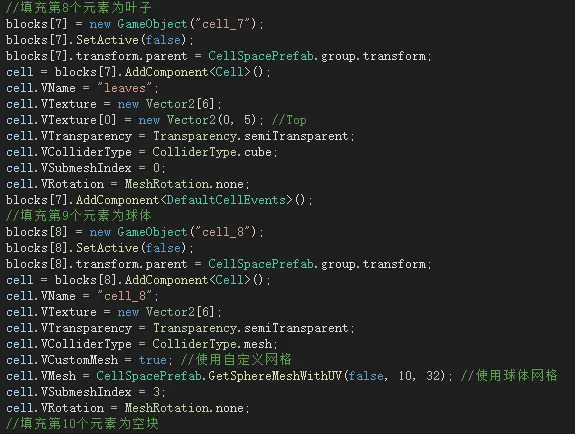
方块和自定义网格形状的预制件制作
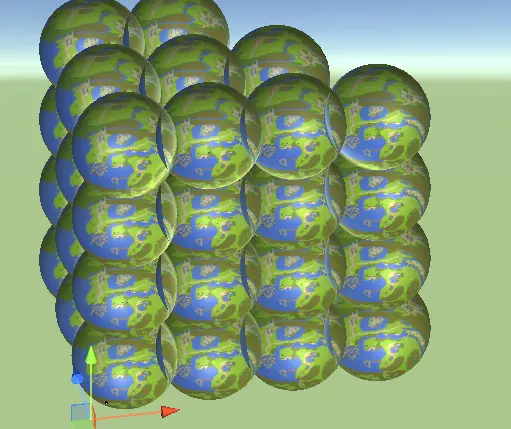
如果单元网格=球
其他概览↓
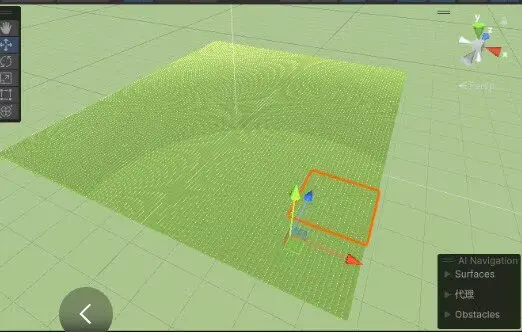
通过参数调X-Z、X-Y平面做游戏
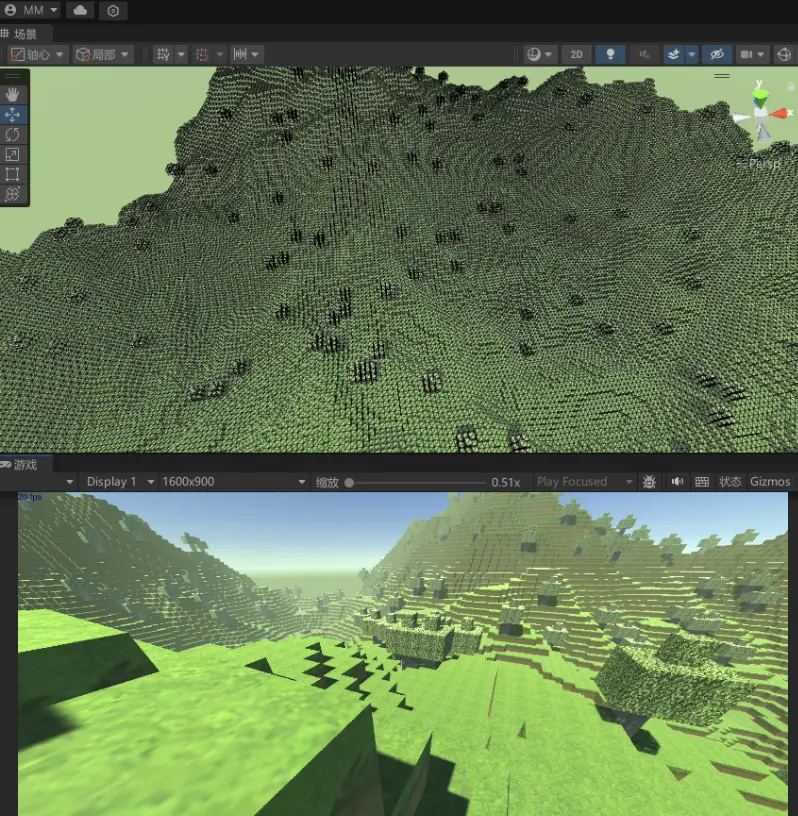
完整MC视图
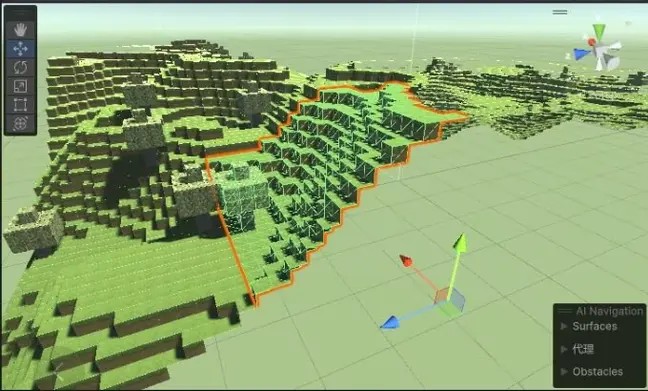
空间团块是一体模型(挂在1个GameObject)
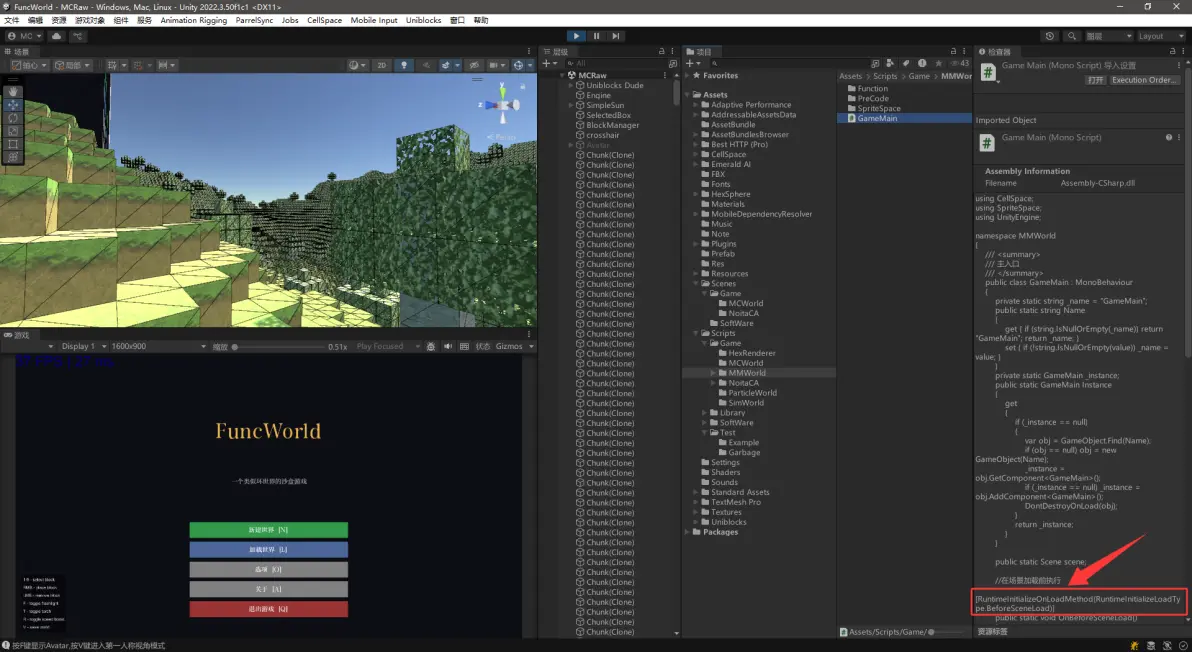
测试其他场景功能时,记得关闭菜单自启动特性
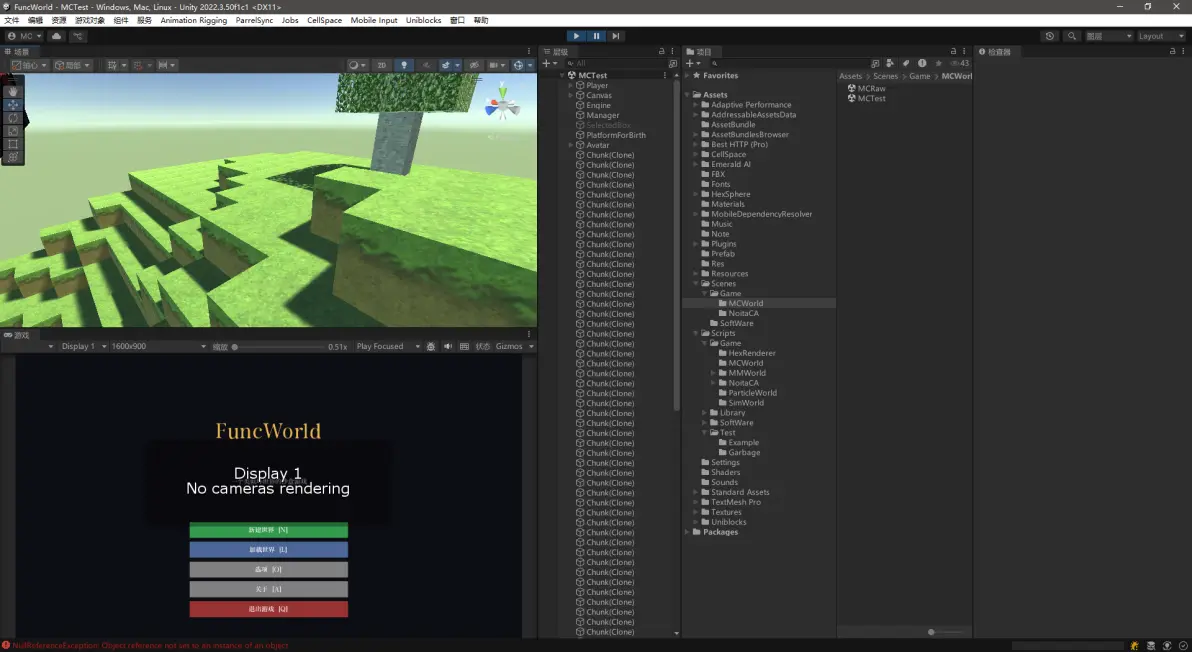
柏林噪声种树(Unity自带的平面噪声函数)
通过简单噪声函数来随机“种树”↓
代码块
//遍历团块长度内所有体素块的索引(进入布置前团块里的单元都是空块)
for (int x = 0; x < SideLength; x++)
{
    for (int y = 0; y < SideLength; y++)
    {
        for (int z = 0; z < SideLength; z++)
        { // for all voxels in the chunk
            Vector3 voxelPos = chunk.CellIndexToPosition(x, y, z); // get absolute position for the voxel.获取单元索引的世界绝对位置
            voxelPos = new Vector3(voxelPos.x + seed, voxelPos.y, voxelPos.z + seed); // offset by seed.用世界种子进行噪声修正,种子是30625这种数字
                                                                                      //Mathf.PerlinNoise()参数固定会形成固定的噪声,只需调整噪声函数返回结果接近某种高度,再遍历团块内单元高度来比对,就可布置该高度形状上的单元种类形成固定地貌
                                                                                      //制造主要地形(大山和小山)
            float perlin1 = Mathf.PerlinNoise(voxelPos.x * 0.010f, voxelPos.z * 0.010f) * 70.1f; // major (mountains & big hills),22左右波动(数值变化平稳,噪声系数0.010f)
                                                                                                 //制造次要地形(精致的细节)
            float perlin2 = Mathf.PerlinNoise(voxelPos.x * 0.085f, voxelPos.z * 0.085f) * 9.1f; // minor (fine detail),3-8左右波动(数值变化剧烈,噪声系数0.085f)
            int currentHeight = y + (SideLength * chunky); // get absolute height for the voxel.获得单元的(绝对坐标)世界高度
            bool setToGrass = false;
            //噪声结果如22是一个波动的高度值,遍历x pixelY z 是在遍历团块内每个单元的索引(然后转换为世界高度),跟单元高度对比后符合高度则进行具体布置
            if (CPEngine.keepTerrainHeight)
            {
                if (CPEngine.TerrainHeight > currentHeight)
                {
                    //更改指定索引处的单元数据(即修改单元的种类)
                    chunk.SetCellSimple(x, y, z, 2);   // set grass.设置为草地,2是草地的种类ID
                    setToGrass = true;
                }
                currentHeight = currentHeight + 1; //布置泥土时偏移1(因为我们想要草更高1块)
                if (CPEngine.TerrainHeight > currentHeight)
                {
                    //更改指定索引处的单元数据(即修改单元的种类)
                    chunk.SetCellSimple(x, y, z, 1); // set dirt.设置为土块,1是土块的种类ID
                    setToGrass = false;
                }
                //接下来在成型的地面上布置树
                if (setToGrass && TreeCanFit(x, y, z))
                {
                    //1%概率布置树
                    if (Random.Range(0.0f, 1.0f) < 0.01f)
                    {
                        //AddTree(x, y + 1, z);
                    }
                }
            }
            else
            {
                // grass pass.布置草地(噪声1大于当前高度时)
                if (perlin1 > currentHeight)
                {
                    //若噪声1大于噪声2+当前高度
                    if (perlin1 > perlin2 + currentHeight)
                    {
                        //更改指定索引处的单元数据(即修改单元的种类)
                        chunk.SetCellSimple(x, y, z, 2);   // set grass.设置为草地,2是草地的种类ID
                        setToGrass = true;
                    }
                }
                // dirt pass
                currentHeight = currentHeight + 1; // offset dirt by 1 (since we want grass 1 block higher).布置泥土时偏移1(因为我们想要草更高1块)
                if (perlin1 > currentHeight)
                {
                    //若噪声1大于(噪声2+当前高度)
                    if (perlin1 > perlin2 + currentHeight)
                    {
                        //更改指定索引处的单元数据(即修改单元的种类)
                        chunk.SetCellSimple(x, y, z, 1); // set dirt.设置为土块,1是土块的种类ID
                        setToGrass = false;
                    }
                }
                // tree pass.接下来在成型的地面上布置树
                if (setToGrass && TreeCanFit(x, y, z))
                { // only add a tree if the current block has been set to grass and if there is room for the tree in the chunk
                    if (Random.Range(0.0f, 1.0f) < 0.01f)
                    { // 1% chance to add a tree
                      //AddTree(x, y + 1, z);
                    }
                }
            }
        }

    }
}

      复制成功
免责声明:本文系网络转载或改编,未找到原创作者,版权归原作者所有。如涉及版权,请联系删
 技术文档
 推荐好文



 155-2731-8020