


软件

产品

安装ANSYS 2023 R2后运行Fluent时出现报错提示:
Welcome to ANSYS Fluent 2023 R2
Copyright 1987-2023 ANSYS, Inc. All Rights Reserved.
Unauthorized use, distribution or duplication is prohibited.
This product is subject to U.S. laws governing export and re-export.
For full Legal Notice, see documentation.
Build Time: May 29 2023 07:58:23 EDT
Build Id: 10212
Connected License Server List:
Hit return to exit.
Unexpected license problem; exiting.
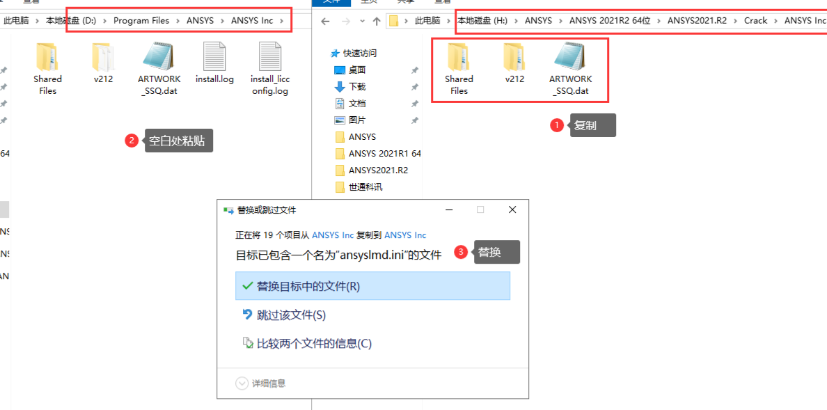
解决方法(测试过两台电脑均有效):
1.重新上传license文件并重启后,Fluent可正常运行
2.参考B站up主"火灌"的文章《ANSYS 2023 R2安装后,fluent打开报错》中的方案
问题原因:许可证文件异常 解决方案:替换ANSYS Inc文件
最新许可证文件下载地址: 百度网盘链接:https://pan.baidu.com/s/1BMkGBzwfgvMtXlS-5LY5mQ 提取码:i4wr
操作步骤:
1.下载文件
2.替换原有license文件
3.重启系统即可正常使用
免责声明:本文系网络转载或改编,未找到原创作者,版权归原作者所有。如涉及版权,请联系删
 技术文档
技术文档
 推荐好文
推荐好文





 155-2731-8020