


软件

产品

记录自己部署Django项目到服务器的笔记
一.安装nginx
nginx安装到/usr/local/nginx下
二.安装uwsgi
前提需要安装python3
安装命令:
pip3 install uwsgi三.上传项目文件
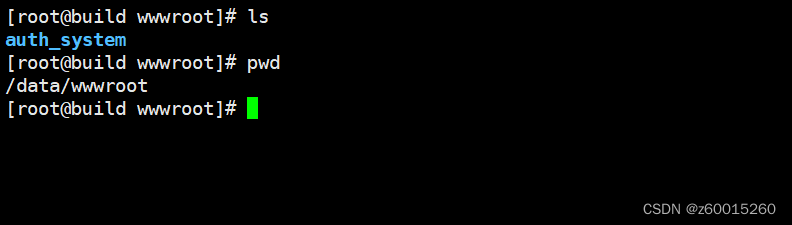
1.上传项目文件到centos7主机,我的项目名称为auth_system,上传到/ data /目录下,如图
2.文件结构:
.└── auth_system ├── auth_system │ ├── asgi.py │ ├── __init__.py │ ├── __pycache__ │ │ ├── __init__.cpython-38.pyc │ │ ├── settings.cpython-38.pyc │ │ ├── urls.cpython-38.pyc │ │ └── wsgi.cpython-38.pyc │ ├── settings.py │ ├── urls.py │ └── wsgi.py ├── common │ ├── API │ │ ├── auth.py │ │ ├── captcha.py │ │ ├── echarts.py │ │ ├── __init__.py │ │ ├── log.py │ │ ├── model_filter.py │ │ ├── __pycache__ │ │ │ ├── auth.cpython-38.pyc │ │ │ ├── captcha.cpython-38.pyc │ │ │ ├── echarts.cpython-38.pyc │ │ │ ├── __init__.cpython-38.pyc │ │ │ ├── log.cpython-38.pyc │ │ │ ├── model_filter.cpython-38.pyc │ │ │ └── res_josn_data.cpython-38.pyc │ │ └── res_josn_data.py │ ├── __init__.py │ └── __pycache__ │ └── __init__.cpython-38.pyc ├── login │ ├── admin.py │ ├── apps.py │ ├── __init__.py │ ├── migrations │ │ ├── 0001_initial.py │ │ ├── 0002_logo.py │ │ ├── __init__.py │ │ └── __pycache__ │ │ ├── 0001_initial.cpython-38.pyc │ │ ├── 0002_logo.cpython-38.pyc │ │ └── __init__.cpython-38.pyc │ ├── models.py │ ├── __pycache__ │ │ ├── admin.cpython-38.pyc │ │ ├── apps.cpython-38.pyc │ │ ├── __init__.cpython-38.pyc │ │ ├── models.cpython-38.pyc │ │ ├── urls.cpython-38.pyc │ │ └── views.cpython-38.pyc │ ├── tests.py │ ├── urls.py │ └── views.py ├── manage.py ├── requirements.txt ├── sql │ └── auth_system.sql ├── static │ ├── admin │ │ ├── css │ │ │ ├── autocomplete.css │ │ │ ├── base.css │ │ │ ├── changelists.css │ │ │ ├── dark_mode.css │ │ │ ├── dashboard.css │ │ │ ├── fonts.css │ │ │ ├── forms.css │ │ │ ├── login.css │ │ │ ├── nav_sidebar.css │ │ │ ├── responsive.css │ │ │ ├── responsive_rtl.css │ │ │ ├── rtl.css │ │ │ ├── vendor │ │ │ │ └── select2 │ │ │ │ ├── LICENSE-SELECT2.md │ │ │ │ ├── select2.css │ │ │ │ └── select2.min.css │ │ │ └── widgets.css │ │ ├── fonts │ │ │ ├── LICENSE.txt │ │ │ ├── README.txt │ │ │ ├── Roboto-Bold-webfont.woff │ │ │ ├── Roboto-Light-webfont.woff │ │ │ └── Roboto-Regular-webfont.woff │ │ ├── img │ │ │ ├── calendar-icons.svg │ │ │ ├── gis │ │ │ │ ├── move_vertex_off.svg │ │ │ │ └── move_vertex_on.svg │ │ │ ├── icon-addlink.svg │ │ │ ├── icon-alert.svg │ │ │ ├── icon-calendar.svg │ │ │ ├── icon-changelink.svg │ │ │ ├── icon-clock.svg │ │ │ ├── icon-deletelink.svg │ │ │ ├── icon-no.svg │ │ │ ├── icon-unknown-alt.svg │ │ │ ├── icon-unknown.svg │ │ │ ├── icon-viewlink.svg │ │ │ ├── icon-yes.svg │ │ │ ├── inline-delete.svg │ │ │ ├── LICENSE │ │ │ ├── README.txt │ │ │ ├── search.svg │ │ │ ├── selector-icons.svg │ │ │ ├── sorting-icons.svg │ │ │ ├── tooltag-add.svg │ │ │ └── tooltag-arrowright.svg │ │ └── js │ │ ├── actions.js │ │ ├── admin │ │ │ ├── DateTimeShortcuts.js │ │ │ └── RelatedObjectLookups.js │ │ ├── autocomplete.js │ │ ├── calendar.js │ │ ├── cancel.js │ │ ├── change_form.js │ │ ├── collapse.js │ │ ├── core.js │ │ ├── filters.js │ │ ├── inlines.js │ │ ├── jquery.init.js │ │ ├── nav_sidebar.js │ │ ├── popup_response.js │ │ ├── prepopulate_init.js │ │ ├── prepopulate.js │ │ ├── SelectBox.js │ │ ├── SelectFilter2.js │ │ ├── urlify.js │ │ └── vendor │ │ ├── jquery │ │ │ ├── jquery.js │ │ │ ├── jquery.min.js │ │ │ └── LICENSE.txt │ │ ├── select2 │ │ │ ├── i18n │ │ │ │ ├── af.js │ │ │ │ ├── ar.js │ │ │ │ ├── az.js │ │ │ │ ├── bg.js │ │ │ │ ├── bn.js │ │ │ │ ├── bs.js │ │ │ │ ├── ca.js │ │ │ │ ├── cs.js │ │ │ │ ├── da.js │ │ │ │ ├── de.js │ │ │ │ ├── dsb.js │ │ │ │ ├── el.js │ │ │ │ ├── en.js │ │ │ │ ├── es.js │ │ │ │ ├── et.js │ │ │ │ ├── eu.js │ │ │ │ ├── fa.js │ │ │ │ ├── fi.js │ │ │ │ ├── fr.js │ │ │ │ ├── gl.js │ │ │ │ ├── he.js │ │ │ │ ├── hi.js │ │ │ │ ├── hr.js │ │ │ │ ├── hsb.js │ │ │ │ ├── hu.js │ │ │ │ ├── hy.js │ │ │ │ ├── id.js │ │ │ │ ├── is.js │ │ │ │ ├── it.js │ │ │ │ ├── ja.js │ │ │ │ ├── ka.js │ │ │ │ ├── km.js │ │ │ │ ├── ko.js │ │ │ │ ├── lt.js │ │ │ │ ├── lv.js │ │ │ │ ├── mk.js │ │ │ │ ├── ms.js │ │ │ │ ├── nb.js │ │ │ │ ├── ne.js │ │ │ │ ├── nl.js │ │ │ │ ├── pl.js │ │ │ │ ├── ps.js │ │ │ │ ├── pt-BR.js │ │ │ │ ├── pt.js │ │ │ │ ├── ro.js │ │ │ │ ├── ru.js │ │ │ │ ├── sk.js │ │ │ │ ├── sl.js │ │ │ │ ├── sq.js │ │ │ │ ├── sr-Cyrl.js │ │ │ │ ├── sr.js │ │ │ │ ├── sv.js │ │ │ │ ├── th.js │ │ │ │ ├── tk.js │ │ │ │ ├── tr.js │ │ │ │ ├── uk.js │ │ │ │ ├── vi.js │ │ │ │ ├── zh-CN.js │ │ │ │ └── zh-TW.js │ │ │ ├── LICENSE.md │ │ │ ├── select2.full.js │ │ │ └── select2.full.min.js │ │ └── xregexp │ │ ├── LICENSE.txt │ │ ├── xregexp.js │ │ └── xregexp.min.js │ ├── api │ │ ├── auth.json │ │ ├── clear.json │ │ ├── init.json │ │ ├── menus.json │ │ ├── table.json │ │ ├── tableSelect.json │ │ └── upload.json │ ├── css │ │ ├── layuimini.css │ │ ├── public.css │ │ └── themes │ │ └── default.css │ ├── images │ │ ├── bg.jpg │ │ ├── captcha.jpg │ │ ├── donate_qrcode.png │ │ ├── favicon.ico │ │ ├── home.png │ │ ├── icon-login.png │ │ ├── loginbg.png │ │ ├── logo1.png │ │ └── logo.png │ ├── js │ │ ├── lay-config.js │ │ └── lay-module │ │ ├── echarts │ │ │ ├── echarts.js │ │ │ └── echartsTheme.js │ │ ├── iconPicker │ │ │ └── iconPickerFa.js │ │ ├── layarea │ │ │ └── layarea.js │ │ ├── layuimini │ │ │ ├── miniAdmin.js │ │ │ ├── miniMenu.js │ │ │ ├── miniTab.js │ │ │ ├── miniTheme.js │ │ │ └── miniTongji.js │ │ ├── step-lay │ │ │ ├── step.css │ │ │ └── step.js │ │ ├── tableSelect │ │ │ └── tableSelect.js │ │ ├── treetable-lay │ │ │ ├── treetable.css │ │ │ └── treetable.js │ │ └── wangEditor │ │ ├── fonts │ │ │ └── w-e-icon.woff │ │ ├── wangEditor.css │ │ ├── wangEditor.js │ │ ├── wangEditor.min.css │ │ ├── wangEditor.min.js │ │ └── wangEditor.min.js.map │ └── lib │ ├── font-awesome-4.7.0 │ │ ├── css │ │ │ ├── font-awesome.css │ │ │ └── font-awesome.min.css │ │ ├── fonts │ │ │ ├── FontAwesome.otf │ │ │ ├── fontawesome-webfont.eot │ │ │ ├── fontawesome-webfont.svg │ │ │ ├── fontawesome-webfont.ttf │ │ │ ├── fontawesome-webfont.woff │ │ │ └── fontawesome-webfont.woff2 │ │ ├── HELP-US-OUT.txt │ │ ├── less │ │ │ ├── animated.less │ │ │ ├── bordered-pulled.less │ │ │ ├── core.less │ │ │ ├── fixed-width.less │ │ │ ├── font-awesome.less │ │ │ ├── icons.less │ │ │ ├── larger.less │ │ │ ├── list.less │ │ │ ├── mixins.less │ │ │ ├── path.less │ │ │ ├── rotated-flipped.less │ │ │ ├── screen-reader.less │ │ │ ├── stacked.less │ │ │ └── variables.less │ │ └── scss │ │ ├── _animated.scss │ │ ├── _bordered-pulled.scss │ │ ├── _core.scss │ │ ├── _fixed-width.scss │ │ ├── font-awesome.scss │ │ ├── _icons.scss │ │ ├── _larger.scss │ │ ├── _list.scss │ │ ├── _mixins.scss │ │ ├── _path.scss │ │ ├── _rotated-flipped.scss │ │ ├── _screen-reader.scss │ │ ├── _stacked.scss │ │ └── _variables.scss │ ├── jq-module │ │ ├── jquery.particleground.min.js │ │ ├── paigusu.min.js │ │ └── zyupload │ │ ├── zyupload-1.0.0.min.css │ │ └── zyupload-1.0.0.min.js │ ├── jquery-3.4.1 │ │ └── jquery-3.4.1.min.js │ └── layui-v2.6.3 │ ├── css │ │ ├── layui.css │ │ └── modules │ │ ├── code.css │ │ ├── laydate │ │ │ └── default │ │ │ └── laydate.css │ │ └── layer │ │ └── default │ │ ├── icon-ext.png │ │ ├── icon.png │ │ ├── layer.css │ │ ├── loading-0.gif │ │ ├── loading-1.gif │ │ └── loading-2.gif │ ├── font │ │ ├── iconfont.eot │ │ ├── iconfont.svg │ │ ├── iconfont.ttf │ │ ├── iconfont.woff │ │ └── iconfont.woff2 │ └── layui.js ├── sys_manage │ ├── admin.py │ ├── apps.py │ ├── __init__.py │ ├── migrations │ │ ├── 0001_initial.py │ │ ├── 0002_alter_user_role_id.py │ │ ├── 0003_role.py │ │ ├── 0004_alter_role_sort.py │ │ ├── 0005_user_role_des.py │ │ ├── 0006_power_rolepower.py │ │ ├── __init__.py │ │ └── __pycache__ │ │ ├── 0001_initial.cpython-38.pyc │ │ ├── 0002_alter_user_role_id.cpython-38.pyc │ │ ├── 0003_role.cpython-38.pyc │ │ ├── 0004_alter_role_sort.cpython-38.pyc │ │ ├── 0005_user_role_des.cpython-38.pyc │ │ ├── 0006_power_rolepower.cpython-38.pyc │ │ └── __init__.cpython-38.pyc │ ├── models.py │ ├── __pycache__ │ │ ├── admin.cpython-38.pyc │ │ ├── apps.cpython-38.pyc │ │ ├── __init__.cpython-38.pyc │ │ ├── models.cpython-38.pyc │ │ ├── urls.cpython-38.pyc │ │ └── views.cpython-38.pyc │ ├── tests.py │ ├── urls.py │ └── views │ ├── __init__.py │ ├── log_manage.py │ ├── power_manage.py │ ├── __pycache__ │ │ ├── __init__.cpython-38.pyc │ │ ├── log_manage.cpython-38.pyc │ │ ├── power_manage.cpython-38.pyc │ │ ├── role_manage.cpython-38.pyc │ │ └── user_manage.cpython-38.pyc │ ├── role_manage.py │ └── user_manage.py ├── templates │ ├── errors │ │ ├── 403.html │ │ ├── 404.html │ │ └── 500.html │ ├── login │ │ ├── home.html │ │ ├── index.html │ │ ├── login.html │ │ ├── user_password.html │ │ └── user_setting.html │ └── sys_manage │ ├── log_manage │ │ └── log_main.html │ ├── power_manage │ │ ├── power_add.html │ │ └── power_main.html │ ├── role_manage │ │ ├── role_add.html │ │ ├── role_main.html │ │ └── role_power.html │ └── user_manage │ ├── user_add.html │ ├── user_main.html │ └── user_role_edit.html └── 四.运行nginx
1.修改/usr/local/nginx/conf下的配置文件nginx.conf, nginx使用socket与uwsgi通信,监听80端口
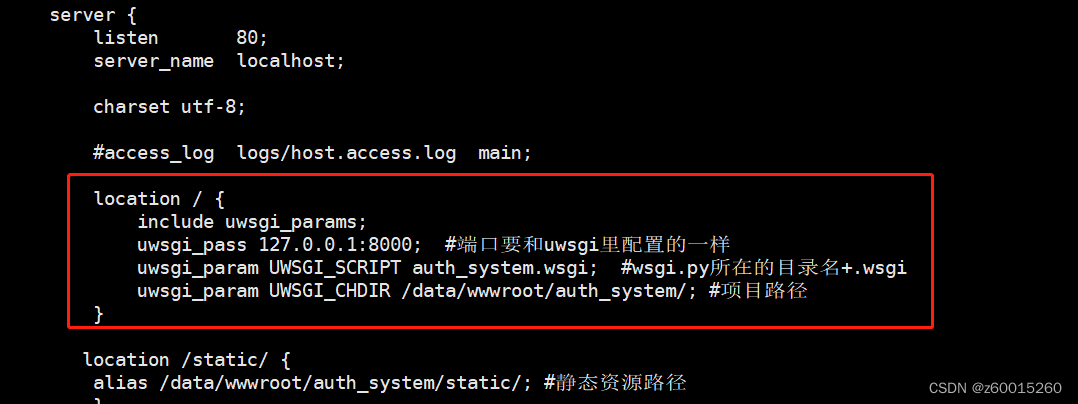
2.nginx.conf文件内容如下:
#user nobody;worker_processes 1; #error_log logs/error.log;#error_log logs/error.log notice;#error_log logs/error.log info; #pid logs/nginx.pid; events { worker_connections 1024;} http { include mime.types; default_type application/octet-stream; #log_format main '$remote_addr - $remote_user [$time_local] "$request" ' # '$status $body_bytes_sent "$http_referer" ' # '"$http_user_agent" "$http_x_forwarded_for"'; #access_log logs/access.log main; sendfile on; #tcp_nopush on; #keepalive_timeout 0; keepalive_timeout 65; #gzip on; server { listen 80; server_name localhost; charset utf-8; #access_log logs/host.access.log main; location / { include uwsgi_params; uwsgi_pass 127.0.0.1:8000; #端口要和uwsgi里配置的一样 uwsgi_param UWSGI_SCRIPT auth_system.wsgi; #wsgi.py所在的目录名+.wsgi uwsgi_param UWSGI_CHDIR /data/wwwroot/auth_system/; #项目路径 } location /static/ { alias /data/wwwroot/auth_system/static/; #静态资源路径 } #error_page 404 /404.html; # redirect server error pages to the static page /50x.html # error_page 500 502 503 504 /50x.html; location = /50x.html { root html; } # proxy the PHP scripts to Apache listening on 127.0.0.1:80 # #location ~ \.php$ { # proxy_pass http://127.0.0.1; #} # pass the PHP scripts to FastCGI server listening on 127.0.0.1:9000 # #location ~ \.php$ { # root html; # fastcgi_pass 127.0.0.1:9000; # fastcgi_index index.php; # fastcgi_param SCRIPT_FILENAME /scripts$fastcgi_script_name; # include fastcgi_params; #} # deny access to .htaccess files, if Apache's document root # concurs with nginx's one # #location ~ /\.ht { # deny all; #} } # another virtual host using mix of IP-, name-, and port-based configuration # #server { # listen 8000; # listen somename:8080; # server_name somename alias another.alias; # location / { # root html; # index index.html index.htm; # } #} # HTTPS server # #server { # listen 443 ssl; # server_name localhost; # ssl_certificate cert.pem; # ssl_certificate_key cert.key; # ssl_session_cache shared:SSL:1m; # ssl_session_timeout 5m; # ssl_ciphers HIGH:!aNULL:!MD5; # ssl_prefer_server_ciphers on; # location / { # root html; # index index.html index.htm; # } #} }3.运行nginx
./usr/local/nginx/sbin/nginx4.查看nginx是否启动
ps aux|grep nginx
也可以查询端口80是否有监听
netstat -anlp|grep 80
五.运行uwsgi
1在项目文件auth_system新建 文件夹 uwsgi
cd /data/wwwroot/auth_systemmkdir uwsgi2.在文件夹uwsgi下auth_system.ini,内容如下,保存退出
[uwsgi]#使用nginx连接时使用(最好写成本机的IP地址,例如:192...)socket=127.0.0.1:8000#直接做web服务器使用(最好写成本机的IP地址,例如:192...)#http=127.0.0.1:8000#自己的项目目录chdir=/data/wwwroot/auth_system#项目中wsgi.py文件的目录,相对于项目目录wsgi-file=auth_system/wsgi.py#开启4个进程(足够一个小型社区往网站的使用)processes=4#开启2个线程threads=2master=Truepidfile=uwsgi.piddaemonize=uwsgi.logvacuum = true #环境退出时自动清理buffer-size = 65536 #设置用于uwsgi包解析的内部缓存区大小为64k,默认是4k3.运行uwsgi
cd /data/wwwroot/auth_system/uwsgi/uwsgi --ini auth_system.ini4.查看日志uwsgi.log启动是否正常,以下是正常启动日志:
*** Starting uWSGI 2.0.21 (64bit) on [Fri Jun 16 11:27:09 2023] ***compiled with version: 4.8.5 20150623 (Red Hat 4.8.5-44) on 14 June 2023 06:40:31os: Linux-3.10.0-1160.90.1.el7.x86_64 #1 SMP Thu May 4 15:21:22 UTC 2023nodename: buildmachine: x86_64clock source: unixpcre jit disableddetected number of CPU cores: 2current working directory: /data/wwwroot/auth_system/uwsgiwriting pidfile to uwsgi.piddetected binary path: /usr/local/python3/bin/uwsgiuWSGI running as root, you can use --uid/--gid/--chroot options*** WARNING: you are running uWSGI as root !!! (use the --uid flag) *** chdir() to /data/wwwroot/auth_systemyour processes number limit is 31169your memory page size is 4096 bytesdetected max file descriptor number: 1024lock engine: pthread robust mutexesthunder lock: disabled (you can enable it with --thunder-lock)uwsgi socket 0 bound to TCP address 127.0.0.1:8000 fd 3uWSGI running as root, you can use --uid/--gid/--chroot options*** WARNING: you are running uWSGI as root !!! (use the --uid flag) *** Python version: 3.8.3 (default, Apr 14 2022, 15:58:12) [GCC 4.8.5 20150623 (Red Hat 4.8.5-44)]Python main interpreter initialized at 0x1b5d1a0uWSGI running as root, you can use --uid/--gid/--chroot options*** WARNING: you are running uWSGI as root !!! (use the --uid flag) *** python threads support enabledyour server socket listen backlog is limited to 100 connectionsyour mercy for graceful operations on workers is 60 secondsmapped 1031270 bytes (1007 KB) for 8 cores*** Operational MODE: preforking+threaded ***WSGI app 0 (mountpoint='') ready in 0 seconds on interpreter 0x1b5d1a0 pid: 21773 (default app)uWSGI running as root, you can use --uid/--gid/--chroot options*** WARNING: you are running uWSGI as root !!! (use the --uid flag) *** *** uWSGI is running in multiple interpreter mode ***spawned uWSGI master process (pid: 21773)spawned uWSGI worker 1 (pid: 21775, cores: 2)spawned uWSGI worker 2 (pid: 21776, cores: 2)spawned uWSGI worker 3 (pid: 21778, cores: 2)spawned uWSGI worker 4 (pid: 21779, cores: 2)也可以通过是否运行起来
ps aux|grep uwsgi
六.通过 浏览器 访问:
1.输入centos7主机 IP ,我这里是10.10.80.125,无法访问
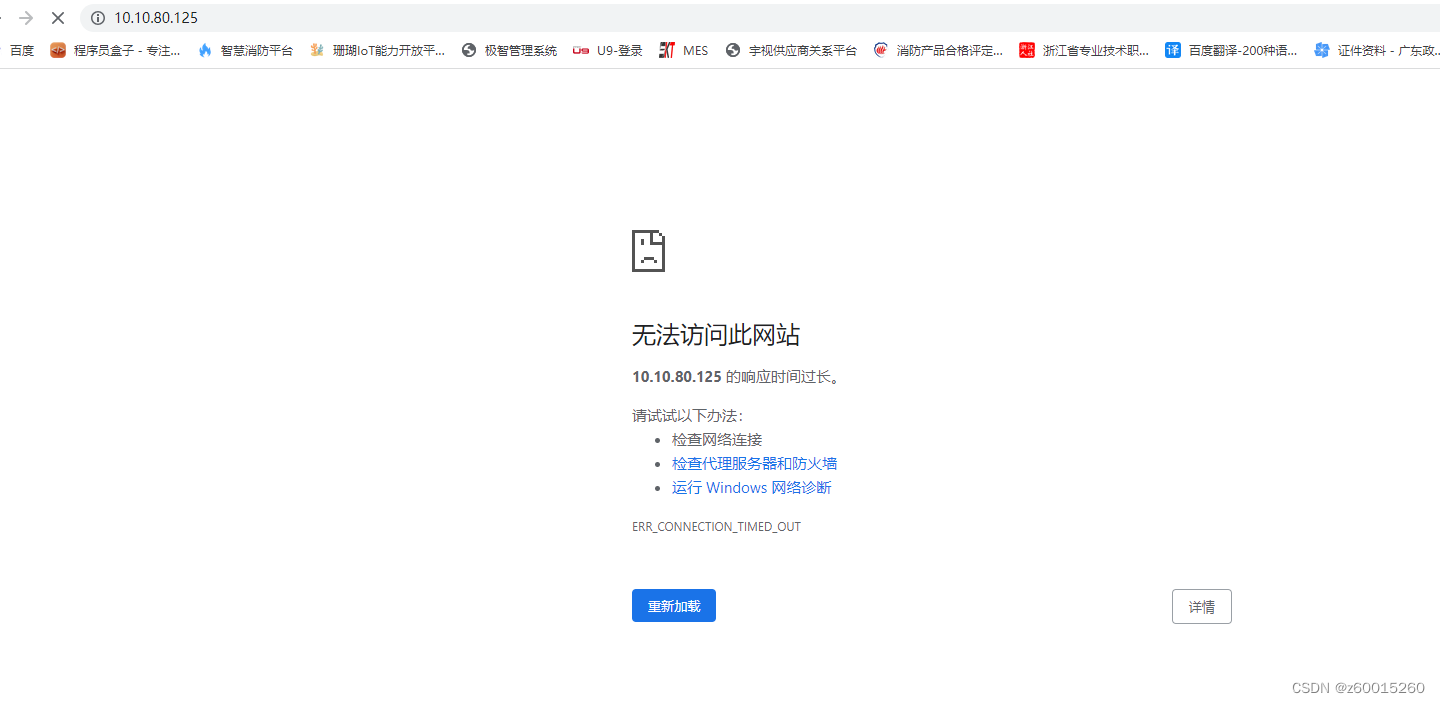
2.查看nginx日志,路径/usr/local/nginx/logs下的access.log,没有访问 信息 ,80端口监听正常,但没访问记录,应该是被防火墙拦截了
3.查看防火墙状态,命令systemctl status firewalld, 防火墙在运行
systemctl status firewalld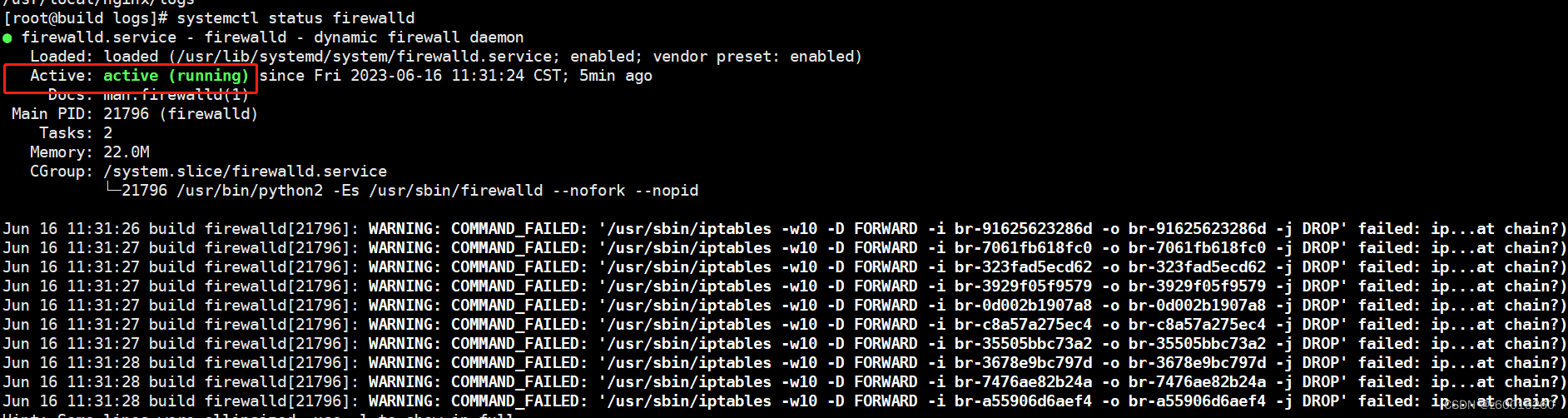
4.关闭防火墙后,浏览器再次访问,正常:
systemctl stop firewalld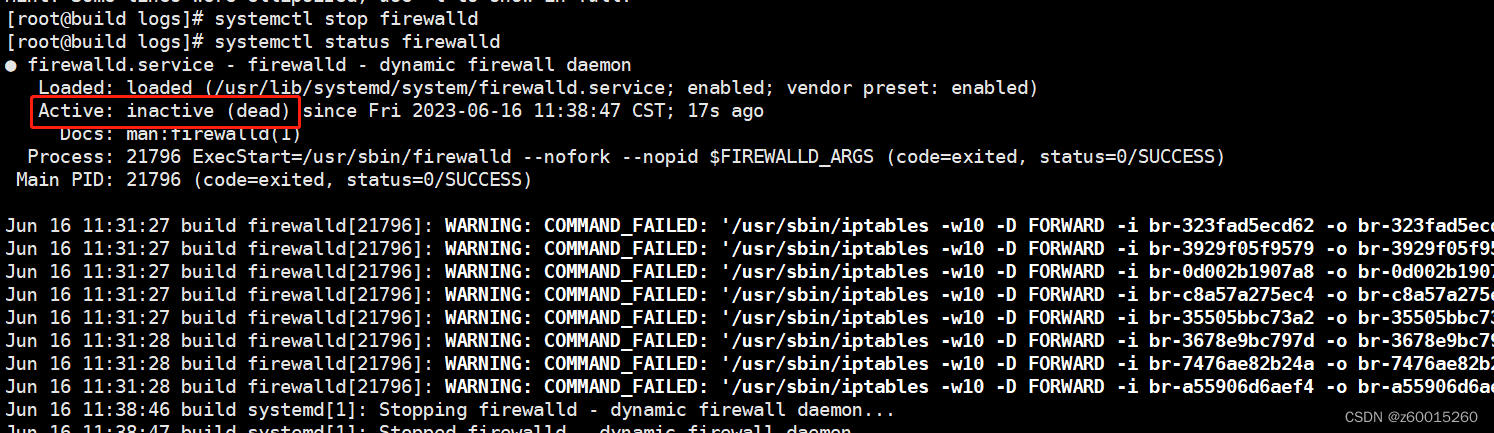
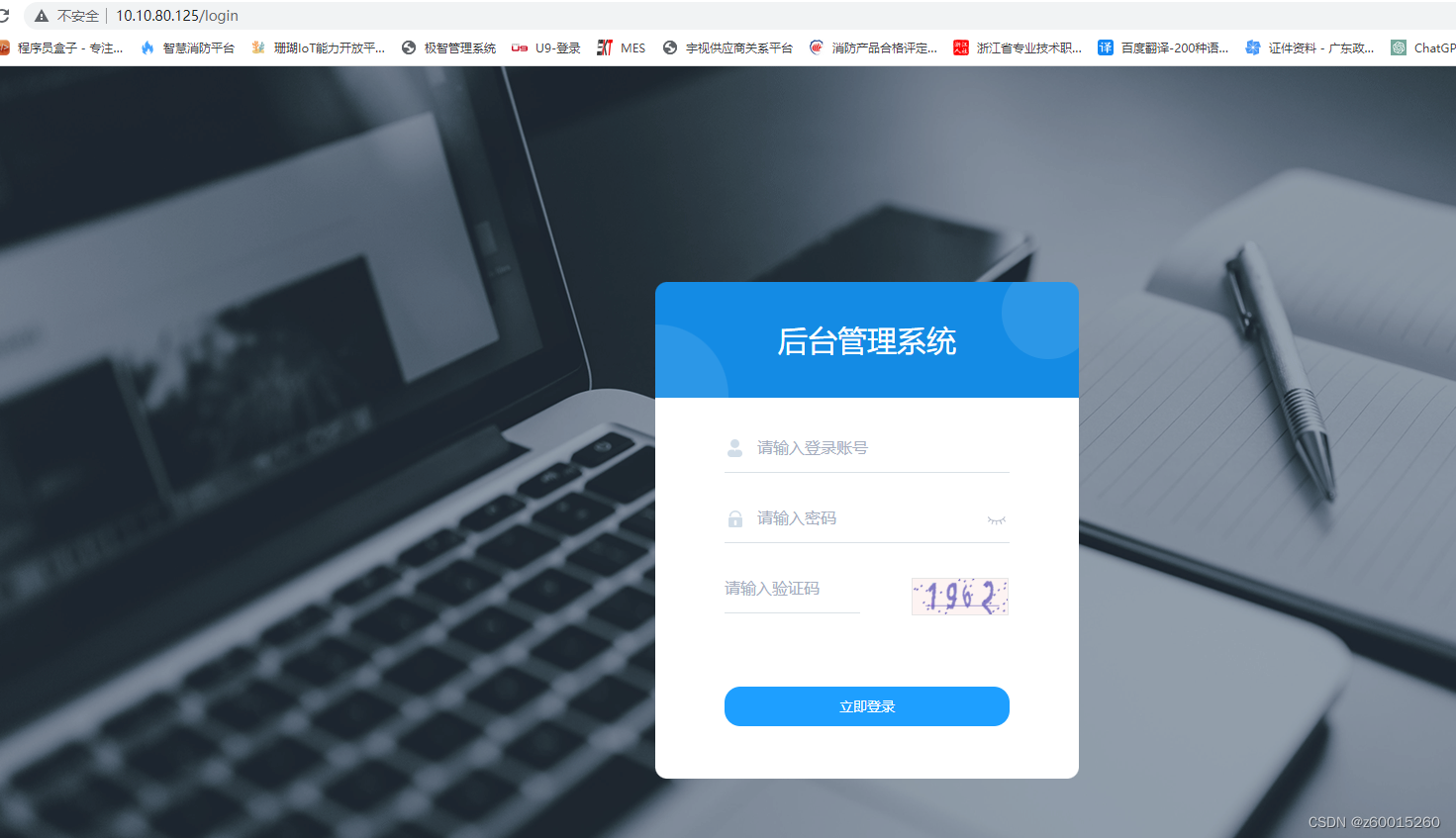
5.也可以防火墙不关闭,开启80端口
# 查看所有开启的端口firewall-cmd --list-ports # 注:启动防火墙后,默认没有开启任何端口,需要手动开启端口 # 防火墙开启端口80访问firewall-cmd --zone=public --add-port=80/tcp --permanent#命令含义: --zone #作用域 --add-port=80/tcp #添加端口,格式为:端口/通讯协议 --permanent #永久生效,没有此参数重启后失效 #注:开启后需要重启防火墙才生效 firewall-cmd --reload #重启命令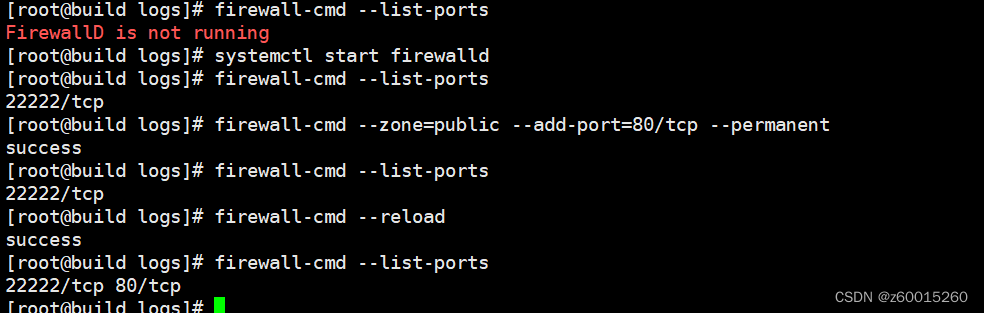
免责声明:本文系网络转载或改编,未找到原创作者,版权归原作者所有。如涉及版权,请联系删
 技术文档
技术文档
 推荐好文
推荐好文





 155-2731-8020