


软件

产品


偶然看到一篇文章,原文链接
突然对人脸识别有了很大兴趣,于是对文章中利用的方法进行了深入的学习,原理大致基于人脸上的OpenCV库和68个特征点,对监测到的标志点进行标记显示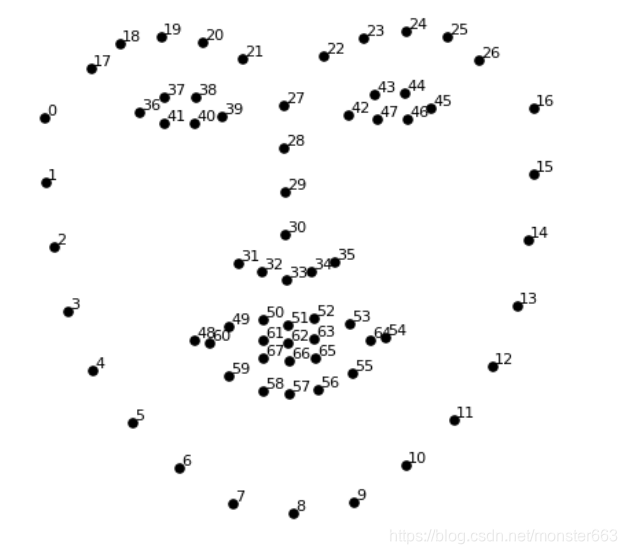
颚点= 0–16
右眉点= 17–21
左眉点= 22–26
鼻点= 27–35
右眼点= 36–41
左眼点= 42–47
口角= 48–60
嘴唇分数= 61–67
需要 shape_predictor_68_face_landmarks.dat 资源已经上传至百度云
链接:https://pan.baidu.com/s/1qowI0Xf49s_luqozFeWGww
提取码:qwer
python 安装dlib库和OpenCV库
dlib库的安装较为麻烦,主要是它十个C++的开源包,笔者是通过vs2019装上的,详细的教程可以参考这篇博客
当然也可以进入
https://pypi.org/project/dlib/19.6.0/#files 下载 Dlib库
pip install dlib-19.6.0-cp36-cp36m-win_amd64.whl
当你把数据文件和代码文件放到同一个文件夹下,并且运行也没有报错,就可以开始玩耍了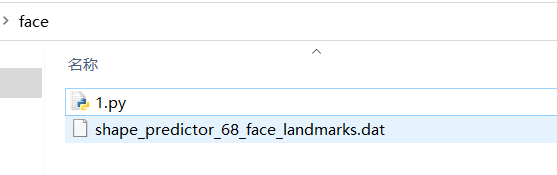
相比于监测图片,我还是更喜欢实时监测,关于监测图片的代码也贴一下,也可以在原文中查看
import cv2
import numpy as np
import dlib
# Load the detector
detector = dlib.get_frontal_face_detector()
# Load the predictor
predictor = dlib.shape_predictor("shape_predictor_68_face_landmarks.dat")
# read the image
img = cv2.imread("face.jpg")
# Convert image into grayscale
gray = cv2.cvtColor(src=img, code=cv2.COLOR_BGR2GRAY)
# Use detector to find landmarks
faces = detector(gray)
for face in faces:
    x1 = face.left() # left point
    y1 = face.top
免责声明:本文系网络转载或改编,未找到原创作者,版权归原作者所有。如涉及版权,请联系删
 技术文档
技术文档
 推荐好文
推荐好文





 155-2731-8020




