


软件

产品


在做cadence 仿真 的时候,有些时候需要确定各个管子处在什么operating region, 这里主要介绍一下仿真的方法。
首先,各个operating region 定义如下(参考来源):
0: cutoff
1: triode
2: saturation
3: subthreshold
4: breakdown
cadence 上的仿真方法:
schematic 画好以后,打开ADE进行仿真,进行常规的设置,比如load state, set up library, analyses等,
在ADE window 里面选择
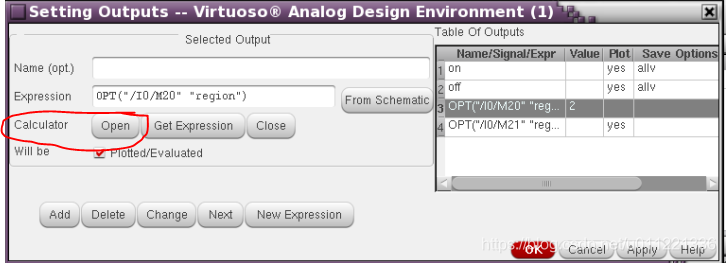
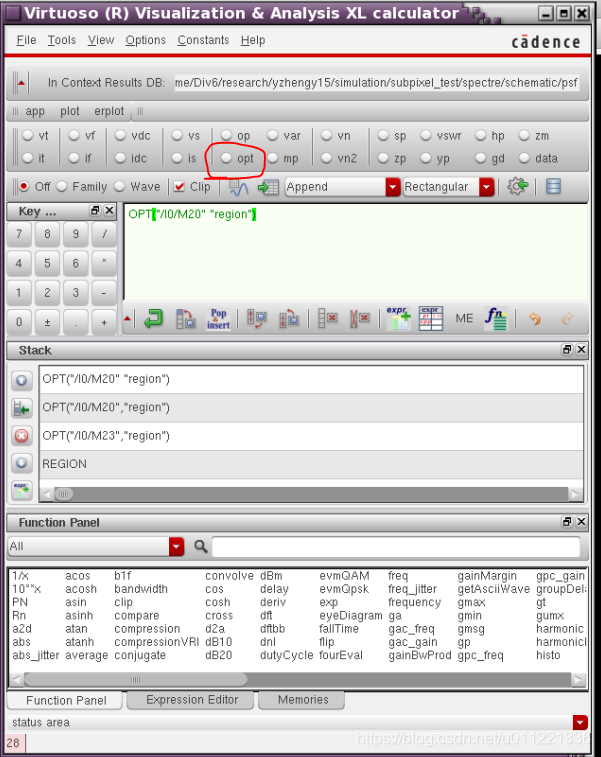
Outputs-> setup-> calculator:open-> info: opt-> 在schematic 里面选择要测的管子-> OPT parameter window: list-> region-> setting outpus window: get expression->Add-> OK-> 至此,测试的对象已经被添加在ADE window 里的outputs 栏里了,然后选择netlist and run, 你就能看到测试的管子处在哪个region.
补充:最后operating region 是以数字形式还是以 waveform 形式展现与选择的分析方
免责声明:本文系网络转载或改编,未找到原创作者,版权归原作者所有。如涉及版权,请联系删
 技术文档
技术文档
 推荐好文
推荐好文





 155-2731-8020




