


软件

产品


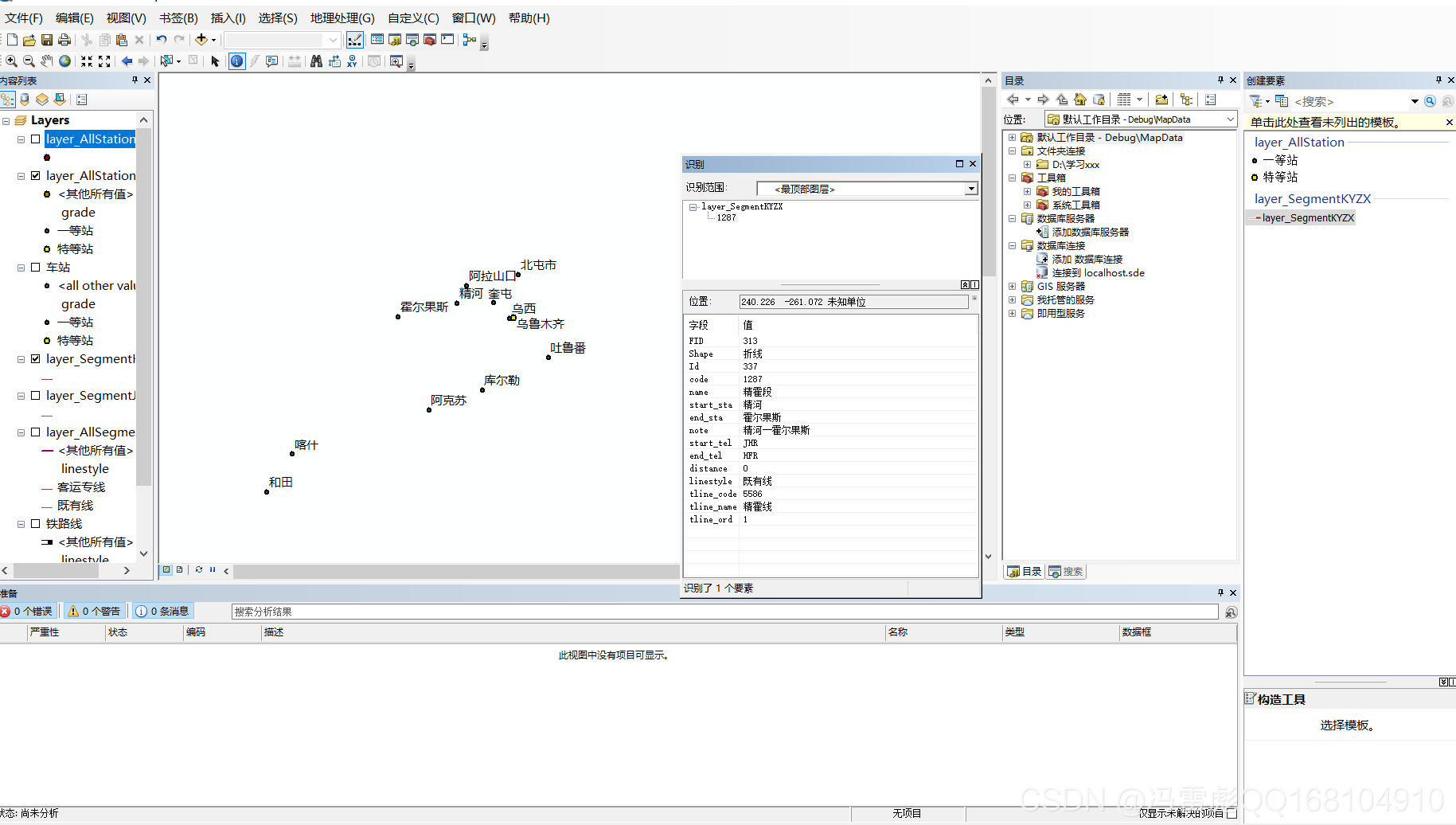
在arcgismap中,我们点击 识别 要素的按钮,然后在选中元素就可以获取这个要素的属性了。
在arcgisengine中,实现的 原理 如下:
获取鼠标点击 位置信息
如果是栅格图层:
图层转为Identify对象,将扩大后的点作为参数输入,进行识别
遍历识别结果记录,获取图层名和对应位置的属性值
如果是 矢量 要素图层:
先对点进行缓冲,扩大点覆盖范围(尽量减少 对空白区域的识别,增加对有效记录的识别)
图层转为Identify对象,将扩大后的点作为参数输入,进行识别
遍历识别结果中的记录,获取对应的要素属性记录,通过遍历属性记录来获取属性记录的字段、字段名
代码 参考:
#region 双击识别 private void axMapControl1_OnDoubleClick(object sender, IMapControlEvents2_OnDoubleClickEvent e) { //获取鼠标点击位置点 IPoint point = new PointClass(); point.PutCoords(e.mapX, e.mapY); string output = ""; for (int i = 0; i < axMapControl1.LayerCount; i++) { output += Identify_layer(axMapControl1.get_Layer(i), point); } MessageBox.Show(output); } private string Identify_layer(ILayer layer, IPoint SelectedPoint) { //定义几何图形 IGeometry pGeometry; //定义结果字符串 string output = ""; //如果是矢量图层 if (layer is IFeatureLayer) { //图层转Identify对象 IIdentify pFL = layer as IIdentify; //对点进行缓冲赋给几何图形,尽量减少对空白区域判定 ITopologicalOperator pTopo = SelectedPoint as ITopologicalOperator; pGeometry = pTopo.Buffer(500); //将几何图形作为输入传入Identify对象,进行识别 IArray id_result = pFL.Identify(pGeometry); if (id_result != null) { //对识别结果中的记录进行遍历(由于缓冲扩大,可能识别到同一图层多条记录) for (int i = 0; i < id_result.Count; i++) { //获取识别结果记录中的属性记录 IIdentifyObj featureIdentifyobj = (IIdentifyObj)id_result.get_Element(i); IRowIdentifyObject iRowIdentifyObject = featureIdentifyobj as IRowIdentifyObject; IRow pRow = iRowIdentifyObject.Row;//添加引用GeoDatabase output += "\"" + featureIdentifyobj.Layer.Name + "\":\n"; //遍历属性记录,获取字段名、字段值 for (int a = 0; a < pRow.Fields.FieldCount; a++) { if (pRow.Fields.get_Field(a).Type != esriFieldType.esriFieldTypeGeometry) { output += String.Format("{0}={1} \n", pRow.Fields.get_Field(a).Name, pRow.get_Value(a).ToString()); } } } } } else if (layer is IRasterLayer) { //图层转Identify对象 IIdentify pFL = layer as IIdentify; //点转几何对象 pGeometry = SelectedPoint as IGeometry; //将几何图形作为输入传入Identify对象,进行识别 IArray id_result = pFL.Identify(pGeometry); if (id_result != null) { //遍历识别结果记录,获取图层名和对应位置的属性值 for (int i = 0; i < id_result.Count; i++) { IIdentifyObj featureIdentifyobj = (IIdentifyObj)id_result.get_Element(i); IRasterIdentifyObj rasterIdentifyobj = featureIdentifyobj as IRasterIdentifyObj; output += "\"" + featureIdentifyobj.Layer.Name + "\":" + "\n" + rasterIdentifyobj.MapTip + "\n"; } } } return output + "\n"; } #endregion参考代码2:
1 ITopologicalOperator pTopo; 2 IGeometry pGeometry; 3 IFeature pFeature; 4 IFeatureLayer pFeatureLayer; 5 IFeatureCursor pCursor; 6 ISpatialFilter pFilter; 7 DataTable dataTable; 8 9 for (int i = 0; i < axMapControl1.Map.LayerCount; i++)10 {11 12 pPoint = new PointClass();13 pPoint.PutCoords(e.mapX, e.mapY);14 pTopo = pPoint as ITopologicalOperator;17 double m_Radius = 1;18 pGeometry = pTopo.Buffer(m_Radius); 19 if (pGeometry == null)20 continue;21 axMapControl1.Map.SelectByShape(pGeometry, null, true);//第三个参数为是否只选中一个22 axMapControl1.Refresh(esriViewDrawPhase.esriViewGeoSelection, null, null); //选中要素高亮显示23 pFilter = new SpatialFilterClass();25 pFilter.SpatialRel = esriSpatialRelEnum.esriSpatialRelIntersects;26 pFilter.Geometry = pGeometry;27 pFeatureLayer = axMapControl1.Map.get_Layer(i) as IFeatureLayer; 28 pCursor = pFeatureLayer.Search(pFilter, false);29 pFeature = pCursor.NextFeature();30 string fieldName;31 if (pFeature != null)33 {34 if (Application.OpenForms["otherQueryForm"] == null)35 {36 otherqueryform = new otherQueryForm();37 otherqueryform.Show();38 }39 else40 {41 Application.OpenForms["otherQueryForm"].Show();42 }//这里主要控制子窗体不会重复弹出44 dataTable = new DataTable();45 for (int k = 0; k < 2; k++)46 {47 if (k == 0)48 {49 dataTable.Columns.Add("属性");50 }51 if (k == 1)52 {53 dataTable.Columns.Add("值");54 }55 }56 DataRow datarow;57 for (int j = 0; j < pFeature.Fields.FieldCount; j++)58 {59 datarow = dataTable.NewRow();60 for (int m = 0; m < 2; m++)61 {62 if (m == 0)63 {64 fieldName = pFeature.Fields.get_Field(j).Name;65 datarow[m] = fieldName;66 }67 if (m == 1)68 {69 if (pFeature.Fields.get_Field(j).Name == "Shape")70 {71 if (pFeature.Shape.GeometryType == ESRI.ArcGIS.Geometry.esriGeometryType.esriGeometryPoint)72 {73 datarow[m] = "点";74 }75 if (pFeature.Shape.GeometryType == ESRI.ArcGIS.Geometry.esriGeometryType.esriGeometryPolyline)76 {77 datarow[m] = "线";78 }79 if (pFeature.Shape.GeometryType == ESRI.ArcGIS.Geometry.esriGeometryType.esriGeometryPolygon)80 {81 datarow[m] = "面";82 }83 }84 else85 {86 datarow[m] = pFeature.get_Value(j).ToString();87 }88 }89 }90 dataTable.Rows.Add(datarow);91 }92 otherqueryform.dataGridView1.DataSource = dataTable;93 otherqueryform.layerName_dev.Text = pFeatureLayer.Name;94 otherqueryform.dataGridView1.Refresh();95 pFeature = null;96 break;97 }99 }
免责声明:本文系网络转载或改编,未找到原创作者,版权归原作者所有。如涉及版权,请联系删
 技术文档
技术文档
 推荐好文
推荐好文





 155-2731-8020




