软件

产品


原理
通过配置html中的代码使入口文件每次都强制加载最新的内容,进而加载指定哈希值的新资源文件,实现不用手动清除浏览器缓存即可加载最新版本内容。
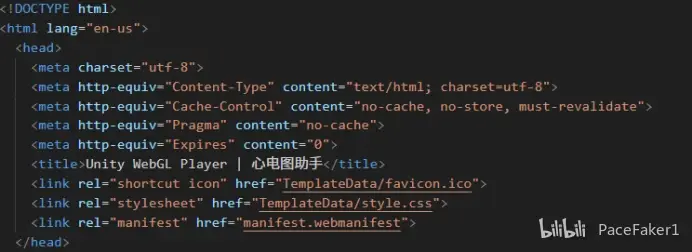
3.在打包出的index.html文件中添加meta配置代码,强制本地不对index.html文件进行缓存,这样每次加载的html文件都是最新的。
<meta http-equiv="Cache-Control" content="no-cache, no-store, must-revalidate">
<meta http-equiv="Pragma" content="no-cache">
<meta http-equiv="Expires" content="0">
位置如图所示
此项配置验证是否成功,需在浏览器控制台查看index.html的响应码信息。
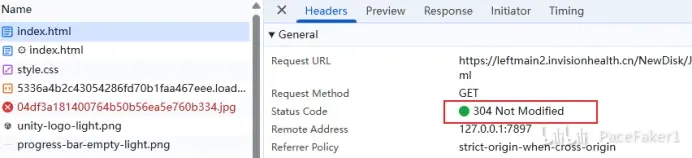
如果为200 OK或304 Not Modified则为配置成功。
如果为200 OK(from workservice)则为从缓存中加载的,这是由于被WorkService.js文件覆盖了缓存策略,此时需要修改WorkService.js中的代码使其忽略index.html文件的缓存,仅缓存资源文件。
4.将WorkService.js方法中的fetch事件修改为以下内容
self.addEventListener('fetch', function (e) {
// 关键修改:对HTML文件跳过Service Worker缓存
if (e.request.url.includes('.html')) {
console.log(`[Service Worker] Bypassing cache for HTML: ${e.request.url}`);
return fetch(e.request); // 直接请求网络最新HTML
}
e.respondWith((async function() {
const cachedResponse = await caches.match(e.request);
if (cachedResponse) {
console.log(`[Service Worker] Serving from cache: ${e.request.url}`);
return cachedResponse;
}
const networkResponse = await fetch(e.request);
// 关键修改:非HTML资源才缓存
if (!e.request.url.includes('.html')) {
const cache = await caches.open(cacheName);
console.log(`[Service Worker] Caching new resource: ${e.request.url}`);
cache.put(e.request, networkResponse.clone());
}
return networkResponse;
})());
});
这样会忽略所有html文件的浏览器本地缓存,每次都加载最新的,且不影响html引用的资源文件缓存。
将以上内容修改后,替换WebGLTemplates模板文件,这样每次打包将自动替换对应文件无需每次打包都修改一次。
默认WebGL模板路径:Unity编辑器安装路径\Editor\Data\PlaybackEngines\WebGLSupport\BuildTools\WebGLTemplates。
免责声明:本文系网络转载或改编,未找到原创作者,版权归原作者所有。如涉及版权,请联系删
 技术文档
 推荐好文



 155-2731-8020