软件

产品


先上效果图。
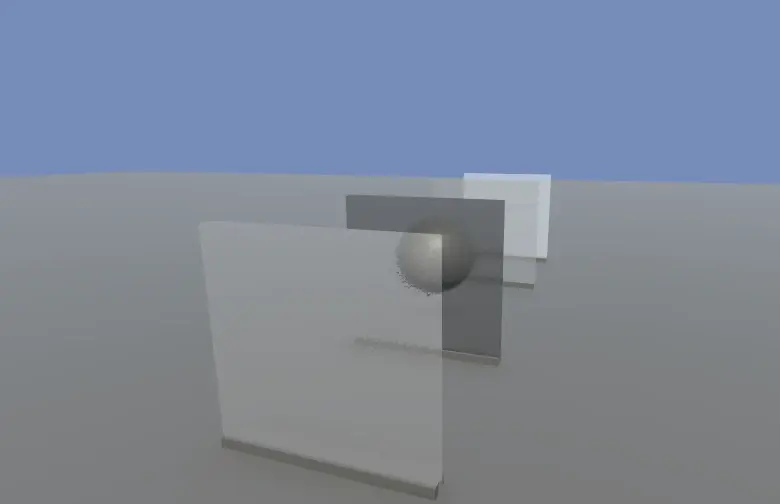
要实现毛玻璃效果,就必须得要对场景物件进行采样,然后通过模糊或者噪声图去偏移 uv 就能实现毛玻璃效果。
在URP管线中,你只需要勾上 Opaque Texture 就可以采样不透明物体了。
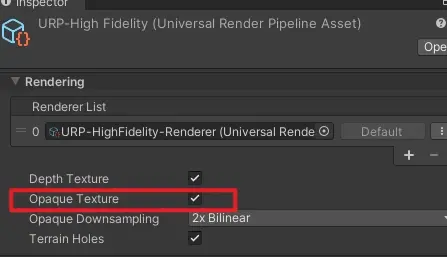
但如果你想要让透明物体能扭曲透明物体,那就比较麻烦了,需要对透明物体抓屏。
最后附上毛玻璃效果的 PS 阶段的 shader 代码
float4 frag(v2f i) : SV_Target
{
float2 screenUV = i.scrPos.xy / i.scrPos.w; // 直接用 i.uv 采样噪声贴图,自动支持 Tiling/Offset float2 noise = SAMPLE_TEXTURE2D(_NoiseTex, sampler_NoiseTex, i.uv).rg * 2.0 - 1.0; float2 grainOffset = noise * _GlassBlur; // 多次采样叠加颗粒感 float3 color = float3(0,0,0); [unroll] for (int j = 0; j < 5; j++) { float2 offset = grainOffset * (j * 0.5 + 1.0); color += SAMPLE_TEXTURE2D(_CameraOpaqueTexture, sampler_CameraOpaqueTexture, screenUV + offset).rgb; } color /= 5.0; float3 finalColor = lerp(color, _GlassColor.rgb, _GlassStrength); return float4(finalColor, _GlassColor.a); }
免责声明:本文系网络转载或改编,未找到原创作者,版权归原作者所有。如涉及版权,请联系删
 技术文档
 推荐好文


 155-2731-8020