


软件

产品


1、教程地址
安装 torch 直接参考官方的教程即可,官方教程地址:
Jetson_Zoo教程地址:https://www.elinux.org/Jetson_Zoo
2、下载torch安装包
下载torch1.6.0版本的whl安装包,下载地址如下:
torch1.6.0版本下载地址:https://nvidia.box.com/shared/static/9eptse6jyly1ggt9axbja2yrmj6pbarc.whl
其他版本自己去上面的官网地址查看那
3、下面是安装torch的具体过程
# install OpenBLAS and OpenMPI
$ sudo apt-get install libopenblas-base libopenmpi-dev

# Python 2.7 (download pip wheel from above)
$ pip install future torch-1.4.0-cp27-cp27mu-linux_aarch64.whl

# Python 3.6 (download pip wheel from above)
$ sudo apt-get install python3-pip
pip3 install Cython
pip3 install numpy torch-1.6.0-cp36-cp36m-linux_aarch64.whl
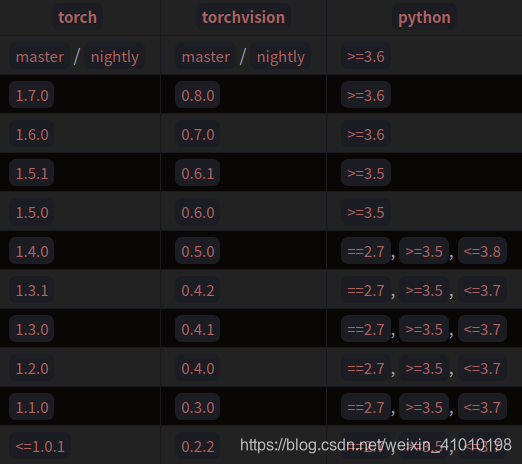
1、查看torchvision和torch的版本对应关系
首先安装torchvision的版本是要和torch版本对应的,具体对应如下:
2、直接使用pip3安装torchvision(报错)
如果你直接安装,会提示你没有0.7.0的版本,而且提示的版本都比较低:
zhihui@zhihui-desktop:~$ pip3 install torchvision==0.7.0
Collecting torchvision==0.7.0
  Retrying (Retry(total=4, connect=None, read=None, redirect=None, status=None)) after connection broken by 'ReadTimeoutError("HTTPSConnectionPool(host='pypi.tuna.tsinghua.edu.cn', port=443): Read timed out. (read timeout=15)",)': /simple/torchvision/
  Could not find a version that satisfies the requirement torchvision==0.7.0 (from versions: 0.1.6, 0.1.7, 0.1.8, 0.1.9, 0.2.0, 0.2.1, 0.2.2, 0.2.2.post2, 0.2.2.post3)
No matching distribution found for torchvision==0.7.0
zhihui@zhihui-desktop:~$
3、正确安装torchvision的方式
git clone -b v0.7.0 https://hub.fastgit.org/pytorch/vision.git
zhihui@zhihui-desktop:~$ git clone  -b v0.7.0 https://hub.fastgit.org/pytorch/vision.git
Cloning into 'vision'...
remote: Enumerating objects: 30, done.
remote: Counting objects: 100% (30/30), done.
remote: Compressing objects: 100% (30/30), done.
remote: Total 11381 (delta 7), reused 2 (delta 0), pack-reused 11351
Receiving objects: 100% (11381/11381), 12.75 MiB | 965.00 KiB/s, done.
Resolving deltas: 100% (7922/7922), done.
Note: checking out '78ed10cc51067f1a6bac9352831ef37a3f842784'.

You are in 'detached HEAD' state. You can look around, make experimental
changes and commit them, and you can discard any commits you make in this
state without impacting any branches by performing another checkout.

If you want to create a new branch to retain commits you create, you may
do so (now or later) by using -b with the checkout command again. Example:

  git checkout -b <new-branch-name>

zhihui@zhihui-desktop:~$ ls
datsets  Desktop  Documents  Downloads  examples.desktop  Music  Pictures  project  Public  Templates  tools  Videos  vision
cd visionpython3 setup.py install
zhihui@zhihui-desktop:~$ cd vision/
zhihui@zhihui-desktop:~/vision$ ls
cmake           CODE_OF_CONDUCT.md  examples    LICENSE      mypy.ini   README.rst  setup.cfg  test         tox.ini
CMakeLists.txt  docs                hubconf.py  MANIFEST.in  packaging  references  setup.py   torchvision  travis-scripts
zhihui@zhihui-desktop:~/vision$ python3 setup.py install
如果上面安装报错:fatal error: libavcodec/avcodec.h: No such file or directory,请参考博客
1、首先使用查看有哪些torchvision版本
pip3 search torchvision --timeout=500
zhihui@zhihui-desktop:~$ pip3 search torchvision --timeout=500
Retrying (Retry(total=4, connect=None, read=None, redirect=None, status=None)) after connection broken by 'NewConnectionError('<urllib3.connection.VerifiedHTTPSConnection object at 0x7f843ca400>: Failed to establish a new connection: [Errno 101] Network is unreachable',)': /pypi
torchvision-raspi (0.2.1.1)                      - Torchvision for Raspberry Pi 3B armv7l
torchvision-enhance (0.1.3)                      - Enhance torchvision for multi-channel images, 16-bit image, segmentation...
torchvision (0.8.1)                              - image and video datasets and models for torch deep learning
  INSTALLED: 0.7.0a0+78ed10c
  LATEST:    0.8.1
opencv-torchvision-transforms-yuzhiyang (0.0.1)  - an opencv based rewriting of the "transforms" in torchvision package
nvidia-torchvision (0.0.1.dev4)                  - A fake package to warn the user he is not installing the correct package.
torchvision-yolov3 (0.6.0)                       - A minimal PyTorch implementation of YOLOv3.
torchvision-detection (0.7.0)                    - Object detection reference training scripts.
torchvision4ad (0.1.1)                           - torchvision for anomaly detection
pytorch-fasterrcnn (0.2.1)                       - Torchvision Faster RCNN Fine Tuner
lxtoolkit (0.0.1)                                - a simple toolkit based on torch and torchvision
quadratum (0.2.1)                                - Additional torchvision image transforms for practical usage.
opencv-transforms (0.0.3.post3)                  - A drop-in replacement for Torchvision Transforms using OpenCV
invertransforms (0.2.1)                          - A library which turns torchvision transformations invertible and replayable.
zhihui@zhihui-desktop:~$
2、查看到有torchvision的0.7.0a0+78ed10c,这个就是0.7.0版本,安装这个就可以
pip3 install torchvision==0.7.0a0+78ed10c
pip3
免责声明:本文系网络转载或改编,未找到原创作者,版权归原作者所有。如涉及版权,请联系删
 技术文档
技术文档
 推荐好文
推荐好文





 155-2731-8020




