


软件

产品


在安装MATLAB R2019b Update 5的过程中出现未知错误unexpected error,并且找不到日志文件可供查询(如果有高手找到请指教),打开代理后仍然出现未知错误还连带了连接错误connection error。本来想暂时放弃更新,结果打开 MATLAB 发现命令行窗口报错:
Caught "std::exception" Exception message is:Bundle#136 start failed: Loading E:\Program Files\MATLAB\R2019b\bin\win64\builtins\matlab_graphics_hg\mwhg_builtinimpl.dllfailed with error: 鎵句笉鍒版寚瀹氱殑妯″潡銆� 在后台初始化图形期间出错: Bundle#136 start failed: Loading E:\ProgramFiles\MATLAB\R2019b\bin\win64\builtins\matlab_graphics_hg\mwhg_builtinimpl.dllfailedwith error: 鎵句笉鍒版寚瀹氱殑妯″潡銆而试图打开一个m文件则继续报错
Exception in thread "AWT-EventQueue-0": java.lang.NoClassDefFoundError: com/mathworks/toolbox/coder/nide/editor/StateflowStorageLocation at java.lang.ClassLoader.defineClass1(Native Method) at java.lang.ClassLoader.defineClass(ClassLoader.java:763) at java.security.SecureClassLoader.defineClass(SecureClassLoader.java:142) at java.net.URLClassLoader.defineClass(URLClassLoader.java:468) at java.net.URLClassLoader.access$100(URLClassLoader.java:74) at java.net.URLClassLoader$1.run(URLClassLoader.java:369) at java.net.URLClassLoader$1.run(URLClassLoader.java:363) at java.security.AccessController.doPrivileged(Native Method) at java.net.URLClassLoader.findClass(URLClassLoader.java:362) at java.lang.ClassLoader.loadClass(ClassLoader.java:424) at sun.misc.Launcher$AppClassLoader.loadClass(Launcher.java:349) at java.lang.ClassLoader.loadClass(ClassLoader.java:357) at com.mathworks.toolbox.eml.breakpoints.EmlMarginProvider.isApplicable(EmlMarginProvider.java:21) at com.mathworks.mde.editor.EditorView.getApplicableMarginProviders(EditorView.java:252) at com.mathworks.mde.editor.EditorView.initSyntaxTextPane(EditorView.java:885) at com.mathworks.mde.editor.EditorView.<init>(EditorView.java:222) at com.mathworks.mde.editor.EditorView.<init>(EditorView.java:153) at com.mathworks.mde.editor.EditorViewClient.init(EditorViewClient.java:232) at com.mathworks.mde.editor.EditorViewClient.<init>(EditorViewClient.java:181) at com.mathworks.mde.editor.MatlabEditorApplication.createEditorViewClient(MatlabEditorApplication.java:700) at com.mathworks.mde.editor.MatlabEditorApplication.createEditorViewClient(MatlabEditorApplication.java:685) at com.mathworks.mde.editor.MatlabEditorApplication.createEditorViewClientFromExistingFile(MatlabEditorApplication.java:677) at com.mathworks.mde.editor.MatlabEditorApplication.access$300(MatlabEditorApplication.java:73) at com.mathworks.mde.editor.MatlabEditorApplication$4.runWithOutput(MatlabEditorApplication.java:402) at com.mathworks.jmi.AWTUtilities$Invoker$2.watchedRun(AWTUtilities.java:475) at com.mathworks.jmi.AWTUtilities$WatchedRunnable.run(AWTUtilities.java:436) at java.awt.event.InvocationEvent.dispatch(InvocationEvent.java:311) at java.awt.EventQueue.dispatchEventImpl(EventQueue.java:758) at java.awt.EventQueue.access$500(EventQueue.java:97) at java.awt.EventQueue$3.run(EventQueue.java:709) at java.awt.EventQueue$3.run(EventQueue.java:703) at java.security.AccessController.doPrivileged(Native Method) at java.security.ProtectionDomain$JavaSecurityAccessImpl.doIntersectionPrivilege(ProtectionDomain.java:74) at java.awt.EventQueue.dispatchEvent(EventQueue.java:728) at java.awt.EventDispatchThread.pumpOneEventForFilters(EventDispatchThread.java:205) at java.awt.EventDispatchThread.pumpEventsForFilter(EventDispatchThread.java:116) at java.awt.EventDispatchThread.pumpEventsForHierarchy(EventDispatchThread.java:105) at java.awt.EventDispatchThread.pumpEvents(EventDispatchThread.java:101) at java.awt.EventDispatchThread.pumpEvents(EventDispatchThread.java:93) at java.awt.EventDispatchThread.run(EventDispatchThread.java:82)Caused by: java.lang.ClassNotFoundException: com.mathworks.toolbox.coder.nide.editor.StateflowStorageLocation at java.net.URLClassLoader.findClass(URLClassLoader.java:382) at java.lang.ClassLoader.loadClass(ClassLoader.java:424) at sun.misc.Launcher$AppClassLoader.loadClass(Launcher.java:349) at java.lang.ClassLoader.loadClass(ClassLoader.java:357) ... 40 more不禁让人联想起更新NVIDIA显卡驱动程序时MATLAB出现的临时性错误。经过回忆想起在这期间由于需要给开始菜单截图提交GitHub issue而把系统的语言更改成了英文。这时我们把系统的语言改回 中文 ,命令行窗口仍会报错,这可能是因为更新失败无法回滚造成的,点击右上角铃铛图标显示通知中更新Update 5,无需代理即可成功安装更新。这启示如果出现 类 似错误,可以先检查一下系统设置是否发生了改变。
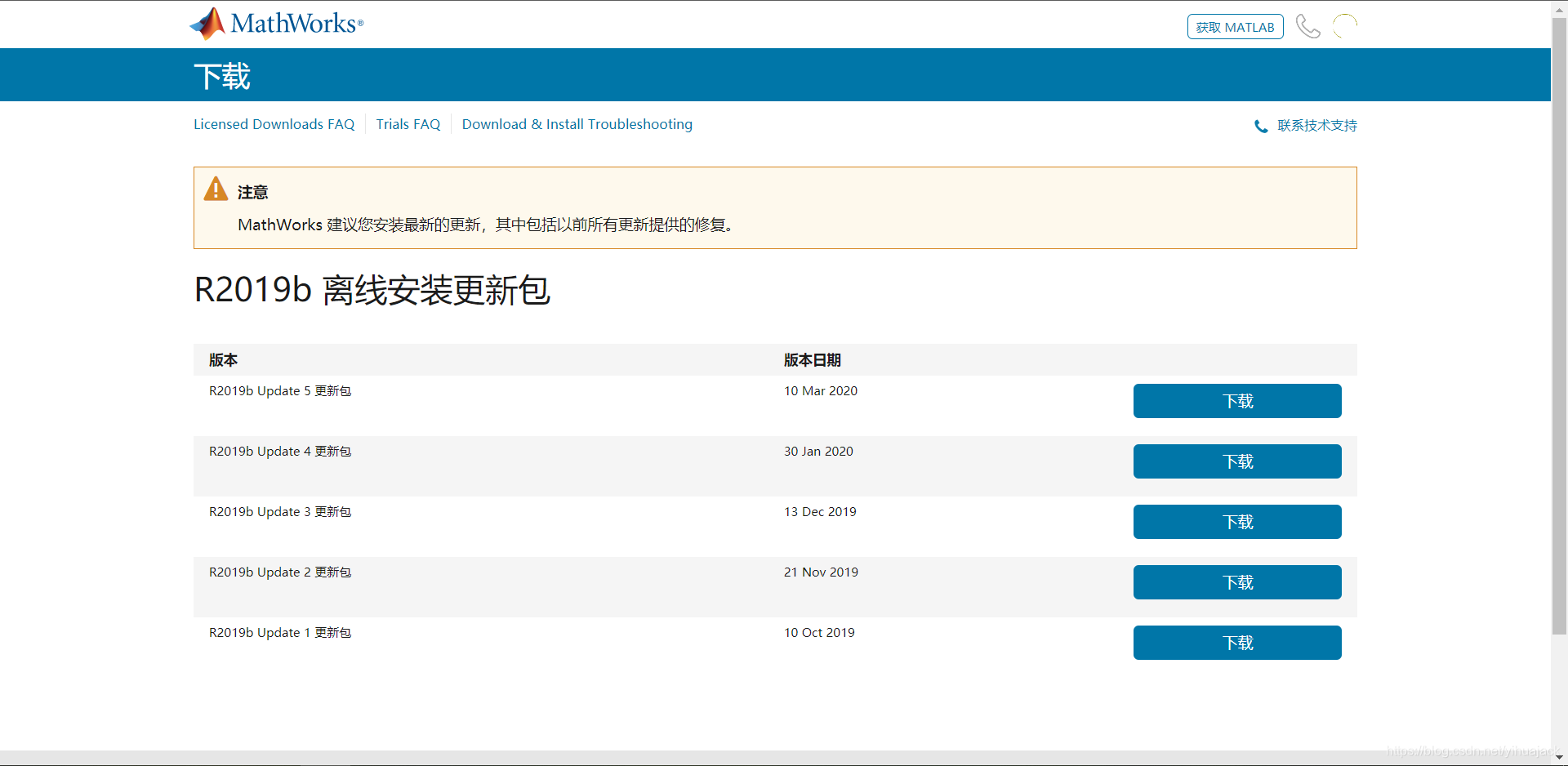
另外,如有需求,我们可以直接从MathWorks Account Sign In(URL最后的R2019b可换成你想更新的MATLAB版本号)下载MATLAB Update更新包,如图所示:
免责声明:本文系网络转载或改编,未找到原创作者,版权归原作者所有。如涉及版权,请联系删
 技术文档
技术文档
 推荐好文
推荐好文





 155-2731-8020




