


软件

产品


最近遇到个变态需求,使用系统数据通过matlab绘图,并将图片上传系统。作为一个java程序员对于matlab了解的实在少,于是就上网寻找答案,但是找到的东西都不够全面,所以决定自己记录一下这个过程。
这点对于java调用matlab来说至关重要,如果出现差别就可能会使得调用不成功
| 运行环境 | 版本 | 操作系统类型 |
|---|---|---|
| jdk | 1.8.0.131 | windows x64 |
| matlab | R2017b | windows x64 |
这里matlab自带jdk的版本是1.8.0.121与开发 windows 系统的版本相近,开发环境java调用matlab库会直接调用安装的matlab环境,不会调用MCR(matlab运行时环境)
| 运行环境 | 版本 | 操作系统类型 |
|---|---|---|
| jdk | 1.8.0.191 | centos x64 |
| matlab MCR | R2017b | centos x64 |
线上部署一般使用的是 linux 服务器,没有图形化界面,因此一般安装运行时环境及MCR,当程序代码移植到服务器就需要去调用MCR环境->下载地址
带参数返回值
function [ data ] imageCreate(name,time,data,storePath)
这里data是返回值,可以是矩阵,可以是值;name,time,data,storePath是参数,如name可以传string,time可以传double,data可以传矩阵,这都取决于你的matlab程序如何处理这些参数
不带参数返回值
function imageCreate()


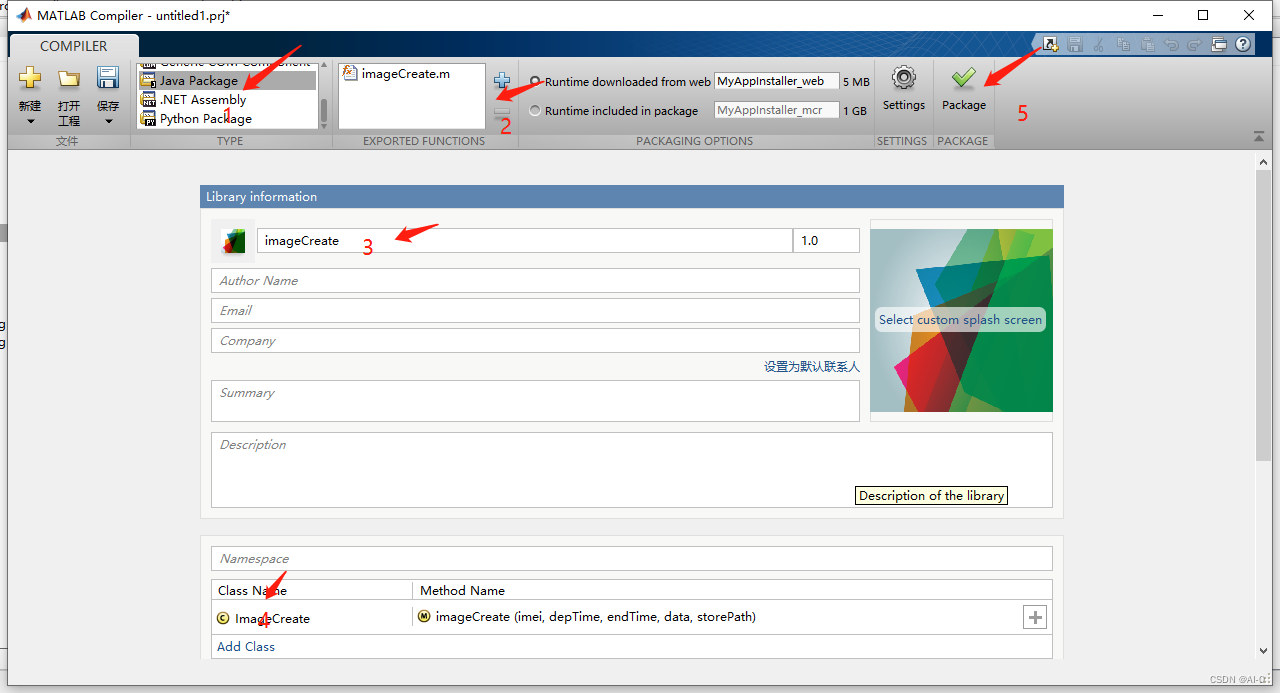
还有需要注意的一点是,如果你的matlab程序依赖的别的包,在打成jar时需要将这些依赖打包进去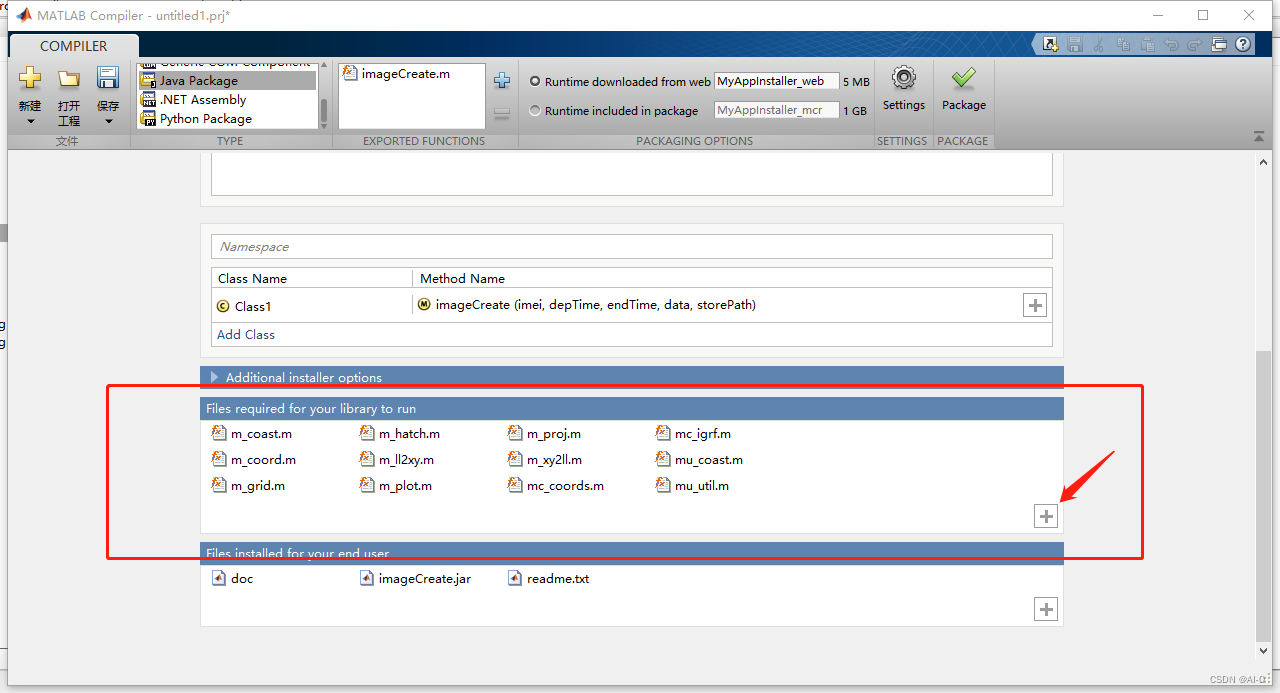

        <!-- matlab绘图导出jar -->
        <dependency>
            <groupId>com.spaceon</groupId>
            <artifactId>matlab-infocard</artifactId>
            <version>1.0</version>
            <scope>system</scope>
            <systemPath>${pom.basedir}/src/main/resources/lib/imageCreate.jar</systemPath>
        </dependency>
        <!-- matlab javabuilder-->
        <dependency>
            <groupId>com.spaceon</groupId>
            <artifactId>matlab-jb</artifactId>
            <version>1.0</version>
            <scope>system</scope>
            <systemPath>${pom.basedir}/src/main/resources/lib/javabuilder.jar</systemPath>
        </dependency>
package com.face;

import imageCreate.ImageCreate;
import com.mathworks.toolbox.javabuilder.MWClassID;
import com.mathworks.toolbox.javabuilder.MWException;
import com.mathworks.toolbox.javabuilder.MWNumericArray;

/**
 * @author baixuezhi
 * @date 2022/7/1
 */
public class Test {
    public static void main(String[] args) throws MWException {

        ImageCreate ic = new ImageCreate();
        String[][] arr = {{"20220601000203","-3.775923","82.507018","27.9"},
                {"20220601010203","-3.784745","82.516632","28.1"},
                {"20220601020203","-3.791435","82.528632","28.5"},
                {"20220601030203","-3.798773","83.540260","29.1"},
                {"20220601040203","-3.807707","83.546432","29.5"},
                {"20220601050203","-3.817848","84.550345","30.2"},
                {"20220601060203","-3.827710","84.551833","30.5"},
                {"20220601070203","-3.840060","85.551552","31.2"},
                {"20220601080203","-3.853607","85.553405","31.5"},
                {"20220601090203","-3.868455","85.558052","32.3"},
                {"20220601100203","-3.881727","86.561080","32.5"},
                {"20220601110203","-3.893028","86.563507","33.5"},
                {"20220601120203","-3.904352","86.566032","34.5"},
                {"20220601140203","-3.904352","87.566032","34.8"}
        };
        //转矩阵
        MWNumericArray matArr = new MWNumericArray(arr, MWClassID.DOUBLE);
        String name= "AMAX121212";
        String time="20220601";
        String path = "C:\\Users\\lenovo\\Desktop\\xxx\\图片\\";
        //生成图片并保存到指定路径
        ic.argosInfoCard(name, s, matArr,path);
    }
}
<includeSystemScope>true</includeSystemScope>
例:
            <plugin>
                <groupId>org.springframework.boot</groupId>
                <artifactId>spring-boot-maven-plugin</artifactId>
                <configuration>
                    <mainClass>com.face.webapi.WebApplication</mainClass>
                    <includeSystemScope>true</includeSystemScope>
                </configuration>
                <executions>
                    <execution>
                        <goals>
                            <goal>build-info</goal>
                        </goals>
                    </execution>
                </executions>
            </plugin>
 技术文档
技术文档
 推荐好文
推荐好文





 155-2731-8020




