


软件

产品


Thanks for Must(QQ ID)'s big help for installing Maya in CentOS7.
This is my steps for installing maya in CentOS 7, but it may not be the simplest way. Please let me know if any step is unnecessary.
- Chang your hostname[1](e.g. I will set my hostname to myserver). Because I can't regist maya successfully with the default host name: localhost.localdomain.
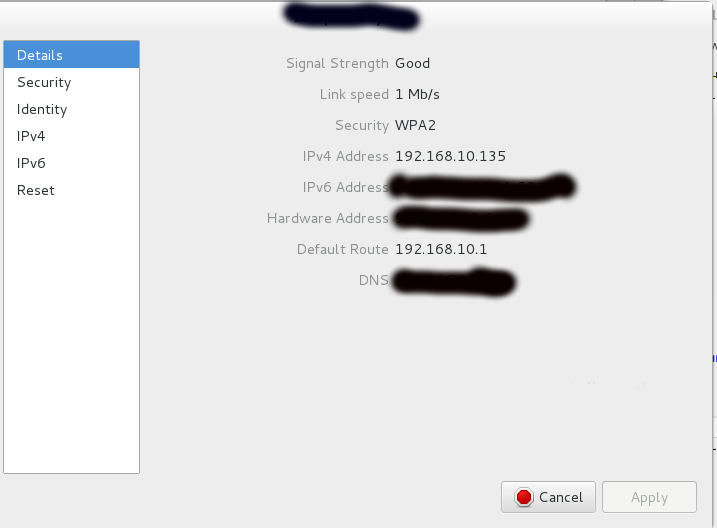
- find your IP:
- vi /etc/hosts
result:
cat /etc/hosts
192.168.10.135 myserver
192.168.10.135 is your IP. Note:You may have different IPs for Ethernet and WIFI. Choose the network and its IP which you use for Maya.
- vi /etc/hostname
result:
cat /etc/hostname
myserver
- vi /etc/sysconfig/network
result:
# Created by anaconda
HOSTNAME=myserver
- reboot
This will restart your machine and enable the new hostname
- download Autodesk_Maya_2015_SP3_English_Linux.tgz (and crack of course), and unzip to a directory(e.g. /home/user0/tools/autodesk/maya2015x64/linux/maya2015sp3)
- setup maya
su
cd /home/user0/tools/autodesk/maya2015x64/linux/maya2015sp3/
./setup
set license type to Network
set serial(e.g. 666-69696969)
set Product Key: 657G1
set server to myserver
press "Continue" button.
Then if it says "myserver" is not found, just ignore this warning and press "Continue" button.
press Continue button again to install all maya components which include flexnet, Maya2015 and mentalray.
- crack maya
(my crack files are located at: /home/user0/tools/autodesk/maya2015x64/linux/Crack-Net-Lnx64)
- replace adskflex:
rm /opt/flexnetserver/adskflex
cp /home/user0/tools/maya2015x64/linux/Crack-Net-Lnx64/adskflex /opt/flexnetserver
- replace libadlmint.so.9.0.23
rm /usr/autodesk/maya2015-x64/lib/libadlmint.so.9.0.23
cp /home/user0/tools/maya2015x64/linux/Crack-Net-Lnx64/libadlmint.so.9.0.23 /usr/autodesk/maya2015-x64/lib/
- Edit <your crack folder>/lic.dat and change HOSTNAME and MAC to suit your configuration (use lmutils)
To find your HOST : /opt/flexnetserver/lmutil lmhostid hostname
To find your MAC : /opt/flexnetserver/lmutil lmhostid ether
#/opt/flexnetserver/lmutil lmhostid hostname
lmutil - Copyright (c) 1989-2013 Flexera Software LLC. All Rights Reserved.
The FlexNet host ID of this machine is "HOSTNAME=myserver"
#/opt/flexnetserver/lmutil lmhostid ether
lmutil - Copyright (c) 1989-2013 Flexera Software LLC. All Rights Reserved.
The FlexNet host ID of this machine is ""********1279 *******fe80""
Only use ONE from the list of hostids. <------- note this line
You must choose which one you are using? ********1279 or *******fe80. Check your network settings:
Network Settins>

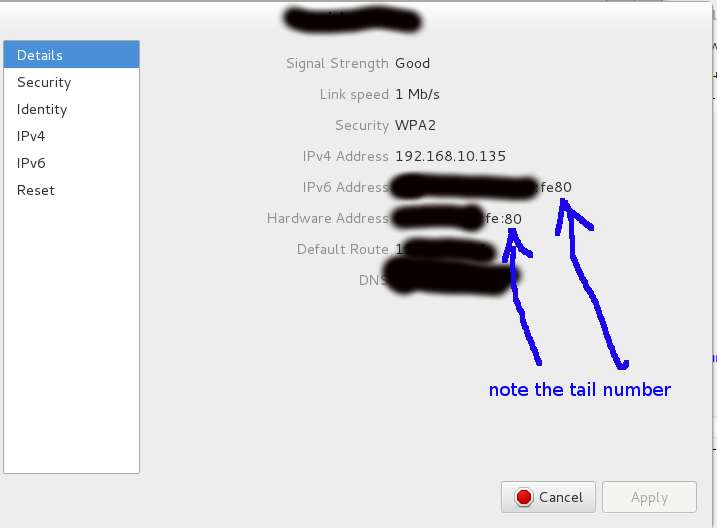
so you should use *******fe80 in your lic.dat
This is my fist line in lic.dat:
SERVER myserver *********fe80
- copy this lic.dat to /opt/flexnetserver/lic.dat:
cp /home/user0/tools/autodesk/maya2015x64/linux/Crack-Net-Lnx64/lic.dat /opt/flexnetserver/
- start daemon
/opt/flexnetserver/lmgrd -z -c /opt/flexnetserver/lic.dat
- start maya
- add a deamon into startup application for maya:
Applications>SystemTools>StartupApplications>Add>
Name:lmgrd
Command:/opt/flexnetserver/lmgrd -z -c /opt/flexnetserver/lic.dat
Comment:daemon for maya
NOTE:
Sometimes, Maya can't start after I switch my network connection to another WIFI(I have different IP with each WIFI). But Houdini doesn't has this problem.
I came out with adding the following line to /etc/hosts, and reboot my system:
<My new IP with another WIFI> myserver
References:
[1] http://www.itzgeek.com/how-tos/linux/centos-how-tos/change-hostname-in-centos-7-rhel-7.html#axzz3BblsScAI
转载于:https://www.cnblogs.com/yaoyansi/p/3940414.html
免责声明:本文系网络转载或改编,未找到原创作者,版权归原作者所有。如涉及版权,请联系删
 技术文档
技术文档
 推荐好文
推荐好文





 155-2731-8020




