


软件

产品


LabVIEW虚拟机(VM)支持NI产品吗
对于NI软件:
NI软件通常可在虚拟机上按预期运行(尽管没有得到NI官方支持)。
对于NI硬件:
由于通信间的挑战因素和数据可能不正确,VM不支持NI硬件。虚拟机通常无法访问PCI总线。因此,基于PCI和PCIe的仪器本质上与VM不兼容,与MXI连接的VXI,PXI和PXIe机箱也是如此。现代VM通常允许访问USB端口(称为USB直通)。考虑到虚拟机的托管性质,与USB直通相关的可变数据传输速度可能会在与DAQ设备通信时导致各种错误。以太网直通在VM上相当普遍,虽然不能保证成功,但应该允许与远程设备进行通信。
对于NI批量许可证管理器(VLM):
只要虚拟机运行NIVLM所支持的操作系统,NI VLM就可在虚拟化环境使用。有关在VM上运行NI VLM的更多信息和注意事项,请参考虚拟机上的Volume License Manager 。
相关信息
虚拟机(VM)是在主机OS中运行隔离的来宾操作系统(OS)。VM对硬件平台进行虚拟化,从而允许来宾OS使用非本地指令集,这是与主机OS隔离运行。
虚拟机上的VolumeLicense Manager
Issue Details
I would like torun my NI Volume License Manager (VLM) using a Virtual Machine environment,such as the XP Mode feature in Windows 7or through a VMWare image. Is this possible,and what do I need to consider whensetting up my server?
Solution
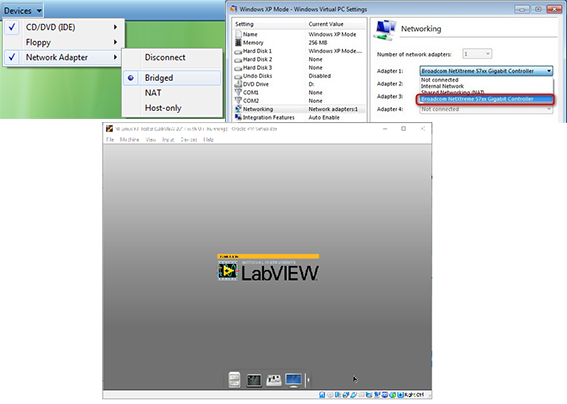
NI Volume LicenseManager is tested and supported in virtualized environments. Note that thevirtual machine must be running an operating system supported by VLM. For mostvirtual machine software , it is recommended that you set the network adapter toBridged for proper connectivity. If you are using the XP mode feature forWindows 7 or a VMware image, see the instructions provided below. Otherwise,refer to the documentation for your virtualization software for moreinformation on changing this setting.
AdditionalInformation
VMware
Navigate toDevices»Network Adapter , then selecting Bridged.
Restart yourvirtual machine for the setting to take effect.
XP Mode Featurein Windows 7
Navigate toTools»Settings, then select Networking.
Change theadapter settings from the default of Shared Networking (NAT) to the ethernetcontroller on your computer, as shown below:
If you are unableto connect to your VLM server running on your virtual machine, one possiblecause is the default Windows firewall settings of your computer image.
FlexLM
Flexnet PublisherLicense Manager (FLEXlm) can also be used to manage licenses on a virtualmachine. Verify that the operating system is supported by the FLEXlm software.It is not recommended to run FLEXlm and VLM on the same virtual machine as theycan conflict with one another.
需要说明的是,上述的例程和文档,都是可以下载的,双击即可打开,其中压缩文件是可以采用粘贴复制的方式,拷贝到硬盘上。这不是图片,各位小伙伴看到后尝试一下,这个问题就不用加微信咨询了。有关LabVIEW编程、LabVIEW开发等相关项目问题,可联系们。
免责声明:本文系网络转载或改编,未找到原创作者,版权归原作者所有。如涉及版权,请联系删
 技术文档
技术文档
 推荐好文
推荐好文





 155-2731-8020




