


软件

产品


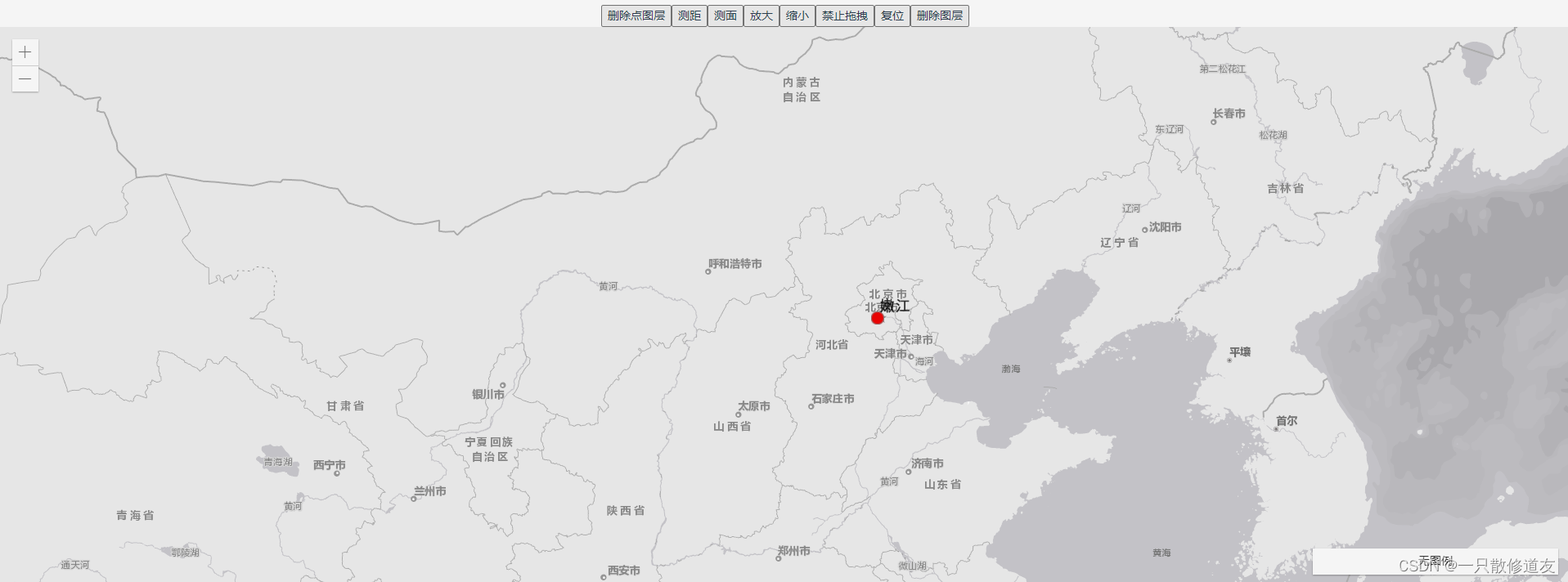
<div id="mapDiv"></div>
  import {


    loadModules
  } from "esri-loader";
   data() {


      return {


        // 地图类
        map: {

   },
        // 地图视图
        view: {

   },
        // esri返回值
        ArcGISApi: {

   },
        // esri组件
         modules: [
          "esri/config",
          "esri/Map",
          "esri/WebMap",
          "esri/widgets/Locate",
          "esri/widgets/Track",
          "esri/layers/TileLayer",
          "esri/views/MapView",
          "esri/widgets/Locate",
          "esri/widgets/Track",
          "esri/Graphic",
          "esri/widgets/Zoom",
          "esri/geometry/Polygon",
          "esri/geometry/SpatialReference",
          "esri/layers/GraphicsLayer",
          "esri/layers/FeatureLayer",
          "esri/layers/VectorTileLayer",
          "esri/PopupTemplate",
          "esri/widgets/Popup",
          "esri/widgets/Sketch",
          "esri/widgets/Legend",
          "esri/symbols/TextSymbol",
          "esri/symbols/Font",
          "dojo/domReady!",

        ],
        graphicsLayers: {


          testGraphicsLayer: null,
        },
      };
    },
     mounted() {


      loadModules(this.modules, {


        css: true
      }).then(this.initMap);
    },
    methods: {


     initMap(args) {


        for (let k in args) {


          let name = this.modules[k].split("/").pop();
          name = name.replace(name[0], name[0].toUpperCase());
          this.ArcGISApi[name] = args[k];
        }
        var TileLayer = new this.ArcGISApi.TileLayer({


          url: "https://map.geoq.cn/ArcGIS/rest/services/ChinaOnlineStreetGray/MapServer",
          id: "streets",
        });
        this.map = new this.ArcGISApi.Map({


          // 底图的图层
          layers: [TileLayer],
        });
        this.view = new this.ArcGISApi.MapView({


          map: this.map,
          container: "mapDiv",
          zoom: 12,
          center: [116.19432, 39.911222],
        });
       }
   }
 // marker样式
 let pictureMarkerSymbol = {


          type: 'picture-marker',
          url: require('@/assets/img/marker_1.png'),
          width: 8,
          height: 12,
          angle: 90
        }
  // 标注样式
 let textSymbol = {


          type: "text", // autocasts as new TextSymbol()
          color: "black",
          // haloColor: "black",
          // haloSize: "1px",
          text: "嫩江",
          xoffset: 16,
          yoffset: 6,
          font: {

    // autocasts as new Font()
            size: 10,
            family: "sans-serif",
            weight: "normal"
          }
        };
  const point = {


          //Create a point
          type: "point",
          longitude: 116.3,
          latitude: 39.9,
        };
 //绘画marker图形
const pointGraphic = new this.ArcGISApi.Graphic({


          geometry: point,
          symbol: pictureMarkerSymbol,
          attributes: {


            name: "测试",
            des: "这是一个marker点",
          },
        });
  //绘画标识图形
  const pointGraphicText = new this.ArcGISApi.Graphic({


          geometry: point,
          symbol: textSymbol,
        });
  // 创建图层
 let graphicsLayer = new this.ArcGISApi.GraphicsLayer({


          id: "001",
          title: "markerLayer",
          graphics: [pointGraphic]
        });
 //将图形添加到图层中
   // graphicsLayer.add(pointGraphicText);
   graphicsLayer.graphics.add(pointGraphicText);
 //将图层添加map中
   this.map.layers.add(graphicsLayer);
let that = this;
        this.view.on("click", function (event) {


          that.view.hitTest(event.screenPoint).then((responses) => {


            if (responses.results.length > 0) {


             // marker graphic的attributes
              const data = responses.results[0].graphic.attributes;
              console.log("markerData", data);
            }
          });
        });
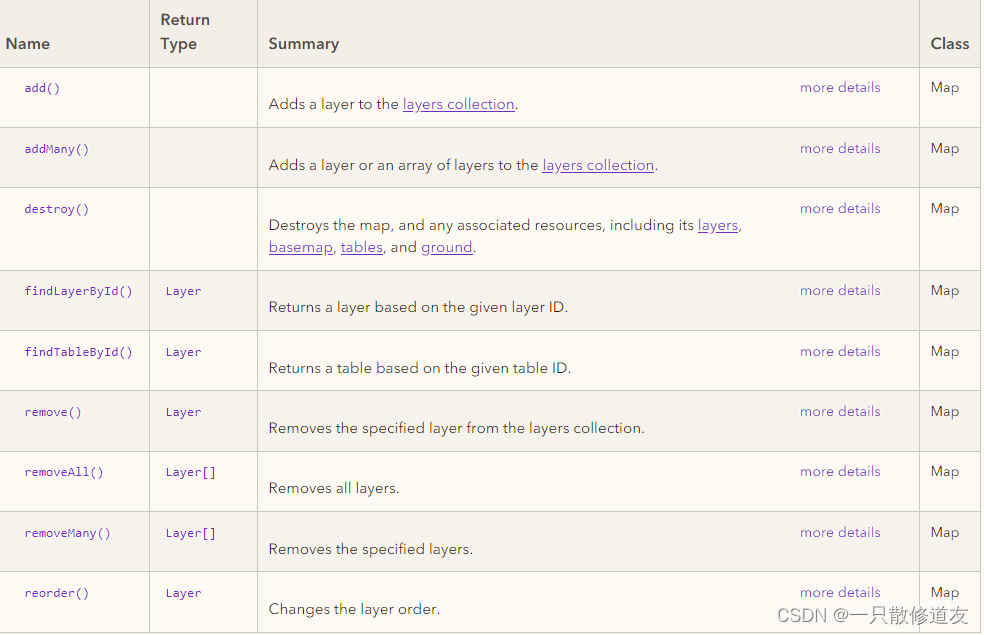
//使用数组在地图的构造函数中添加图层
let fl = new FeatureLayer(url);
let gl = new GraphicsLayer();
let map = new Map({


  layers: [fl, gl]

免责声明:本文系网络转载或改编,未找到原创作者,版权归原作者所有。如涉及版权,请联系删
 技术文档
技术文档
 推荐好文
推荐好文





 155-2731-8020




