


软件

产品


将ArcGIS Server的EsriJSON转化为GDB文件,支持带弧的面和线
# -*- coding: utf-8 -*-# ---------------------------------------------------------------------------# JSONToGDB.py# Created on: 2022-02-12 17:00:00.00000# # Description:# --------------------------------------------------------------------------- import osimport jsonimport arcpy jsonFile='C:/data/queryData.txt'arcpy.env.workspace = "C:/data.gdb"outpath = "C:/data.gdb"outname = os.path.split(jsonFile)[1].split('.')[0]#arcpy.env.workspace = "C:/output"#outpath = "C:/output"#outname = os.path.split(jsonFile)[1].split('.')[0] + ".shp"arcpy.AddMessage(outname)fileObject = open(jsonFile, 'r')jsonText = fileObject.read()fileObject.close()featureSet = json.loads(jsonText)geometryType = featureSet["geometryType"] #geometry_type = "POINT"if geometryType == "esriGeometryPolygon": geometry_type = "POLYGON"elif geometryType == "esriGeometryPolyline": geometry_type = "POLYLINE"elif geometryType == "esriGeometryPoint": geometry_type = "POINT"elif geometryType == "esriGeometryMultiPoint": geometry_type = "MULTIPOINT" # Execute CreateFeatureclassarcpy.CreateFeatureclass_management(outpath, outname, geometry_type)#featureShape = outpath + "/" + outnamefields = featureSet["fields"]fieldValid = [] #Original attribute namefieldValidLayer = ["SHAPE@"] #New attribute namefor field in fields: fieldName = field["name"] fieldType = field["type"] if fieldName.lower() != 'objectid' and fieldName.lower() != 'shape_length' and fieldName.lower() != 'shape.length' and fieldName.lower() != 'shape.len' and fieldName.lower() != 'shape_area' and fieldName.lower() != 'shape.area' and fieldName.lower() != 'fid': fieldValid.append(fieldName) if len(fieldName)>10: fieldName = fieldName[0:9] fieldValidLayer.append(fieldName) if fieldType=="esriFieldTypeInteger": arcpy.AddField_management(featureShape, fieldName, "LONG") elif fieldType=="esriFieldTypeSmallInteger": arcpy.AddField_management(featureShape, fieldName, "LONG") elif fieldType=="esriFieldTypeDouble": arcpy.AddField_management(featureShape, fieldName, "DOUBLE") elif fieldType=="esriFieldTypeSingle": arcpy.AddField_management(featureShape, fieldName, "DOUBLE") else: arcpy.AddField_management(featureShape, fieldName, "TEXT", field["length"])#features = featureSet["features"]cur = arcpy.da.InsertCursor(featureShape, fieldValidLayer)for feature in features: attributes = feature["attributes"] geometry = feature["geometry"] valueList = [] geojson = {} isEsriJson = False if geometryType == "esriGeometryPolygon": ringsName = "rings" if 'rings' in geometry: ringsName = "rings" isEsriJson = False rings = geometry[ringsName] geojson = { "type": "Polygon", "coordinates": rings} else: ringsName = "curveRings" isEsriJson = True rings = geometry[ringsName] geojson = { "curveRings": rings, "spatialReference": {"wkid": 0}} elif geometryType == "esriGeometryPolyline": pathsName = "paths" if 'paths' in geometry: pathsName = "paths" isEsriJson = False paths = geometry[pathsName] geojson = { "type": "MultiLineString", "coordinates": paths} else: pathsName = "curvePaths" isEsriJson = True paths = geometry[pathsName] geojson = { "curvePaths": paths, "spatialReference": {"wkid": 0}} elif geometryType == "esriGeometryPoint": geojson = { "type": "Point", "coordinates": [geometry["x"], geometry["y"]]} polygon = arcpy.AsShape(geojson,isEsriJson) valueList.append(polygon) # (arcpy.Polygon(rings)) for field in fieldValid: if attributes[field]!=None: #arcpy.AddMessage(attributes[field]) valueList.append(attributes[field]) else: valueList.append('') cur.insertRow(valueList) del cur #print "finish !"arcpy.AddMessage("finish !")如果生成带弧面或线时报return self._gp.FromEsriJson(json) ValueError: Invalid geometry type for method错误,如下图所示: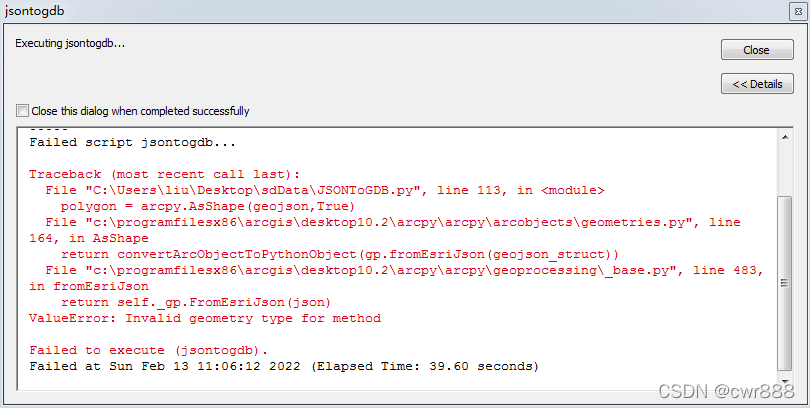
请用arcmap10.3及以上的版本即可 解决 ,这是arcmap10.3以下版本的Bug.
参考资料 :
将ArcGIS Server的JSON转化为SHP文件_weixin_30859423的博客-CSDN博客
Solved: Re: arcpy.Polygon Object and distanceTo() - Method... - Esri Community
免责声明:本文系网络转载或改编,未找到原创作者,版权归原作者所有。如涉及版权,请联系删
 技术文档
技术文档
 热门文章
热门文章





 155-2731-8020




