


软件

产品


备注:本文的所有的demo都是基于前端react框架编写,为了demo完成性,会尽量完整,其他框架基本页面操作因框架而异,主要关注GIS部分功能即可,esriloader是es6引api包工具,正常用dojo引包即可。
距离测量和面积测量是GIS项目中必不可少的工具,arcgis api 3.x中有对应的接口实现测量的功能。具体的实现方式如下。
(1) arcgis api 3.x的测量工具是基于 arcgis server 的 几何服务(GeometryService)实现的,首先我们得确保服务器安装了arcgis server,并去站点管理页面启动GeometryService服务。
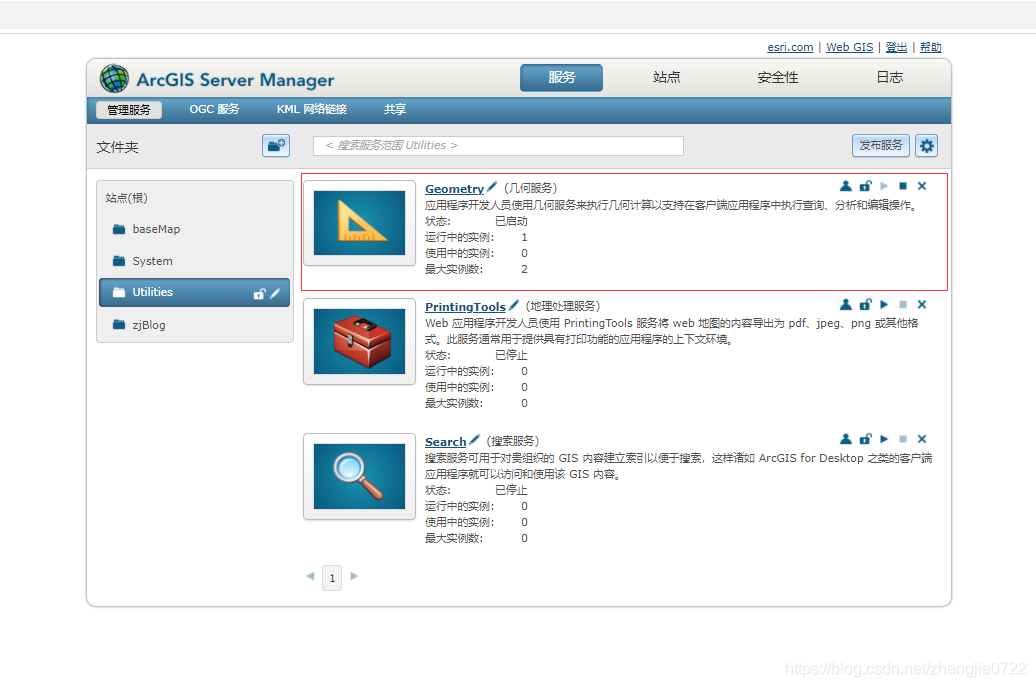
(2)加载底图、加载测量绘制图层、定义弹框
import React, { Component } from 'react'import esriLoader from 'esri-loader'import { Menu, Dropdown, Icon, Button } from 'antd' export default class InitMap extends Component { constructor (props) { super(props) this.allBaseLayer = [], // 底图数组 this.initCenter = [119, 34] // 初始化中心经纬度 this.initZoom = 4 // 初始化缩放级别 } state = { mapView: {} // 地图对象 } componentDidMount () { // 初始化地图 this.initMap() } /** * 初始化地图 */ initMap = () => { const mapOption = { url: 'https://js.arcgis.com/3.33/' } esriLoader .loadModules( [ 'esri/map', 'esri/layers/googleLayer', 'esri/toolbars/draw', 'esri/layers/GraphicsLayer', 'esri/dijit/Popup', 'dojo/dom-construct' ], mapOption ) .then(([ map, googleLayer, Draw, GraphicsLayer, Popup, domConstruct ]) => { this.popup = new Popup(null, domConstruct.create('div')) const mapView = new map('mapContent', { logo: false, slider: false, showAttribution: false, showLabels: true, zoom: this.initZoom, center: this.initCenter, infoWindow: this.popup, minZoom: 2, // 最小空间等级 maxZoom: 18 // 最大空间等级 }) // 定义图层 const googleDigitalLayer = new googleLayer({ id: 'google_road', layertype: 'road', visible: true }) // 测量绘制图层 this.measureGraphicsLayer = new GraphicsLayer({ id: 'measureGraphicsLayer' }) // 测量绘制工具 this.messureDraw = new Draw(mapView) mapView.addLayer(googleDigitalLayer) mapView.addLayer(this.measureGraphicsLayer) this.setState({ mapView }) }) } render () { const mapStyle = { width: '100%', height: '100%' } const { codes, mapView } = this.state return ( <div className="page-content"> <div id="mapContent" className="map-content" style={mapStyle}></div>> <Toolbar mapView={mapView} popup={this.popup} messureDraw={this.messureDraw} /> </div> ) }}(3)实现测量功能
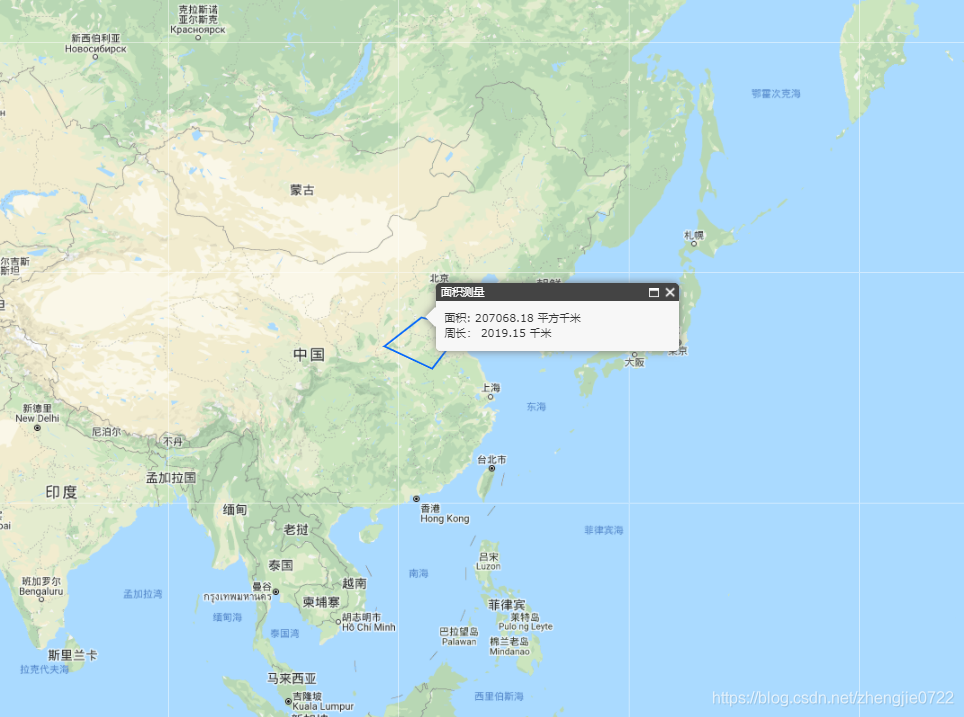
function Toolbar (props) { // 底图数组属性 const { mapView, popup, messureDraw } = props const toolbarStyle = { position: 'absolute', right: '1rem', top: '0.2rem', zIndex: 999 } /** * 执行框选 * @param {*} type */ const measureClick = ({ key }) => { esriLoader .loadModules([ 'esri/toolbars/draw', 'esri/symbols/SimpleLineSymbol', 'esri/graphic', 'esri/tasks/GeometryService', 'esri/tasks/LengthsParameters', 'esri/tasks/AreasAndLengthsParameters', 'esri/SpatialReference', 'esri/geometry/Point', 'esri/Color', 'esri/geometry/webMercatorUtils' ]) .then(([ Draw, SimpleLineSymbol, Graphic, GeometryService, LengthsParameters, AreasAndLengthsParameters, SpatialReference, Point, Color, WebMercatorUtils ]) => { // 测量绘制图层 const measureGraphicsLayer = mapView.getLayer('measureGraphicsLayer') // 清除绘制图层 measureGraphicsLayer.clear() // 弹框隐藏 popup.hide() // 判断测量类型 switch (key) { case 'length': messureDraw.activate(Draw.POLYLINE) break case 'area': messureDraw.activate(Draw.POLYGON) break case 'clear': messureDraw.deactivate() break default: return } let measuregeometry // 绘制结束事件 messureDraw.on('draw-end', (res) => { const geometry = res.geometry mapView.enableMapNavigation() drawMeatureGraphic(geometry) }) // 绘制测量的图形 function drawMeatureGraphic (geometry) { measureGraphicsLayer.clear() let symbol switch (geometry.type) { case 'polyline': symbol = new SimpleLineSymbol( SimpleLineSymbol.STYLE_SOLID, new Color([8, 105, 250]), 2 ) break case 'polygon': symbol = new SimpleLineSymbol( SimpleLineSymbol.STYLE_SOLID, new Color([8, 105, 250]), 2 ) break default: break } const graphic = new Graphic(geometry, symbol) measureGraphicsLayer.add(graphic) excuteMeasure(geometry) } // 执行图形计算 function excuteMeasure (geometry) { const isMercator = geometry.spatialReference.isWebMercator() geometry = isMercator ? WebMercatorUtils.webMercatorToGeographic(geometry) : geometry measuregeometry = geometry const geometryService = new GeometryService('http://localhost:6080/arcgis/rest/services/Utilities/Geometry/GeometryServer') if (geometry.type === 'polyline') { // 距离测量 const lengthParams = new LengthsParameters() lengthParams.polylines = [geometry] lengthParams.lengthUnit = GeometryService.UNIT_METER // lengthParams.geodesic = true; lengthParams.calculationType = 'preserveShape' geometryService.lengths(lengthParams) lengthParams.polylines[0].spatialReference = new SpatialReference(4326) geometryService.lengths(lengthParams) geometryService.on('lengths-complete', outputDistance) } else if (geometry.type === 'polygon') { // 面积测量 const areasAndLengthParams = new AreasAndLengthsParameters() areasAndLengthParams.lengthUnit = GeometryService.UNIT_METER areasAndLengthParams.areaUnit = GeometryService.UNIT_SQUARE_METERS const outSR = new SpatialReference({ wkid: 4326 }) geometryService.project([geometry], outSR, function (geometry) { geometryService.simplify(geometry, function (simplifiedGeometries) { areasAndLengthParams.polygons = simplifiedGeometries areasAndLengthParams.polygons[0].spatialReference = new SpatialReference(4326) geometryService.areasAndLengths(areasAndLengthParams) }) }) geometryService.on('areas-and-lengths-complete', outputAreaAndLength) } } // 距离测量结果 function outputDistance (res) { if (parseInt(String(res.result.lengths[0])) !== 0) { let length = Number(res.result.lengths[0]) length = length > 1000 ? (length / 1000).toFixed(2) + ' 千米' : length.toFixed(2) + ' 米' const curX = measuregeometry.paths[0][measuregeometry.paths[0].length - 1][0] const curY = measuregeometry.paths[0][measuregeometry.paths[0].length - 1][1] const curPos = new Point( curX, curY, new SpatialReference({ wkid: 4326 }) ) popup.setTitle('距离测量') popup.setContent( ' 测 量 长 度 : ' + length ) popup.show(curPos) } } // 面积测量结果 function outputAreaAndLength (res) { let area = Number(res.result.areas[0]) let length = Number(res.result.lengths[0]) area = area > 1000000 ? (area / 1000000).toFixed(2) + ' 平方千米' : area.toFixed(2) + ' 平方米' length = length > 1000 ? (length / 1000).toFixed(2) + ' 千米' : length.toFixed(2) + ' 米' const pointXY = measuregeometry.rings[0][0] const curPos = new Point( pointXY[0], pointXY[1], new SpatialReference({ wkid: 4326 }) ) popup.setTitle('面积测量') const content = `面积: ${area}</br> 周长: ${length} ` popup.setContent(content) popup.show(curPos) } }) } const measure = ( <Menu onClick={measureClick} className="layerClass"> <Menu.Item key="length">测量距离</Menu.Item> <Menu.Item key="area">测量面积</Menu.Item> <Menu.Item key="clear">清除</Menu.Item> </Menu> ) return ( <div className="toolbar" style={toolbarStyle}> <Dropdown overlay={measure} trigger={['click']}> <span> <Button>测量工具</Button> <Icon type="down" /> </span> </Dropdown> </div> )}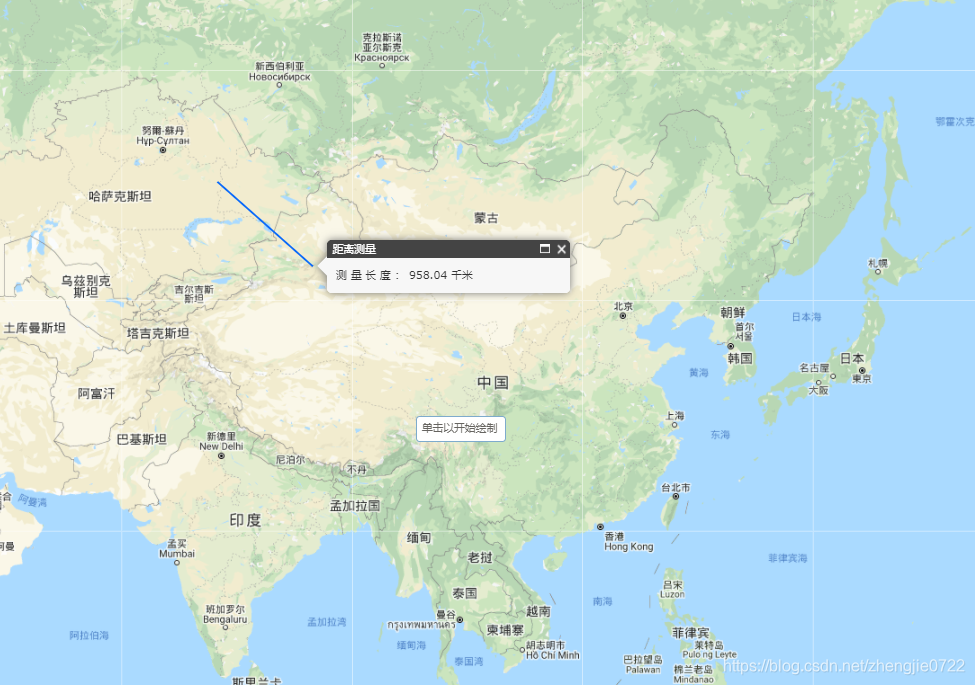
免责声明:本文系网络转载或改编,未找到原创作者,版权归原作者所有。如涉及版权,请联系删
 技术文档
技术文档
 热门文章
热门文章





 155-2731-8020




