


软件

产品


约束的创建需要用到 Sketch 下面 Constraints 这个 Collection 的 Add 方法。该对象创建约束有三个方法:AddMonoEltCst, AddBiEltCst, AddTriEltCst,对应的功能分别为为单个元素创建约束(如固定 a) 、为两个元素创建约束(如 a 与 b 相切)、为三个元素创建约束(如 a、 b 关于 c 对称)。至于每个方法创建的具体约束 类 型,需要通过方法的参数来控制。几何元素不能直接用于创建约束,必须为其创建参考对象,再使用参考对象创建约束。
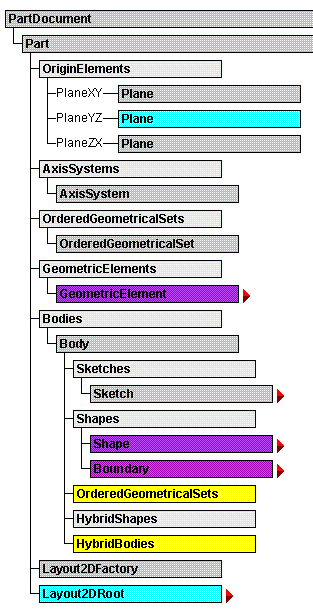
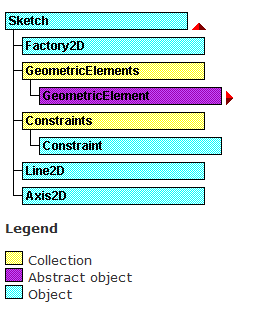
以下为约束类型的枚举值(从0开始):
enum CatConstraintType {
  catCstTypeReference,
  catCstTypeDistance,
  catCstTypeOn,
  catCstTypeConcentricity,
  catCstTypeTangency,
  catCstTypeLength,
  catCstTypeAngle,
  catCstTypePlanarAngle,
  catCstTypeParallelism,
  catCstTypeAxisParallelism,
  catCstTypeHorizontality,
  catCstTypePerpendicularity,
  catCstTypeAxisPerpendicularity,
  catCstTypeVerticality,
  catCstTypeRadius,
  catCstTypeSymmetry,
  catCstTypeMidPoint,
  catCstTypeEquidistance,
  catCstTypeMajorRadius,
  catCstTypeMinorRadius,
  catCstTypeSurfContact,
  catCstTypeLinContact,
  catCstTypePoncContact,
  catCstTypeChamfer,
  catCstTypeChamferPerpend,
  catCstTypeAnnulContact,
  catCstTypeCylinderRadius,
  catCstTypeStContinuity,
  catCstTypeStDistance,
  catCstTypeSdContinuity,
  catCstTypeSdShape
}
下面是一个简单实例,实现草图全约束:
import win32com.client import pywintypes # 导入pywintypes模块# 启动CATIA应用catia = win32com.client.Dispatch('CATIA.Application')catia.Visible = True # 设置为可见模式 try: # 获取当前Part文件 doc = catia.ActiveDocument print(doc.name) part=doc.part mybody = part.bodies[0] plane = part.originelements.planexy sketches = mybody.sketches mysketch = sketches.add(plane) fact2d = mysketch.OpenEdition() axis=mysketch.GeometricElements.Item("绝对轴") ax=axis.GetItem("横向") ay=axis.GetItem("纵向") axiscenter=axis.GetItem("原点") # 画线,四个参数分别为线段起、止点的坐标 myline = fact2d.CreateLine(50.0, -50.0, 50.0, 50.0) # 画整圆,三个参数分别为圆心坐标与半径 mycircle = fact2d.CreateClosedCircle(0.0, 0.0, 50.0) mycons = mysketch.Constraints # 创建元素的参考 ref1 = part.CreateReferenceFromObject(mycircle) ref2 = part.CreateReferenceFromObject(myline) ref3 = part.CreateReferenceFromObject(myline.StartPoint) ref4 = part.CreateReferenceFromObject(ax) ref5 = part.CreateReferenceFromObject(ay) # 创建相切约束,查阅帮助文档可知,相切: catCstTypeTangency 的枚举值为 4 mycons.AddMonoEltCst(14, ref1) mycircle.CenterPoint = axiscenter mycons.AddBiEltCst(4, ref1, ref2) mycons.AddBiEltCst(1, ref3, ref4) mycons.AddBiEltCst(1, ref3, ref5) mycons.AddMonoEltCst(5, ref2) mysketch.CloseEdition() part.update() except pywintypes.com_error as e: # 如果出现错误,可能是因为没有活动文档 print("无法获取活动文档,请确保CATIA应用程序中已有打开的文档。") print(e)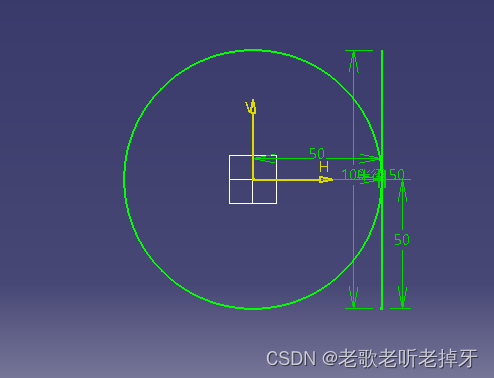
免责声明:本文系网络转载或改编,未找到原创作者,版权归原作者所有。如涉及版权,请联系删
 技术文档
技术文档
 推荐好文
推荐好文





 155-2731-8020




