


软件

产品


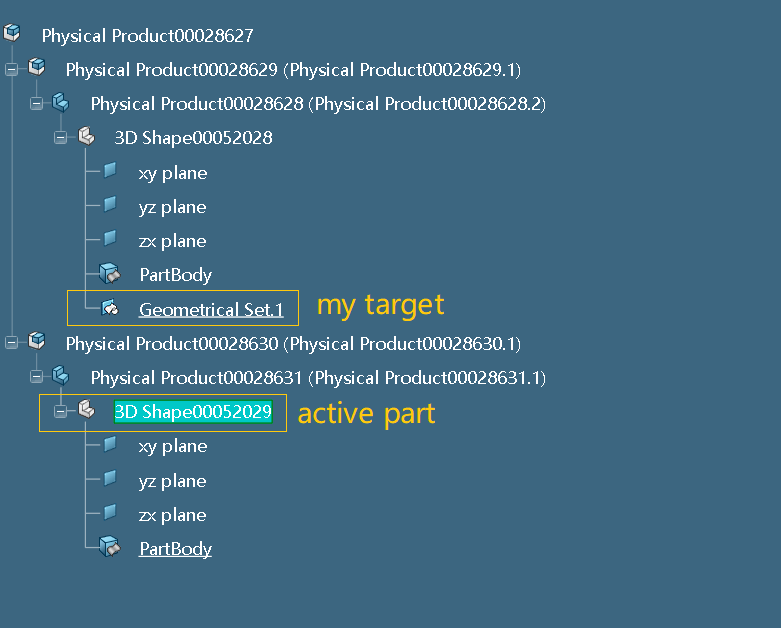
Hi, I am new in V6 COM development, and recently encountered a problem of getting the GeoSet from another part (not in active) which is in another product. I can use the following code to get the root product , but have no idea to find the child product of the root one by name, not to mention, to find the part inside. So, can anyone help? Thanks a lot!
pLMProductService.EditedContent.Item(1)
Hello,
There are I think several ways to do this. Here is one of them: not necessarily the fastest or the simplest, but it's one way. Hope it helps.

Sub CATMain()

    ' Getting active editor (the current tab)
    Dim oActiveEditor As Editor
    Set oActiveEditor = CATIA.ActiveEditor

    ' Getting the root occurrence of the editor
    Dim vpmRootOcc As VPMRootOccurrence
    Set vpmRootOcc = oActiveEditor.GetService("PLMProductService").RootOccurrence

    ' Getting all its children
    Dim vpmRootChildrenOcc As VPMOccurrences
    Set vpmRootChildrenOcc = vpmRootOcc.Occurrences

    ' Getting the first one (28629.1 in your case)
    Dim vpmRootChild1Occ As VPMOccurrence
    Set vpmRootChild1Occ = vpmRootChildrenOcc.Item(1)

    ' Getting the first part inside your 28629.1 (instance 28628.2 of the 3DPart in your case)
    Dim vpmPart1Occ As VPMOccurrence
    Set vpmPart1Occ = vpmRootChild1Occ.Occurrences.Item(1)

    ' Getting the part instance, then the reference
    Dim vpminstPart As VPMInstance
    Set vpminstPart = vpmPart1Occ.InstanceOccurrenceOf

    Dim vpmrefPart As VPMReference
    Set vpmrefPart = vpminstPart.ReferenceInstanceOf


    ' Getting the 3DShape instance, then the 3DShape reference
    Dim vpmrepinstPart As VPMRepInstance
    Set vpmrepinstPart = vpmrefPart.RepInstances.Item(1)

    Dim vpmreprefPart As VPMRepReference
    Set vpmreprefPart = vpmrepinstPart.ReferenceInstanceOf

    ' Getting the part item from the part(i.e. so far the 3DShape is a PLM object, we need to get to the object allowing to access the internal features of that PLM object)
    Dim oPart As Part
    Set oPart = vpmreprefPart.GetItem("Part")

    ' Getting the geometrical sets
    Dim oHybridBodies As HybridBodies
    Set oHybridBodies = oPart.HybridBodies

    ' Getting the first one
    Dim oGeoSet1 As HybridBody
    Set oGeoSet1 = oHybridBodies.Item(1)


    ' Check
    MsgBox oGeoSet1.Name


End Sub
It works! Thanks very much. In addition, my objective is to find the shape in the unactive Part, and use it in my active Part to go on my geo operation. When I use it in a direct way, it goes wrong, and is it necessary to copy and paste(as result) the shape to my active Part before I do the following geo operation? Hope for your reply. Thanks again for your help!
 // CurrentPart is the active Part
 HybridShapeFactory hsf = (HybridShapeFactory)CurrentPart.HybridShapeFactory;
 // line1 and line2 are shapes I got from the unactive Part
 var point1 = hsf.AddNewPointOnCurveFromPercent((Reference)line1, 0.5,false);
 var point2 = hsf.AddNewPointOnCurveFromPercent((Reference)line2, 0.5, false);
 var line3 = hsf.AddNewLinePtPt((Reference)point1, (Reference)point2);
 CurrentPart.HybridBodies.Item(1).AppendHybridShape(line3);
 CurrentPart.Update();
Yes, might be necessary to do so (copy paste “As Result” or “With Link”, or …). I’m not 100% sure but I think you won’t be able to do anything in your active part by directly pointing to an element that is outside. Unless maybe check your Preferences? In your Preferences, make sure that when you are using an object that is outside, you keep a link to the selected object (see picture attached).
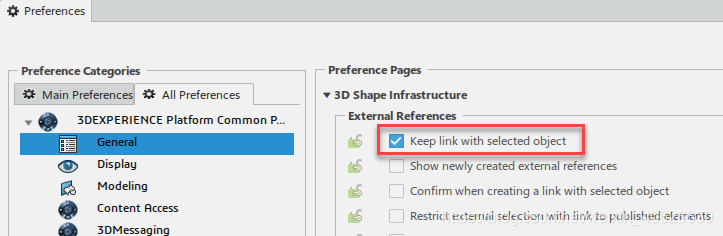
Thanks for your reply! I have checked my preferences, and the button in the picture has already been selected. Maybe it is essential to copy and paste the object outside when using the automation.
Thank you again, and good luck to you!
免责声明:本文系网络转载或改编,未找到原创作者,版权归原作者所有。如涉及版权,请联系删
 技术文档
技术文档
 推荐好文
推荐好文





 155-2731-8020




