


软件

产品


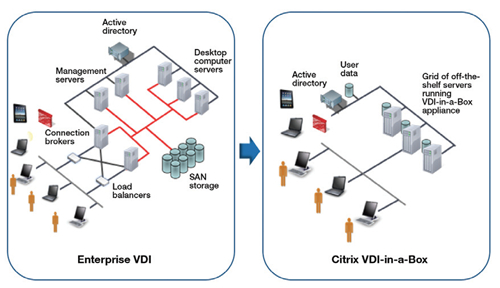
VDI-in-a-box是一个针对桌面虚拟化的整体打包方案,相关的支持服务器都以虚拟机的形式打包在一台服务器中。一台8核心、32GB内存、250GB存储的服务器可以支持30个主流规模的虚拟桌面,对SMB来说,应该是一个很有吸引力的桌面虚拟化解决方案
Citrix VDI-in-a-box 5安装在一台服务器上,包括Windows管理员交付虚拟桌面给使用任何设备的终端用户的所有工具。VDI-in-a-Box交付Citrix HDX获得高清晰桌面。也可以与Citrix Receiver软件客户端工作,得到VDI安全性与高可用×××。
增添了简化Windows管理员虚拟桌面管理的向导,并支持三大主要的hypervisor:Microsoft Hyper-V、Citrix XenServer与VMware vSphere、ESX和ESXi。
思杰也将Citrix VDI-in-a-Box与Citrix GoToManage结合,让IT能进行远程监控,并在多个地点支持虚拟桌面。
系统环境需求:
Citrix XenServer
VMware ESXi or VMware vSphere
VMware ESXi 5.0 VMware ESXi 4.1
Secure remote connections from user devices to virtual desktops are supported for the following products:
Windows 7 N is not supported.
Windows Virtual Desktop Access Volume License is needed to access virtual desktops. Please refer to for licensing details.
The following provides recommended CPU, memory, and disk allocations to use when sizing a VDI-in-a-Box deployment. These recommendations are based on an average task worker desktop and may vary based on your desktop needs.
支持客户端协议及设备:
Protocols Supported by VDI-in-a-Box
1. HDX:
This is the default protocol.
No separate license is required.
HDX provides a high-definition user experience.
HDX provides better multimedia support while using less bandwidth.
HDX is suitable for remote access over a WAN.
2. Remote Desktop Connection (RDP) V6 and V7:
RDP is suitable for LAN deployments.
Accessing VDI-in-a-Box Virtual Desktops
Users access VDI-in-a-Box virtual desktops in any of three ways:
1. Web browser – Web browsers support both HDX and RDP, although some configuration is required to use each protocol.
2. Citrix Receiver (formerly Citrix online plug-in)
allows direct access to VDI-in-a-Box desktops through an HDX connection without the use of a Web browser or Java client.
Receiver connects to VDI-in-a-Box desktops on Windows, Mac, Linux, iOS, and Android platforms.
3. Zero-maintenance VDI-in-a-Box Java Client
The Java client automatically checks for updates and refreshes itself as needed.
The client requires Java Runtime Environment (JRE) 1.6 or higher.
The client switches to an RDP connection if an HDX connection is not available.
Comparing Client Access
| Client | Accesses virtual desktop | Automatic RDP connection started if there is no HDX | Kiosk | Integrated error messages | Automatic failover to healthy vdiManager |
|---|---|---|---|---|---|
| Citrix Receiver | Y | Not applicable | Y | ||
| Web browser | Y | Y | Y | ||
| VDI-in-a-Box Java Client | Y | Y | Y | Y | Y |
Logging on From a User Device
The following figure shows a basic logon sequence between a Web browser on a user device and a server with VDI-in-a-Box Manager. An HDX session between the user device and a specific virtual desktop on the server is being created using Citrix Receiver. Once the connection is created, the session traffic takes place between Receiver and the virtual desktop only. The same sequence applies when the Java client is used.

With Citrix Receiver, older and low-end thin clients that do not have browsers can be used to access VDI-in-a-Box virtual desktops. Mobile devices, such as the iPad, can also be used with Receiver to access VDI-in-a-Box virtual desktops without requiring a Web browser or Java client.
转载于:https://blog.51cto.com/virtuallife/787180
免责声明:本文系网络转载或改编,未找到原创作者,版权归原作者所有。如涉及版权,请联系删
 技术文档
技术文档
 推荐好文
推荐好文





 155-2731-8020




